Published: October 18, 2026 · 7 min read
Kubernetes Cluster Setup — Minikube, kubeadm and EKS
We know what a cluster is and what is inside it. Now we build one.
There is more than one way to get a Kubernetes cluster. This class covers all of them in short, then sets up a real cluster on AWS.
Here is the whole class in short:
- A cluster can be self managed or managed.
- Self managed means you build it and look after it.
- Minikube gives you a single node cluster on your own machine.
- kubeadm gives you a multi node cluster on real servers.
- Managed means the cloud runs the control plane for you.
- AWS has EKS, Azure has AKS, Google Cloud has GKE, IBM Cloud has IKS.
- OpenShift is Red Hat's Kubernetes with extra tools on top.
- For EKS you need three tools: kubectl, AWS CLI and eksctl.
- Then one command builds the whole cluster, in about 13 minutes.
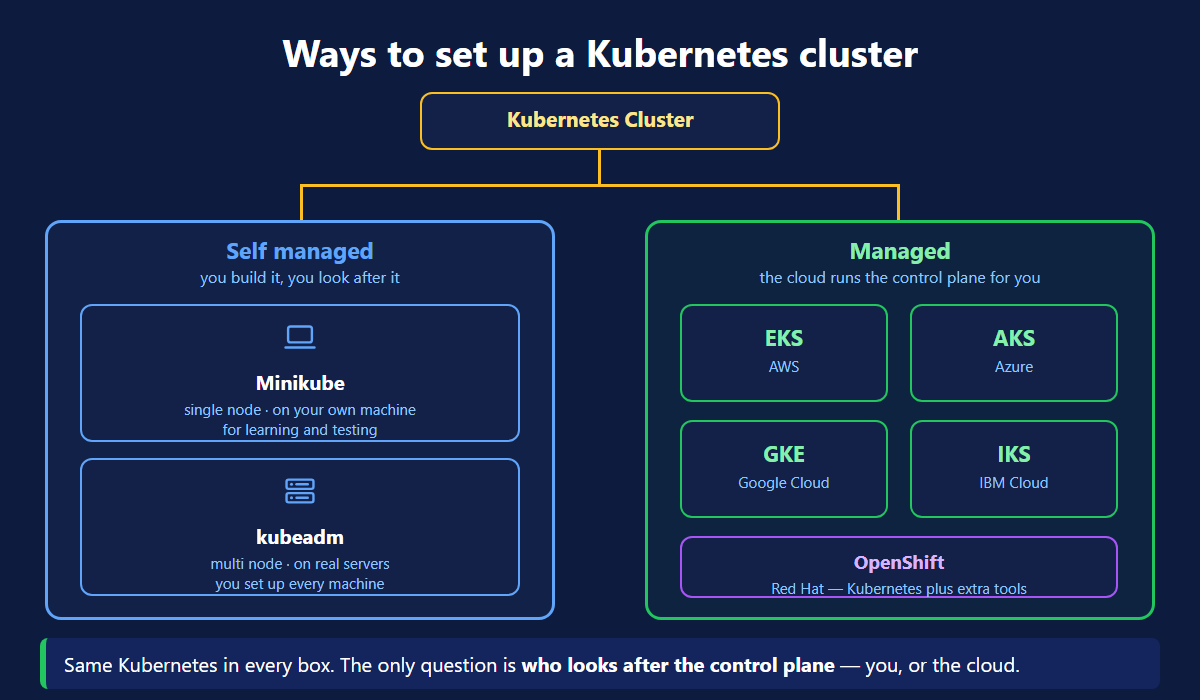
Self Managed Clusters
You build the cluster yourself. There are two common tools.
Minikube — single node. It runs on your own machine. The master and the worker are the same node. It starts in a minute and it is made for learning.
kubeadm — multi node. It runs on real servers. You install it on each machine and join them together. This is a proper cluster, and everything in it is yours to fix.
Managed Clusters
Here the cloud provider runs the control plane. You never see the master nodes.
| Cloud | Service |
|---|---|
| AWS | EKS — Elastic Kubernetes Service |
| Azure | AKS — Azure Kubernetes Service |
| Google Cloud | GKE — Google Kubernetes Engine |
| IBM Cloud | IKS — IBM Cloud Kubernetes Service |
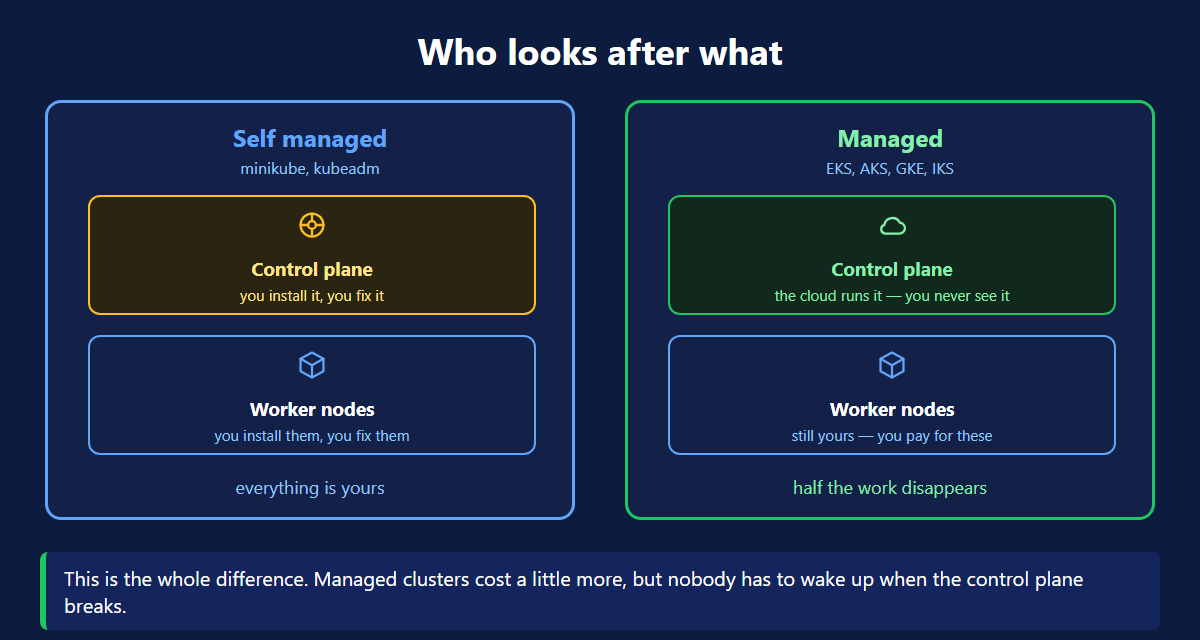
The picture above is the whole difference. In a self managed cluster both halves are yours. In a managed cluster the control plane belongs to the cloud, and you only look after the worker nodes.
Red Hat OpenShift
OpenShift is Kubernetes with extra tools added by Red Hat.
You get a web console, an image registry, build pipelines and stricter security rules, all in one package.
Why companies pick it: paid support from Red Hat, and security rules that are on by default. Banks and large companies use it a lot. Underneath, it is still Kubernetes.
Which Kubernetes Cluster Setup Should You Pick?
| You want to... | Use |
|---|---|
| Learn on your laptop | Minikube |
| Build a cluster on your own servers | kubeadm |
| Run a real app without babysitting the master | EKS, AKS, GKE or IKS |
| Work in a bank or a large enterprise | OpenShift |
For the rest of this class we use EKS.
Pick one and stick with it while learning. The Kubernetes commands you type are the same in all of them. Only the setup is different.
Setting Up an EKS Cluster
Take one Ubuntu VM. Install three tools on it. Then run one command.
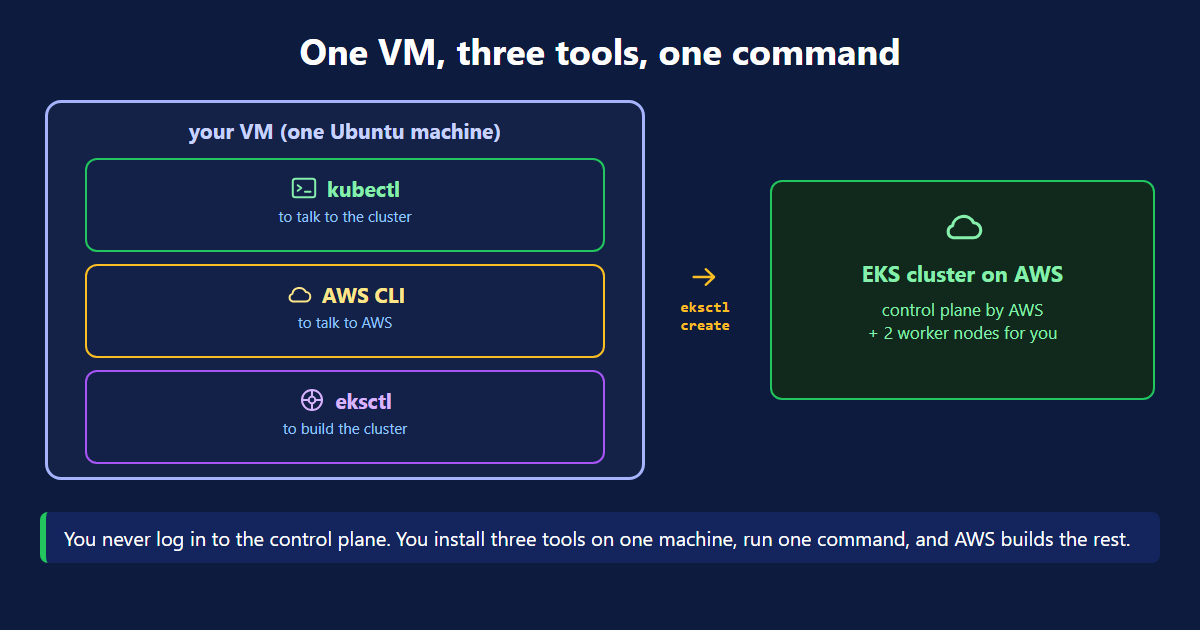
| Tool | What it is for |
|---|---|
| kubectl | to talk to the cluster |
| AWS CLI | to talk to AWS |
| eksctl | to build the cluster |
Step 1 — Install kubectl
What each line does:
apt-get updaterefreshes the package list. It installs nothing.curldownloads files.ca-certificateslets it trust HTTPS sites.- The long
curlline reads the latest version number, then downloads that version of kubectl. installcopies the file into/usr/local/binand makes it runnable. That folder is in your PATH, sokubectlnow works from anywhere.
Step 2 — Install the AWS CLI
Download the zip, unzip it, run the installer. Then aws configure asks for your access key and secret. Without this step eksctl has no permission to build anything.
Step 3 — Install eksctl
Same pattern as kubectl. Work out which build you need, download it, extract it, put it in your PATH.
eksctl is worth it. Without it you would create the VPC, the IAM roles, the control plane and the node group yourself.
Step 4 — Create the Cluster
Two nodes, both Ready. The cluster is live.
What Happens While You Wait
One command, but a lot happens behind it. eksctl sends two stacks to CloudFormation.
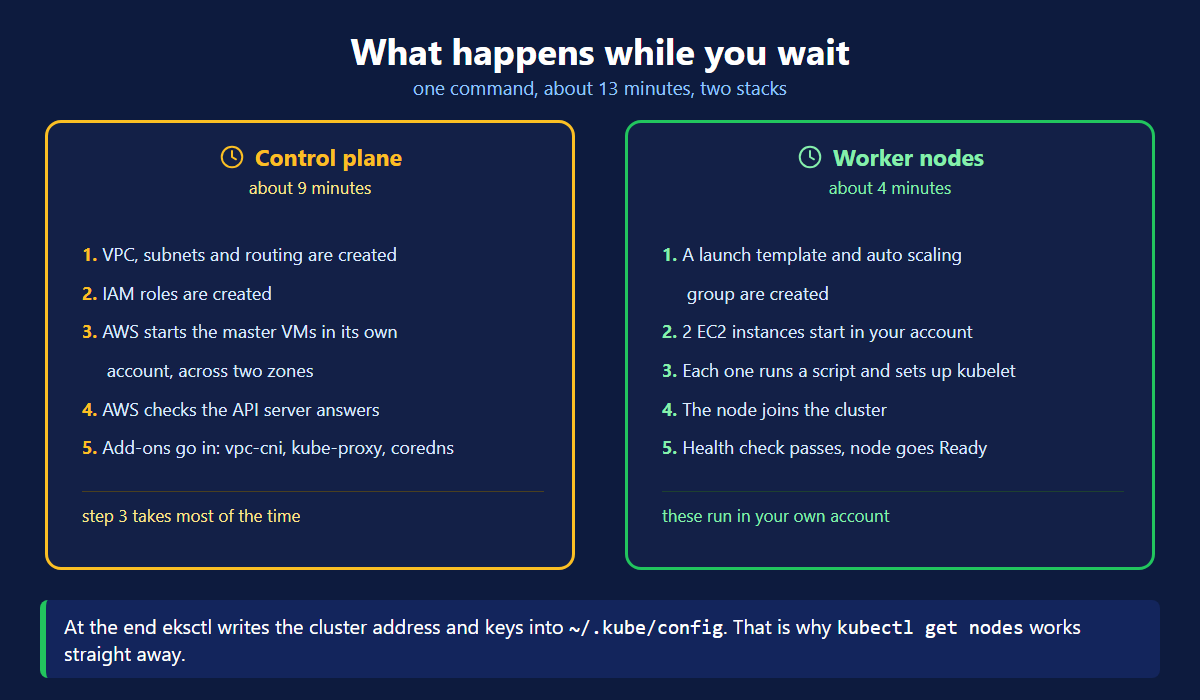
Control plane — about 9 minutes
- VPC, subnets and routing are created.
- IAM roles are created.
- AWS starts the master VMs in its own account, across two zones.
- AWS checks that the API server answers and etcd is in sync.
- Add-ons go in: vpc-cni, kube-proxy, coredns.
Step 3 takes most of the time. Those master VMs are not in your account and you never see them.
Worker nodes — about 4 minutes
- A launch template and an auto scaling group are created.
- Two EC2 instances start, in your account this time.
- Each one runs a script that points kubelet at the cluster.
- The node joins the cluster and authenticates with IAM.
- The health check passes and the node goes Ready.
At the end eksctl writes the cluster address and keys into ~/.kube/config. That is why kubectl get nodes worked straight away.
If the control plane succeeds but the nodes fail, it is usually an account limit. New and free tier accounts often cannot launch the instance type you asked for. Check the CloudFormation events for the node group to see the real error, then try another instance type or region.
Delete It When You Are Done
EKS charges by the hour, for the control plane and for every node. Delete the cluster as soon as you are finished with it.
What's Next
You can now pick a setup and build one. Minikube to learn. Kubeadm for your own servers. EKS, AKS or GKE when you want the cloud to run the master. The official eksctl docs (opens in a new tab) and the EKS user guide (opens in a new tab) have the full list of options. Next we put an app on this cluster.
← Back to Kubernetes Architecture
Frequently Asked Questions
What are the ways to set up a Kubernetes cluster?
Two ways. Self managed means you build the cluster and look after it. Minikube gives you a single node on your own machine. Kubeadm gives you a multi node cluster on real servers. Managed means a cloud provider runs the control plane for you. AWS has EKS, Azure has AKS, Google Cloud has GKE and IBM Cloud has IKS. It is the same Kubernetes either way.
What is the difference between minikube and kubeadm?
Minikube runs a single node cluster on one machine, usually your laptop. It is made for learning and testing, and it starts in a minute. Kubeadm builds a real multi node cluster across several servers. You install it on each machine yourself and you look after everything afterwards. Use minikube to learn, kubeadm when you want a real cluster on your own servers.
What is a managed Kubernetes cluster?
A managed cluster is one where the cloud provider runs the control plane for you. You never see the master nodes and you never fix them. You only create and pay for the worker nodes that run your app. AWS calls it EKS, Azure calls it AKS, Google Cloud calls it GKE, and IBM Cloud calls it IKS. It costs a little more, but nobody has to wake up when the control plane breaks.
What is Red Hat OpenShift?
OpenShift is Kubernetes with extra tools added on top by Red Hat. It brings a web console, a built in image registry, build and deploy pipelines, and stricter security defaults. Companies pick it for two reasons: paid support from Red Hat, and the security rules it enforces by default. It is common in banks and large enterprises. Underneath it is still Kubernetes.
What tools do I need to create an EKS cluster?
Three tools on one machine. kubectl is how you talk to the cluster once it exists. The AWS CLI is how you talk to AWS. It also holds your access keys after you run aws configure. eksctl is the tool that builds the cluster. Without eksctl you would build the VPC, the IAM roles, the control plane and the node group by hand.
How long does it take to create an EKS cluster?
About 13 minutes. The control plane takes around 9 minutes. AWS creates the VPC and the IAM roles first. Then it starts the master VMs in its own account, across two zones. Last it checks that the API server answers. The worker nodes take around 4 minutes. EC2 instances have to start, run their setup script, join the cluster and pass a health check. Most of the wait is the control plane.
Why do my EKS worker nodes fail to launch?
The usual reason is an account limit. On new or free tier accounts the instance type you asked for may not be allowed. The node group stack then fails, even though the control plane worked. Check the CloudFormation events for the node group to see the real error. Try a different instance type or region, or use a normal paid account. Also remember to delete the cluster afterwards, because EKS charges by the hour.