Micro Frontend Communication Patterns
The biggest challenge after splitting a monolith into Micro Frontends is not the split itself — it is how those independent applications communicate with each other. When the Products MFE adds an item to the cart, how does the Cart MFE know? When the Auth MFE logs the user out, how does every other MFE clear user-specific data?
In this article, you will learn the five main Micro Frontend communication patterns used in production applications, when to use each one, their trade-offs, and real code examples based on how MFE architectures are actually built with Next.js (opens in a new tab), Webpack Module Federation (opens in a new tab), and Redux Toolkit (opens in a new tab).
New to Micro Frontend? Start with What is Micro Frontend Architecture? first. Already familiar? Make sure you've read Micro Frontend vs Monolith for the architectural context.
The Communication Problem
In a Monolith, communication is effortless — every component shares the same Redux store, the same context providers, and the same function scope. A button click in ProductCard can dispatch an action that updates CartBadge instantly because they live in the same application.
In Micro Frontend architecture, each MFE is a separate application with its own:
- Bundled JavaScript (separate Webpack builds)
- Component tree (separate React root)
- Internal state (separate local state)
So how does ProductCard in the Products MFE tell CartBadge in the Header that the cart count changed?
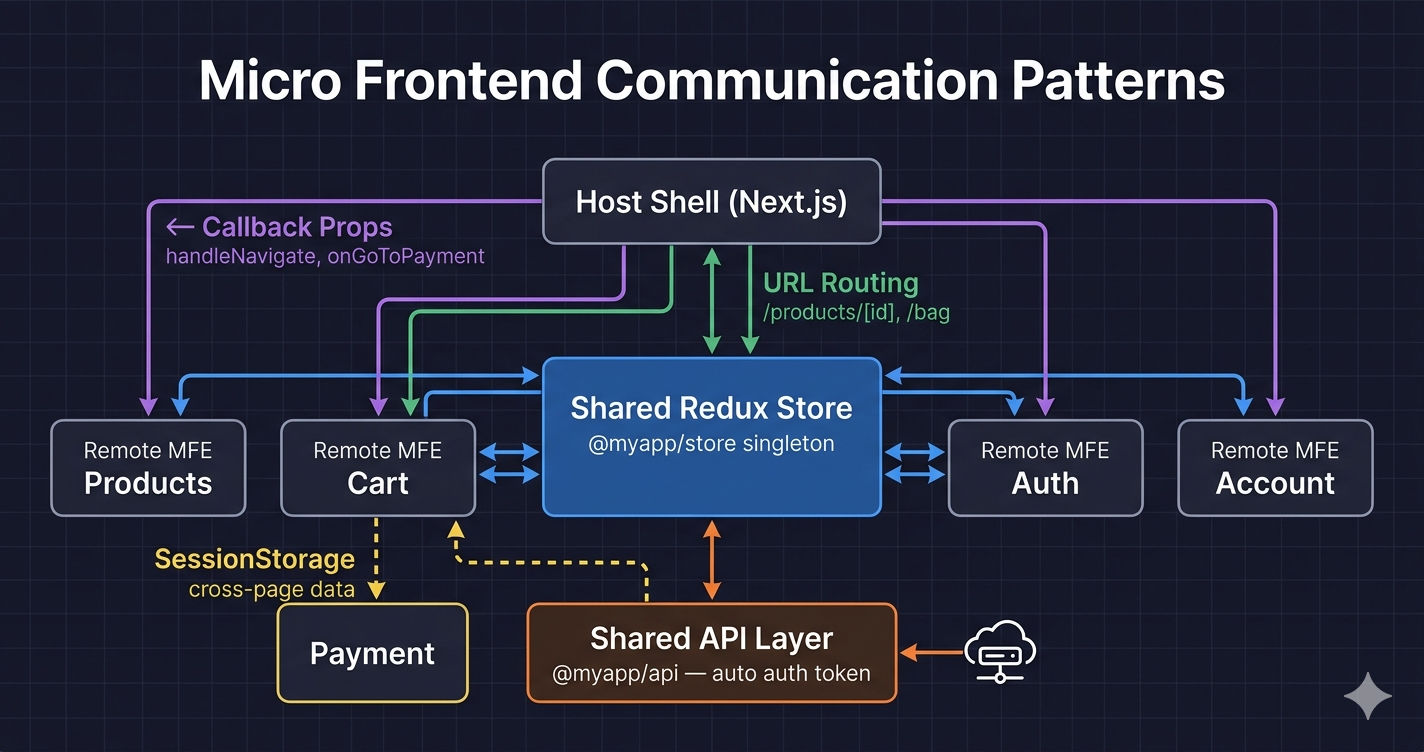
There are five patterns used in production MFE applications:
Pattern 1: Shared Redux Store (Primary Pattern)
This is the most common pattern in production MFE applications. All MFEs share a single Redux store instance through a shared npm workspace package, loaded as a singleton via Module Federation.
How It Works
- Create a Redux store as a shared npm workspace package (e.g.,
@myapp/store) - Define slices for global state —
userSlice,cartSlice, etc. - Every MFE wraps its root with the shared
StoreProvider - Module Federation's
singleton: trueensures only one store instance exists at runtime - When any MFE dispatches an action, all MFEs re-render automatically
Code Example
Module Federation Config — Singleton Is Critical
Both the Host and every Remote MFE must declare the shared store as singleton: true. Without this, Module Federation loads separate instances — each MFE has its own state and they cannot see each other's changes.
Why NextFederationPlugin for the Host? If your Host MFE uses Next.js (for SSR and SEO), use NextFederationPlugin from @module-federation/nextjs-mf instead of the standard ModuleFederationPlugin. It handles Next.js-specific concerns like SSR chunks, page routing, and static asset loading. Remote MFEs that are plain React apps (not Next.js) still use the standard ModuleFederationPlugin.
Version mismatch breaks singletons. If the Host has @reduxjs/toolkit@2.0.0 but Cart MFE has @reduxjs/toolkit@1.9.0, Module Federation may load two separate instances — breaking shared state. Always pin the same version across all MFEs. Use requiredVersion: '1.0.0' with strictVersion: true for your shared packages.
When to Use Shared State
| Use When | Avoid When |
|---|---|
| Multiple MFEs read/write the same data (cart, auth) | Data is local to one MFE only |
| State must stay in sync in real-time across MFEs | Simple one-way notifications |
| Complex state with reducers and async thunks | You want MFEs to be completely independent |
Pattern 2: Callback Props (Host → Remote)
In a Next.js MFE architecture, the Host owns the router (next/router). Remote MFEs cannot import the Host's router directly — that would create tight coupling. Instead, the Host passes callback functions as props when loading Remote components.
How It Works
- Host loads Remote MFE using
next/dynamicwithssr: false - Host passes callbacks:
handleNavigate,onGoToPayment,onSelectedItemsChange - Remote MFE calls these callbacks when it needs the Host to do something (navigate, show toast, etc.)
- Remote MFE stays independent — it doesn't know or care how navigation works
Code Example
Why next/dynamic instead of React.lazy? In a Next.js application, React.lazy does not support SSR. next/dynamic with ssr: false ensures the Remote MFE loads only on the client side — preventing hydration errors and server-side import failures for Module Federation remotes.
Common Callback Props in MFE Applications
| Prop Name | Purpose |
|---|---|
handleNavigate(path) | Navigate to any route via Host router |
onGoToPayment() | Navigate to checkout/payment flow |
onSelectedItemsChange(items) | Notify Host when selection changes |
onShowToast(message) | Trigger toast notification from Host |
productNumericId | Pass route params to Remote component |
When to Use Callback Props
| Use When | Avoid When |
|---|---|
| Remote MFE needs Host to navigate | Data that changes frequently (causes re-renders) |
| One-way communication (Remote → Host action) | MFE-to-MFE communication (without Host) |
| Passing route parameters to Remote components | Large or complex data objects |
Pattern 3: URL / Route-Based Communication
The URL is a global, shared state that every MFE can read. In a Next.js MFE architecture, the Host application uses file-based routing — each page file dynamically imports the corresponding Remote MFE.
How It Works
- Host has pages like
pages/product/[id]/index.tsx,pages/bag/index.tsx - Next.js router resolves the URL and renders the correct page
- The page loads the corresponding Remote MFE via
next/dynamic - Route params (
[id]) are passed as props to the Remote component - MFEs can "communicate" by navigating — Cart navigates to
/checkout/payment, which loads the Payment MFE
When to Use URL Routing
| Use When | Avoid When |
|---|---|
| Page-level MFE loading (one MFE per route) | Component-level composition (multiple MFEs on one page) |
| Deep linking and bookmark support needed | Data that shouldn't be visible in the URL |
| Navigation between domains (Products → Cart → Checkout) | Sensitive data (auth tokens, personal info) |
| SEO matters (URLs are crawlable by Google) | High-frequency state changes |
Pattern 4: Shared API Layer
Just like the shared Redux store, a shared API layer is packaged as a singleton npm workspace package. All MFEs use the same axios (opens in a new tab) instance with centralized interceptors for authentication, error handling, and token refresh.
How It Works
- Create a shared axios instance as
@myapp/apipackage - Request interceptor reads the access token from the shared Redux store and attaches it as a Bearer token
- Response interceptor handles 401 errors — automatically refreshes the token and retries the failed request
- Every MFE imports
apifrom the shared package — no MFE manages auth tokens directly
Code Example
Why This Matters
Without a shared API layer, every MFE would need to:
- Read the auth token from the store independently
- Implement its own token refresh logic
- Handle 401 errors and session expiry separately
This leads to duplicated code and inconsistent error handling. A shared API package solves this once — all MFEs benefit automatically.
When to Use Shared API
| Use When | Avoid When |
|---|---|
| All MFEs call the same backend API | MFEs call completely different backends |
| Authentication is centralized (shared token) | Each MFE has its own auth mechanism |
| You want consistent error handling | API logic is trivial (one or two endpoints) |
Pattern 5: SessionStorage (Cross-Page Data)
When an MFE needs to pass data to another MFE across a page navigation — and that data is too complex or sensitive for URL params — sessionStorage is a practical approach. The data lives only for the browser session and is automatically cleared when the tab closes.
Code Example
When to Use SessionStorage
| Use When | Avoid When |
|---|---|
| Passing complex data between page navigations | Data that needs to persist across sessions |
| Data too large or sensitive for URL params | Real-time state sync between MFEs |
| One-time data transfer (read once, delete) | Frequent read/write across components |
Bonus: Custom Events (Browser Native)
For simple, fire-and-forget notifications where you want zero coupling between MFEs, browser Custom Events (opens in a new tab) work well. However, in most production MFE applications, the shared Redux store handles this more reliably.
When to use Custom Events over Shared Redux: Use Custom Events when the sending MFE and receiving MFE have no shared state dependency — for example, an analytics MFE that just listens for page events without needing access to the Redux store.
Anti-Pattern: Direct Imports Between MFEs
The one thing you must never do — import internal files from another MFE directly.
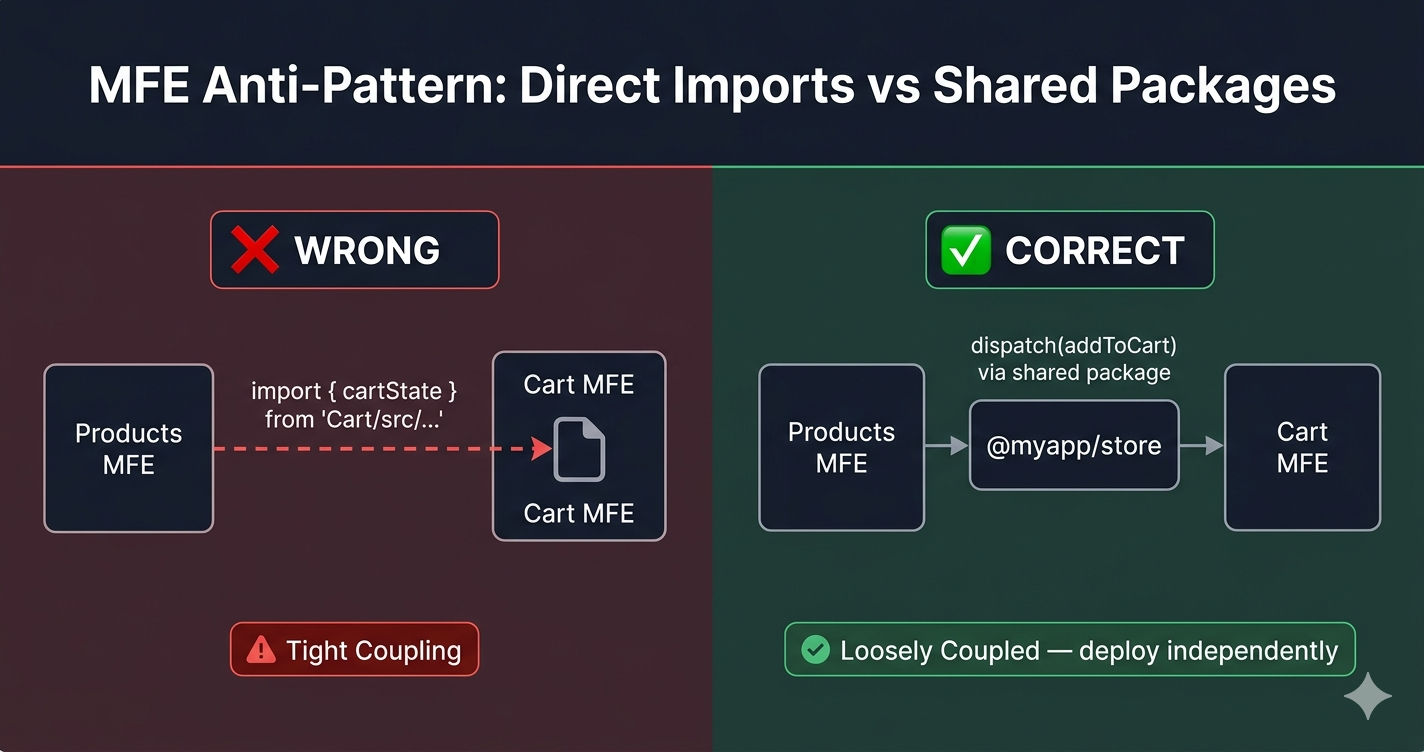
Rule of thumb: If deploying one MFE requires changes in another MFE, they are too tightly coupled. Each MFE must be independently deployable.
Which Pattern Should You Use?
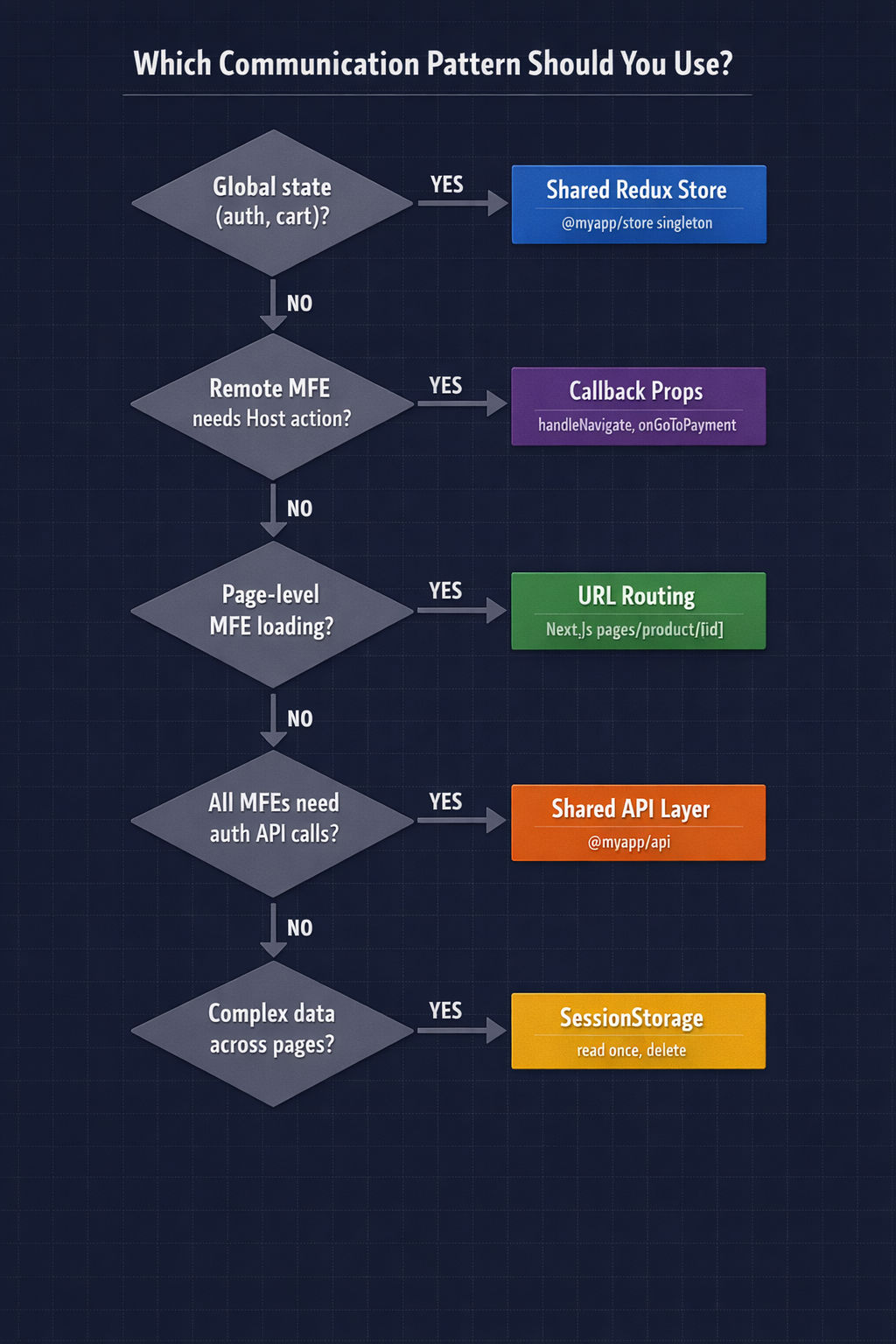
| Scenario | Recommended Pattern |
|---|---|
| Cart state shared across Products, Header, Checkout | Shared Redux Store |
| Remote MFE needs to navigate to another page | Callback Props (handleNavigate) |
| Loading different MFEs based on URL path | URL Routing (Next.js pages) |
| All MFEs need authenticated API calls | Shared API Layer |
| Passing order details from Cart to Payment page | SessionStorage |
| Analytics MFE listening for page events | Custom Events |
| Auth logout → clear all user data everywhere | Shared Redux (dispatch(clearUser())) |
The Golden Rule
Share as little as possible. Each MFE should own its local state. Only put state in the shared store that genuinely needs to be global — authenticated user, cart items, global settings. Everything else stays local to the MFE that owns it.
Summary
| Pattern | Coupling | Best For | Real Example |
|---|---|---|---|
| Shared Redux Store | Medium | Global state (auth, cart) | Products dispatches addToCart → Cart re-renders |
| Callback Props | Low | Host → Remote actions | Host passes handleNavigate to Cart MFE |
| URL Routing | Lowest | Page navigation | /product/[id] loads Products MFE |
| Shared API Layer | Medium | Centralized HTTP + auth | All MFEs use same axios with auto-token |
| SessionStorage | Lowest | Cross-page data transfer | Cart saves items → Payment reads on mount |
| Custom Events | Lowest | Fire-and-forget | Analytics listens for page view events |
Production MFE applications use a combination — Shared Redux for auth and cart state, Callback Props for navigation, URL routing for page-level MFE loading, a shared API layer for all HTTP calls, and SessionStorage for cross-page data when needed.
What's Next?
Now that you understand how Micro Frontends communicate, the next step is learning how to deploy them — CI/CD pipelines, Nginx configuration, and independent deployment strategies.
← Back to 5 MFE Integration Patterns
Continue to Micro Frontend Deployment Strategies →
Frequently Asked Questions
How do Micro Frontends communicate with each other?
Micro Frontends communicate using five main patterns: Shared Redux Store (primary — all MFEs share one store instance via Module Federation singleton), Callback Props (Host passes navigation and action callbacks to Remote MFEs), URL/Route-based communication (Next.js dynamic routes with query params), Shared API Layer (centralized axios instance with auth interceptors), and SessionStorage for cross-page data passing.
Should Micro Frontends share a Redux store?
Yes, for data that genuinely needs to be global — like authenticated user state and cart items. The recommended approach is to create a shared store as an npm workspace package and load it as a singleton via Module Federation. All MFEs import from the same package and share one store instance at runtime. Keep MFE-specific state local.
How does Module Federation singleton work for shared state?
When you mark a shared package as singleton: true in Module Federation config, it ensures only one instance of that package is loaded at runtime — even though multiple MFEs bundle it. This is critical for Redux because if two store instances exist, MFEs cannot see each other's state changes. Always pin the same version across all MFEs.
How do you load Remote MFE components in a Next.js Host?
Use next/dynamic with ssr: false — not React.lazy. Example: const RemoteCart = dynamic(() => import('Cart/ShoppingBag'), { ssr: false }). The Host passes callback props like handleNavigate and onGoToPayment so the Remote MFE can trigger navigation without directly importing the Host's router.
How do you avoid tight coupling between Micro Frontends?
Never import internal files from another MFE directly. Instead, communicate through shared packages — a shared store for state, a shared API layer for HTTP calls, and callback props for navigation. If deploying one MFE requires changes in another, they are too tightly coupled. Each MFE should be independently deployable.