What is Micro Frontend Architecture?
Micro Frontend architecture is a design approach where a large frontend application is split into smaller, independent applications — each owned by a separate team, built with its own tech stack, and deployed independently. Think of it as microservices (opens in a new tab), but for the frontend. The term was first introduced in the ThoughtWorks Technology Radar (opens in a new tab) in 2016.
In this article, you'll learn what Micro Frontend (MFE) architecture is, why it exists, when you should use it, and how it works — with practical examples and code snippets.
The Problem with Monolithic Frontends
Most frontend applications start as a single monolithic codebase. One repository, one build pipeline, one deployment. This works fine for small teams and small applications.
But as the application grows, problems start appearing:
1. Codebase Becomes Unmanageable
Imagine an e-commerce platform with these features — Product Catalog, Shopping Cart, User Authentication, Order Management, Payments, Analytics Dashboard, and Customer Support. In a monolith, all of this lives in one codebase. Every developer works in the same repository, same build, same deployment.
2. Team Scaling Issues
When you have 5+ developers working in the same codebase:
- Merge conflicts become daily pain
- A bug in the Orders module blocks the Products team's deployment
- Code reviews take longer because everything is intertwined
- Onboarding new developers takes weeks
3. Deployment Bottlenecks
In a monolith, deploying a small change to the Pricing page requires:
- Building the entire application
- Testing everything (not just your change)
- Deploying all modules at once
- If something breaks, everything rolls back
4. Build Time Gets Slower
As the codebase grows, build times increase from seconds to minutes. In a monolith with 50+ pages, a full rebuild can take 5–10 minutes. Every developer waits for this on every change.
5. Scalability Limitations
A monolithic frontend is a single deployment unit. When traffic spikes — say during a flash sale — you have to scale the entire application, even if only the Product Catalog and Cart pages are under heavy load. You can't independently scale just the parts that need it. This wastes infrastructure resources and increases costs.
Note: These are not hypothetical problems. Many production teams hit these exact issues as their application scales beyond a certain size.
What is Micro Frontend?
Micro Frontend is an architectural pattern where a frontend application is decomposed into smaller, independent applications called micro frontends (MFEs). Each MFE:
- Is a standalone application with its own codebase
- Can be developed independently by a separate team
- Can be deployed independently without affecting other MFEs
- Is loaded at runtime by a host/shell application
Here's how it looks in practice. Instead of one monolith, you have:
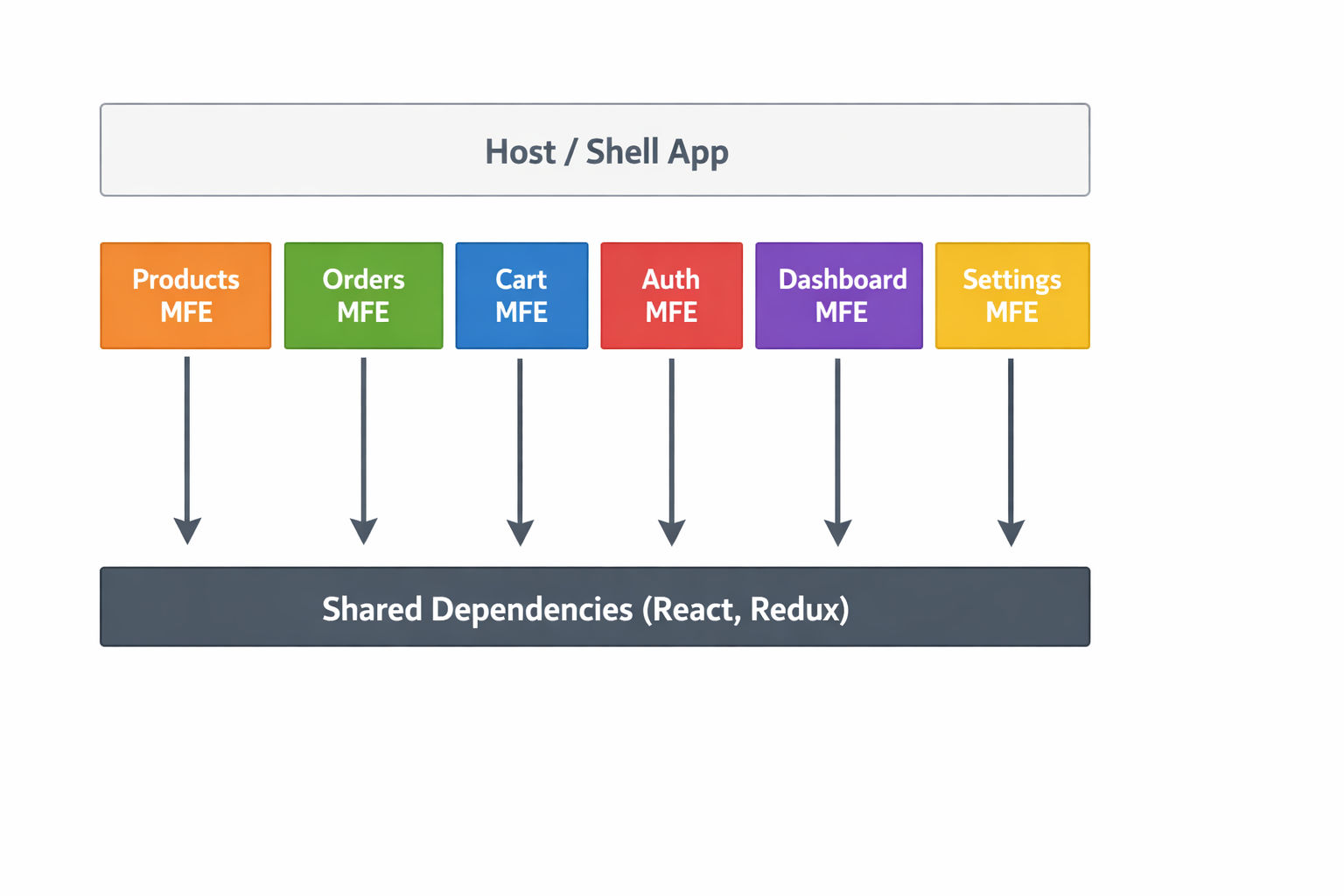
Each box above is a separate application — with its own package.json, its own Webpack config, its own build, and its own deployment. The Host (shell) application loads them at runtime using Webpack Module Federation.
How Does It Work?
The most popular approach is Webpack 5 Module Federation (opens in a new tab). Here's the simplified flow:
- Each MFE exposes components via a
remoteEntry.jsfile - The Host app declares remotes — URLs pointing to each MFE's
remoteEntry.js - At runtime, the Host loads the remote components dynamically over the network
- Shared dependencies (React, Redux) are loaded once, not duplicated
Local Development and Production configs are different. When running locally, each MFE runs on its own localhost port and remotes point to https://localhost:PORT/remoteEntry.js. On the server, MFEs are served behind Nginx at a path like /products/, so remotes point to /products/remoteEntry.js. Always update the remote URLs when switching between environments.
Host Application (Shell)
Remote MFE (e.g., Products)
How it works at runtime:
- User visits the Host application
- Host app loads
Products@/products/remoteEntry.jsover the network remoteEntry.jstells the Host what modules are available- Host dynamically imports
ProductListorProductDetailas needed - React, Redux, and other shared libraries are loaded only once (singleton pattern)
Key Benefits of Micro Frontend
1. Independent Deployments
Each MFE deploys separately. The Products team can deploy 5 times a day without waiting for the Orders team. A bug in Settings doesn't block Cart deployment.
2. Team Autonomy
Each team owns their MFE end-to-end — from development to deployment. In a large application, you can have multiple independent teams working in parallel without stepping on each other's code.
3. Technology Flexibility
Different MFEs can use different frameworks. For example:
| MFE | Framework | Why |
|---|---|---|
| Host App | Next.js | SSR, SEO, image optimization |
| Products | Next.js | SSR for product pages (SEO) |
| Auth | React | Client-only login flow |
| Cart | React | Client-only cart logic |
| Dashboard | React | Client-only admin views |
This mixed React + Next.js architecture lets you pick the right tool for each domain — SSR where SEO matters, client-side React where it doesn't.
4. Faster Build Times
Instead of building one massive application, each MFE builds independently. A change in the Products MFE only rebuilds Products — not the entire application.
5. Independent Scalability
In a monolith, you scale the entire application even if only one section has high traffic. With MFE, you can scale each micro frontend independently. During a flash sale, you scale only the Products and Cart MFEs — not the Settings or Analytics pages. This means:
- Lower infrastructure costs — scale only what needs scaling
- Better performance under load — each MFE handles its own traffic
- Kubernetes-friendly — each MFE runs as a separate container/pod that auto-scales independently
This is one of the biggest advantages when deploying MFEs with Docker (opens in a new tab) and Kubernetes (opens in a new tab).
6. Fault Isolation
If the Analytics MFE crashes, only the analytics section breaks. The rest of the application (Products, Orders, Cart) continues working normally.
When Should You Use Micro Frontends?
Micro Frontend is not for every project. Use it when:
- Team size exceeds 5–8 developers working on the same frontend
- Multiple business domains need independent release cycles (Products, Orders, Payments)
- Different parts need different frameworks (some pages need SSR, others don't)
- Deployment speed matters — you can't wait for a full monolith rebuild every time
- Organizational structure maps to business domains (each team owns a domain)
Warning: Do NOT use Micro Frontend if you have a small team (2–3 developers) building a simple application. The operational complexity of MFE is not worth it for small projects. Start with a monolith and migrate when you hit scaling problems.
Real-World Companies Using Micro Frontends
| Company | How They Use MFE |
|---|---|
| IKEA | Micro frontends for product catalog, cart, checkout |
| Spotify | Independent squads own different parts of the web player |
| Amazon | Each product team owns their section of the page |
| Zalando | Project Mosaic — micro frontends for e-commerce |
| DAZN | Sports streaming platform with independent MFEs |
For a deeper dive into micro frontend concepts, read Martin Fowler's detailed article on Micro Frontends (opens in a new tab).
Micro Frontend vs Monolithic Frontend
| Feature | Monolithic Frontend | Micro Frontend |
|---|---|---|
| Codebase | Single repository | Multiple repositories or monorepo |
| Deployment | Entire app redeployed | Independent MFE deployment |
| Team Size | One large team | Small autonomous teams |
| Tech Stack | Single framework | Mixed frameworks possible |
| Build Time | Slow (full rebuild) | Fast (only changed MFE rebuilds) |
| Failure Impact | Entire app fails | Only affected MFE fails |
| Scalability | Scale entire app together | Scale each MFE independently |
| Complexity | Lower (simple setup) | Higher (federation, shared state) |
| Best For | Small teams, simple apps | Large teams, complex domains |
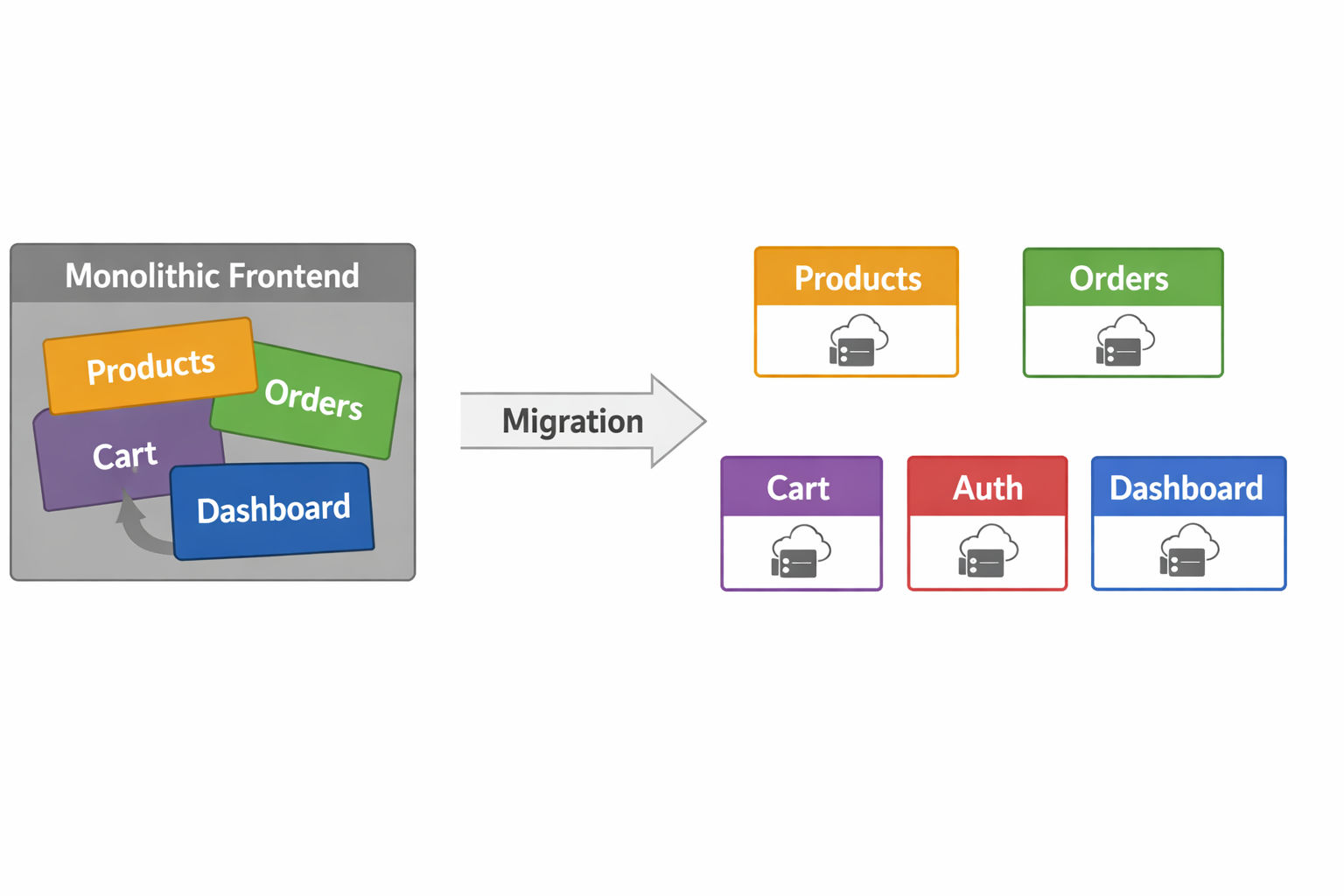
Typical MFE Project Structure
Here's what a typical Micro Frontend monorepo looks like:
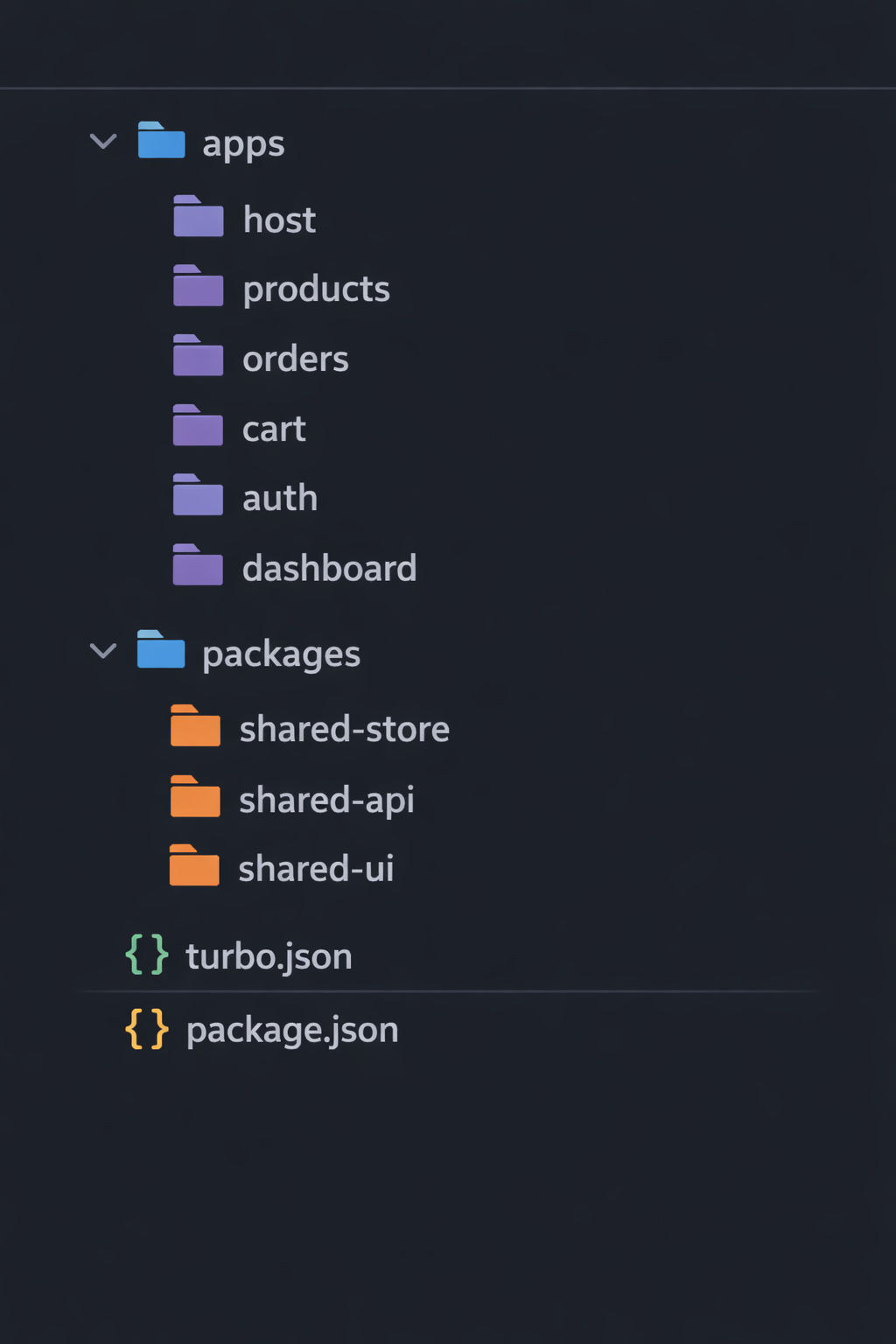
Each app under apps/ is a fully independent application with its own webpack.config.js, package.json, and dev server running on its own port.
The packages/ directory contains shared code — a Redux store, API utilities, and UI components that all MFEs consume as npm packages via workspace linking.
What's Next?
This article covered what Micro Frontend architecture is and why you would use it. In the next article, we'll dive deeper into Micro Frontend vs Monolith — including a decision framework to help you choose the right approach for your project.
Continue to Micro Frontend vs Monolith →
Frequently Asked Questions
What is a micro frontend in simple terms?
A micro frontend is a small, independent frontend application that handles one part of a larger application. Multiple micro frontends are combined at runtime to form the complete user experience — similar to how microservices work on the backend.
Is micro frontend the same as micro services?
No, but the concept is similar. Microservices split the backend into independent services. Micro frontends split the frontend into independent applications. They often work together — each micro frontend calls its corresponding microservice.
What is the best framework for micro frontends?
There is no single best framework. The most common approach is React with Webpack 5 Module Federation. For SSR (Server-Side Rendering) pages, Next.js with NextFederationPlugin is the recommended choice. The beauty of MFE is that you can mix frameworks.
Is micro frontend good for SEO?
It depends on the integration approach. With Module Federation, the Host application handles routing and renders MFE components like normal components — so SEO works as expected. For pages that need strong SEO, use Next.js with Server-Side Rendering as the MFE framework.
How many micro frontends is too many?
There's no fixed number, but each MFE should represent a business domain, not a UI component. If you're splitting a single page into micro frontends, you've gone too far. Each MFE should map to a distinct domain like Products, Orders, Cart, etc.