Published: April 19, 2026 · 14 min read
Next.js Micro Frontend Host App: Complete Setup Guide
You have multiple micro frontend teams. Some build with React, others with Next.js. You need a single Next.js micro frontend host app that loads all these remote MFEs at runtime — shares a Redux store across every module, handles SSR for the Next.js remotes, and wraps everything with PWA support, image optimization, and Content Security Policy headers. In the previous article, you learned the differences between NextFederationPlugin and ModuleFederationPlugin. Now it is time to build the host application that puts it all together.
In this guide, you will:
- Set up a Next.js host with NextFederationPlugin and define both React and Next.js remotes
- Configure shared singleton dependencies that every remote reuses
- Wire up _app.tsx with a shared Redux Provider
- Consume remote components with next/dynamic and handle loading states
- Add image optimization, PWA, bundle analysis, and security headers
- See the complete production-ready next.config.js from a real-world project
What Is a Next.js Micro Frontend Host App?
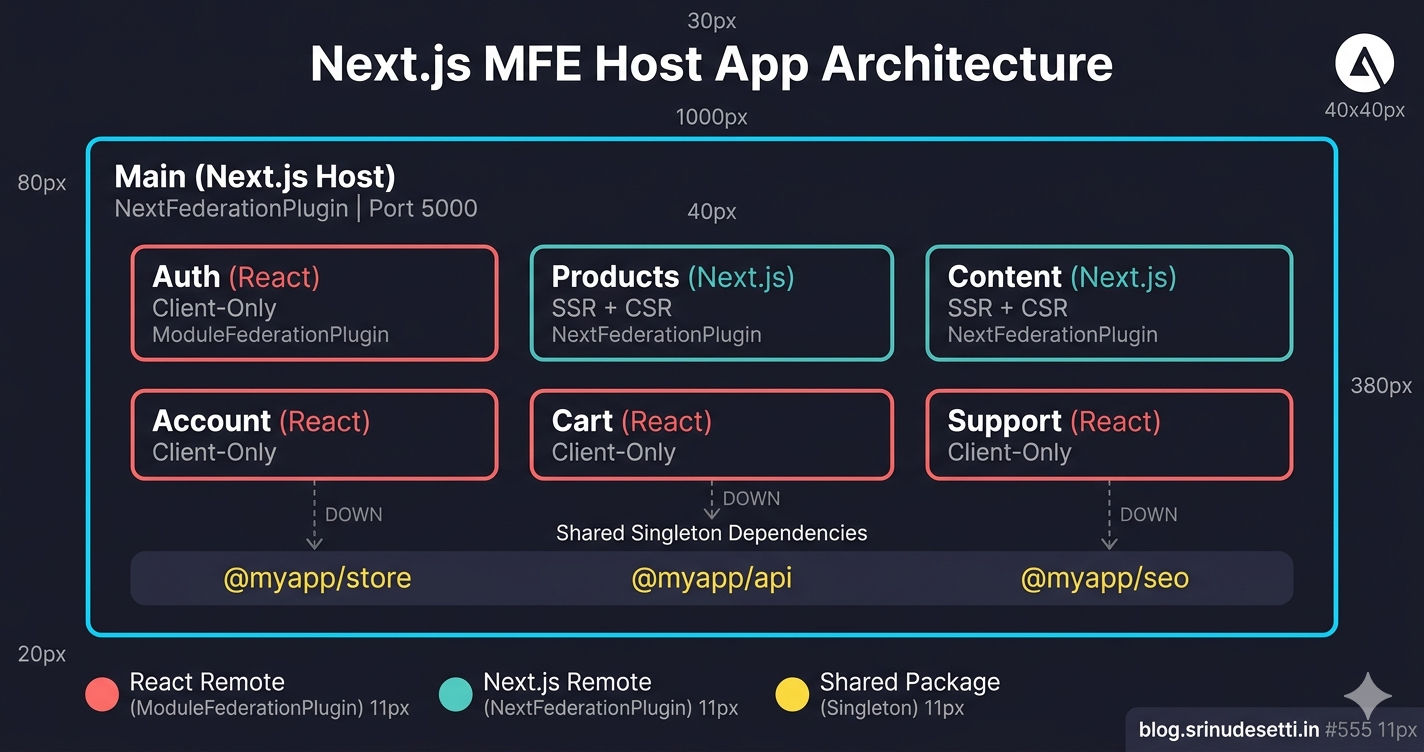
The host app is the container application — the shell that users navigate to. It owns the top-level layout (header, footer, sidebar), the shared Redux store, and the routing system. Every other micro frontend (Auth, Products, Cart, Content, Support) is a remote — an independent application that the host loads at runtime via Webpack Module Federation (opens in a new tab).
In a React-only architecture, the host is a React SPA using ModuleFederationPlugin. When the host is Next.js, it uses NextFederationPlugin instead — gaining SSR support, built-in image optimization, file-based routing, and security headers that React SPAs handle manually.
A Next.js host can load both React remotes and Next.js remotes simultaneously. React remotes (Auth, Cart, Account, Support) use plain remoteEntry.js paths. Next.js remotes (Products, Content) use _next/static/chunks/remoteEntry.js with the isServer toggle for SSR.
Prerequisites
Before starting, ensure you have:
- Node.js 18+ and npm 9+ installed
- A monorepo with npm workspaces or Turborepo configured
- Shared packages (
@myapp/store,@myapp/api,@myapp/seo) already created - At least one remote MFE (React or Next.js) running and exposing components
- Familiarity with NextFederationPlugin vs ModuleFederationPlugin
Step 1 — Install Dependencies
The host application needs Next.js, the Module Federation plugin, shared monorepo packages, and development tools.
Key dependencies to note:
@module-federation/nextjs-mf(opens in a new tab) — the NextFederationPlugin packagewebpack: ^5.89.0— explicit webpack 5 dependency (required when usingNEXT_PRIVATE_LOCAL_WEBPACK=true)@myapp/store,@myapp/api,@myapp/seo— shared monorepo packages consumed as singleton dependenciescross-env— setsNEXT_PRIVATE_LOCAL_WEBPACK=trueacross platforms
NEXT_PRIVATE_LOCAL_WEBPACK=true is required in every npm script. Without it, Next.js uses its internal bundled webpack which does not expose the container plugin API. Module Federation silently fails — no errors in the console, but remotes never load. This is the number one "it builds but remotes are empty" issue.
Step 2 — Initialize NextFederationPlugin
Create next.config.js in the host app root. The minimum viable configuration needs three things: the plugin name, the filename for the remote entry, and the remotes map.
const { NextFederationPlugin } = require('@module-federation/nextjs-mf');

module.exports = {
  output: 'standalone',
  webpack(config, { isServer }) {
    config.plugins.push(
      new NextFederationPlugin({
        name: 'Main',
        filename: 'static/chunks/remoteEntry.js',
        remotes: { /* defined in Step 3 */ },
        shared: { /* defined in Step 4 */ },
        extraOptions: { /* defined in Step 5 */ },
      })
    );
    return config;
  },
};
name: 'Main'— unique identifier for this container in the Module Federation scopefilename: 'static/chunks/remoteEntry.js'— follows the Next.js asset convention (all chunks live under_next/static/chunks/)output: 'standalone'— generates a self-contained build folder for Docker deployment
Step 3 — Define Remote Micro Frontends
The remotes object maps each remote MFE name to its remoteEntry.js URL. The URL format differs between React remotes and Next.js remotes, and between production and local development.
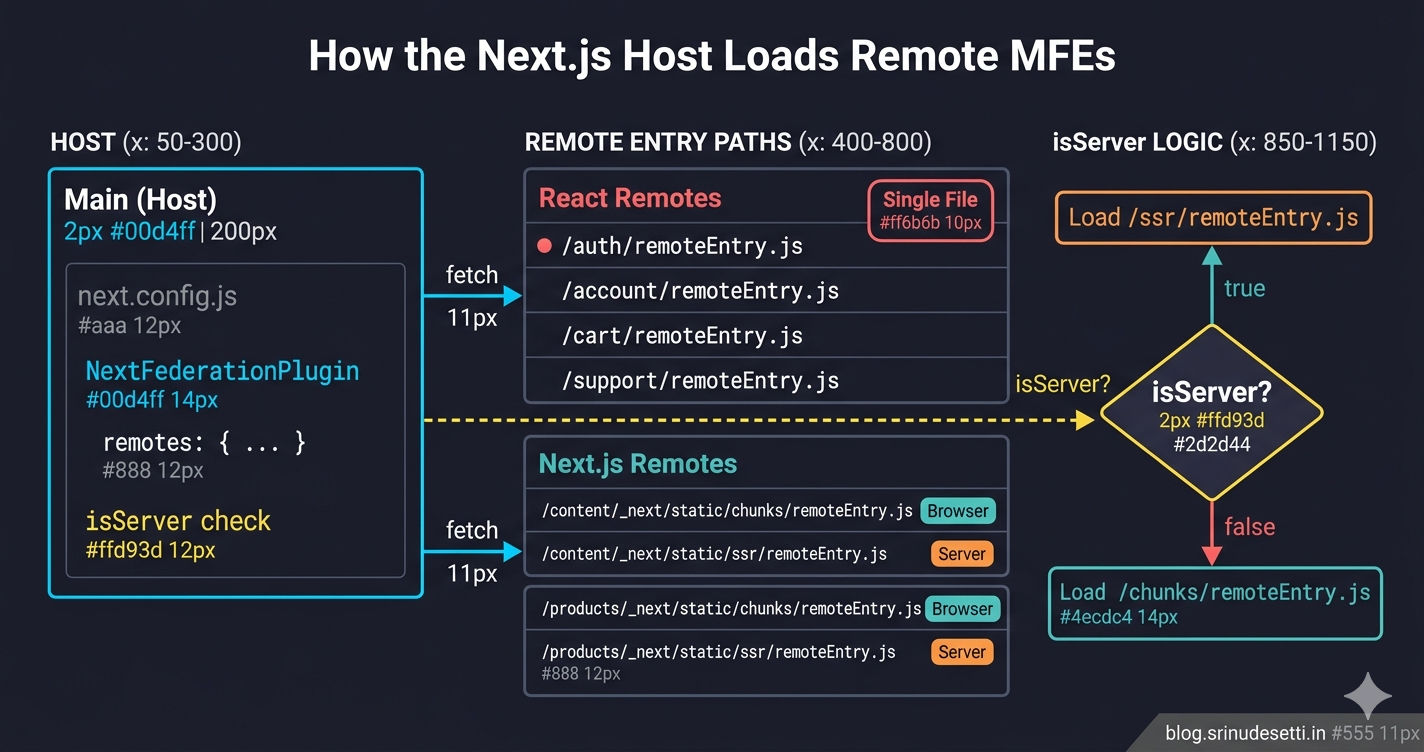
React Remotes vs Next.js Remotes — Path Differences
| Remote Type | remoteEntry.js Path | isServer Needed? | Why |
|---|---|---|---|
| React (Auth, Cart, Account, Support) | /auth/remoteEntry.js | No | ModuleFederationPlugin outputs one file at root — no SSR |
| Next.js (Content, Products) | /content/_next/static/{ssr|chunks}/remoteEntry.js | Yes | NextFederationPlugin outputs two files — one for Node.js (SSR), one for browser |
The isServer flag is passed by Next.js when it runs webpack. Next.js builds twice — once for the server (Node.js) and once for the client (browser). The isServer ? 'ssr' : 'chunks' ternary picks the correct remoteEntry.js for each build.
React remotes do NOT need the isServer check. They produce a single remoteEntry.js that works only in the browser. The host loads them with ssr: false via next/dynamic, so the server build never tries to fetch their remote entry.
Step 4 — Configure Shared Dependencies
Shared dependencies ensure that React, Redux, and your internal packages are loaded once and shared across all remotes. Without sharing, each remote bundles its own copy — multiplying bundle size and breaking singleton state.
Key configuration choices:
requiredVersion: falsefor core libraries (react, react-dom) — Next.js manages its own React version internally. Pinning a specific version can conflict with Next.js's bundled React.eager: falsefor everything — in Next.js, eager loading breaks SSR hydration because shared modules load synchronously before the hydration cycle completes. This is the most common source of "Cannot read properties of null" errors in Next.js MFE setups.strictVersion: true+requiredVersion: '1.0.0'for internal packages — ensures that the host and all remotes use the exact same version of@myapp/store,@myapp/api, and@myapp/seo. A version mismatch means two store instances, breaking shared state.- No
react-router-dom— Next.js uses its ownnext/router. React remotes that use React Router internally handle their own routing.
Step 5 — Configure Extra Options
The extraOptions object provides Next.js-specific features that do not exist in ModuleFederationPlugin. These options solve real problems that surface only when running Module Federation inside the Next.js framework.
Step 6 — Transpile Shared Packages and Browser Fallbacks
Shared packages from the monorepo need explicit transpilation because Next.js treats symlinked workspace packages like node_modules — it skips them during compilation. You also need browser fallbacks for any Node.js core modules that shared packages import.
Without transpilePackages, your shared packages will not be transpiled and the build will fail with syntax errors if they contain TypeScript or JSX. Without the browser fallbacks, the client build crashes with Module not found: Can't resolve 'fs' if any shared package imports Node.js modules conditionally.
Step 7 — Set Up _app.tsx with Shared Redux Provider
The _app.tsx file wraps every page in the application. This is where the host mounts the shared Redux store, the authentication initializer, the layout shell, and route protection.
Every component in _app.tsx is loaded with next/dynamic and ssr: false. This ensures that client-only dependencies (Redux store, window-based auth checks, DOM-dependent layout) do not execute during server-side rendering. The loading order matters:
- ClientReduxProvider mounts first — creates the singleton store
- InitiateAuth checks for refresh tokens and restores the session
- ProtectedRoute blocks unauthenticated users from protected pages
- Layout renders the header, sidebar, and footer shell
- Component renders the actual page content (including remote MFE components)
Step 8 — Consume Remote Components
Remote MFE components are loaded at the page level. Each page imports the remote component using next/dynamic with ssr: false and wraps it with error handling.
Use next/dynamic over React.lazy for these reasons:
- Built-in SSR exclusion —
ssr: falsein one call vs double-wrapping with React.lazy - Built-in loading state —
loadingprop replacesSuspensefallback - Automatic code splitting — Next.js manages chunk names without
webpackChunkNamecomments - Consistent with Next.js patterns — the framework team recommends
next/dynamicfor all dynamic imports
For a deep dive into loading patterns and fallback UI, see Lazy Loading Micro Frontends with React Suspense.
Step 9 — Image Optimization
The Next.js host provides built-in image optimization (opens in a new tab) via next/image. Configure remotePatterns to allow images from your CDN, asset servers, and development hosts.
This configuration enables:
- Automatic AVIF/WebP conversion — smaller file sizes with
formats: ['image/avif', 'image/webp'] - Responsive
srcsetgeneration —deviceSizesandimageSizesgenerate optimized variants for every screen size - CDN caching —
minimumCacheTTL: 60caches optimized images for at least 60 seconds
Remote MFE components that use next/image need enableImageLoaderFix: true in extraOptions. Without it, the image loader constructs URLs relative to the host domain instead of the remote's domain, causing 404s for every image loaded from a remote component.
Step 10 — PWA and Bundle Analyzer
The host wraps the Next.js config with two higher-order functions: withPWA for Progressive Web App support and withBundleAnalyzer for bundle size analysis.
The final export composes both wrappers: withBundleAnalyzer(withPWA({ ...nextConfig })). This pattern is common in Next.js — each wrapper adds functionality without modifying the core config.
Step 11 — Security Headers
Content Security Policy (CSP) headers control which scripts, styles, images, and connections the browser allows. In a micro frontend architecture, CSP is especially important because the host loads JavaScript from multiple remote origins at runtime.
Key CSP directives for Module Federation:
'unsafe-eval'in script-src — Module Federation usesnew Function()to evaluate remote modules at runtime. Withoutunsafe-eval, remote loading fails silently.'unsafe-inline'in script-src and style-src — Next.js injects inline scripts for page data and inline styles for CSS-in-JS. Both requireunsafe-inline.- connect-src with localhost — development mode requires WebSocket connections (
ws://localhost) for hot module replacement.
For a comprehensive guide to CSP in micro frontend architecture, see the upcoming Content Security Policy article.
Complete next.config.js
Here is the complete, production-ready next.config.js with every configuration assembled into one file. This is the actual pattern used in production with generic names.
Running the Host Application
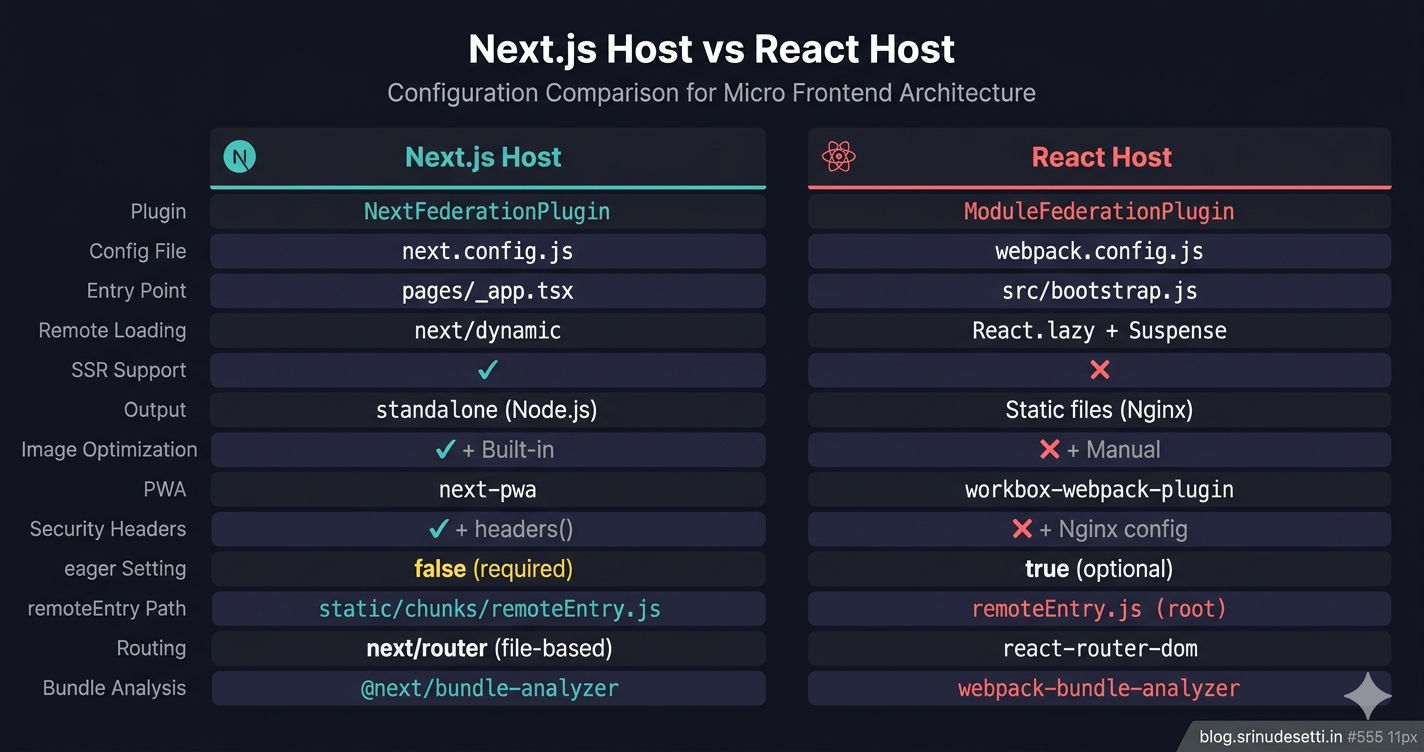
Next.js Host vs React Host — Comparison
| Feature | Next.js Host | React Host |
|---|---|---|
| Plugin | NextFederationPlugin | ModuleFederationPlugin |
| Config file | next.config.js | webpack.config.js |
| Entry point | pages/_app.tsx | src/bootstrap.js |
| Remote loading | next/dynamic (ssr: false) | React.lazy + Suspense |
| SSR support | Yes (isServer toggle) | No |
| Output | standalone (for Docker/Node.js) | Static files (for Nginx) |
| Image optimization | Built-in next/image | Manual or third-party |
| PWA | next-pwa plugin | workbox-webpack-plugin |
| Security headers | Built-in headers() config | Manual webpack or Nginx |
| Shared dep eager | Must be false | Can be true |
| remoteEntry.js | static/chunks/remoteEntry.js | remoteEntry.js (root) |
| Routing | File-based (next/router) | react-router-dom |
| Bundle analysis | @next/bundle-analyzer | webpack-bundle-analyzer |
Common Mistakes
-
Missing
NEXT_PRIVATE_LOCAL_WEBPACK=true— Module Federation silently fails. Remotes appear to load but render nothing. No error in the console. Always set this flag in every npm script. -
Using
eager: truefor shared dependencies — Causes hydration mismatch errors in production. React loads twice — once eagerly during chunk evaluation, once during hydration. Useeager: falsefor all shared deps in Next.js. -
Using React-style paths for Next.js remotes — Writing
Content@/content/remoteEntry.jsinstead ofContent@/content/_next/static/chunks/remoteEntry.js. The file does not exist at the root — NextFederationPlugin places it inside_next/static/. -
Forgetting
ssr: falsein next/dynamic — Remote components attach towindow, which does not exist on the server. Withoutssr: false, the server build crashes withReferenceError: window is not defined. -
Not setting
output: 'standalone'— Without standalone mode,next buildproduces a build that depends onnode_modulesat runtime. Docker images become massive (500MB+) instead of the lightweight standalone output (~150MB). -
Skipping
transpilePackagesfor shared packages — Monorepo packages with TypeScript or JSX fail to compile because Next.js treats them as pre-builtnode_modules.
What's Next
You now have a complete Next.js host application loading both React and Next.js remote micro frontends. The next article covers how to configure Next.js remote MFEs with basePath and assetPrefix — the settings that make subdirectory routing and asset serving work correctly for Next.js remotes.
← Back to NextFederationPlugin vs ModuleFederationPlugin
Continue to Next.js Remote MFE with basePath and assetPrefix →
Frequently Asked Questions
What is a Next.js micro frontend host app?
A Next.js micro frontend host app is the main application that uses NextFederationPlugin to load and orchestrate multiple remote micro frontend modules at runtime. It handles routing, shared state management via a singleton Redux store, SSR-aware remote loading using the isServer flag, and wraps the entire architecture with PWA support, image optimization, and security headers. The host creates the shell (header, footer, sidebar) while each remote provides the page content.
What is the difference between a Next.js host and a React host in Module Federation?
A Next.js host uses NextFederationPlugin in next.config.js with isServer checks for SSR support, next/dynamic for loading remotes, and extraOptions like exposePages and enableImageLoaderFix. A React host uses ModuleFederationPlugin in webpack.config.js, React.lazy with Suspense for loading remotes, and has no SSR capabilities. The Next.js host serves remoteEntry.js from _next/static/chunks/ while the React host serves it from the root path.
Can a Next.js host load both React and Next.js remote micro frontends?
Yes. A Next.js host can load both React remotes built with ModuleFederationPlugin and Next.js remotes built with NextFederationPlugin simultaneously. React remotes use a simple path like /auth/remoteEntry.js while Next.js remotes use _next/static/chunks/remoteEntry.js with the isServer toggle for SSR. All remotes are loaded with next/dynamic using ssr: false since remote entry scripts require the window object.
Why does the Next.js host need NEXT_PRIVATE_LOCAL_WEBPACK=true?
NEXT_PRIVATE_LOCAL_WEBPACK=true forces Next.js to use the locally installed webpack 5 instead of its bundled internal copy. Module Federation plugins hook into webpack's container system which requires access to the full webpack API. Without this flag, Next.js uses a stripped-down webpack build that does not expose the container plugin API, causing Module Federation configuration to silently fail — no errors appear, but remotes never load.
What are extraOptions in NextFederationPlugin?
extraOptions is a configuration object unique to NextFederationPlugin. exposePages automatically exposes all Next.js pages as federated modules. enableImageLoaderFix corrects next/image URLs when loaded from remotes. enableUrlLoaderFix fixes static asset paths for fonts and SVGs. automaticAsyncBoundary wraps modules in an async boundary for shared dependency negotiation, replacing the manual bootstrap.js pattern used in React MFEs. These options do not exist in ModuleFederationPlugin.
How do you consume remote components in a Next.js host app?
Remote components are consumed using next/dynamic with ssr: false. The dynamic import wraps the Module Federation import statement (e.g., import('Products/ProductDetailPage')), a loading prop provides fallback UI during fetch, and ssr: false prevents the remote from rendering during server-side rendering since remotes attach to the window object which does not exist on the server. Error handling is added via .catch() on the import and an ErrorBoundary wrapper component.