Micro Frontend Folder Structure: Best Practices
How you organize your Micro Frontend project determines how easy it is to develop, build, deploy, and scale. A poor folder structure leads to tight coupling between MFEs, unclear ownership boundaries, and painful onboarding for new developers. A well-structured monorepo makes each MFE self-contained while sharing only what needs to be shared.
In this article, you'll learn how to structure a Micro Frontend monorepo — the apps/ directory for independent MFEs, the packages/ directory for shared code, key config files like turbo.json and root package.json, and the internal structure of each MFE app. Every example is based on real-world Micro Frontend projects built with React (opens in a new tab), Next.js (opens in a new tab), Webpack Module Federation (opens in a new tab), and Turborepo (opens in a new tab).
New to Micro Frontend? Start with What is Micro Frontend Architecture? for the foundations.
The Problem: Unorganized MFE Projects
When teams start building Micro Frontends, they often make one of these structural mistakes:
1. Flat File Dump
All MFE apps dumped in the root with no clear separation:
host-app/,product-app/,cart-app/all at the root level- Shared code duplicated across every MFE
- No workspace linking — shared packages published manually to npm
2. Over-Nested Directories
Deep nesting like src/modules/mfe/products/components/pages/ where finding a file requires clicking through 6 levels. Every directory contains one file.
3. No Shared Package Layer
Each MFE has its own copy of the Redux store, its own axios instance, its own UI components. When the auth token logic changes, you update it in 8 places.
4. Missing Infrastructure Co-location
Dockerfiles and Kubernetes manifests stored in a separate infrastructure/ repo. The MFE team writes code, but a different team manages deployment — leading to mismatches and delays.
A well-designed Micro Frontend folder structure solves all of these problems.
Monorepo vs Polyrepo
Before diving into folder structure, you need to choose between monorepo (all MFEs in one repository) and polyrepo (each MFE in its own repository).
Monorepo (Recommended)
All MFE applications and shared packages live in a single Git repository. npm workspaces (opens in a new tab) link shared packages locally — no npm publish needed.
Polyrepo
Each MFE lives in its own Git repository. Shared packages are published to an npm registry (private or public) and installed as regular dependencies.
Comparison
| Feature | Monorepo | Polyrepo |
|---|---|---|
| Shared packages | Linked locally via workspaces | Published to npm registry |
| Cross-MFE changes | One PR updates everything | Multiple PRs across repos |
| Dependency versions | Enforced at root level | Each repo manages its own |
| CI/CD | One pipeline, multiple targets | Separate pipeline per repo |
| Code discoverability | Easy — everything in one place | Harder — spread across repos |
| Team independence | Medium — share same repo | High — fully independent repos |
| Best for | Teams in the same organization | Teams in different organizations |
Most production MFE projects use monorepo. The ability to link shared packages locally, make cross-MFE changes in a single PR, and enforce consistent tooling outweighs the minor reduction in team independence. Use polyrepo only when teams are in completely separate organizations or need fully isolated CI/CD pipelines.
Recommended Monorepo Structure
Here is the recommended Micro Frontend folder structure for a production monorepo:
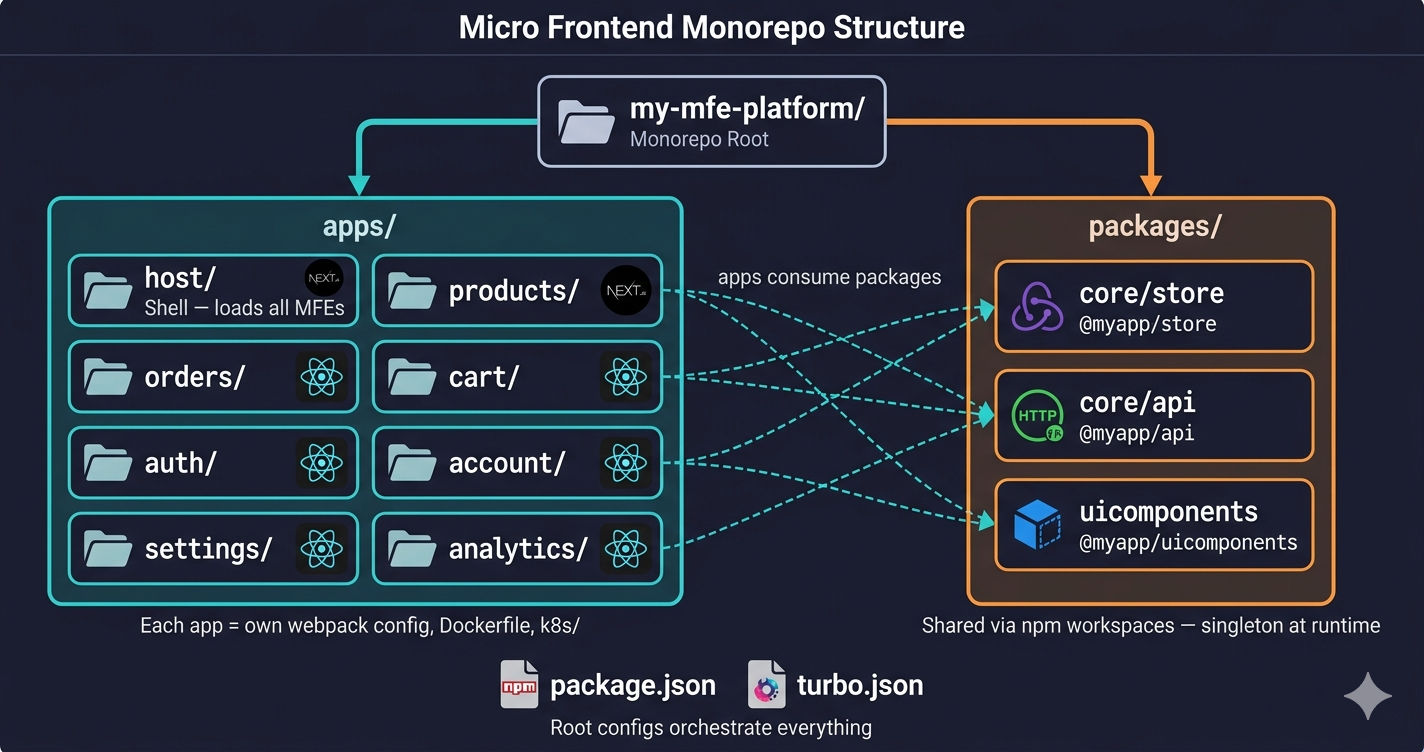
The structure has two main directories:
apps/— Each subdirectory is an independent MFE application with its own build, dev server, Dockerfile, and Kubernetes manifestspackages/— Shared code consumed by all MFEs via workspace linking — Redux store, API layer, UI components
This same two-directory pattern works regardless of whether your Host is React or Next.js. Let's explore each directory in detail.
The apps/ Directory — Independent MFE Applications
Every subdirectory under apps/ is a fully self-contained application. Each MFE has its own package.json, its own build config, its own build output, and its own deployment configuration.
React MFE App Structure (Remote)
For MFE apps built with React + Webpack 5, here is the internal folder structure. This applies to every remote MFE — whether it's a products page, an analytics dashboard, or a settings panel:
Key directories inside each React remote MFE:
| Directory | Purpose |
|---|---|
src/components/ | Domain-specific React components — only this MFE's business logic |
src/bootstrap.js | Async entry point required by Module Federation |
docker/nginx/ | Nginx config for serving the built static files in production |
k8s/ | Kubernetes Deployment and Service manifests |
webpack.config.js | Module Federation plugin with exposes and shared config |
Every React MFE needs bootstrap.js. Module Federation requires shared dependencies to be resolved asynchronously before the app renders. The index.js file calls import('./bootstrap.js') which triggers async loading of shared modules (React, Redux). Without this pattern, you get the error: "Shared module is not available for eager consumption."
The Bootstrap Pattern
Local vs Production — Remote MFE Webpack Config
Local development and production configs are fundamentally different. Local uses HTTPS with localhost certificates, full localhost URLs, and disabled chunk splitting for fast rebuilds. Production uses relative paths behind a reverse proxy, deterministic module IDs, and vendor chunk splitting for caching.
Key differences between Local and Production for a Remote MFE:
| Setting | Local Development | Production / Server |
|---|---|---|
| mode | development | production |
| publicPath | https://localhost:PORT/ | /analytics/ (relative path) |
| HTTPS | Yes — local SSL certificates | No — handled by reverse proxy / Nginx |
| CORS headers | Required for cross-origin MFE loading | Not needed — same origin behind proxy |
| splitChunks | Disabled (faster rebuilds) | Enabled with vendor chunk caching |
| performance hints | Not configured | maxEntrypointSize: 512000 |
Choosing a Host Application
The Host (shell) app loads all remote MFEs. You have two independent choices for your Host — React Host or Next.js Host. These are not competing options to compare — they serve different use cases entirely.
When to Use a React Host
Use a React + Webpack Host when:
- Your application is fully client-rendered (no SEO needed)
- You're building internal tools — admin dashboards, seller portals, management panels
- All your remote MFEs are also React + Webpack
- You need
react-router-domfor client-side routing
Local development and production configs are different for the React Host too. Local uses HTTPS with localhost certificates and points remotes to https://localhost:PORT/remoteEntry.js. Production uses relative paths like /products/remoteEntry.js served behind a reverse proxy.
When to Use a Next.js Host
Use a Next.js Host when:
- Your application is customer-facing and needs SEO (server-side rendering)
- You need image optimization, file-based routing, and API routes
- You're building an e-commerce storefront, content site, or public-facing product
- You need SSR for some pages and client-rendered MFEs for others
The Next.js Host uses NextFederationPlugin instead of ModuleFederationPlugin. It also uses next/dynamic with ssr: false to load remote MFEs on the client side.
The Next.js Host config is completely different from the React Host config. It uses next.config.js instead of webpack.config.js, NextFederationPlugin instead of ModuleFederationPlugin, and handles SSR/chunks paths differently for server vs client bundles.
Key differences between Local and Production for the Next.js Host:
| Setting | Local Development | Production / Server |
|---|---|---|
| Remote URLs | https://localhost:PORT/remoteEntry.js | https://yourdomain.com/path/remoteEntry.js |
| output | Not set (default) | standalone (optimized for Docker) |
| Next.js remote path | localhost:PORT/_next/static/chunks/remoteEntry.js | yourdomain.com/products/_next/static/chunks/remoteEntry.js |
| SSR path | localhost:PORT/_next/static/ssr/remoteEntry.js | yourdomain.com/products/_next/static/ssr/remoteEntry.js |
The packages/ Directory — Shared Code
The packages/ directory contains code that is shared across all MFEs. These are not standalone applications — they are library packages consumed by MFE apps via npm workspace linking. The same shared packages work with both React Host and Next.js Host architectures.
Shared Redux Store
The shared store is the most critical shared package. It contains:
- Redux slices for global state —
authSlice(user session),cartSlice(cart items),settingsSlice(app preferences) - Typed hooks —
useAppDispatchanduseAppSelectorthat every MFE imports instead of plainuseDispatch/useSelector - StoreProvider — a React component that wraps the app root with
<Provider store={store}>
Every MFE wraps its root component with StoreProvider. Module Federation's singleton: true ensures only one store instance exists at runtime — so when the Products MFE dispatches addToCart, the Cart MFE re-renders automatically.
Shared API Layer
The shared API layer contains:
- A centralized axios instance with request interceptors (auto-attaches auth token) and response interceptors (handles 401 token refresh)
- Domain-specific API modules — each MFE's API calls are organized by business domain (Products, Orders, Inventory, etc.)
Any MFE can call api.get('/products') and the auth token is automatically attached — no MFE manages tokens directly.
Shared UI Components
The shared UI library contains reusable components used across multiple MFEs — buttons, cards, toast notifications, form inputs. These enforce visual consistency across the application.
Keep the shared UI library small. Only add components that are genuinely used by 3+ MFEs. If a component is only used by one MFE, keep it inside that MFE's src/components/ directory. Over-sharing leads to a bloated package that changes frequently and requires all MFEs to update.
Shared Package JSON Files
Each shared package needs its own package.json with a scoped name that MFEs reference in their imports:
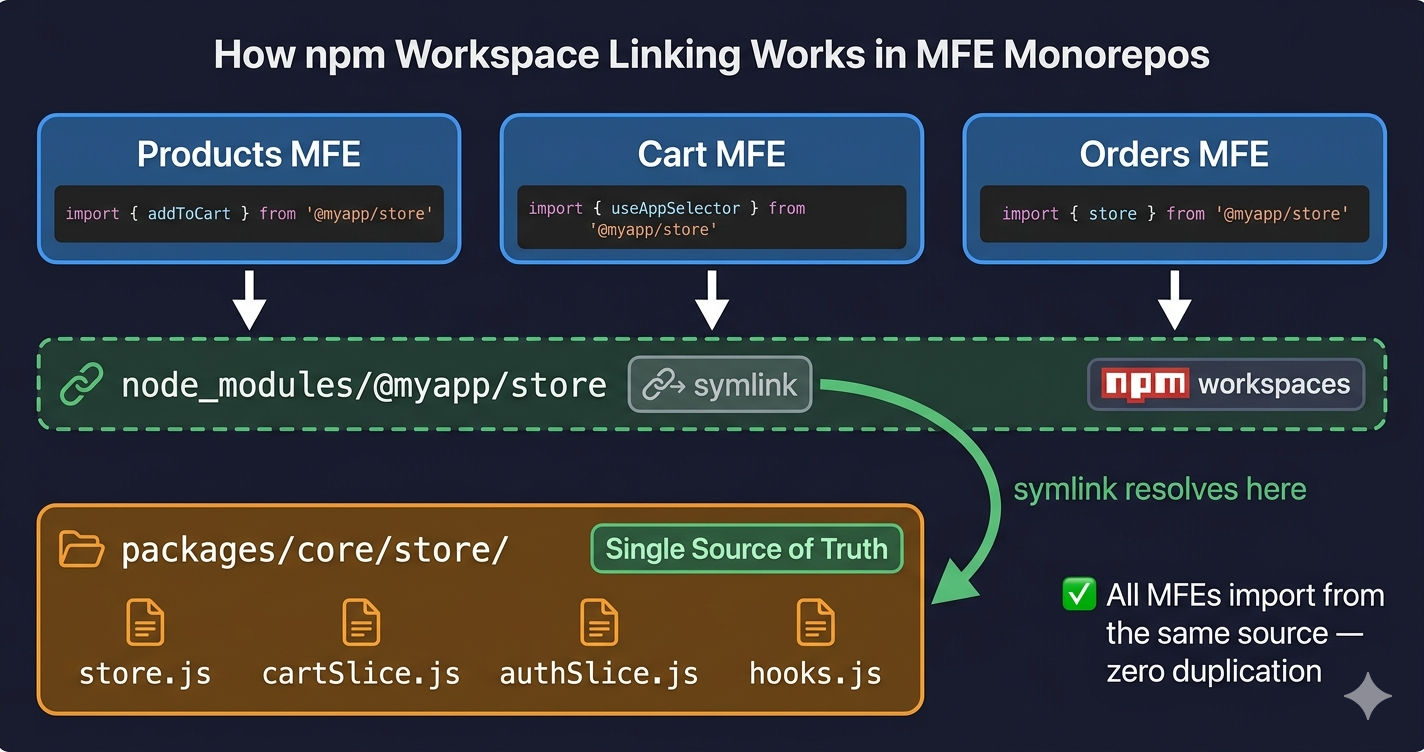
How Workspace Imports Work
With npm workspaces (opens in a new tab), any MFE app can import shared packages directly by name — no npm publish step, no version management headaches:
When you run npm install at the root, npm creates symlinks from node_modules/@myapp/store to packages/core/store/. Every MFE resolves imports through these symlinks — all pointing to the same source code.
Root Config Files
Two files at the monorepo root orchestrate everything: package.json and turbo.json.
Root package.json — Workspace Definition
Key fields:
| Field | Purpose |
|---|---|
"workspaces" | Tells npm which directories contain packages — apps/* and packages/*/* |
"private": true | Prevents accidentally publishing the root package to npm |
"scripts" | All commands go through Turbo — turbo run dev starts all dev servers concurrently |
"devDependencies" | Shared dev tools — Tailwind, PostCSS, Turborepo |
"engines" | Enforces minimum Node.js version across the team |
Notice packages/*/* in workspaces. This nested glob is needed because shared packages are nested under packages/core/ — so the workspace pattern must reach packages/core/store/, packages/core/api/, etc. Without the double wildcard, npm won't link these nested packages.
turbo.json — Build Pipeline
Turborepo (opens in a new tab) understands the dependency graph between packages and apps. Here's what each pipeline task does:
| Task | Behavior |
|---|---|
build | Builds shared packages first (^build means "build dependencies first"), then builds all MFE apps in parallel. Outputs are cached — unchanged apps skip rebuilding. |
dev | Starts all dev servers concurrently with one command. persistent: true keeps them running. cache: false because dev servers don't produce cacheable output. |
start | Runs production servers after build completes. dependsOn: ["build"] ensures nothing starts until the build finishes. |
Without Turborepo, you would need to open a separate terminal tab for each MFE dev server. With turbo run dev, all dev servers start with a single command.
Infrastructure Co-location
Each MFE app contains its own Docker and Kubernetes configuration:
| File | Purpose |
|---|---|
Dockerfile | Multi-stage build — installs deps, builds the app, copies output to Nginx |
docker/nginx/ | Nginx config for serving static files with correct publicPath routing |
k8s/deployment.yaml | Kubernetes Deployment with resource limits, health probes, and rolling updates |
k8s/service.yaml | Kubernetes Service exposing the MFE pod on a ClusterIP |
Why co-locate infrastructure with code? The team that owns the Products MFE also owns its Dockerfile, its Nginx config, and its Kubernetes manifests. When they add a new route or change the build output, they update the deployment config in the same PR. No handoff to a separate DevOps team.
This pattern aligns with the principle of team autonomy — one of the key benefits of Micro Frontend architecture.
Folder Structure Anti-Patterns
| Anti-Pattern | Why It's Bad | Fix |
|---|---|---|
| Shared code duplicated in every MFE | Changes require updating 8+ copies | Move to packages/ with workspace linking |
One massive src/ with all domains mixed | No clear ownership, merge conflicts | Split into separate apps/ per domain |
| Deep nesting (6+ levels) | Hard to navigate, find files | Keep directory depth under 4 levels |
infrastructure/ repo separate from code | Deployment config drifts from code | Co-locate Dockerfile, k8s/ inside each app |
All MFE configs in one shared webpack.config.js | Can't customize per MFE, tight coupling | Each MFE owns its own webpack config |
| Storing environment variables in code | Security risk, environment-specific | Use .env files (gitignored) or K8s ConfigMaps |
| Using same webpack config for local and server | Broken remote URLs, wrong optimizations | Maintain separate configs for each environment |
Naming Conventions
Consistent naming makes the monorepo navigable for new developers:
| Element | Convention | Example |
|---|---|---|
| App directory | PascalCase or kebab-case (pick one) | ProductManagement/ or product-management/ |
| Shared package name | Scoped @org/package | @myapp/store, @myapp/api |
| Component files | PascalCase .jsx / .tsx | AnalyticsDashboard.jsx |
| Slice files | camelCase + Slice suffix | cartSlice.js, authSlice.js |
| API directories | Domain + -Apis suffix | Products-Apis/, Order-Apis/ |
| K8s manifests | Descriptive kebab-case .yaml | deployment.yaml, service.yaml |
Scaling the Structure
As your project grows from 4 MFEs to 12+, the folder structure scales naturally because the two-directory pattern stays the same.
Adding a New MFE
- Create a new directory under
apps/(e.g.,apps/inventory/) - Add
package.json,webpack.config.js,src/,docker/,k8s/ - Configure Module Federation — add
exposesin the new MFE, add aremoteentry in the Host - Run
npm installat root to link workspace packages - The new MFE immediately has access to
@myapp/store,@myapp/api, and@myapp/uicomponents
Adding a New Shared Package
- Create the package directory (e.g.,
packages/core/routing/) - Add
package.jsonwith a scoped name (e.g.,@myapp/routing) - Add it to Module Federation's
sharedconfig in all MFE webpack configs - Run
npm installat root — all apps can now import@myapp/routing
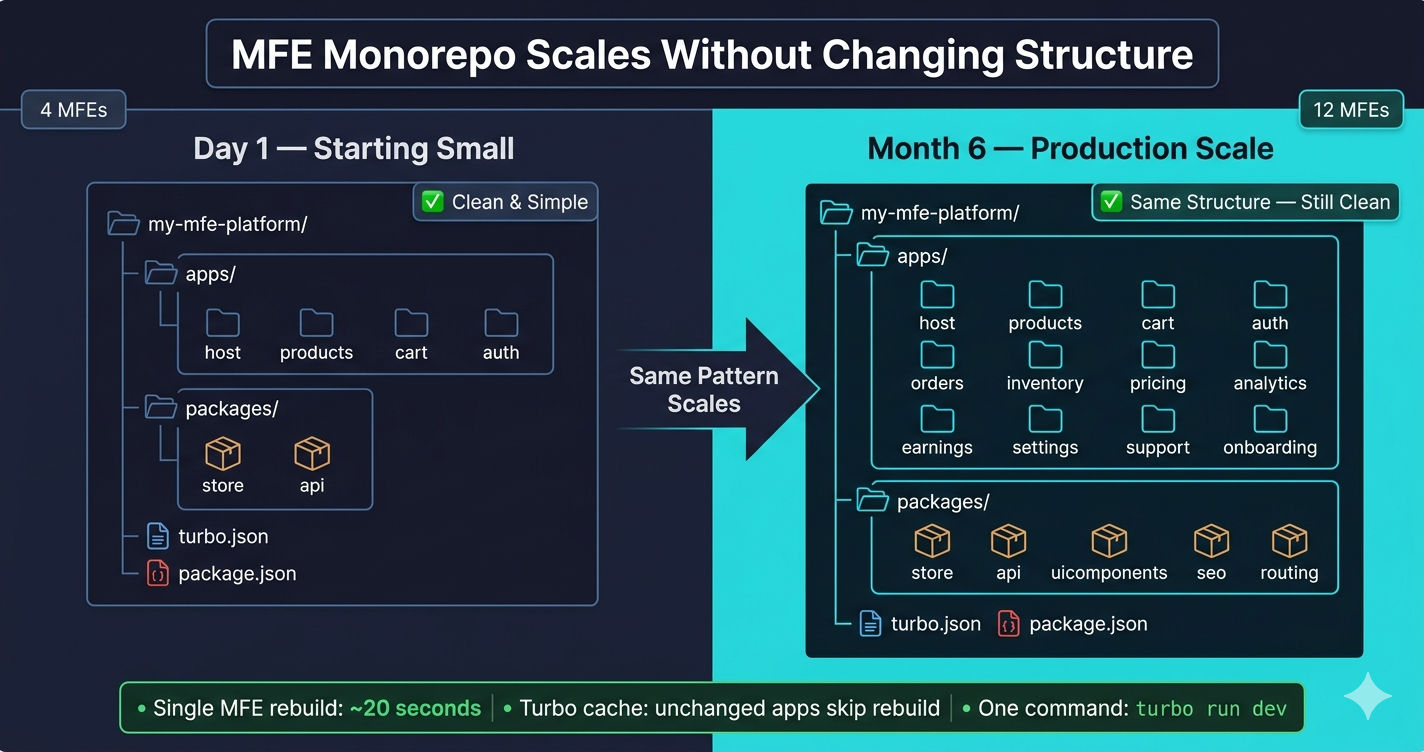
The key insight: single MFE rebuild stays fast regardless of how many MFEs exist. Only the changed MFE rebuilds — Turborepo cache handles the rest.
What's Next?
Now that you understand how to structure a Micro Frontend monorepo, the next step is understanding how Micro Frontends differ from Microservices — and how the two architectures work together in production systems.
← Back to MFE Communication Patterns
Continue to Micro Frontend vs Microservices →
Frequently Asked Questions
What is the best folder structure for a Micro Frontend project?
The recommended structure is a monorepo with two top-level directories: apps/ for independent MFE applications (each with its own webpack config, package.json, Dockerfile, and Kubernetes manifests) and packages/ for shared code (Redux store, API layer, UI components). Use npm workspaces with Turborepo to manage builds, and keep each MFE's internal structure self-contained with src/, docker/, and k8s/ directories.
Should Micro Frontends use a monorepo or polyrepo?
A monorepo is recommended for most teams because it simplifies shared package management, enforces consistent tooling, and makes cross-MFE changes easier. Polyrepo makes sense when teams are in different organizations or need completely independent CI/CD pipelines. With monorepo + npm workspaces, shared packages like the Redux store and API layer are linked locally without publishing to npm.
How do shared packages work in a Micro Frontend monorepo?
Shared packages live in a packages/ directory and are linked via npm workspaces. Each package has its own package.json with a scoped name like @myapp/store or @myapp/api. Any MFE in apps/ can import them directly — no npm publish step needed. At runtime, Module Federation loads shared packages as singletons so only one instance exists across all MFEs.
Why does each Micro Frontend need a bootstrap.js file?
Module Federation requires shared dependencies to be resolved asynchronously before the app renders. The bootstrap.js pattern splits the entry point into two files: index.js calls import('./bootstrap.js') which triggers async loading of shared modules (React, Redux). Without this, shared singletons fail to initialize and you get runtime errors like "Shared module is not available for eager consumption."
What is the difference between Local and Production webpack config in Micro Frontends?
Local development uses HTTPS with localhost certificates, full localhost URLs for remote entries (e.g., https://localhost:PORT/remoteEntry.js), development mode, and splitChunks disabled for faster rebuilds. Production uses production mode, relative paths for remote entries behind a reverse proxy (e.g., /analytics/remoteEntry.js), deterministic moduleIds, vendor chunk splitting for caching, and performance hints configured for bundle size limits.
When should I use a React Host vs a Next.js Host for Micro Frontends?
Use a React Host (Webpack) when your application is fully client-rendered, such as internal admin dashboards, seller portals, or management panels where SEO is not needed. Use a Next.js Host when your application is customer-facing and needs server-side rendering (SSR), SEO, image optimization, and file-based routing — such as e-commerce storefronts or content-heavy websites. Both use the same monorepo structure with apps/ and packages/ directories.