Shared Packages in a Micro Frontend Monorepo
In a Micro Frontend monorepo, shared packages are the glue that keeps your independent MFEs consistent. Without them, every micro frontend duplicates its own API layer, its own Redux store, and its own UI components — leading to inconsistent behavior, duplicated bugs, and wasted bundle size. Shared packages in a micro frontend architecture solve this by centralizing common code into reusable internal libraries that all MFEs consume.
In this article, you'll learn how to create three shared packages from a real production monorepo with 11+ React MFEs: a shared API layer with axios interceptors, a shared Redux store with authentication state, and shared UI components. You'll also see the Webpack alias and Module Federation config that makes it all work.
The Problem — Why You Need Shared Packages
Imagine you have 11 micro frontends in your monorepo. Each MFE needs to:
- Make authenticated API calls — attach a JWT token, handle 401 errors, refresh expired tokens
- Read user state — check if the user is logged in, get their permissions
- Show consistent UI — use the same toast notifications, buttons, and card components
Without shared packages, every MFE implements this independently. Here's what goes wrong:
| Problem | Impact |
|---|---|
| Duplicated axios config | Token refresh logic differs between MFEs — some refresh, others log out |
| Separate Redux stores | Auth state is out of sync — one MFE thinks the user is logged in, another doesn't |
| Copy-pasted components | A design change requires updating 11 MFEs instead of 1 package |
| Inconsistent error handling | Some MFEs handle 401 correctly, others silently fail |
Shared packages eliminate all of these problems. You write the code once in packages/, and every MFE imports it.
Architecture Overview — Three Shared Packages
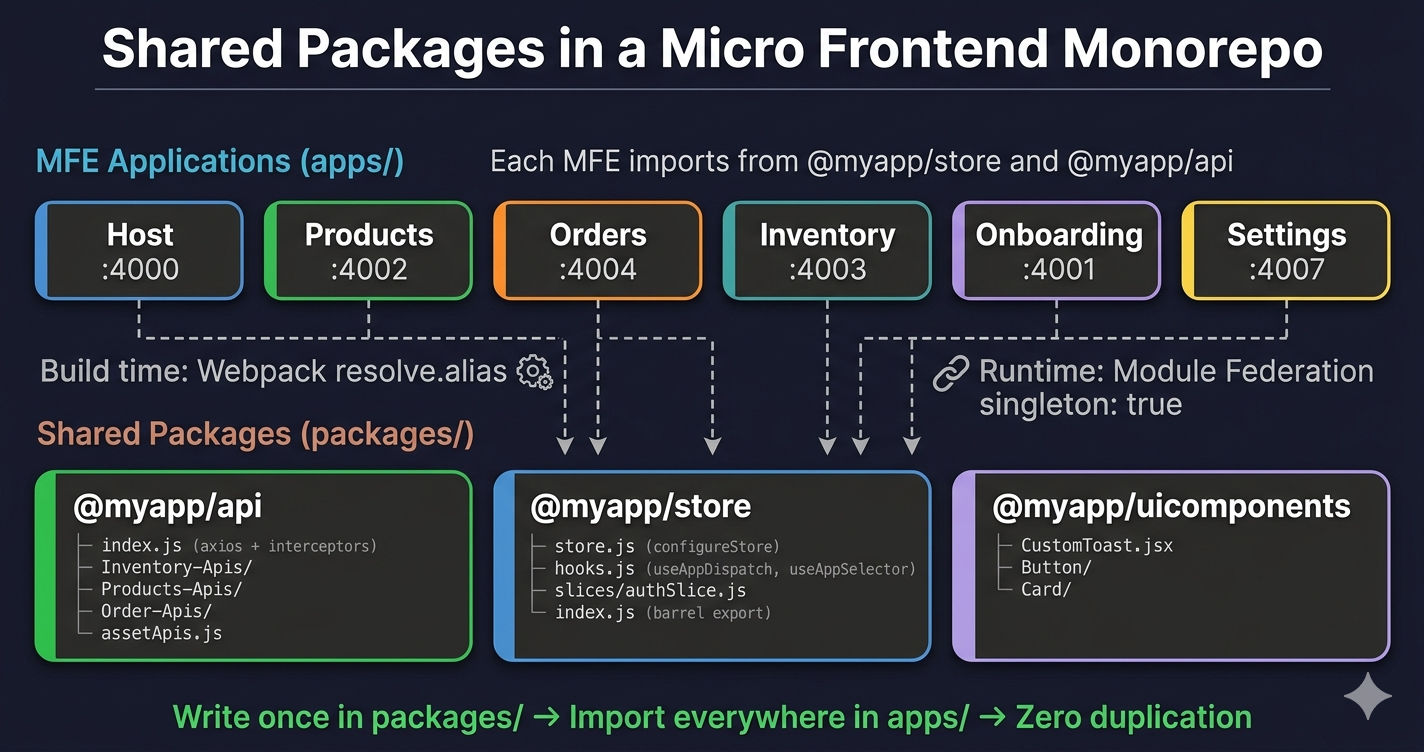
Here's the folder structure of the shared packages inside the monorepo:
Each shared package has its own package.json, a clear entry point, and is consumed by MFEs via npm workspaces (opens in a new tab) and Webpack resolve aliases.
Let's build each one.
Package 1 — Shared API Layer (@myapp/api)
The shared API package is the most critical shared package. It provides a single axios (opens in a new tab) instance with request interceptors (for attaching JWT tokens) and response interceptors (for handling 401 errors and token refresh). Every MFE imports this instead of creating its own axios config.
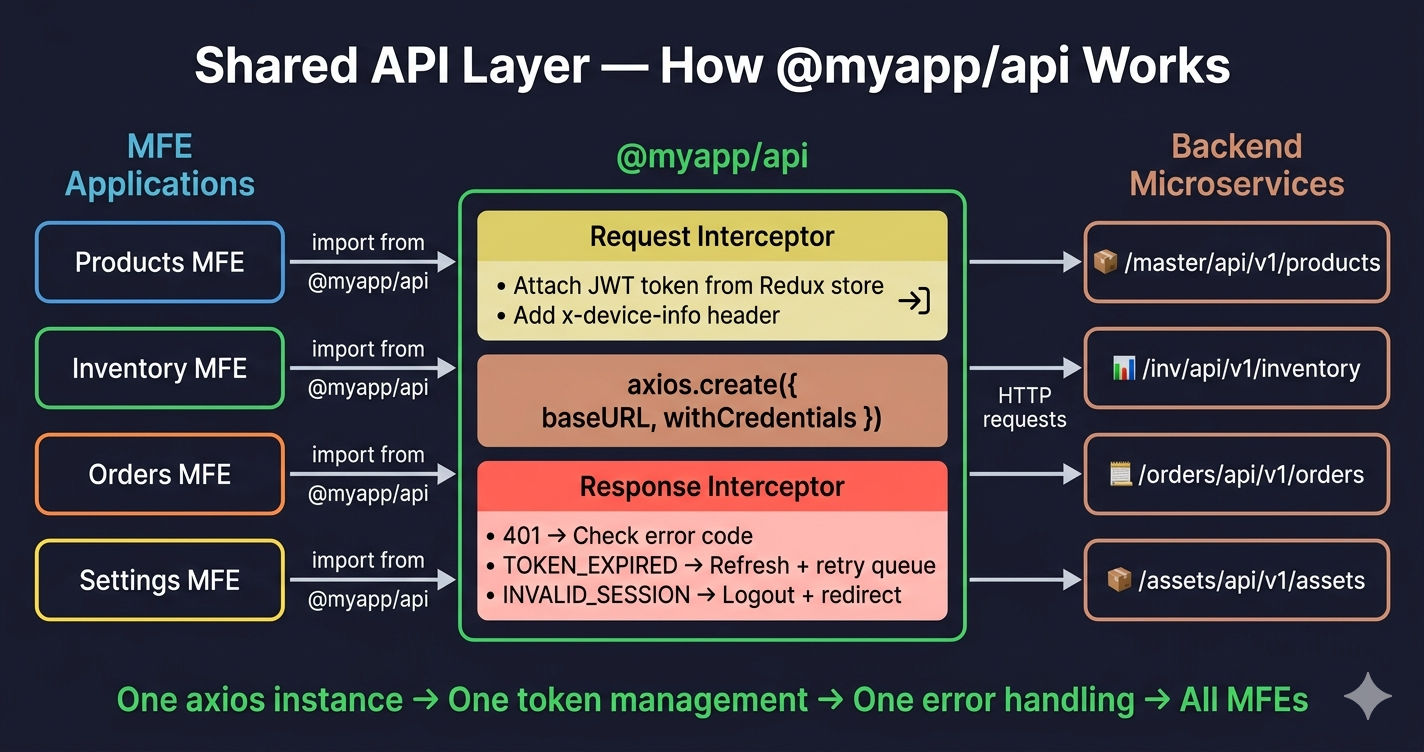
Package Configuration
The main: "index.js" tells npm workspaces that index.js is the entry point. When an MFE imports @myapp/api, it resolves to this file.
Core Axios Instance with Interceptors
This is the heart of the shared API layer — a configured axios instance with request interceptors (attach JWT), response interceptors (handle 401 + token refresh), and a failed request queue to prevent race conditions during token refresh.
Why a failed request queue? When a token expires, multiple API calls may fail simultaneously with 401. Without the queue, each call would trigger its own token refresh — causing duplicate refresh requests. The queue holds all failed requests, refreshes the token once, then retries them all with the new token.
Domain-Specific API Files
Each business domain gets its own API file (or folder) that imports the shared axios instance. This keeps API functions organized and lets each MFE import only what it needs.
Inventory APIs — used by the Inventory MFE:
Product APIs — used by the Products MFE for bulk upload:
Asset APIs — used by any MFE that uploads images or resolves asset URLs:
Never hardcode API base URLs in individual MFEs. Always use the shared axios instance from @myapp/api. If you need to change the base URL or add a header, you change it once in packages/core/api/index.js and every MFE picks it up automatically.
Package 2 — Shared Redux Store (@myapp/store)
The shared Redux store is the second critical package. In a Micro Frontend architecture, all MFEs must share the same store instance — otherwise, auth state, user data, and permissions get out of sync across modules. This follows the singleton pattern (opens in a new tab) enforced by Redux Toolkit (opens in a new tab).
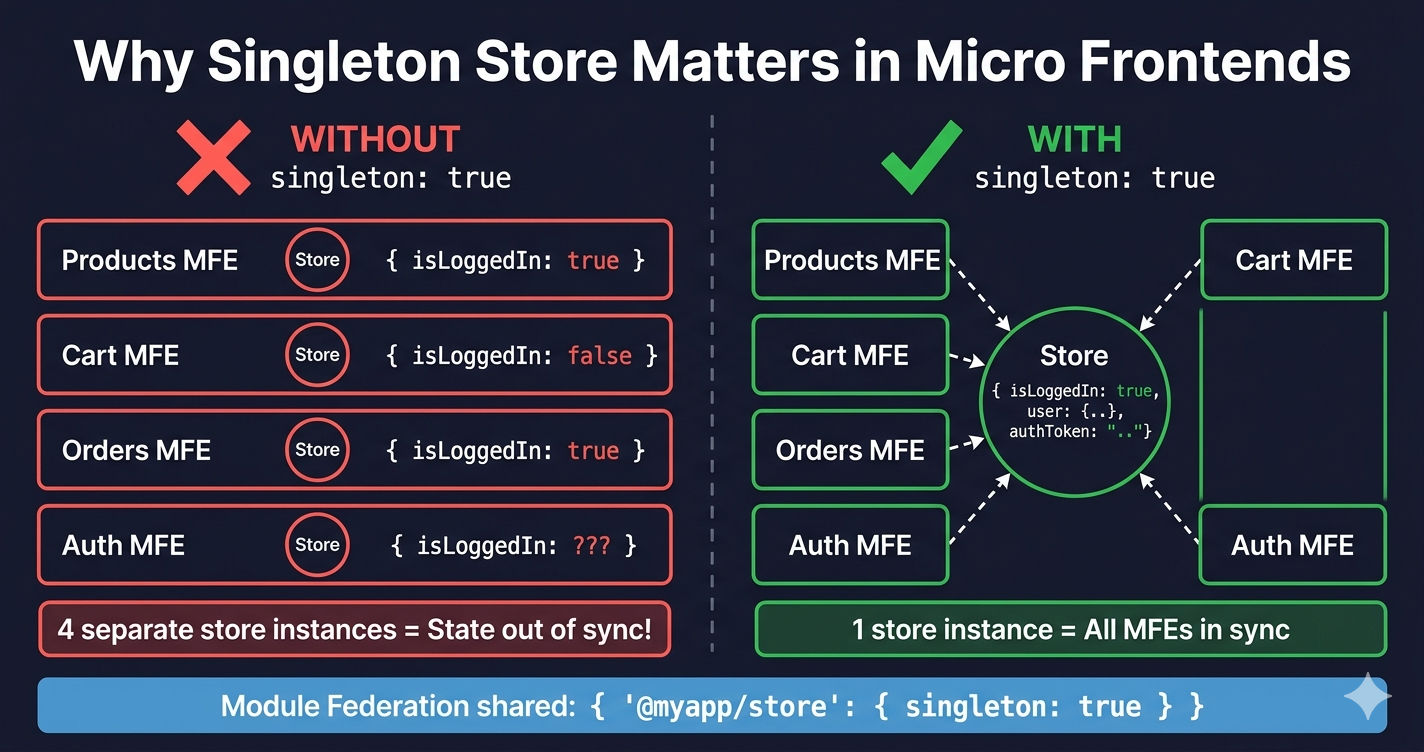
Package Configuration
Note that @reduxjs/toolkit and react-redux are listed as dependencies here, not in individual MFE package.json files. The store package owns these dependencies.
Store Configuration
Custom Hooks
These typed hooks provide a cleaner import pattern and make it easy to add TypeScript types later without changing every consumer.
Auth Slice — Shared Authentication State
The auth slice manages login state, user info, permissions, and session expiration across all MFEs. When any MFE dispatches setAuthToken, every other MFE that reads selectAuthToken gets the updated value instantly — because they all share the same singleton store.
Store Entry Point — Barrel Export
The index.js re-exports everything MFEs need from a single import path. This is the barrel export pattern — MFEs import from @myapp/store instead of reaching into internal files.
This means an MFE can do:
import { store, Provider, useAppSelector, selectIsLoggedIn } from "@myapp/store";Instead of importing from 4 different files. Clean, simple, consistent.
Package 3 — Shared UI Components (@myapp/uicomponents)
The UI components package contains reusable React components that every MFE uses — toast notifications, buttons, cards, and other design system elements.
Package Configuration
Custom Toast Component
Entry Point
Webpack Alias — How MFEs Find Shared Packages
The critical piece that makes this work is the Webpack resolve alias configuration. Without it, import { store } from "@myapp/store" would fail because Webpack doesn't know where @myapp/store lives on disk.
Local and Production Webpack configs use the same alias paths — the monorepo folder structure is identical in both environments. The only difference is the Module Federation remote URLs (localhost ports vs Nginx paths).
Why Both Aliases AND Module Federation shared?
| Mechanism | What It Does |
|---|---|
| resolve.alias | Tells Webpack where to find the package at build time — resolves @myapp/store to ../../packages/core/store |
| shared + singleton | Tells Module Federation to share one instance at runtime — prevents each MFE from loading its own copy |
You need both. Aliases alone would bundle the package into every MFE separately. Module Federation shared alone wouldn't resolve the import path. Together, they give you a single shared instance across all MFEs.
How MFEs Consume Shared Packages
App Entry Point — Wrapping with Provider and Store
Every MFE wraps its root component with the shared Provider and store from @myapp/store:
Component Usage — API + Store Together
Here's a real example showing how an MFE component uses both the shared API layer and shared store in a single component:
Notice how the component:
- Imports
useAppSelectorandselectIsLoggedInfrom@myapp/store— shared auth state - Imports API functions from
@myapp/api/Inventory-Apis/seller-inventory— shared API layer - Both work together seamlessly — the API layer reads the token from the same store
Summary — Shared Package Checklist
| Package | Purpose | Key Files | Consumed Via |
|---|---|---|---|
| @myapp/api | Axios instance + interceptors + domain APIs | index.js, Inventory-Apis/, Products-Apis/ | import axiosInstance from "@myapp/api" |
| @myapp/store | Redux store + auth slice + hooks + selectors | store.js, hooks.js, slices/authSlice.js | import { store, Provider } from "@myapp/store" |
| @myapp/uicomponents | Shared React components (Toast, Button, Card) | src/index.js, src/CustomToast.jsx | import { CustomToast } from "@myapp/uicomponents" |
All three packages follow the same pattern: private npm workspace package → Webpack alias for import resolution → Module Federation shared + singleton for runtime deduplication.
What's Next?
This article covered how to create and consume shared packages in a Micro Frontend monorepo. In the next article, we'll dive into the complete Webpack 5 configuration — covering entry/output, Babel, CSS, dev server, code splitting, and optimization settings for MFE builds.
← Back to React MFE Monorepo Setup
Continue to Webpack 5 Configuration for Micro Frontends →
Frequently Asked Questions
What are shared packages in a micro frontend monorepo?
Shared packages are internal libraries inside a monorepo that multiple micro frontends consume. Common examples include a shared API layer (axios instance with interceptors), a shared Redux store, and shared UI components. They live in the packages/ directory and are linked via npm workspaces.
How do MFEs consume shared packages without duplicating code?
MFEs consume shared packages through two mechanisms: Webpack resolve aliases map import paths like @myapp/store to the actual package folder, and Module Federation's shared config with singleton: true ensures only one instance of the package loads at runtime, preventing duplication.
Why is singleton: true important for shared packages in Module Federation?
Without singleton: true, each MFE would load its own copy of the shared package. For a Redux store, this means each MFE has a separate store instance and state changes in one MFE are invisible to others. Singleton ensures all MFEs share the exact same instance at runtime.
Should I publish shared packages to npm in a micro frontend monorepo?
No. In a monorepo, shared packages are private ("private": true in package.json) and resolved locally via npm workspaces and Webpack aliases. Publishing to npm adds versioning overhead and deployment complexity. Keep them internal — npm workspaces handle the linking automatically.
How do I organize API functions across multiple domains in a shared API package?
Create a folder per business domain inside the API package: Inventory-Apis/, Products-Apis/, Order-Apis/, Pricing-Apis/, etc. Each folder contains a single file with all API functions for that domain. The root index.js holds the shared axios instance with interceptors. MFEs import only the domain APIs they need.
Can shared packages work with both React and Next.js micro frontends?
Yes. Shared packages are plain JavaScript or React code. A Redux store or API layer works identically in React (Webpack) and Next.js (NextFederationPlugin) MFEs. The only difference is the Webpack config — React uses ModuleFederationPlugin while Next.js uses NextFederationPlugin, but both support the same shared dependency configuration.