Published: April 18, 2026 · 14 min read
NextFederationPlugin vs ModuleFederationPlugin: Complete Guide
You built a React micro frontend architecture with ModuleFederationPlugin — a host app loading remote MFEs via remoteEntry.js, shared singleton dependencies, and lazy loading with Suspense. Now you need to add a Next.js application to the same system. You drop ModuleFederationPlugin into next.config.js, run the build, and get a wall of errors. NextFederationPlugin vs ModuleFederationPlugin — they solve the same problem (sharing modules between applications at runtime) but they configure, serve, and load those modules in fundamentally different ways.
This is Article 17 in the Micro Frontend Architecture series and the first article in the Next.js MFE section. If you haven't completed the React MFE section, start with the Module Federation Complete Guide.
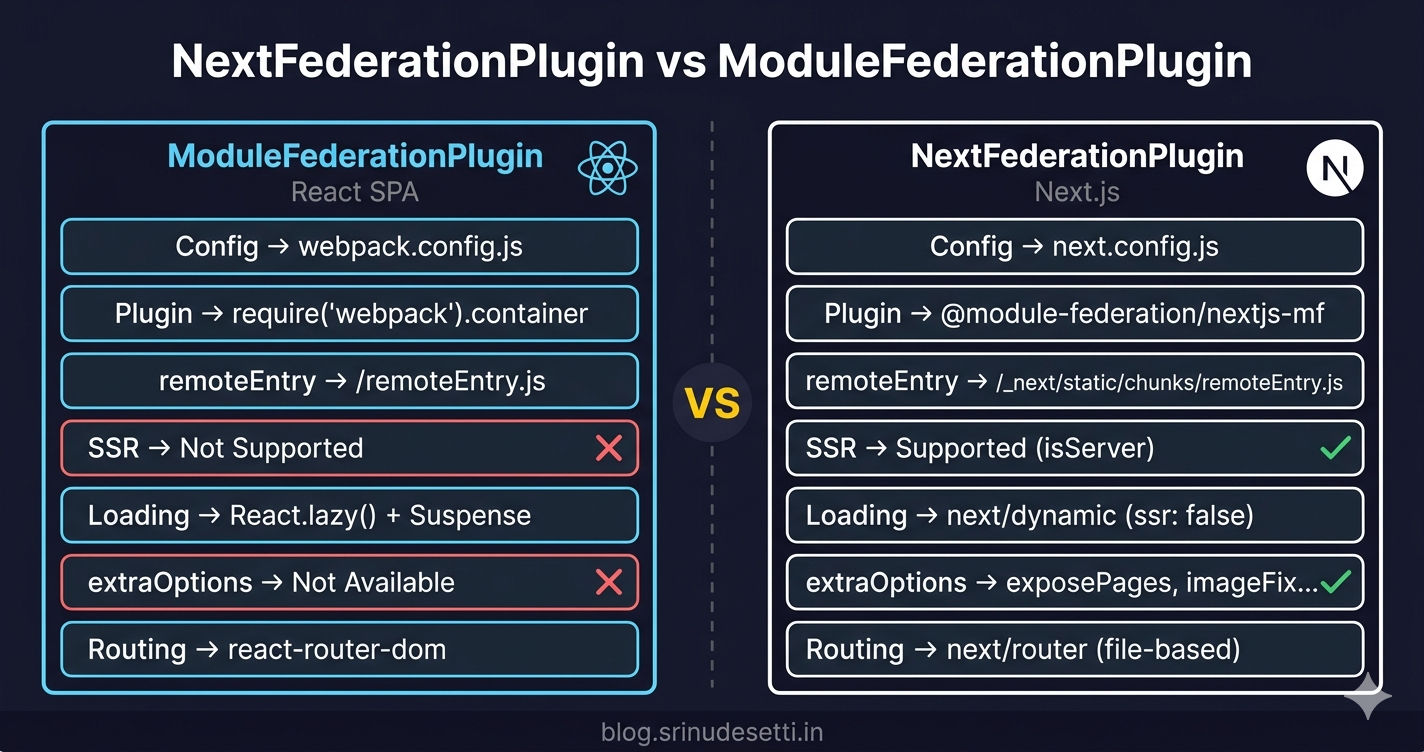
The Problem — ModuleFederationPlugin Doesn't Work with Next.js
ModuleFederationPlugin (opens in a new tab) is a built-in webpack 5 plugin. It works perfectly with React SPAs where you control the entire webpack configuration. But Next.js abstracts webpack behind next.config.js — you cannot drop a raw webpack plugin into a Next.js config and expect it to work.
The issues:
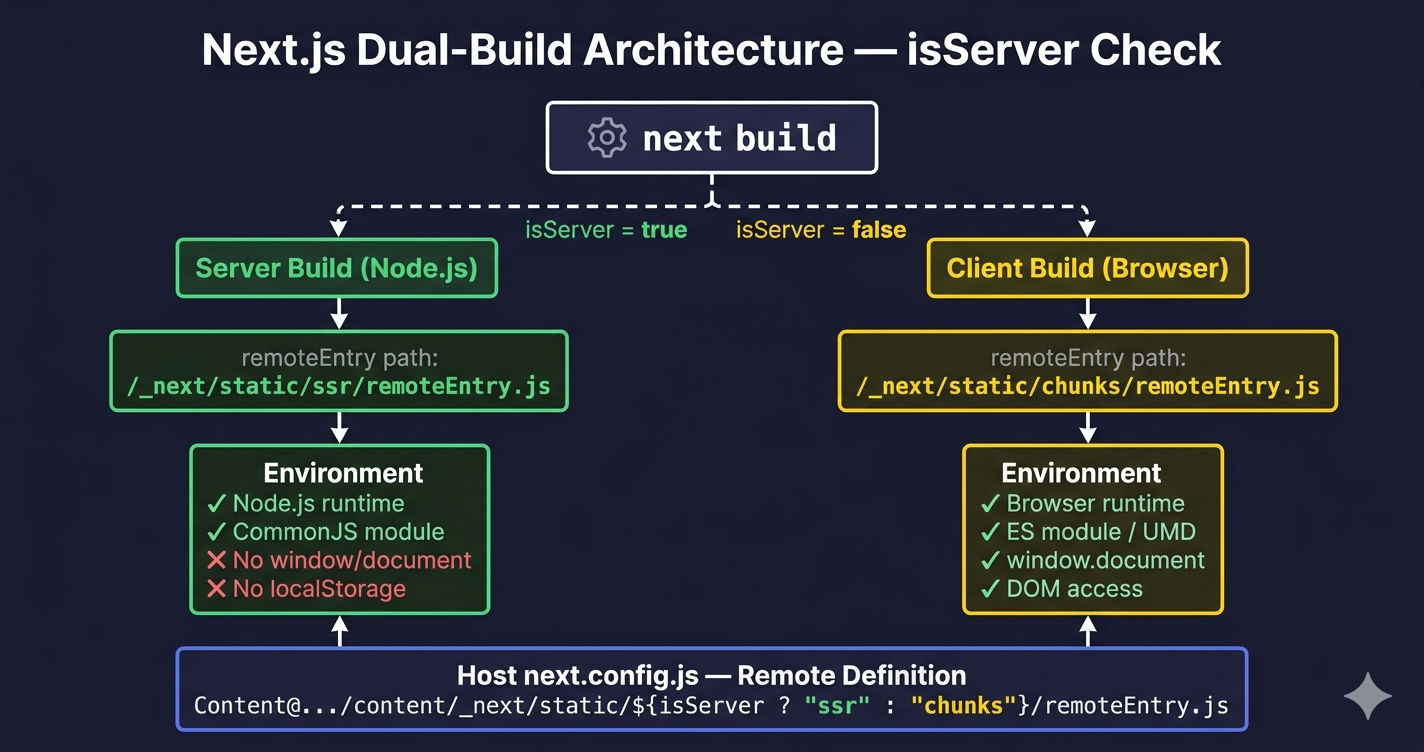
- Next.js runs webpack twice — once for the server bundle (Node.js) and once for the client bundle (browser). ModuleFederationPlugin generates one
remoteEntry.js— Next.js needs two (one for SSR, one for the client). - Asset paths differ — Next.js serves static assets from
/_next/static/not from the root. AremoteEntry.jsat/remoteEntry.jsreturns 404 because Next.js does not serve files from the root static directory. next/imagebreaks — The image loader resolves URLs against the host's domain, not the remote's domain. Images in federated components return 404.- No automatic async boundary — Module Federation requires an async entry point for shared dependency negotiation. React MFEs use a manual
bootstrap.jsfile. Next.js has no equivalent mechanism without plugin support.
NextFederationPlugin (opens in a new tab) from @module-federation/nextjs-mf solves all four issues by wrapping ModuleFederationPlugin with Next.js-specific handling.
What Is NextFederationPlugin?
NextFederationPlugin is a wrapper around ModuleFederationPlugin that adapts Module Federation for Next.js's dual-build architecture (server + client), asset serving conventions, and SSR requirements. It is maintained by the Module Federation team (opens in a new tab) and distributed as @module-federation/nextjs-mf.
NextFederationPlugin uses ModuleFederationPlugin internally. It is not a replacement — it is an adapter. Every feature of Module Federation (shared dependencies, remote containers, exposed modules) works the same way. NextFederationPlugin adds the Next.js-specific configuration that ModuleFederationPlugin does not know about.
Install it in your Next.js application:
npm install @module-federation/nextjs-mfSide-by-Side Comparison
| Feature | ModuleFederationPlugin (React) | NextFederationPlugin (Next.js) |
|---|---|---|
| Package | Built into webpack 5 | @module-federation/nextjs-mf |
| Config file | webpack.config.js | next.config.js |
| Import statement | require("webpack").container | require("@module-federation/nextjs-mf") |
remoteEntry.js path | /remoteEntry.js (root) | /_next/static/chunks/remoteEntry.js |
| SSR support | No | Yes (separate ssr/chunks entries) |
isServer check | Not needed | Required for Next.js remote paths |
basePath / assetPrefix | Not used (publicPath only) | Required for subdirectory routing |
output: 'standalone' | Not needed | Required for Docker deployment |
extraOptions | Not available | exposePages, enableImageLoaderFix, etc. |
| Loading remote components | React.lazy() + Suspense | next/dynamic with ssr: false |
| Routing | react-router-dom | next/router (file-based) |
splitChunks (dev) | Disabled manually | Managed by Next.js |
splitChunks (prod) | Manual cacheGroups config | Managed by Next.js |
publicPath (dev) | https://localhost:PORT/ | Automatic via dev server |
publicPath (prod) | /app-name/ | basePath + assetPrefix |
| Shared dep versions | requiredVersion from package.json | requiredVersion: false for core libs |
| Image handling | Standard img tags | next/image with remotePatterns |
| Security headers | Manual webpack config | Built-in via headers() in next.config.js |
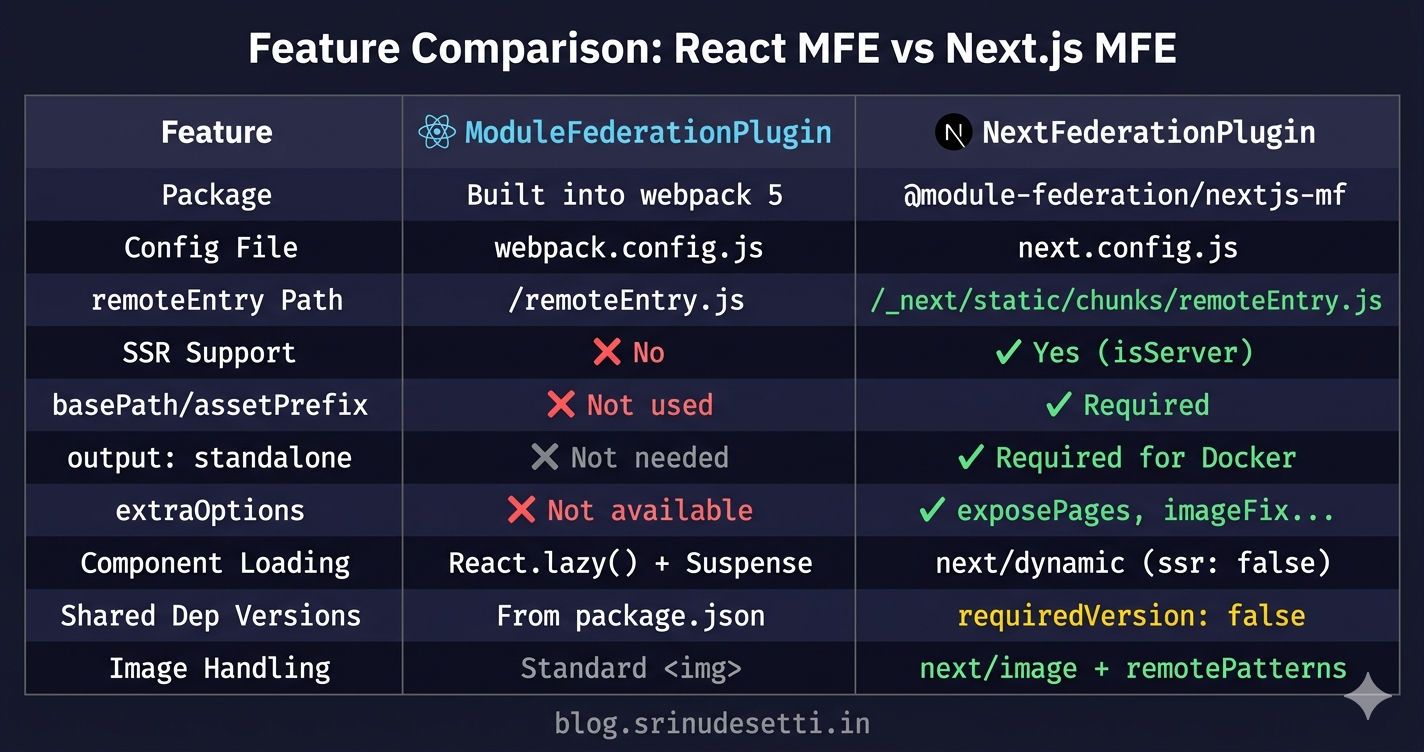
Configuration Comparison — React vs Next.js
The configuration files look structurally different even though they achieve the same goal: expose modules from a remote application and load them in a host application.
React Remote (ModuleFederationPlugin)
Local development and production configs are fundamentally different. Local dev uses https://localhost:PORT with CORS headers and disables splitChunks for faster rebuilds. Production uses path-based URLs (/products/) with content-hash filenames and vendor chunk splitting.
Next.js Remote (NextFederationPlugin)
Notice the differences from the React remote:
basePathandassetPrefixreplace webpack'spublicPath— they tell Next.js to scope all routes and assets under/content/output: "standalone"builds a self-contained deployment folder (essential for Docker)filename: "static/chunks/remoteEntry.js"follows the Next.js asset convention instead of serving from roottranspilePackagesreplaces webpack'sbabel-loaderinclude paths for shared packagesrequiredVersion: falsefor core libraries — Next.js manages React versions internally
remoteEntry.js Path Differences
The most common mistake when mixing React and Next.js remotes: using the wrong remoteEntry.js path. React and Next.js serve the remote entry file from completely different locations.
If you use a React-style path (/remoteEntry.js) for a Next.js remote, the host gets a 404. The file does not exist at the root — NextFederationPlugin places it at _next/static/chunks/remoteEntry.js. Conversely, using the Next.js path for a React remote also returns 404. Always check which plugin built the remote before writing the remote URL.
The isServer Check — SSR-Aware Remote Loading
Next.js runs webpack twice: once for the server bundle and once for the client bundle. The isServer flag is passed to the webpack function in next.config.js and determines which remoteEntry.js path to use for Next.js remotes.
Mixing React and Next.js Remotes in One Host
A Next.js host application can load both React remotes and Next.js remotes simultaneously. The host uses NextFederationPlugin to define all remotes, but the path format differs based on which plugin built the remote.
Host Configuration — React Host vs Next.js Host
The host application's configuration differs significantly depending on whether it is a React SPA or a Next.js application.
extraOptions — Next.js-Specific Configuration
NextFederationPlugin provides an extraOptions object that handles Next.js-specific concerns. These options do not exist in ModuleFederationPlugin because they solve problems unique to the Next.js framework.
Shared Dependencies — Same Pattern, Different Defaults
Both plugins use the same shared configuration structure, but the defaults differ because Next.js manages its own React version and routing.
Loading Remote Components — React.lazy vs next/dynamic
How the host application loads remote MFE components also differs between React and Next.js hosts. React uses React.lazy() with Suspense, while Next.js uses next/dynamic with ssr: false. For a deep dive into lazy loading patterns, see Lazy Loading Micro Frontends with React Suspense.
ssr: false is mandatory for ALL Module Federation remotes in Next.js — including Next.js remotes loaded via NextFederationPlugin. Even though NextFederationPlugin generates an SSR-compatible remoteEntry, the next/dynamic call on the host side must disable SSR for the remote component import. The SSR remoteEntry handles the server-side module resolution, but the actual component rendering must happen on the client after hydration.
When to Use Which Plugin
| Scenario | Plugin | Why |
|---|---|---|
| React SPA host + React SPA remotes | ModuleFederationPlugin | No SSR needed, full webpack control |
| Next.js host + React remotes | NextFederationPlugin (host) + ModuleFederationPlugin (remotes) | Host needs SSR-aware loading, remotes are client-only |
| Next.js host + Next.js remotes | NextFederationPlugin (both) | Both need SSR support and Next.js asset conventions |
| Next.js host + mixed remotes | NextFederationPlugin (host) + both plugins (remotes) | Host handles both path formats via isServer check |
| React host + Next.js remotes | ModuleFederationPlugin (host) — use _next/static/chunks/ path | Host loads the client-side entry directly |
What's Next?
Now that you understand the differences between NextFederationPlugin and ModuleFederationPlugin, the next article walks through setting up a Next.js host application that loads both React and Next.js remote MFEs — from next.config.js configuration to routing, SSR handling, and deployment.
← Back to Lazy Loading with React Suspense
Continue to Next.js MFE Host App Setup →
Frequently Asked Questions
What is the difference between NextFederationPlugin and ModuleFederationPlugin?
ModuleFederationPlugin is built into webpack 5 and works with React SPAs — it uses webpack.config.js, serves remoteEntry.js at the root path, and has no SSR support. NextFederationPlugin is a separate package (@module-federation/nextjs-mf) designed for Next.js — it uses next.config.js, serves remoteEntry.js at _next/static/chunks/ (client) and _next/static/ssr/ (server), supports server-side rendering via the isServer flag, and provides extra options like exposePages and enableImageLoaderFix that do not exist in the standard webpack plugin.
Why does NextFederationPlugin have a different remoteEntry.js path?
NextFederationPlugin places remoteEntry.js at _next/static/chunks/remoteEntry.js instead of the root because Next.js has a specific asset serving convention. All static assets live under _next/static/ — JavaScript chunks go in chunks/, CSS goes in css/, and SSR bundles go in ssr/. NextFederationPlugin follows this convention so the remote entry integrates with Next.js's asset serving, cache invalidation, and CDN deployment. It also generates a separate SSR entry at _next/static/ssr/remoteEntry.js for server-side rendering.
Can I mix React and Next.js remotes in the same host application?
Yes. A Next.js host using NextFederationPlugin can load both React remotes (built with ModuleFederationPlugin) and Next.js remotes (built with NextFederationPlugin) simultaneously. The key is using the correct remoteEntry.js path for each type — React remotes use a simple path like /auth/remoteEntry.js, while Next.js remotes use the _next/static path with the isServer ternary. React remotes must be loaded with next/dynamic using ssr: false since they are client-only. Next.js remotes can optionally support SSR.
What are extraOptions in NextFederationPlugin?
extraOptions is a configuration object unique to NextFederationPlugin that handles Next.js-specific concerns. exposePages automatically exposes all Next.js pages as federated modules without manually listing each one. enableImageLoaderFix corrects next/image component URLs when loaded from a remote so images resolve against the remote's domain instead of the host's. enableUrlLoaderFix fixes static asset paths (fonts, SVGs) in remotes. automaticAsyncBoundary wraps exposed modules in an async boundary for shared dependency negotiation — replacing the manual bootstrap.js file needed in React MFEs.
Do I need to use next/dynamic instead of React.lazy in a Next.js host?
Yes, use next/dynamic instead of React.lazy() when your host is a Next.js application. The critical difference is SSR handling — next/dynamic accepts an ssr: false option that tells Next.js to skip the component during server-side rendering. Module Federation remotes attach to the window object, which does not exist on the server. Without ssr: false, the build crashes with a reference error. React.lazy() does not have this option and is client-only by design, making it suitable only for React SPA hosts, not Next.js hosts.
Why is basePath required for Next.js remotes but not React remotes?
Next.js remotes need basePath and assetPrefix because Next.js generates internal routes and asset URLs that must be scoped to the remote's subdirectory. Without basePath set to /content, a Next.js remote's internal navigation would resolve to / instead of /content/, breaking routing. assetPrefix ensures that CSS, images, and JavaScript chunks are fetched from /content/_next/ instead of /_next/. React MFEs handle this through webpack's publicPath setting alone — there is no internal routing framework that needs subdirectory scoping.