Setting Up a React Micro Frontend Monorepo with Turborepo
Setting up a React micro frontend monorepo with Turborepo is the foundation for building scalable, independently deployable frontend applications. In this step-by-step guide, you'll initialize a production-ready monorepo from scratch — with npm workspaces for package management, Turborepo (opens in a new tab) for build orchestration, and Webpack 5 Module Federation (opens in a new tab) for runtime integration.
By the end of this article, you'll have a working monorepo with a Host shell application, multiple Remote MFEs each running on their own port, and shared packages consumed across all MFEs.
This is a hands-on tutorial. Every code block comes from a real production monorepo with 11 React MFEs running on ports 4000–4011. We show both Local Development and Production configs — they are significantly different.
Prerequisites
Before starting, make sure you have:
- Node.js 16+ installed (
node -v) - npm 8+ (ships with Node.js — supports workspaces natively)
- mkcert for local HTTPS certificates (optional but recommended for cross-origin MFE loading)
The Monorepo Structure
Here's the complete folder structure we're building. Study it before we start — every file has a purpose.
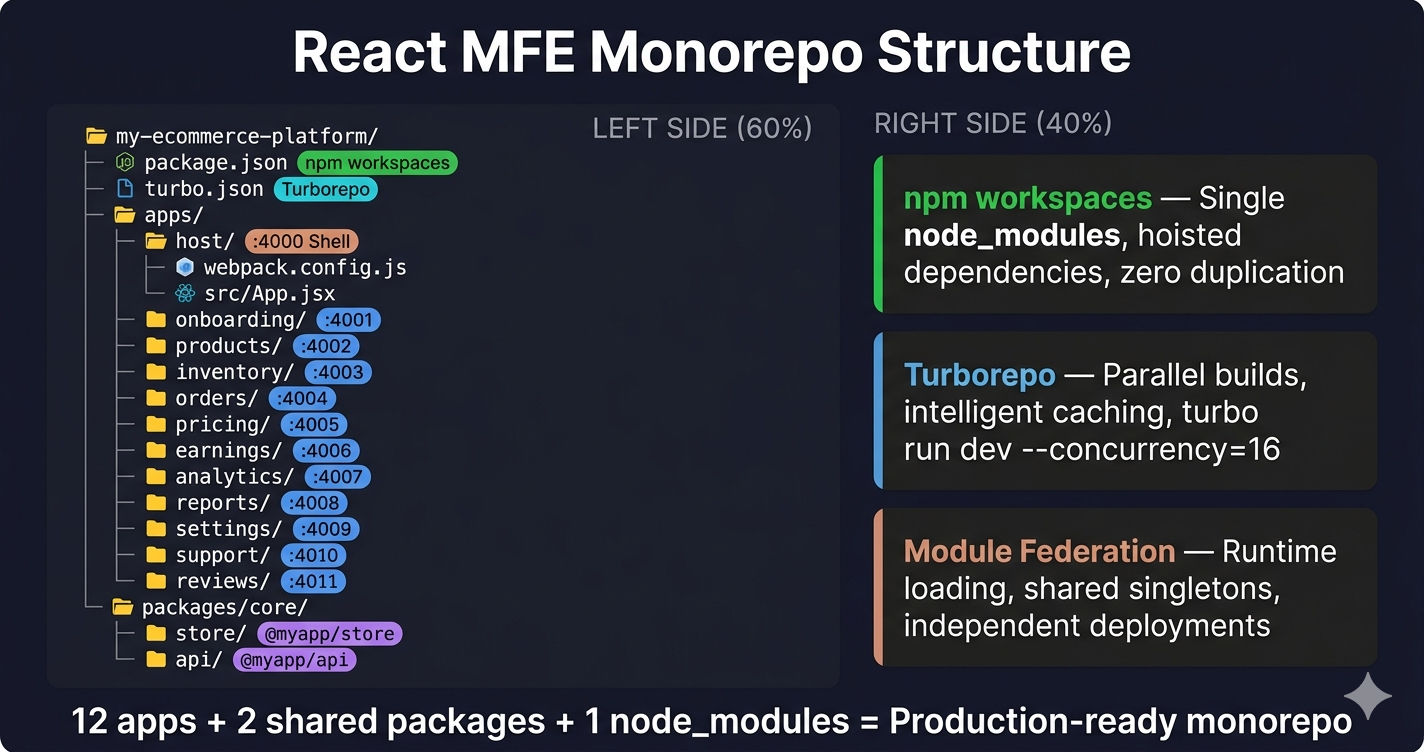
Key insight: Each app under apps/ is a fully independent application with its own package.json, webpack.config.js, dev server, and build output. The packages/ directory contains shared code consumed by all MFEs via npm workspace linking.
Step 1 — Initialize the Monorepo Root
Start by creating the root package.json with npm workspaces. This tells npm to hoist shared dependencies into a single node_modules/ at the root.
What each workspace pattern means:
| Pattern | What It Matches |
|---|---|
apps/* | Each MFE app: apps/host, apps/products, apps/orders, etc. |
packages/* | Top-level packages |
packages/*/* | Nested packages: packages/core/store, packages/core/api |
configs/* | Shared configs: ESLint, Prettier, etc. |
Run npm install at the root — npm resolves all workspace dependencies and hoists them into a single node_modules/. No duplicate React, no version conflicts.
Step 2 — Configure Turborepo
Turborepo (opens in a new tab) orchestrates builds across all workspace packages. The turbo.json file defines the build pipeline — which tasks depend on which, what outputs to cache, and which tasks run in parallel.
Pipeline breakdown:
| Task | dependsOn | cache | persistent | What It Does |
|---|---|---|---|---|
build | ["^build"] | yes (default) | no | Build each app — but build dependencies first (^ means "build my deps first") |
dev | none | false | true | Start dev servers — no caching (always fresh), persistent (keeps running) |
start | ["build"] | false | no | Serve production builds — requires build to finish first |
Now turbo run dev --concurrency=16 starts all 12 dev servers in parallel — Host on 4000, Onboarding on 4001, Products on 4002, all the way to Reviews on 4011.
Step 3 — Create the Host App (Shell)
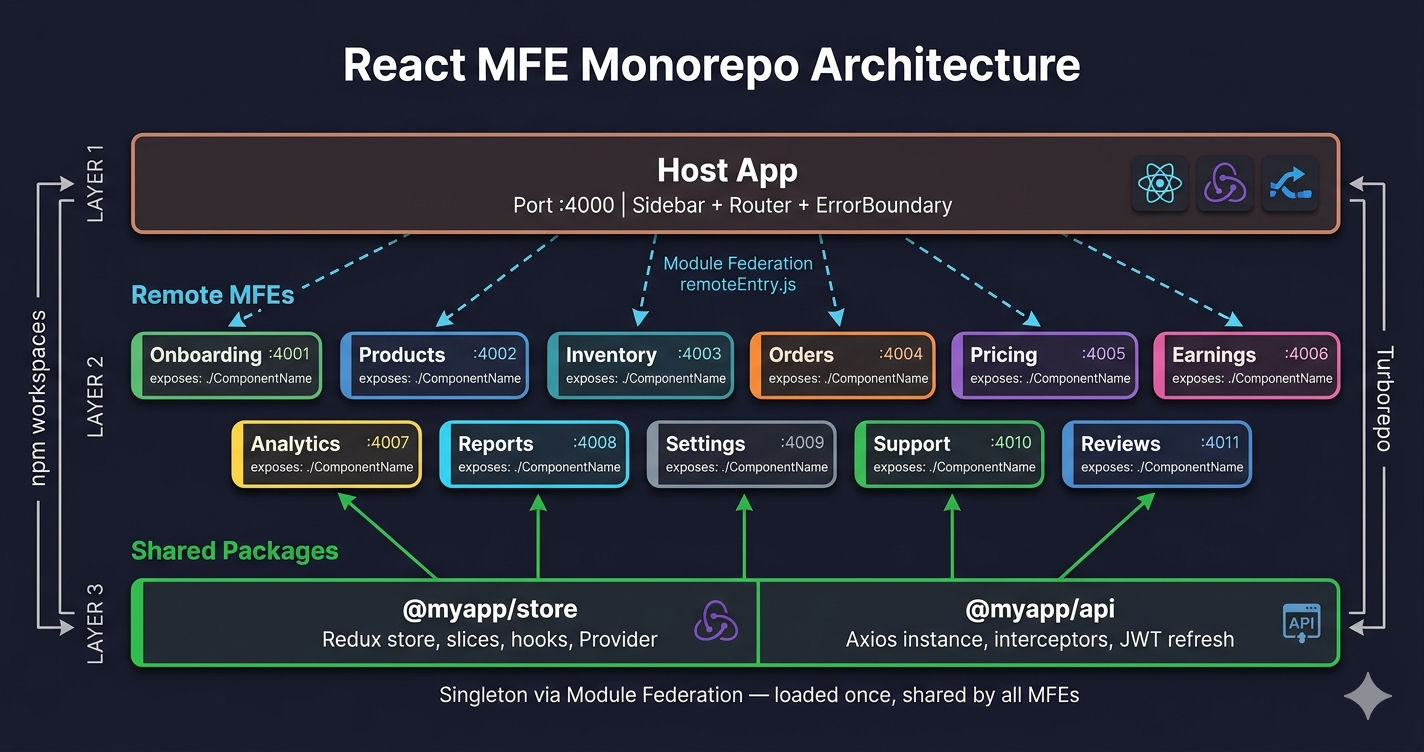
The Host app is the shell application — it owns the layout (sidebar, header), routing, and loads Remote MFEs at runtime via Module Federation.
Critical: The Host app declares @myapp/api and @myapp/store as dependencies (not devDependencies). These are workspace-linked packages resolved from packages/core/api and packages/core/store. npm resolves them via the workspace protocol automatically.
Host Webpack Config (LOCAL vs PRODUCTION)
This is where local and production configs diverge significantly. Local uses HTTPS with localhost certificates, development mode, and localhost remote URLs. Production uses relative paths, production mode, and full optimization.
Key differences between Local and Production:
| Config | Local Development | Production / Server |
|---|---|---|
mode | 'development' | 'production' |
| HTTPS | mkcert certificates loaded from ../../localhost.pem | Not needed — Nginx handles SSL |
| Remote URLs | https://localhost:4001/remoteEntry.js | /onboarding/remoteEntry.js |
publicPath | / | / (Host) or /products/ (Remote) |
splitChunks | Disabled (false) | Enabled with vendor chunking |
performance | Not configured | maxEntrypointSize: 512000 |
Why HTTPS locally? Module Federation loads remote scripts cross-origin. Browsers block mixed content (HTTP resources on HTTPS pages). Using mkcert (opens in a new tab) to create trusted local certificates ensures all MFEs load without CORS errors.
Host Entry Point (Async Boundary)
Module Federation requires an async boundary before shared dependencies are used. The entry point does a dynamic import() which creates this boundary.
Why not render directly in index.js? Without the async boundary, Webpack cannot negotiate shared dependency versions before React loads. You'll get the error: Shared module is not available for eager consumption. The import('./bootstrap') pattern solves this for every Module Federation project.
Host App Component (Routes + Lazy MFEs)
The Host app loads each MFE lazily using React.lazy() with dynamic imports from Module Federation remotes. Each route maps to a remote MFE.
Step 4 — Create a Remote MFE
Each Remote MFE is a standalone React application that exposes components via remoteEntry.js. The Host loads these at runtime.
Remote Webpack Config (LOCAL vs PRODUCTION)
Key differences for Remote MFEs:
| Config | Local Development | Production / Server |
|---|---|---|
publicPath | 'https://localhost:4002/' | '/products/' |
| HTTPS | mkcert certificates | Not needed |
splitChunks | Disabled | Vendor chunking enabled |
optimization | None | moduleIds: 'deterministic' |
publicPath must match the URL where this MFE is served. Locally, that's https://localhost:4002/. On the server, Nginx serves it at /products/. If publicPath is wrong, chunk loading fails with 404 errors.
Step 5 — Create Shared Packages
Shared packages are consumed by all MFEs via workspace linking. They're declared in packages/ and imported like normal npm packages.
@myapp/store — Shared Redux Store
@myapp/api — Shared API Layer
Both packages are resolved by the alias config in Webpack and shared as singletons via Module Federation — ensuring all MFEs use the exact same Redux store instance and axios interceptors. Read more in MFE Communication Patterns.
Step 6 — Tailwind CSS Configuration
Each MFE needs its own postcss.config.js and tailwind.config.js. The configs are identical in structure — only the content paths change per app.
Running All MFEs Together
With everything configured, start the entire monorepo with one command:
npm run devThis runs turbo run dev --concurrency=16, which starts all 12 dev servers in parallel:
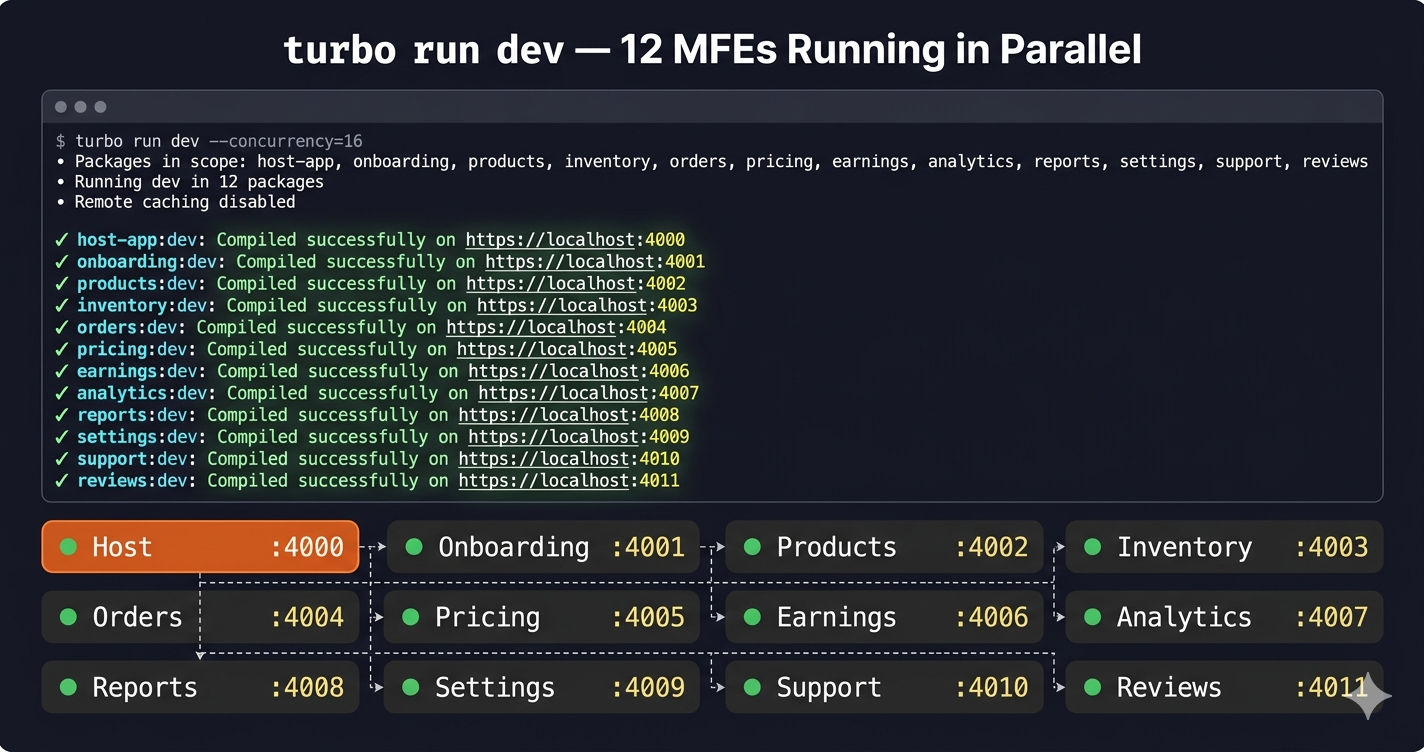
| App | Port | URL |
|---|---|---|
| Host (Shell) | 4000 | https://localhost:4000 |
| Onboarding | 4001 | https://localhost:4001 |
| Products | 4002 | https://localhost:4002 |
| Inventory | 4003 | https://localhost:4003 |
| Orders | 4004 | https://localhost:4004 |
| Pricing | 4005 | https://localhost:4005 |
| Earnings | 4006 | https://localhost:4006 |
| Analytics | 4007 | https://localhost:4007 |
| Reports | 4008 | https://localhost:4008 |
| Settings | 4009 | https://localhost:4009 |
| Support | 4010 | https://localhost:4010 |
| Reviews | 4011 | https://localhost:4011 |
Open https://localhost:4000 — the Host app loads, and as you navigate to /products or /orders, Module Federation dynamically loads the corresponding MFE's remoteEntry.js over the network.
You don't need to run all 12. If you're only working on the Products MFE, run just the Host and Products: turbo run dev --filter=host-app --filter=products-mfe. Other MFE routes will show the error boundary fallback until those servers are started.
Common Mistakes and Fixes
| Problem | Cause | Fix |
|---|---|---|
Shared module is not available for eager consumption | Missing async boundary | Use import('./bootstrap') in entry point |
| Remote MFE returns 404 for chunks | Wrong publicPath | Match publicPath to the URL where MFE is served |
| Duplicate React instances | singleton: true missing | Add singleton: true to all shared dependencies |
| CORS errors loading remote | Missing CORS headers | Add Access-Control-Allow-Origin: * in devServer headers |
| Styles not loading in MFE | Missing PostCSS/Tailwind config | Each MFE needs its own postcss.config.js + tailwind.config.js |
Cannot find module '@myapp/store' | Missing webpack alias | Add alias in resolve pointing to ../../packages/core/store |
What's Next?
You now have a working React Micro Frontend monorepo with Turborepo. In the next article, we'll dive deep into Creating Shared Packages — building the @myapp/store (Redux), @myapp/api (axios + interceptors), and @myapp/uicomponents (shared UI) packages that all MFEs consume.
← Back to Micro Frontend vs SPA
Continue to Shared Packages in MFE Monorepo →
Frequently Asked Questions
What is the best way to set up a React Micro Frontend monorepo?
The best approach is to use npm workspaces for package management, Turborepo for build orchestration, and Webpack 5 Module Federation for runtime integration. This combination gives you a single node_modules, parallel builds, and independent MFE deployments.
Why use Turborepo for Micro Frontends?
Turborepo provides parallel task execution, intelligent caching, and dependency-aware build ordering. In a 12-MFE monorepo, running turbo run dev --concurrency=16 starts all MFE dev servers in parallel. Building only rebuilds what changed. This cuts build time from minutes to seconds.
What is the difference between local and production webpack config in MFE?
In local development, remotes point to https://localhost:PORT/remoteEntry.js, mode is development, HTTPS certificates are loaded for local SSL, and splitChunks is disabled. In production, remotes point to relative paths like /products/remoteEntry.js, mode is production, no HTTPS config is needed, and splitChunks with vendor chunking is enabled for optimal bundle sizes.
Why does the MFE entry point use import('./bootstrap') instead of direct rendering?
Module Federation requires an async boundary before using shared dependencies. The dynamic import('./bootstrap') creates this boundary, allowing Webpack to negotiate shared dependency versions (React, Redux) before any code executes. Without it, you get Shared module is not available for eager consumption errors.
How many Micro Frontends can you have in one monorepo?
There is no hard limit. Production systems commonly run 8 to 15 MFEs in a single monorepo. The example in this article uses 11 remote MFEs plus a Host shell, each on its own port (4000 to 4011). Turborepo handles the build orchestration with --concurrency=16 to run all dev servers in parallel.
Can I use Yarn or pnpm instead of npm workspaces?
Yes. Turborepo works with npm workspaces, Yarn workspaces, and pnpm workspaces. The Module Federation configuration stays the same regardless of your package manager. npm workspaces is used here because it requires zero additional tooling — it ships with Node.js.