Published: May 31, 2026 · 14 min read
Permission-Based Routing in React Micro Frontend
Setting up permission based routing react micro frontend patterns starts with a question that does not exist in a single SPA: what happens when a user types /earnings into the URL bar? In a federated host, every remote is mounted by a route — <Route path="earnings/*" element={<EarningsMFE />} /> — and that route renders for anyone who reaches it. A support agent who only needs the Support module can navigate to Earnings, watch the whole remote bundle download, and land on a payouts dashboard they were never meant to see. The nav bar made it worse by showing all ten menu items to everyone. Authorization in a micro frontend is not a single if (isAdmin) check; it is a system that spans the shared store, the host router, the menu config, and every remote. This article builds that system on top of the shared Redux store, slices, and custom hooks from the previous articles.
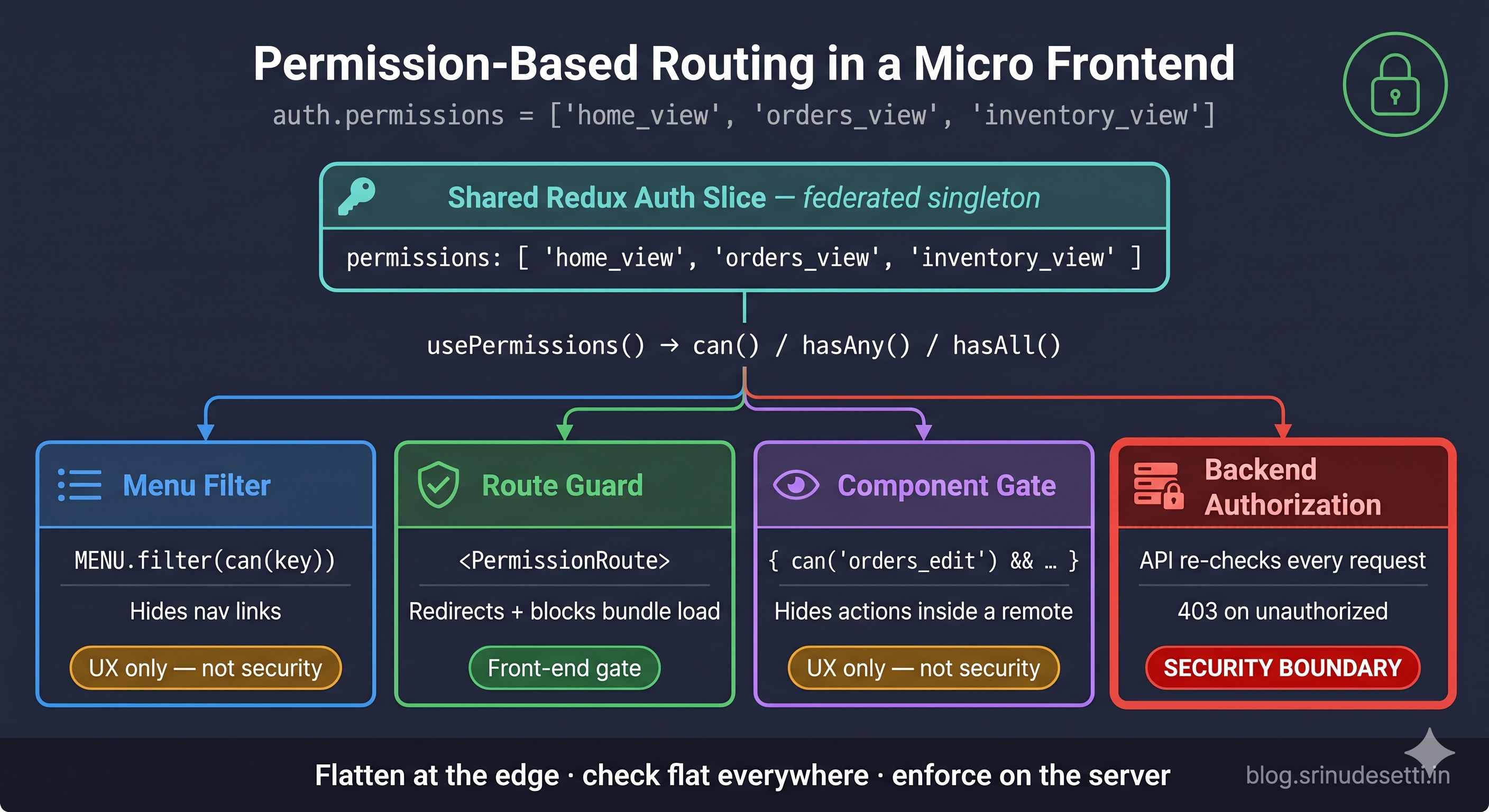
The pattern has four moving parts: a flat permissions array in the shared auth slice, a usePermissions hook every remote imports, a <PermissionRoute> guard that wraps each remote route, and a permission-aware menu config that hides what the user cannot reach. By the end you will see how all four read from one source so they can never drift apart.
In this guide, you will:
- See why every remote route is wide open by default and what that costs in an MFE
- Flatten the backend's nested permissions tree into a flat array of keys at the auth boundary
- Store permissions in the shared Redux auth slice as a federated singleton
- Build a
usePermissionshook withcan,hasAny, andhasAllchecks - Wrap each remote route in a
<PermissionRoute>guard that redirects before the bundle loads - Drive the nav menu and the guards from one config so they stay in sync
- Load permissions differently in local development vs production with Tabs
- Layer route guards, menu filters, and component gates — and why none of them replace backend checks
Why Every Remote Route Is Wide Open
In a monolithic SPA, route guards are simple because one team owns every route and the user object. In a micro frontend, the host mounts each remote by path and the remote is a separately deployed bundle. The host's router does not know — and should not need to know — what each remote does internally. That separation is the whole point of host and remote apps, but it means the default <Route> renders its remote unconditionally.
The fix is to make authorization a first-class concern of the host's routing layer, fed by data the backend owns. The user's permissions ride in the same shared store that already carries authentication state, and the host's router consults them before rendering any remote.
Flattening the Backend Permissions Tree
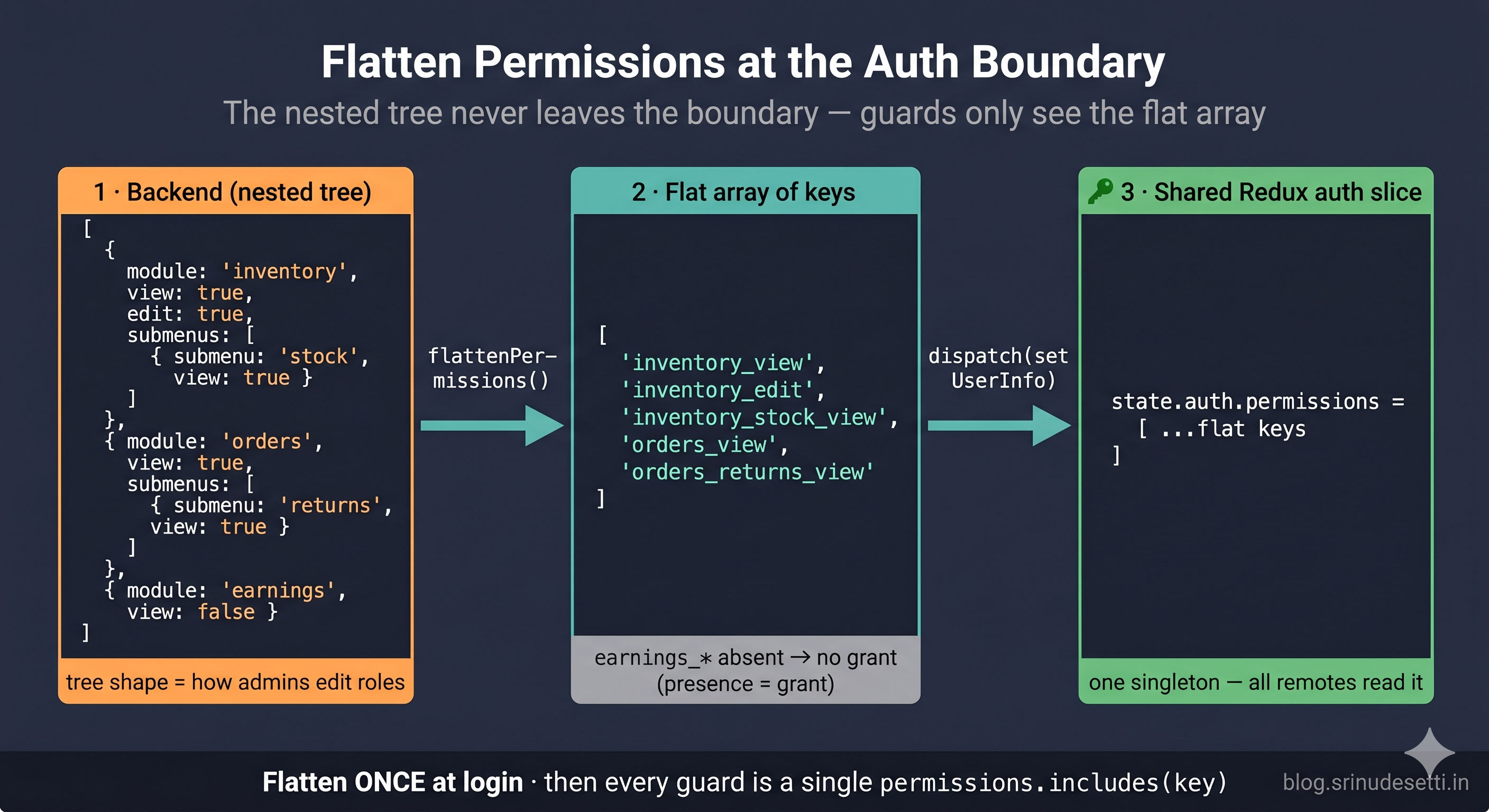
The backend models permissions as a nested tree — one node per module, each with boolean flags and a list of submenus. That shape maps cleanly to the admin UI where roles are edited, but it is awful to check on every render.
Route guards run constantly, so they need an O(1) check, not a recursive tree walk. The host flattens the tree once, at the moment the profile loads, into a flat array of string keys like inventory_view and orders_returns_approve. Every flag that is false is simply absent — presence in the array is the grant, so there is no "deny" entry to reason about.
This is the single most important design choice in the whole system: flatten at the edge, check flat everywhere else. The nested tree never leaves the auth boundary; the rest of the app — guards, menus, component gates — only ever sees the flat array.
Storing Permissions in the Shared Auth Slice
Permissions do not get their own store. They live in the same auth slice every remote already reads for isLoggedIn and the access token, covered in the shared Redux store article. Because that slice is federated as a Module Federation singleton, every remote reads the identical array from one store instance.
The setUserInfo reducer takes the already-flattened array — flattening is the host's job at the boundary, not the slice's. The slice stays dumb: it stores what it is given and exposes one selectPermissions selector.
Client-side permissions are a UX layer, not a security boundary. The flat array, the menu filter, and the route guard all live in JavaScript the user controls — they can edit Redux state in DevTools. Every check shown here MUST be mirrored by server-side authorization on the protected API endpoints. The front end gives the right user a clean experience; the backend is what actually stops the wrong user.
The usePermissions Hook
Following the custom hooks pattern, every remote imports one usePermissions hook from the shared store package instead of reading selectPermissions directly. The hook returns the three checks guards actually need.
Wrapping the return in useMemo keyed on permissions keeps can, hasAny, and hasAll referentially stable across renders, and converting the array to a Set makes each check O(1). When the slice field eventually renames from permissions to grants, only this hook changes — the dozens of guard call sites across every remote stay untouched.
The PermissionRoute Guard
The guard is a thin wrapper component placed as the parent of the remote's <Suspense> boundary. If the user lacks the key, it redirects instead of rendering.
The replace prop on <Navigate> is deliberate: it keeps the blocked URL out of history so the back button cannot bounce the user back into a redirect loop. The subtle win is bandwidth — because the guard is the parent of the <Suspense> and the lazy() remote, React never commits the lazy component for a redirected route, so the remote's remoteEntry chunk is never fetched for an unauthorized user.
One Config for Menu and Guards
The most common source of authorization bugs is the menu and the guards drifting apart — a menu item that links to a route the guard blocks, or a route with no menu entry. The fix is to drive both from one config where each item declares its permissionKey.
The host header filters this exact config to render the nav bar. An item with no matching permission disappears from the menu and — because the route guard reads the same permissionKey — its route redirects too.
Now the routing layer wraps every remote route in <PermissionRoute> and uses the same config to compute a safe landing redirect — never a hard-coded /home that a support agent might not have access to.
The firstAllowedPath() helper is what makes the "/" redirect safe across roles: it filters the menu config by the user's permissions and sends them to the first module they can actually open.
Loading Permissions: Local vs Production
How permissions get into the store differs sharply between environments. Locally there is no auth server, so you seed a fixed role from an env file. In production the host runs the real refresh-token and profile flow, receives the nested tree, and flattens it. The store shape is identical — only the loading path changes.
Local seeds a fixed permission set; production fetches and flattens the real tree. Keep the dev branch behind an env flag so it can never ship — a seeded DEV_PERMISSIONS array in production would grant everyone the same role.
The differences that matter:
| Aspect | Local Development | Production / Server |
|---|---|---|
| Permission source | DEV_PERMISSIONS env string | Profile API nested tree |
| Flattening | Not needed (already flat) | flattenPermissions() at boundary |
| Auth token | Skipped or mocked | Silent refresh-token call |
| Role switching | Edit .env.local, reload | Backend role assignment |
| Risk | Must never ship to prod | Real authorization source |
Three Layers of Permission Checks
A complete system applies the same flat keys at three different scopes. The route guard prevents loading a remote; inside an allowed remote, a component gate controls individual actions.
A user with orders_view opens the Orders remote, but only a user with orders_edit sees the "Approve refund" button. Here is how the three front-end layers compare — and why all three still sit on top of backend enforcement.
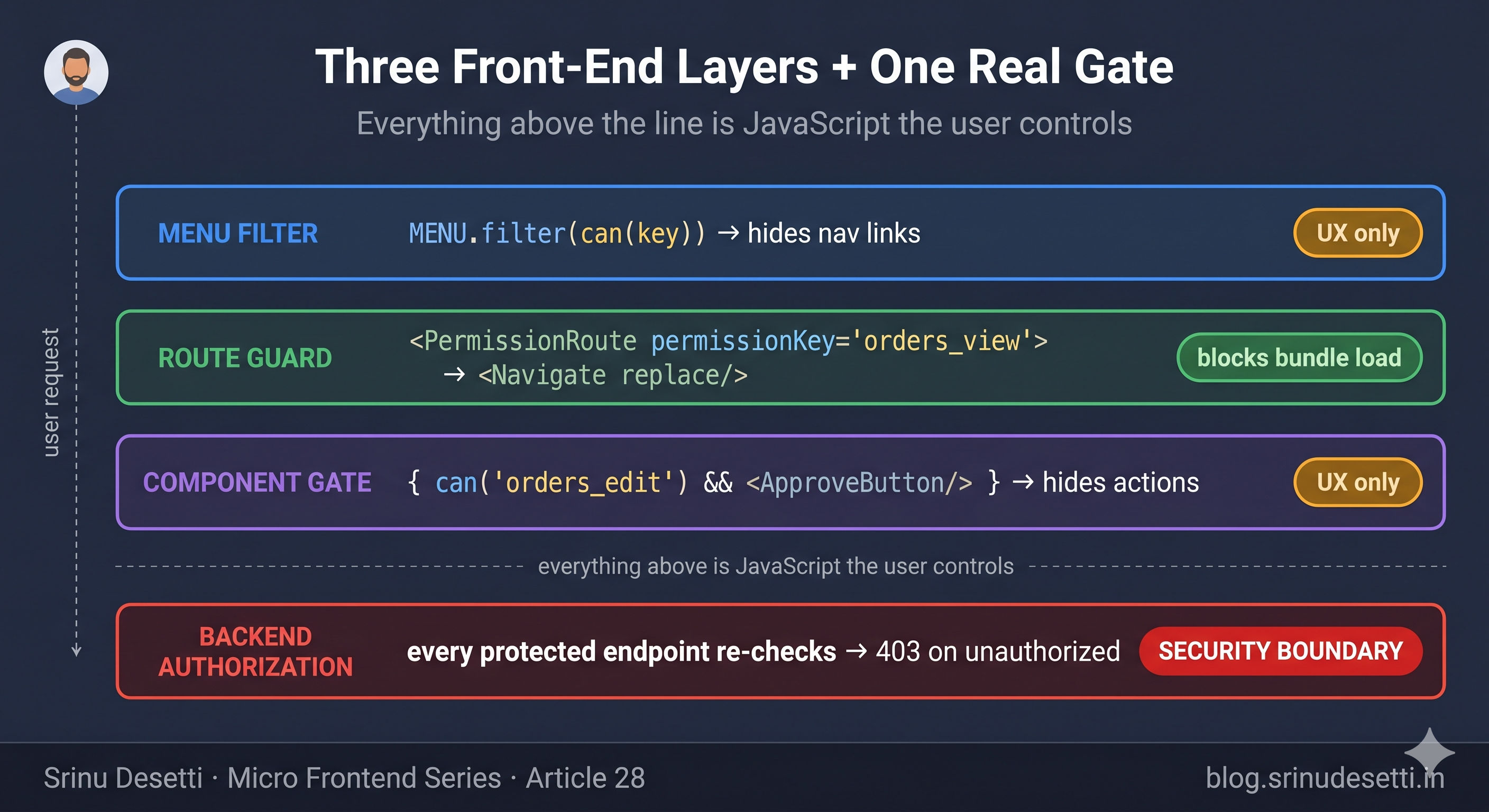
| Layer | Scope | What it does | Is it security? |
|---|---|---|---|
| Menu filter | Whole nav item | Hides links the user cannot use | No — UX only |
Route guard (<PermissionRoute>) | Whole remote MFE | Redirects, blocks bundle load | Partial — front-end gate |
Component gate (can(...)) | Single action/button | Hides edit actions in an allowed remote | No — UX only |
| Backend authorization | API endpoint | Rejects unauthorized requests with 403 | Yes — the real boundary |
For the underlying React Router patterns these guards build on, the React Router documentation (opens in a new tab) covers <Navigate> and nested routes, and the Redux Toolkit docs (opens in a new tab) cover the slice and selector APIs the auth slice uses.
What's Next
You now have a complete permission-based routing system for a React micro frontend: the backend's nested permissions tree flattened once at the auth boundary, a flat array stored in the shared Redux auth slice as a singleton, a usePermissions hook that every remote imports, a <PermissionRoute> guard that redirects before a blocked remote's bundle ever loads, a single menu config that keeps the nav bar and the guards in sync, and three layers of checks — menu, route, and component — all sitting on top of mandatory backend enforcement. This closes out the state-management section of the series. The next article — Article 29: Authentication in Micro Frontend Architecture — goes one layer deeper into where the access token and refresh token actually come from: the OTP login flow, storing the access token in the shared store, the refresh token in an HTTP-only cookie, and how every remote becomes authenticated through one shared auth boundary. Permissions ride on top of that auth foundation.
← Back to Custom Redux Hooks for Micro Frontends
Continue to Authentication in Micro Frontend Architecture →
Frequently Asked Questions
What is permission-based routing in a micro frontend?
Permission-based routing in a micro frontend is the pattern where the host application gates each remote MFE route behind a permission check before rendering it. Because every remote is mounted by a path in the host router (for example /orders, /earnings, /reports), nothing stops a user from typing a URL and loading a module they should not access. Permission-based routing solves this by storing the user's flat permission keys in the shared Redux auth slice, wrapping each remote route in a guard component like <PermissionRoute permissionKey="orders_view">, and redirecting to an allowed route when the key is missing. The guard runs before Suspense resolves the dynamic import, so a blocked user never even downloads the remote's bundle.
Where should permissions be stored in a micro frontend?
Permissions belong in the same shared Redux auth slice every remote already reads for isLoggedIn and the access token — never in a separate per-remote store. The slice is federated as a Module Federation singleton, so every remote and the host read the identical permissions array from one store instance. The backend returns permissions as a nested tree at login; the host flattens that tree into a flat array of string keys (inventory_view, orders_edit, orders_returns_approve) exactly once at the auth boundary, then dispatches the flat array with setUserInfo. Guards and menu filters then do a single permissions.includes(key) check instead of walking a tree on every render.
How do I hide menu items based on user permissions?
Drive both the navigation menu and the route guards from one menu config where each item declares the permissionKey that unlocks it. The host header filters MAIN_MENU_CONFIG with permissions.includes(item.permissionKey) so only allowed items render in the nav bar. This keeps the menu and the guards in sync because they read the same source — an item with no matching permission disappears from the menu and its route redirects. Hiding the menu item is a UX layer only; it is not security, because a user can still type the URL directly, which is why the <PermissionRoute> guard on the route is the real gate.
Is client-side permission routing secure on its own?
No. Client-side permission routing is a user-experience layer, not a security boundary. The flat permissions array, the menu filter, and the route guard all live in JavaScript the user fully controls — they can edit the Redux state in DevTools or call the API directly. Every permission check in the host and remotes MUST be mirrored by server-side authorization on every protected API endpoint, so even if a user forces a remote to render, the backend rejects the unauthorized data request with a 403. Treat the front-end permission system as the thing that gives the right user a clean experience, and the backend as the thing that actually stops the wrong user.
How does the route guard avoid loading the blocked remote's bundle?
The <PermissionRoute> guard is the parent element of the <Suspense> that wraps the lazy-loaded remote. React evaluates the guard first: when the permission key is missing it returns <Navigate replace /> and the children — including the Suspense boundary and the lazy() remote — are never rendered. Because the dynamic import('OrdersManagement/OrdersMFE') only fires when React commits the lazy component, and that never happens for a redirected route, the blocked remote's remoteEntry chunk is never fetched. This means permission routing also saves bandwidth: unauthorized users do not download MFE bundles they cannot use.
What is the difference between a route guard, a menu filter, and a component gate?
They are three layers of the same permission system applied at different scopes. The menu filter hides whole nav items the user cannot access (UX layer, not security). The route guard wraps an entire remote route and redirects when the key is missing (prevents loading the MFE — the primary front-end gate). The component gate is a check inside an already-allowed remote, like wrapping an Approve refund button in can('orders_edit') so a viewer sees the orders module but not the edit action. A complete system uses all three plus server-side enforcement: the menu for discoverability, the route guard for module access, the component gate for action-level control, and the backend as the real authority.
Why flatten the nested permissions tree instead of checking it directly?
The backend models permissions as a nested tree (modules, submenus, boolean flags) because that maps to how an admin UI edits roles. But route guards and menu filters run on every render and need a fast, simple check. Flattening the tree once at the auth boundary into a flat array of string keys turns every check into a single permissions.includes('orders_view') or a Set lookup — no recursive tree walking, no null-checking nested submenus at each call site. The flat keys also read clearly in the code (permissionKey="orders_returns_approve") and make the menu config, the guard, and the component gate all speak the same vocabulary. Flatten at the edge, check flat everywhere else.