Webpack 5 Configuration for Micro Frontends — Complete Guide
Every Webpack 5 micro frontend configuration starts the same way — entry, output, loaders, plugins, dev server. But once you add Module Federation, HTTPS certificates, CORS headers, shared packages, and the split between local development and production builds, the config file becomes the most critical piece of your entire MFE architecture.
Already set up your monorepo? This article continues from Shared Packages in MFE Monorepo. If you're starting fresh, begin with React MFE Monorepo Setup.
This guide walks through every section of the Webpack 5 config — with real code from a 12-MFE production monorepo — showing exactly what changes between local development and production builds.
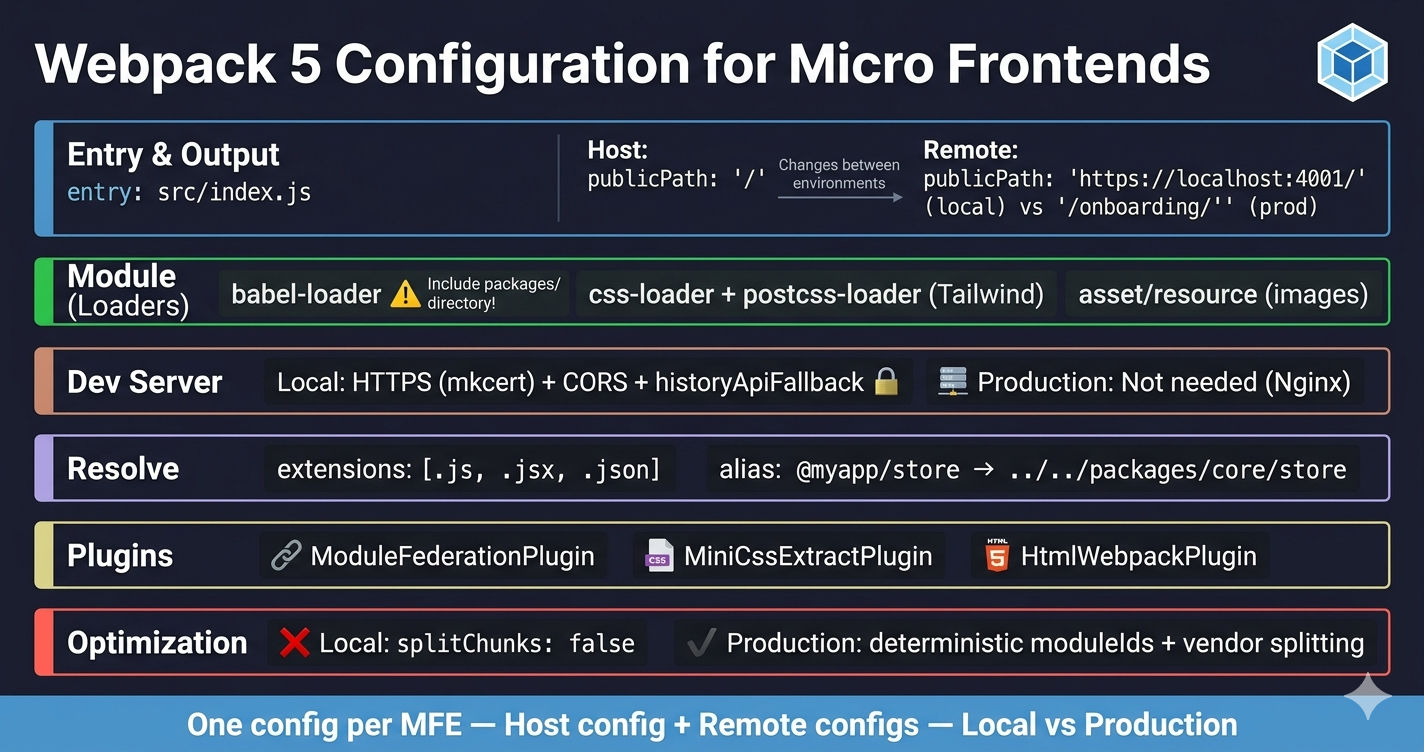
Why Webpack 5 Config Is Different for Micro Frontends
A standard single-page app has one webpack.config.js. A micro frontend monorepo has one config per MFE — a host config and one remote config for every micro frontend. Each config must handle:
- Entry/output — host uses
/publicPath, remotes use unique paths - Dev server — HTTPS certificates for secure cross-origin script loading
- CORS headers — host must fetch
remoteEntry.jsfrom remote dev servers - Module Federation — remotes, exposes, and shared dependencies
- Code splitting — disabled locally for speed, enabled in production for caching
- Resolve aliases — mapping shared package imports to the
packages/directory
The biggest gotcha: local development and production configs are fundamentally different. Remotes change from https://localhost:PORT/remoteEntry.js to /mfe-name/remoteEntry.js, HTTPS certs disappear, and optimization goes from zero to full vendor splitting.
Entry and Output — Host vs Remote
The entry and output sections seem simple, but the publicPath difference between host and remote MFEs is what makes Module Federation work.
Host Application
The host serves at the root path (/) in both environments:
Remote MFE
Remote MFEs need a full URL locally so the host can fetch their remoteEntry.js over the network. In production, they use a relative path behind a reverse proxy:
Why publicPath matters for Module Federation. When the host loads a remote's remoteEntry.js, all subsequent chunk requests from that remote use its publicPath as the base URL. If the remote's publicPath is wrong, every lazy-loaded chunk will 404.
Babel Loader — Transpiling JSX and Modern JavaScript
Every MFE needs Babel to transform JSX and modern JavaScript into browser-compatible code. The standard setup uses two presets:
Including Shared Packages Directory
When your MFE imports shared packages from the monorepo packages/ directory, those packages contain JSX that also needs transpilation. Standard Babel config only processes src/ — you must explicitly include the packages directory:
Common mistake: forgetting to include ../../packages in the Babel include path. The MFE builds fine because Webpack resolves the import via the alias, but the untranspiled JSX in the shared package causes a runtime SyntaxError: Unexpected token < in the browser.
CSS and Asset Handling
CSS with PostCSS (Tailwind CSS support)
The CSS pipeline extracts styles into separate files using MiniCssExtractPlugin and runs PostCSS for Tailwind CSS processing:
The loader chain runs right to left: postcss-loader processes Tailwind directives and autoprefixer, css-loader resolves @import and url(), then MiniCssExtractPlugin.loader extracts the CSS into a separate .css file instead of injecting it into the DOM via JavaScript.
Image and Asset Handling
Webpack 5 has built-in asset modules (opens in a new tab) — no need for file-loader or url-loader:
Using type: "asset/resource" emits the file as-is and provides a URL. Webpack 5 replaces the older loader-based approach with native asset module support.
Dev Server — HTTPS, CORS, and historyApiFallback
The dev server config is where local and production diverge the most. Local development needs HTTPS certificates and CORS headers. Production doesn't use devServer at all — Nginx or a reverse proxy serves the static files.
Why HTTPS Is Required Locally
Module Federation loads remote code by injecting <script> tags at runtime. If your host runs on HTTPS (which most modern dev setups do), the browser blocks any HTTP script requests as mixed content. Every remote dev server must also run HTTPS.
Use mkcert (opens in a new tab) to generate trusted local certificates:
# Install mkcert and generate certificates
mkcert -install
mkcert localhost
# Creates localhost.pem and localhost-key.pem
Place the certificate files at the monorepo root. Each MFE's Webpack config reads them using path.join(__dirname, "../../localhost.pem").
Why CORS Headers Are Required
The host running on https://localhost:4000 fetches remoteEntry.js from https://localhost:4001, 4002, etc. Without CORS headers, the browser blocks these cross-origin requests. Setting Access-Control-Allow-Origin: * in development allows all origins. In production, you'd whitelist specific domains instead.
historyApiFallback
Each MFE uses client-side routing (React Router). Without historyApiFallback: true, refreshing on a deep route like /products/123 returns a 404 because the dev server looks for a literal /products/123 file. This setting redirects all requests to index.html, letting React Router handle the routing.
Resolve — Extensions and Aliases
The resolve section maps shared package import paths to their actual directory locations:
extensions lets you import files without specifying the extension: import App from './App' resolves to App.js, App.jsx, or App.json in order.
alias maps the @myapp/store and @myapp/api import paths to the actual package directories in the monorepo. Without aliases, Webpack wouldn't know where @myapp/store lives on disk.
Important: Aliases handle build-time resolution. Module Federation's
sharedconfig handles runtime deduplication. You need both — covered in detail in Shared Packages in MFE Monorepo.
Plugins — MiniCssExtract and HtmlWebpack
Beyond Module Federation (which is covered in-depth in the next article), every MFE config needs two essential plugins:
- MiniCssExtractPlugin (opens in a new tab) — extracts CSS into separate files instead of inlining them in JavaScript bundles. Critical for production caching — CSS changes don't invalidate JS bundles and vice versa.
- HtmlWebpackPlugin — generates the
index.htmlwith the correct script and link tags injected automatically. Each MFE has its ownsrc/index.htmltemplate.
Optimization — Local vs Production
This is the biggest difference between local and production configs. Local development disables code splitting entirely for faster rebuilds. Production enables full vendor splitting with deterministic module IDs for long-term browser caching.
What Each Production Setting Does
| Setting | Purpose |
|---|---|
moduleIds: "deterministic" | Generates stable numeric IDs for modules. Without this, adding a single file can change every chunk's hash, busting all browser caches |
runtimeChunk: "single" | Extracts the Webpack runtime into its own chunk. When a module changes, only its chunk and the runtime chunk update — not every chunk |
splitChunks.chunks: "all" | Splits both sync and async chunks, extracting shared vendor code |
cacheGroups.vendor | Creates a separate chunk for every node_modules package (e.g., vendor.react.js, vendor.axios.js). Only the changed package's chunk gets a new hash on update |
performance.hints: false | Suppresses Webpack warnings about bundle size. The 512KB limits are set as guardrails for monitoring, not blocking |
Why splitChunks: false locally? Code splitting creates multiple small files, computes content hashes, and manages chunk loading graphs — all of which slow down rebuilds and HMR. In development, a single large bundle that rebuilds in 200ms is better than 50 optimized chunks that take 2 seconds.
Remotes With Multiple Exposes
Some MFEs expose a single component, while others expose many. Here's a real example of a Product Management remote that exposes 9 components:
Each exposed module becomes separately loadable — the host can lazy-load ./BulkUploadPage without loading ./StyleManagementPage. This is why Module Federation is powerful for large MFEs with many pages.
Full Config Comparison — Local vs Production
Here are the complete, working Webpack configs for both the host and a remote MFE, showing every difference between local and production:
Host Application — Full Config
Remote MFE — Full Config
Configuration Differences at a Glance
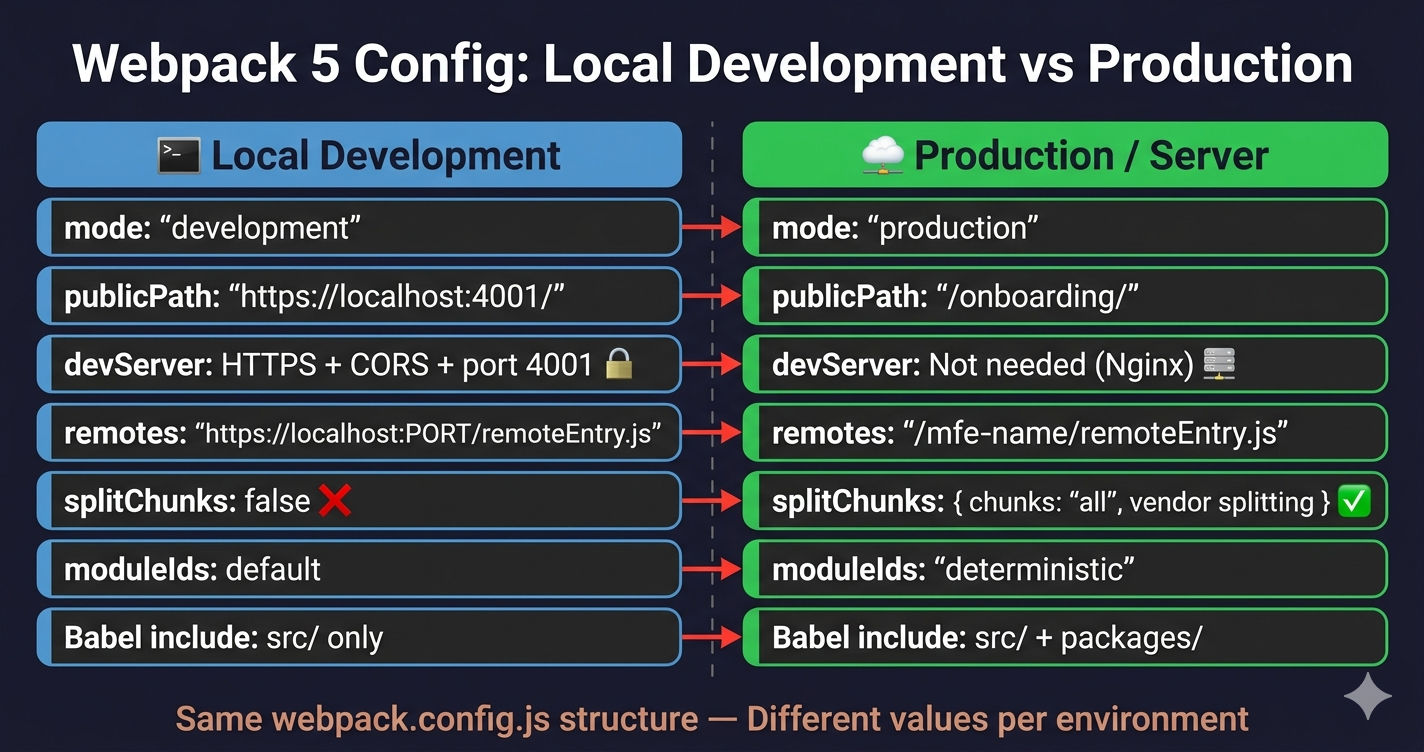
Here's every setting that changes between environments:
| Setting | Local Development | Production / Server |
|---|---|---|
| mode | "development" | "production" |
| filename | "[name].bundle.js" | "[name].bundle.js" or "[name].[contenthash].js" |
| publicPath (host) | "/" | "/" |
| publicPath (remote) | "https://localhost:PORT/" | "/mfe-name/" |
| devServer | HTTPS + CORS + historyApiFallback | Not needed (Nginx serves files) |
| HTTPS certs | mkcert local certificates | Handled by reverse proxy |
| CORS headers | Wildcard * (all origins) | Whitelist specific domains |
| remotes | https://localhost:PORT/remoteEntry.js | /mfe-name/remoteEntry.js |
| splitChunks | false (disabled for speed) | Full vendor splitting enabled |
| moduleIds | Default (natural) | "deterministic" (stable hashes) |
| runtimeChunk | Not set | "single" (shared runtime) |
| performance | Not set | hints: false, 512KB limits |
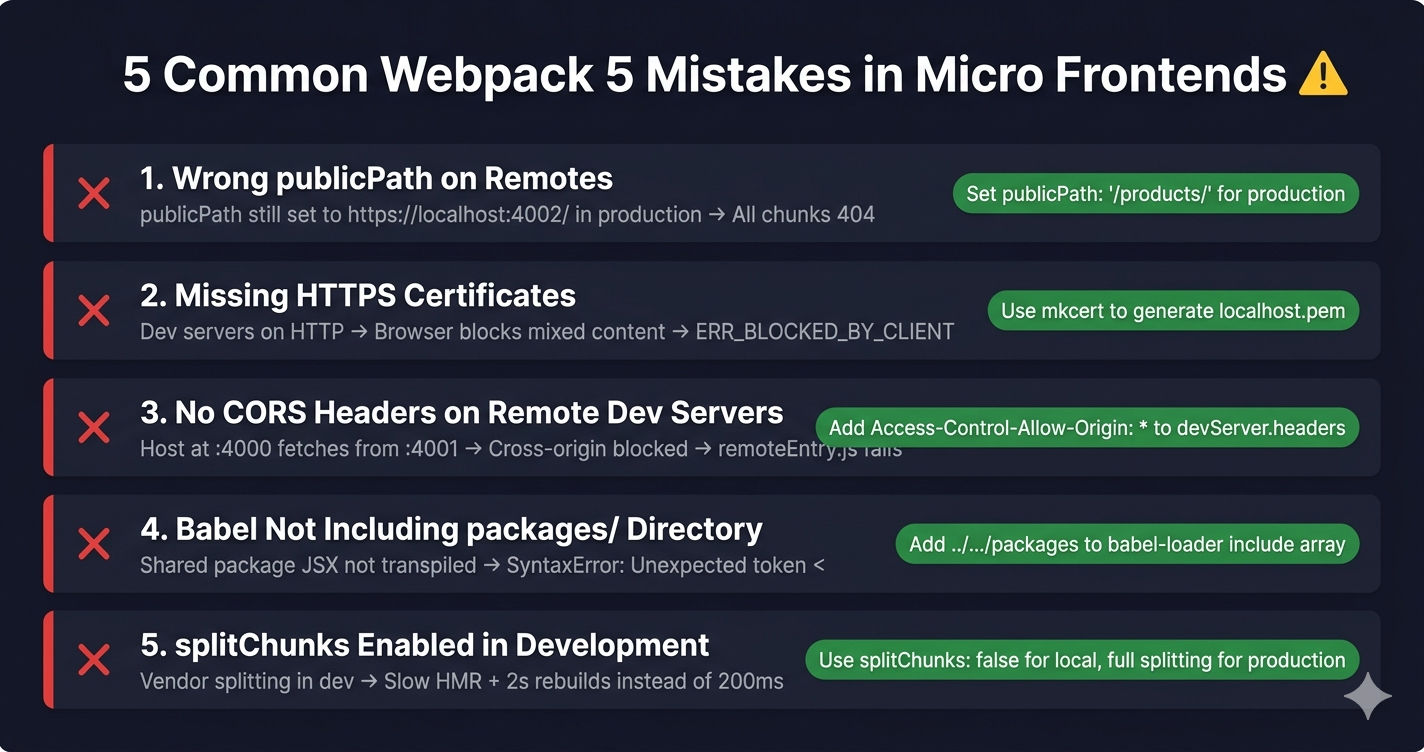
Common Webpack 5 Mistakes in MFE Projects
1. Wrong publicPath on Remotes
If a remote's publicPath doesn't match where its files are actually served, every chunk request after remoteEntry.js will 404. The remote loads but all its lazy-loaded components fail silently.
2. Missing HTTPS Certificates
Forgetting to set up mkcert means your local dev servers run on HTTP. The host on HTTPS blocks all remote script loads as mixed content. You see ERR_BLOCKED_BY_CLIENT or net::ERR_INSECURE_RESPONSE in the console.
3. Forgetting CORS Headers on Remote Dev Servers
The host at localhost:4000 fetching from localhost:4001 is a cross-origin request. Without Access-Control-Allow-Origin: *, the browser blocks the fetch and remoteEntry.js never loads.
4. Not Including Packages in Babel Include
Shared packages in packages/ contain JSX. If Babel only processes src/, the raw JSX hits the browser and throws SyntaxError: Unexpected token <.
5. Using splitChunks in Development
Enabling vendor splitting in development makes HMR slower and debugging harder. Every code change potentially re-generates chunk hashes across multiple files.
What's Next?
This article covered every section of the Webpack 5 configuration for Micro Frontends — entry/output, loaders, dev server, resolve, plugins, and optimization — with real code showing exactly what changes between local development and production. In the next article, we'll set up Tailwind CSS in a Micro Frontend monorepo — covering PostCSS config, shared theme setup, and how to prevent style conflicts between MFEs.
← Back to Shared Packages in MFE Monorepo
Continue to Tailwind CSS in Micro Frontend Monorepo →
Frequently Asked Questions
Why does publicPath differ between local and production in a micro frontend Webpack config?
In local development, remote MFEs use a full URL like https://localhost:4001/ so the host can fetch remoteEntry.js over the network from a different dev server. In production, remotes use a relative path like /onboarding/ because all MFEs are served behind a single reverse proxy or CDN, so the browser resolves paths relative to the same domain.
Why is splitChunks disabled in local development for micro frontends?
Disabling splitChunks locally speeds up builds and hot module replacement. Code splitting adds overhead — creating multiple chunk files, computing content hashes, and managing chunk loading. In development you optimize for rebuild speed, not bundle size. Production enables full vendor splitting with deterministic moduleIds for long-term caching.
Why do micro frontends need HTTPS in local development?
Module Federation loads remote MFE code via script tags at runtime. Browsers block mixed content — if your host runs on HTTPS, all remote script URLs must also be HTTPS. Using mkcert (opens in a new tab) to generate local certificates ensures all dev servers communicate securely without browser warnings or blocked requests.
What is the difference between resolve.alias and Module Federation shared in Webpack?
resolve.alias is a build-time mechanism that tells Webpack where to find a package on disk — it maps import paths like @myapp/store to the actual directory. Module Federation shared is a runtime mechanism that ensures only one instance of a dependency loads across all MFEs. You need both: aliases for import resolution, shared for runtime deduplication.
How does vendor splitting work in a production micro frontend Webpack config?
Production configs use splitChunks with a cacheGroups vendor rule that extracts every node_modules package into its own chunk named vendor.package-name. Combined with deterministic moduleIds, this creates stable filenames that only change when the package version changes, enabling long-term browser caching across deployments.
Why does the Babel loader include the packages directory in some MFE Webpack configs?
When MFEs consume shared packages from a monorepo packages/ directory, those packages contain JSX or modern JavaScript that needs transpilation. By default, Babel only processes the src/ directory. Adding the packages/ directory to the include array ensures shared code like @myapp/store and @myapp/api is also transpiled correctly.