Next.js Remote MFE: basePath & assetPrefix

Published: April 20, 2026 · 14 min read

Next.js Remote MFE: basePath and assetPrefix Guide

Your Next.js host application is running. You deploy two Next.js remote MFEs — Products and Content — to the same domain. Every route collides. The Products index page overwrites the Content index page. CSS files return 404. The basePath and assetPrefix configuration in Next.js remote micro frontends solves this — and getting it wrong is the most common reason Next.js remotes fail silently in production. In the previous article, you set up the host application with NextFederationPlugin. Now it is time to configure the remote side.

In this guide, you will:

  • Understand why basePath and assetPrefix are required for Next.js remotes but not React remotes
  • See the exact route and asset conflicts that happen without them
  • Configure a Products remote and a Content remote with complete next.config.js files
  • Learn how the host resolves remoteEntry.js using the basePath in the URL
  • Set up Nginx reverse proxy routing for Next.js remotes
  • Deploy Next.js remotes as standalone Node.js servers
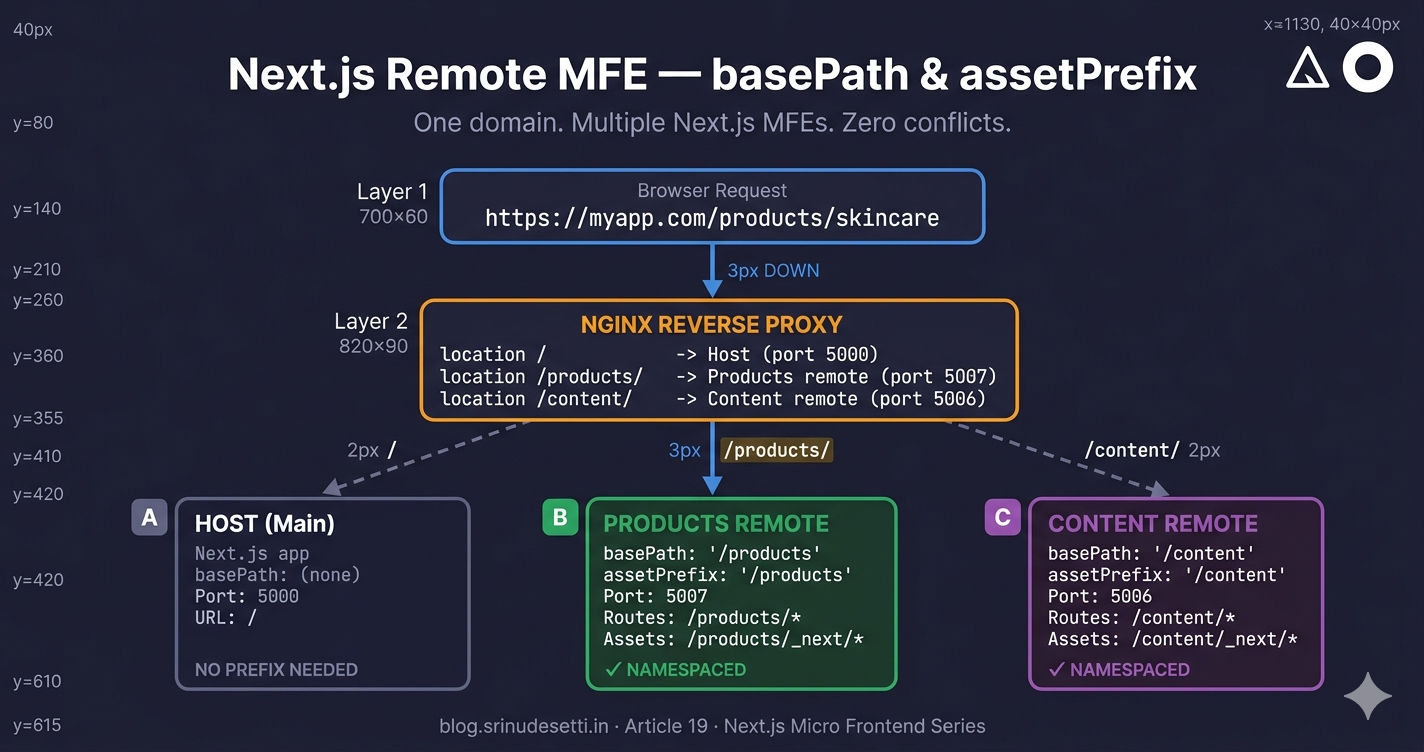
Next.js remote micro frontend basePath and assetPrefix architecture showing how multiple MFEs serve on the same domain with unique path prefixes

Why basePath and assetPrefix Are Required

When multiple Next.js applications run behind the same domain, every application thinks it owns the root path /. The host serves pages from /, the Products remote serves pages from /, the Content remote serves pages from / — all competing for the same URL space. This creates two distinct problems: route conflicts and asset conflicts.

Route conflicts without basePath
# Without basePath, every Next.js MFE's routes start from /
# All of these are served on the SAME domain:

Host (Main):          https://myapp.com/             ← index page
Products remote:      https://myapp.com/             ← CONFLICTS with Host!
Content remote:       https://myapp.com/             ← CONFLICTS with Host!

# Their internal pages also collide:
Host:                 https://myapp.com/api/health
Products:             https://myapp.com/api/health   ← CONFLICTS!
Content:              https://myapp.com/api/health   ← CONFLICTS!

# With basePath, each MFE gets its own namespace:
Host (Main):          https://myapp.com/
Products remote:      https://myapp.com/products/
Content remote:       https://myapp.com/content/

# No conflicts — each MFE owns its path prefix.

basePath solves route conflicts. Setting basePath: '/products' in the Products remote tells Next.js to prefix every route with /products. The index page becomes /products/, API routes become /products/api/..., and internal navigation links automatically include the prefix.

Asset conflicts without assetPrefix
# Without assetPrefix, Next.js loads assets from the root path:

# Products MFE requests:
GET https://myapp.com/_next/static/chunks/pages/index.js   → 404!
GET https://myapp.com/_next/static/css/main.css             → 404!

# Why 404? Because Nginx routes / to the Host, not Products.
# The Products assets live at /products/_next/static/...
# but the browser requests them from /_next/static/...

# With assetPrefix: '/products', the requests become:
GET https://myapp.com/products/_next/static/chunks/pages/index.js   → 200 ✓
GET https://myapp.com/products/_next/static/css/main.css             → 200 ✓

# assetPrefix tells Next.js to prepend /products/ to every asset URL
# in the generated HTML — scripts, stylesheets, images, and chunks.

assetPrefix solves asset conflicts. Setting assetPrefix: '/products' tells Next.js to prepend /products to every static asset URL in the generated HTML — JavaScript bundles, CSS files, images, and font files. Without it, the browser requests assets from /_next/static/... (root path), where Nginx routes traffic to the host app, not the Products remote.

⚠️

basePath and assetPrefix must always match. If basePath is '/products' but assetPrefix is missing or different, pages load but every CSS, JavaScript, and image file returns 404. The page renders as unstyled HTML with no interactivity. This is the most common deployment bug with Next.js remote MFEs.

The basePath and assetPrefix Rule

These two settings solve different problems but must always have the same value in a micro frontend architecture. Here is every combination and what happens:

next.config.js
// The basePath and assetPrefix relationship:

// CORRECT — both values match
basePath: '/products',
assetPrefix: '/products',
// Routes: /products/...    Assets: /products/_next/...    ✓

// WRONG — basePath set, assetPrefix missing
basePath: '/products',
// assetPrefix defaults to ''
// Routes: /products/...    Assets: /_next/...             ✗ 404!
// Pages load but CSS, JS, and images fail to load.

// WRONG — values don't match
basePath: '/products',
assetPrefix: '/shop',
// Routes: /products/...    Assets: /shop/_next/...        ✗ 404!
// Nginx routes /products/ to the app, but it requests /shop/_next/ — wrong path.

// WRONG — assetPrefix set, basePath missing
// basePath defaults to ''
assetPrefix: '/products',
// Routes: /...             Assets: /products/_next/...
// The app responds at root, but Nginx sends / to the Host — conflict.

The rule is simple: set both, set them to the same value, and make sure your Nginx config routes that path prefix to the correct remote server.

Products Remote — Complete Configuration

The Products remote is a full Next.js application that exposes components to the host via NextFederationPlugin. It runs on port 5007 and uses basePath: '/products' to namespace all routes and assets under /products/.

apps/Products/next.config.js
// apps/Products/next.config.js — Complete configuration
const NextFederationPlugin = require('@module-federation/nextjs-mf');

module.exports = {
  reactStrictMode: true,
  output: 'standalone',

  // ─── PATH CONFIGURATION ────────────────────────────────
  // basePath:    prefixes ALL routes    → /products/...
  // assetPrefix: prefixes ALL assets    → /products/_next/static/...
  // These MUST match — otherwise routes work but assets 404.
  basePath: '/products',
  assetPrefix: '/products',

  typescript: { ignoreBuildErrors: true },
  eslint: { ignoreDuringBuilds: true },

  images: {
    remotePatterns: [
      { protocol: 'https', hostname: 'cdn.myapp.com' },
      { protocol: 'https', hostname: 'assets.myapp.com' },
      { protocol: 'https', hostname: 'ik.imagekit.io' },
      { protocol: 'https', hostname: '**.unsplash.com' },
    ],
    formats: ['image/avif', 'image/webp'],
    deviceSizes: [640, 750, 828, 1080, 1200, 1920],
    imageSizes: [16, 32, 48, 64, 96, 128, 256, 384],
    minimumCacheTTL: 60,
  },

  transpilePackages: ['@myapp/seo', '@myapp/store', '@myapp/api'],

  webpack: (config, options) => {
    const { isServer } = options;

    config.module.rules.push({
      test: /\.(tsx?|jsx?)$/,
      include: /packages/,
      use: [options.defaultLoaders.babel],
    });

    config.plugins.push(
      new NextFederationPlugin({
        name: 'Products',
        filename: 'static/chunks/remoteEntry.js',
        exposes: {
          './CategoryPage': './components/CategoryPage.tsx',
          './ProductDetailPage': './pages/products/index.tsx',
        },
        shared: {
          react: { singleton: true, requiredVersion: false, eager: false },
          'react-dom': { singleton: true, requiredVersion: false, eager: false },
          'react-redux': { singleton: true, requiredVersion: false, eager: false },
          '@reduxjs/toolkit': { singleton: true, requiredVersion: false, eager: false },
          '@myapp/store': { singleton: true, strictVersion: true, requiredVersion: '1.0.0' },
          '@myapp/api': { singleton: true, strictVersion: true, requiredVersion: '1.0.0' },
          '@myapp/seo': { singleton: true, strictVersion: true, requiredVersion: '1.0.0' },
        },
        extraOptions: {
          automaticAsyncBoundary: true,
        },
      })
    );

    return config;
  },
};

Key configuration details:

  • basePath: '/products' + assetPrefix: '/products' — routes and assets namespaced to /products/
  • output: 'standalone' — generates a self-contained build for Docker deployment
  • filename: 'static/chunks/remoteEntry.js' — follows the Next.js asset convention (opens in a new tab), placing the remote entry alongside other chunks
  • transpilePackages — ensures monorepo shared packages (@myapp/store, @myapp/api, @myapp/seo) are compiled from source
  • automaticAsyncBoundary: true — wraps exposed modules in an async boundary, replacing the manual bootstrap.js pattern used in React MFEs

NEXT_PRIVATE_LOCAL_WEBPACK=true is required in every npm script — both for the remote and the host. Without it, Next.js uses its internal webpack build that does not expose the container plugin API, and Module Federation silently fails. See the host setup guide for details.

Content Remote — Complete Configuration

The Content remote serves legal and informational pages — FAQ, Terms and Conditions, Privacy Policy, and more. It runs on port 5006 with basePath: '/content'.

apps/Content/next.config.js
// apps/Content/next.config.js — Complete configuration
const NextFederationPlugin = require('@module-federation/nextjs-mf');

module.exports = {
  reactStrictMode: true,
  output: 'standalone',

  // ─── PATH CONFIGURATION ────────────────────────────────
  basePath: '/content',
  assetPrefix: '/content',

  typescript: { ignoreBuildErrors: true },
  eslint: { ignoreDuringBuilds: true },

  transpilePackages: ['@myapp/seo', '@myapp/store', '@myapp/api'],

  webpack: (config, options) => {
    const { isServer } = options;

    config.module.rules.push({
      test: /\.(tsx|ts|jsx|js)$/,
      include: [
        /packages\/seo/,
        /packages\/store/,
        /packages\/api/,
      ],
      use: {
        loader: 'babel-loader',
        options: {
          presets: ['@babel/preset-react', '@babel/preset-typescript'],
        },
      },
    });

    config.plugins.push(
      new NextFederationPlugin({
        name: 'Content',
        filename: 'static/chunks/remoteEntry.js',
        exposes: {
          './FAQ': './components/FAQ',
          './TermsAndConditions': './components/TermsAndConditions',
          './PrivacyPolicy': './components/PrivacyPolicy',
          './RefundPolicy': './components/RefundPolicy',
          './TermsOfUse': './components/TermsOfUse',
          './GiftCards': './components/GiftCards',
          './SizeGuide': './components/SizeGuide/SizeGuide',
        },
        shared: {
          react: { singleton: true, requiredVersion: false, eager: false },
          'react-dom': { singleton: true, requiredVersion: false, eager: false },
          'react-redux': { singleton: true, requiredVersion: false, eager: false },
          '@reduxjs/toolkit': { singleton: true, requiredVersion: false, eager: false },
          '@myapp/store': { singleton: true, strictVersion: true, requiredVersion: '1.0.0' },
          '@myapp/api': { singleton: true, strictVersion: true, requiredVersion: '1.0.0' },
          '@myapp/seo': { singleton: true, strictVersion: true, requiredVersion: '1.0.0' },
        },
        extraOptions: {
          automaticAsyncBoundary: true,
        },
      })
    );

    return config;
  },
};

The Content remote follows the same pattern as Products — the only differences are the name, basePath, assetPrefix, port, and the components it exposes. The shared dependencies, extraOptions, and transpilePackages are identical. This consistency across remotes is intentional — it means every team follows the same configuration template.

Exposing Components from Remote MFEs

The exposes map in NextFederationPlugin defines which components the remote makes available to the host. The host imports these using the format import('RemoteName/ExposedKey').
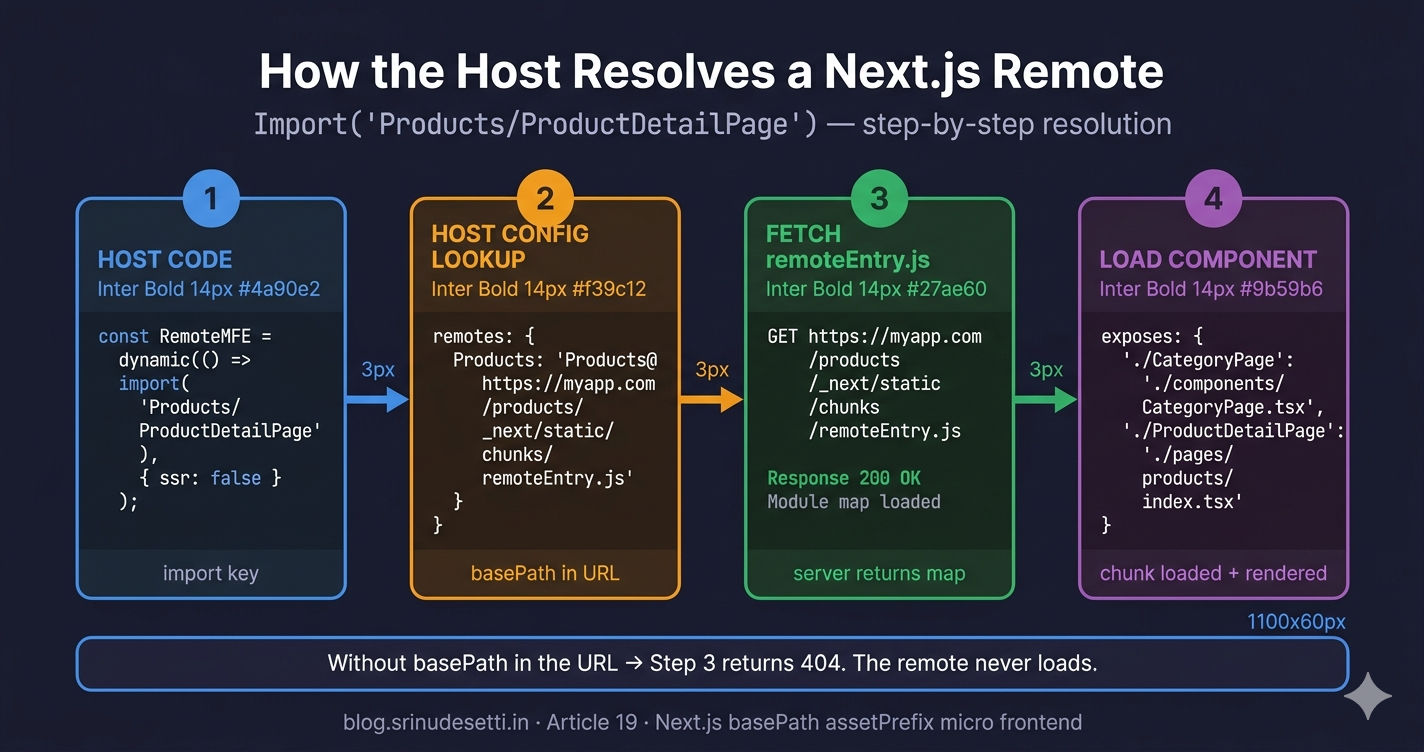
How exposes maps to host imports
// Products remote — exposes 2 components
exposes: {
  // A category listing page (e.g., /products/beauty, /products/skincare)
  './CategoryPage': './components/CategoryPage.tsx',

  // The main product detail page
  './ProductDetailPage': './pages/products/index.tsx',
},

// Content remote — exposes 7 components
exposes: {
  './FAQ': './components/FAQ',
  './TermsAndConditions': './components/TermsAndConditions',
  './PrivacyPolicy': './components/PrivacyPolicy',
  './RefundPolicy': './components/RefundPolicy',
  './TermsOfUse': './components/TermsOfUse',
  './GiftCards': './components/GiftCards',
  './SizeGuide': './components/SizeGuide/SizeGuide',
},

// The host imports these by MFE name + exposed key:
//   import('Products/CategoryPage')
//   import('Products/ProductDetailPage')
//   import('Content/FAQ')
//   import('Content/PrivacyPolicy')
//
// Module Federation resolves the import to:
//   1. Fetch remoteEntry.js from the remote URL
//   2. Look up the exposed key in the remote's module map
//   3. Load the actual chunk that contains the component
//   4. Return the component as a default export

How Next.js remote basePath affects exposed component resolution showing the remoteEntry.js fetch and module map lookup flow

Two important rules for the exposes map:

  1. Expose components, not pages with side effects. If the exposed page imports next/router at the top level, it crashes when rendered inside the host because the router context belongs to the host, not the remote. Wrap the page in a component that handles its own routing internally.

  2. Keep exposed keys stable. Changing './ProductDetailPage' to './ProductDetail' breaks every host that imports the old key. Treat exposed keys like a public API — rename them only with a migration plan.

How the Host Resolves Next.js Remotes

The host must include the remote's basePath in the remoteEntry.js URL. This is the critical link between the remote's basePath setting and the host's remotes configuration.

apps/Main/next.config.js
// apps/Main/next.config.js — How the host resolves Next.js remotes
// The host URL MUST include the basePath in the remote entry path.

remotes: {
  // React remotes — NO basePath, remoteEntry.js at root
  Auth: 'Auth@https://dev.myapp.com/auth/remoteEntry.js',
  Cart: 'Cart@https://dev.myapp.com/cart/remoteEntry.js',

  // Next.js remotes — basePath IS PART OF the URL
  // Products has basePath: '/products'
  //   → remoteEntry lives at /products/_next/static/chunks/remoteEntry.js
  Content: `Content@https://dev.myapp.com/content/_next/static/${
    isServer ? 'ssr' : 'chunks'
  }/remoteEntry.js`,

  Products: `Products@https://dev.myapp.com/products/_next/static/${
    isServer ? 'ssr' : 'chunks'
  }/remoteEntry.js`,
},

// URL breakdown for Products remote:
//
//   https://dev.myapp.com  /products  /_next/static/chunks  /remoteEntry.js
//   ──────────────────────  ────────  ────────────────────  ───────────────
//   domain                  basePath  Next.js asset path    federation entry
//
// Without basePath in the URL → 404 (file doesn't exist at root)

The URL structure for Next.js remotes is: domain + basePath + /_next/static/{ssr|chunks}/remoteEntry.js. Compare this to React remotes, which use: domain + publicPath + /remoteEntry.js.

remoteEntry.js path comparison
# remoteEntry.js location comparison

# React Remote (ModuleFederationPlugin):
/auth/remoteEntry.js
      ↑ publicPath: '/auth/'
# One file. Works in browser only. No SSR entry.

# Next.js Remote (NextFederationPlugin) with basePath: '/products':
/products/_next/static/chunks/remoteEntry.js    ← browser (CSR)
/products/_next/static/ssr/remoteEntry.js       ← server (SSR)
          ↑ basePath
# Two files. isServer picks the right one.
# NextFederationPlugin generates BOTH automatically.

# Why two files?
# - chunks/remoteEntry.js: runs in the browser, accesses window/document
# - ssr/remoteEntry.js: runs in Node.js during server-side rendering
# - React remotes only need the browser file (loaded with ssr: false)
# - Next.js remotes need BOTH for full SSR support

For a deep dive into the isServer toggle and why Next.js remotes need two remote entry files, see the upcoming SSR vs CSR in Next.js Module Federation article.

Shared Dependencies — Matching the Host

The remote's shared configuration must match the host's shared configuration exactly. If the host shares react as a singleton with eager: false but the remote uses eager: true, the shared dependency negotiation fails — the remote bundles its own React copy, breaking singleton state and doubling the bundle size.

Key rules for shared dependencies in Next.js remotes:

SettingValueWhy
singletontrueOnly one instance of React, Redux across all MFEs
requiredVersionfalse (core libs)Let Next.js manage React version internally
eagerfalsePrevents SSR hydration mismatch errors
strictVersiontrue (internal packages)Ensures exact version match for @myapp/store, @myapp/api
requiredVersion'1.0.0' (internal packages)Matches the host's pinned version

The remote does NOT include exposePages or enableImageLoaderFix in its extraOptions. Those options are host-only configurations. The remote only needs automaticAsyncBoundary: true to wrap its exposed modules for async loading.

Nginx Reverse Proxy for Next.js Remotes

Unlike React remotes (which produce static files served directly by Nginx), Next.js remotes run as standalone Node.js servers. Nginx acts as a reverse proxy, routing requests by path prefix to the correct backend.

nginx.conf
# Nginx reverse proxy — routing to Next.js remotes with basePath
# Each Next.js remote runs as a standalone Node.js server on its own port.

server {
    listen 443 ssl;
    server_name myapp.com;

    # Host application (Main) — port 5000
    location / {
        proxy_pass http://127.0.0.1:5000;
        proxy_set_header Host $host;
        proxy_set_header X-Real-IP $remote_addr;
    }

    # Products remote — basePath: '/products', port 5007
    # Matches /products and /products/* (pages + assets)
    location /products/ {
        proxy_pass http://127.0.0.1:5007;
        proxy_set_header Host $host;
        proxy_set_header X-Real-IP $remote_addr;
    }

    # Content remote — basePath: '/content', port 5006
    location /content/ {
        proxy_pass http://127.0.0.1:5006;
        proxy_set_header Host $host;
        proxy_set_header X-Real-IP $remote_addr;
    }

    # React remotes — static files served by Nginx directly
    location /auth/ {
        alias /var/www/mfe/auth/dist/;
        try_files $uri $uri/ /auth/index.html;
    }

    location /cart/ {
        alias /var/www/mfe/cart/dist/;
        try_files $uri $uri/ /cart/index.html;
    }
}

The Nginx location blocks must match the basePath values exactly. When a browser requests https://myapp.com/products/_next/static/chunks/remoteEntry.js, Nginx matches the /products/ prefix and proxies the request to the Products server on port 5007. The Products server (with basePath: '/products') recognizes the request and serves the file.

Deploying Next.js Remotes as Standalone Servers

Each Next.js remote is built with output: 'standalone' and deployed as an independent Node.js server (opens in a new tab). This produces a lightweight, self-contained build (~150MB vs ~500MB without standalone).

Terminal
# Building and running a Next.js remote in production

# 1. Build the standalone output
cd apps/Products
npm run build

# 2. The standalone output contains everything needed to run:
ls .next/standalone/
#   node_modules/    (only production deps, auto-pruned)
#   server.js        (the Node.js server entry point)
#   .next/           (compiled pages and assets)

# 3. Copy static assets (not included in standalone by default)
cp -r .next/static .next/standalone/.next/static
cp -r public .next/standalone/public

# 4. Start with PM2 for process management
pm2 start .next/standalone/server.js \
  --name "products-mfe" \
  --env PORT=5007

# 5. Or run directly with Node.js
PORT=5007 node .next/standalone/server.js

# The server respects basePath automatically:
#   http://localhost:5007/products/          → index page
#   http://localhost:5007/products/_next/... → assets
#   http://localhost:5007/                   → 404 (basePath enforced)

The standalone server automatically respects the basePath configuration. Requesting http://localhost:5007/ returns 404 — only /products/ routes are served. This is the correct behavior and confirms that basePath is working.
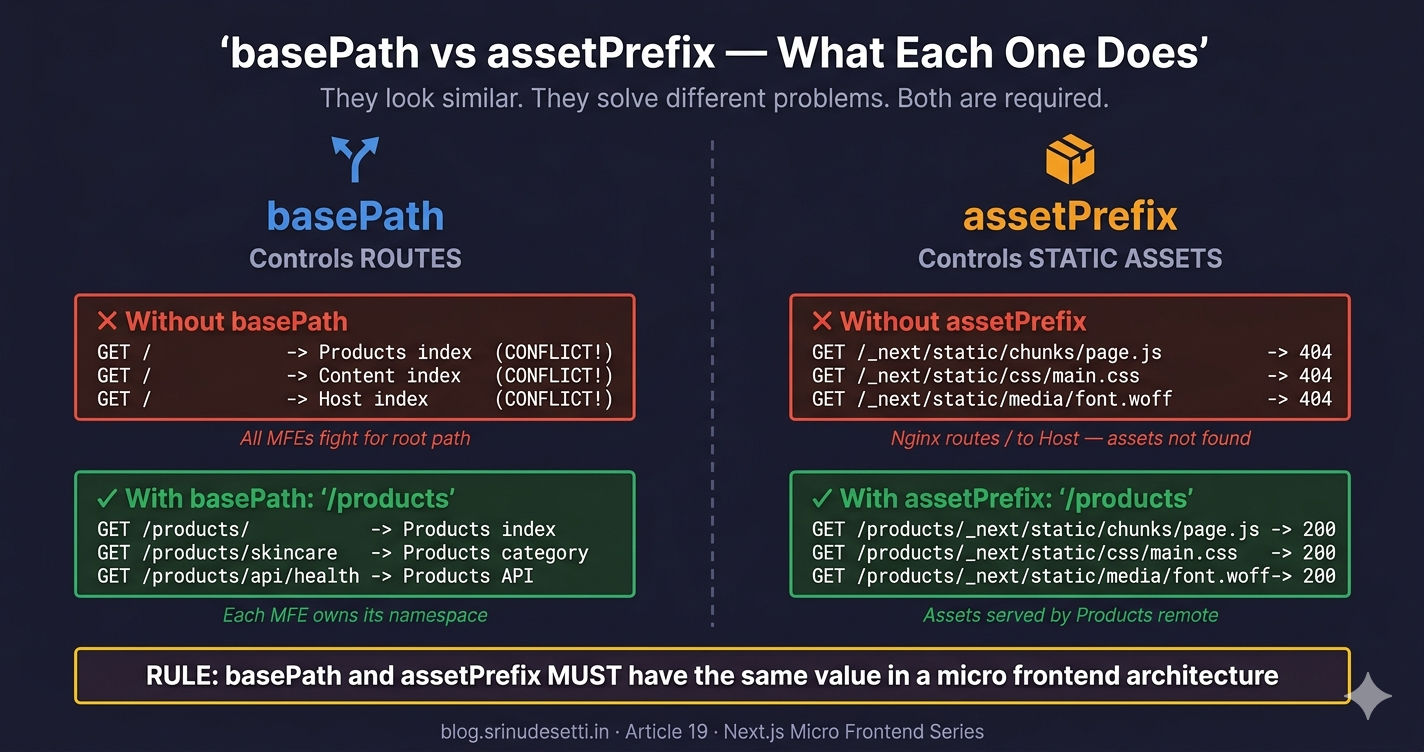
basePath and assetPrefix comparison diagram showing route prefix and asset URL prefix working together for Next.js remote micro frontends

Common Mistakes

  1. Setting basePath but forgetting assetPrefix — Pages load as unstyled HTML. Every CSS and JS file returns 404 because the browser requests assets from /_next/static/... instead of /products/_next/static/....

  2. Using different values for basePath and assetPrefix — Nginx routes /products/ traffic to the remote, but the remote's HTML references assets at a different path. Nothing loads correctly.

  3. Forgetting basePath in the host's remote URL — Writing Products@https://myapp.com/_next/static/chunks/remoteEntry.js instead of Products@https://myapp.com/products/_next/static/chunks/remoteEntry.js. The file does not exist at the root path.

  4. Missing output: 'standalone' — Without standalone, the build requires the full node_modules directory at runtime. Docker images become bloated and deployments fail when the production server lacks build-time dependencies.

  5. Using eager: true in the remote — Even if the host uses eager: false, one remote with eager: true can cause hydration errors across the entire application because shared modules load synchronously before the host's hydration cycle completes.

  6. Not including the basePath in Nginx location blocks — If Nginx has location /product/ instead of location /products/, requests never reach the remote server. The host receives a 404 for the remote entry and silently falls back to the error state.

What's Next

You now have two Next.js remote MFEs properly configured with basePath and assetPrefix, exposing components to the host, and deployed as standalone Node.js servers behind Nginx. The next article explains how SSR vs CSR works in Next.js Module Federation — why NextFederationPlugin generates two remote entry files, what the isServer flag actually does during webpack compilation, and how hydration works when mixing server-rendered Next.js remotes with client-only React remotes.

← Back to Next.js MFE Host App Setup

Continue to SSR vs CSR in Next.js Module Federation →


Frequently Asked Questions

What does basePath do in a Next.js remote micro frontend?

basePath prefixes every route in the Next.js application with a path segment. Setting basePath: '/products' means the app's index page is served at /products/ instead of /. All internal links, API routes, and page navigation automatically include the prefix. This prevents route conflicts when multiple Next.js MFEs run on the same domain — each MFE owns its own URL namespace.

What does assetPrefix do in a Next.js remote micro frontend?

assetPrefix prefixes every static asset URL (JavaScript chunks, CSS files, images, fonts) generated by Next.js. Setting assetPrefix: '/products' changes asset requests from /_next/static/chunks/page.js to /products/_next/static/chunks/page.js. Without assetPrefix, the browser requests assets from the root path where Nginx routes traffic to the host app — not the remote — causing 404 errors for every asset.

Do basePath and assetPrefix need to be the same value?

Yes, in a micro frontend architecture they should always match. basePath controls where routes are served and assetPrefix controls where assets are loaded from. If basePath is '/products' but assetPrefix is different or missing, Nginx routes /products/ traffic to the remote but the remote requests assets from the wrong path. Mismatched values cause pages to load with no styles, broken JavaScript, and missing images.

Why don't React remotes need basePath and assetPrefix?

React remotes built with ModuleFederationPlugin use webpack's publicPath setting instead. Setting publicPath: '/auth/' in webpack.config.js tells webpack to load all chunks from the /auth/ path. React MFEs produce static files (HTML, JS, CSS) that Nginx serves directly from a directory. Next.js MFEs run a Node.js server and generate assets dynamically, which is why they need the Next.js-specific basePath and assetPrefix configuration.

What happens if you forget assetPrefix but set basePath?

The pages load because basePath routes correctly, but every CSS file, JavaScript chunk, and image returns 404. The HTML renders unstyled with broken interactivity. This happens because Next.js generates asset URLs like /_next/static/chunks/page.js (without the prefix), but Nginx sends all root-path requests to the host app. The remote's assets only exist at /products/_next/static/... which requires assetPrefix: '/products' to generate the correct URLs.

How does the host resolve remoteEntry.js for Next.js remotes with basePath?

The host includes the basePath in the remote entry URL. For a Products remote with basePath '/products', the host config is: Products@https://myapp.com/products/_next/static/chunks/remoteEntry.js. The basePath becomes part of the URL path between the domain and /_next/static/. The isServer ternary switches between chunks (browser) and ssr (Node.js) paths. React remotes without basePath use a simpler URL: Auth@https://myapp.com/auth/remoteEntry.js.