Tailwind CSS in a Micro Frontend Monorepo — Setup Guide
Setting up Tailwind CSS works differently in a micro frontend monorepo than in a standard React app. Each MFE is an independent Webpack build with its own PostCSS pipeline — there is no single global CSS file that covers the entire project. You need a tailwind.config.js, a postcss.config.js, and a CSS entry file with @tailwind directives in every MFE app.
Already set up your monorepo? This guide builds on Webpack 5 Configuration for Micro Frontends. If you haven't configured Webpack yet, start there first.
This article covers the complete Tailwind CSS setup for a real-world MFE monorepo — from installing dependencies to configuring content paths, wiring PostCSS into Webpack, and avoiding the production purge trap that breaks styles silently.
Why Tailwind CSS Setup Is Different in a Micro Frontend Monorepo
In a standard React app, you install Tailwind once, create one config, and write one CSS file. In a micro frontend monorepo, the architecture changes everything:
- Each MFE builds independently — Webpack runs a separate build per app, so PostCSS (and Tailwind) must run per app
- Each MFE has its own source files — content paths must point to that app's
src/directory, not a global directory - CSS is NOT shared through Module Federation — Module Federation shares JavaScript at runtime, but CSS is compiled at build time
- Content path mistakes are silent — wrong paths cause missing classes in production but work fine in development
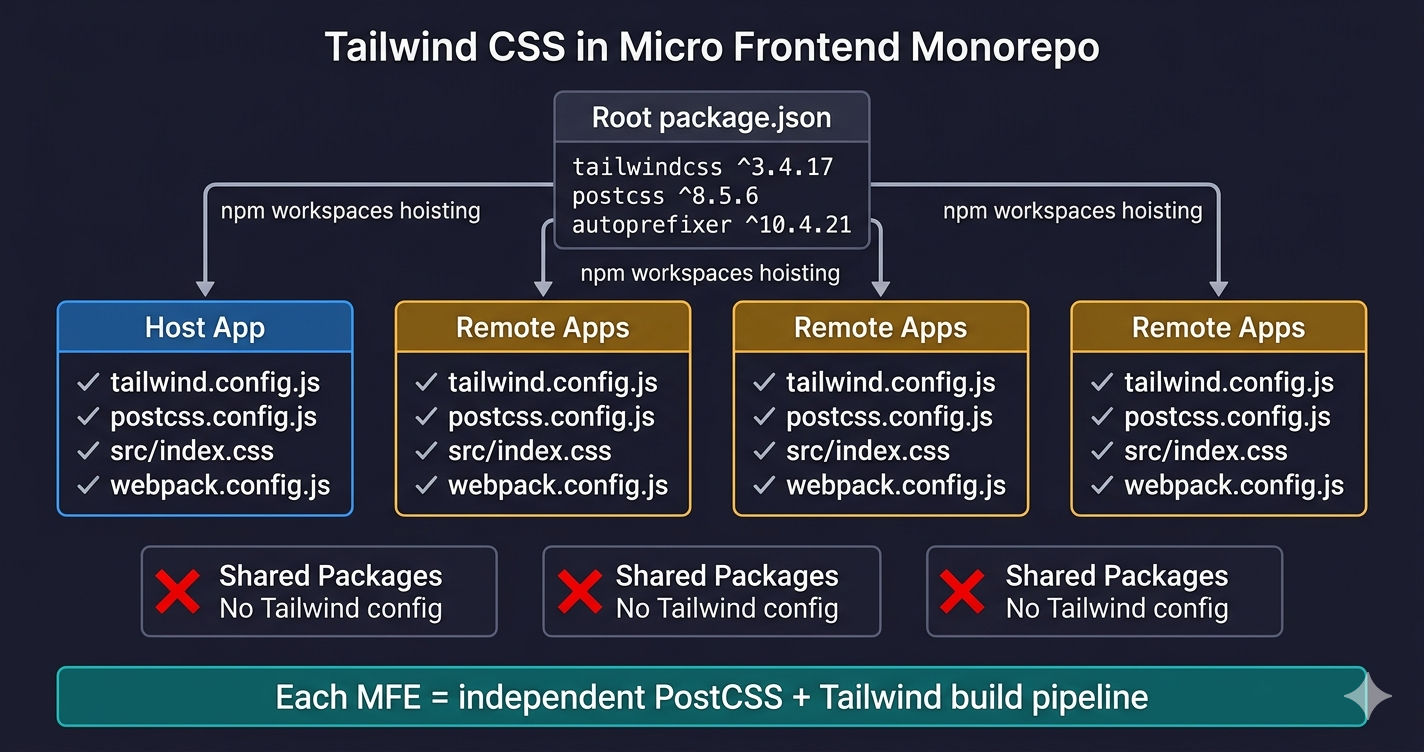
Key insight. Tailwind is a PostCSS plugin, not a runtime library. It runs at build time inside Webpack's postcss-loader. Since each MFE is a separate Webpack build, each MFE needs its own complete Tailwind toolchain.
Project Structure — Where Tailwind Files Live
Every MFE app has three Tailwind-related files: tailwind.config.js, postcss.config.js, and src/index.css. The shared packages in packages/ do not have Tailwind configs — they contain only JavaScript and are transpiled through the consuming MFE's Webpack build.
No shared Tailwind config at root. Unlike ESLint or TypeScript configs that can be extended from a root config, each MFE's Tailwind build runs in isolation. Placing a single tailwind.config.js at the monorepo root will not work — Webpack's postcss-loader resolves the config relative to each app's directory.
Step 1 — Install Tailwind CSS Dependencies
Tailwind CSS requires three packages: tailwindcss, postcss, and autoprefixer. In a monorepo with npm workspaces, you install them at both the root level and the app level.
Root package.json — Hoisted Dependencies
The root devDependencies ensure Tailwind packages are hoisted to the top-level node_modules/. This avoids duplicate installations across apps.
Per-App package.json — Explicit Dependencies
Each app explicitly declares tailwindcss, postcss, postcss-loader, css-loader, mini-css-extract-plugin, and autoprefixer. This makes each MFE self-contained — it can be extracted from the monorepo and still build correctly.
Step 2 — Create tailwind.config.js Per MFE
The tailwind.config.js file tells Tailwind which files to scan for class names. The content paths differ between the host app and remote MFEs.
Why Content Paths Are Different
| Path | Host App | Remote MFE | Why |
|---|---|---|---|
./src/**/*.{js,jsx,ts,tsx} | Yes | Yes | Scan all components |
./src/index.html | Yes | Yes | Scan the HTML template |
./public/index.html | Yes | No | Host may have a public folder entry |
./index.html | Yes | No | Host's HtmlWebpackPlugin output |
Remote MFEs are loaded into the host at runtime — they don't serve their own HTML page in production. So they only need to scan their own src/ directory.
Step 3 — Create postcss.config.js Per MFE
Every MFE needs a postcss.config.js that registers the Tailwind and autoprefixer plugins. This file is identical across all MFEs:
Webpack's postcss-loader reads this file automatically. The loader resolves postcss.config.js relative to the CSS file being processed — so the config must live in the app's root directory, next to webpack.config.js.
Step 4 — Add @tailwind Directives to CSS
Each MFE needs a CSS entry file that imports Tailwind's base styles, components, and utilities.
The host app typically adds global font imports and CSS resets because it controls the page's base styles. Remote MFEs keep their CSS minimal — just the three @tailwind directives.
Import the CSS in Your JavaScript Entry Point
This import triggers Webpack's CSS loader pipeline: postcss-loader processes the @tailwind directives through PostCSS, which invokes the Tailwind plugin to generate the final CSS.
Step 5 — Wire PostCSS into Webpack
The Webpack config uses a three-loader chain to process CSS files: MiniCssExtractPlugin.loader → css-loader → postcss-loader. The CSS rule itself is identical in both local and production configs — the only difference is in the output filename and optimization settings.
How the CSS Loader Chain Works
The loaders execute right to left — postcss-loader runs first:
- postcss-loader — reads
postcss.config.js, runs Tailwind to generate CSS from@tailwinddirectives, runs autoprefixer to add vendor prefixes - css-loader — resolves
@importandurl()references, converts CSS to JavaScript modules - MiniCssExtractPlugin.loader — extracts the CSS into a separate
.cssfile instead of injecting it via JavaScript
Why MiniCssExtractPlugin instead of style-loader? In a micro frontend setup, style-loader injects CSS via JavaScript at runtime, which causes flash-of-unstyled-content (FOUC) when remotes load. MiniCssExtractPlugin generates actual CSS files that the browser loads as stylesheets — no FOUC.
How Module Federation Handles CSS
A common misconception is that CSS can be shared through Module Federation (opens in a new tab) like React or Redux. It cannot. Module Federation shares JavaScript modules at runtime — CSS is compiled at build time by PostCSS.
Each MFE generates its own CSS bundle. When the host loads a remote MFE, the browser downloads the remote's CSS file separately. This means:
- Duplicate utility classes are expected — if both host and remote use
bg-white, both CSS bundles contain that rule. This is fine — the browser deduplicates identical rules automatically. - CSS order matters — if two MFEs define conflicting custom CSS (not Tailwind utilities), the last-loaded MFE's styles win. Tailwind utilities don't conflict because identical class names produce identical output.
Optional — Shared Tailwind Preset for Consistent Theming
While each MFE needs its own tailwind.config.js, you can share theme values across all apps using Tailwind's presets feature (opens in a new tab). Create a shared preset in the configs/ folder:
Then import it in each MFE's config using the presets array:
This gives every MFE the same primary-500, danger-500, and font-sans values without duplicating theme definitions. Each MFE can still extend or override values in its own theme.extend block.
Optional — CSS Isolation with Prefix
If you need strict CSS isolation between MFEs — for example, when different teams own different remotes and might use conflicting custom classes — use Tailwind's prefix option:
Prefixes add verbosity. Every class name becomes longer (products-bg-white instead of bg-white). Most monorepos with a single team skip prefixes because consistent class names across MFEs are a feature, not a bug. Use prefixes only when teams work independently and need guaranteed isolation.
Configuration Differences at a Glance
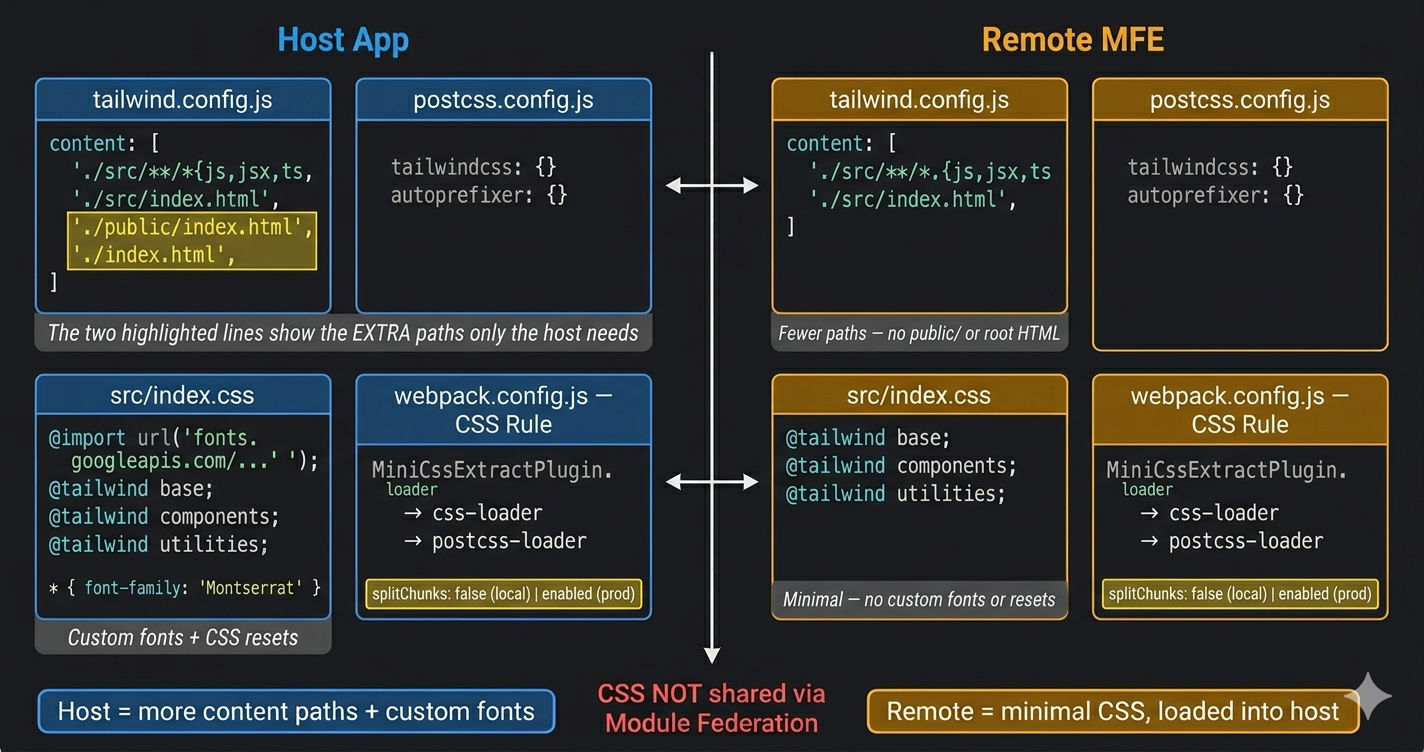
| Setting | Host App | Remote MFE |
|---|---|---|
tailwind.config.js | Per-app (own file) | Per-app (own file) |
postcss.config.js | Per-app (own file) | Per-app (own file) |
| Content paths | ./src/** + ./public/** + ./ | ./src/** + ./src/index.html |
@tailwind directives | src/index.css | src/index.css |
| CSS output | Own CSS bundle | Own CSS bundle |
| Webpack loader | postcss-loader | postcss-loader |
MiniCssExtractPlugin | Yes | Yes |
| CSS shared via MF? | No | No |
| Prefix (optional) | Not needed | Recommended for isolation |
splitChunks (local) | false | false |
splitChunks (production) | Enabled with vendor chunks | Enabled with vendor chunks |
| CSS filename (local) | [name].css | [name].css |
| CSS filename (production) | [name].[contenthash].css | [name].[contenthash].css |
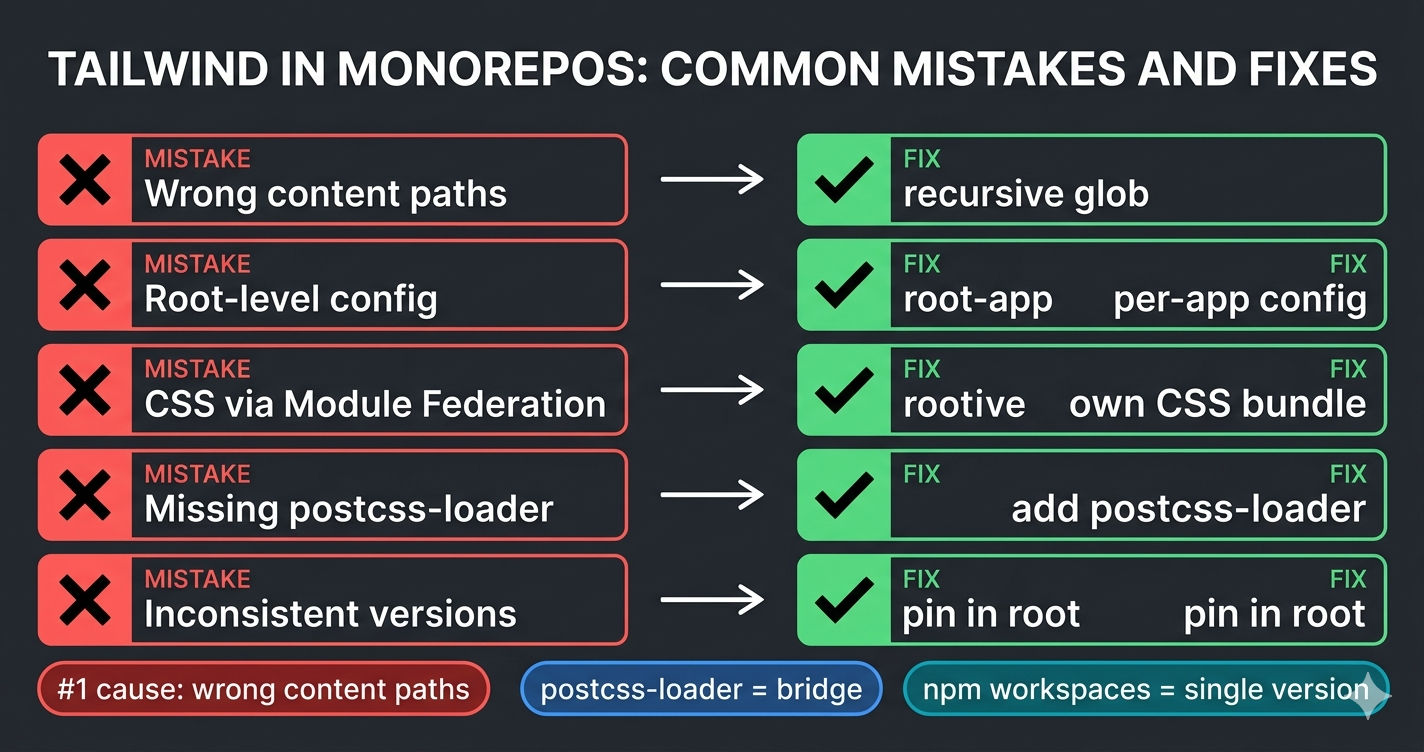
Common Tailwind CSS Mistakes in MFE Monorepos
1. Wrong Content Paths — Styles Disappear in Production
Tailwind v3+ purges unused classes automatically in production builds. If content paths miss files in subdirectories, those classes are removed from the CSS output. The symptom: everything looks correct in development (where purging is less aggressive) but classes vanish in production.
2. Placing tailwind.config.js at the Monorepo Root
Webpack's postcss-loader resolves the PostCSS config relative to the processed file's directory. A single tailwind.config.js at the root will not be found by apps in apps/products/. Each app must have its own config file in its own directory.
3. Trying to Share CSS via Module Federation
Module Federation's shared config handles JavaScript dependencies — not CSS files. Do not add tailwindcss or CSS file paths to the shared block. Each MFE compiles its own CSS at build time and includes it in its output bundle.
4. Forgetting postcss-loader in the Webpack CSS Rule
Without postcss-loader, the @tailwind base; @tailwind components; @tailwind utilities; directives in your CSS file are treated as plain text. The output CSS will be empty — no Tailwind classes will be generated.
5. Inconsistent Tailwind Versions Across MFEs
If one MFE uses Tailwind 3.3 and another uses 3.4, the generated CSS may differ slightly. Always pin the same version in the root package.json and let npm workspaces hoist a single copy.
Summary — Tailwind CSS Setup Checklist
| Step | File | Location | Purpose |
|---|---|---|---|
| 1 | package.json | Root + each app | Install tailwindcss, postcss, autoprefixer |
| 2 | tailwind.config.js | Each app | Define content paths for class scanning |
| 3 | postcss.config.js | Each app | Register tailwindcss and autoprefixer plugins |
| 4 | src/index.css | Each app | Add @tailwind base/components/utilities directives |
| 5 | webpack.config.js | Each app | Add postcss-loader to CSS rule chain |
| 6 | configs/tailwind-preset.js | Root (optional) | Share theme values across MFEs |
Each MFE is a self-contained Tailwind build. The config lives in the app, the CSS compiles in the app, and the output ships with the app. Module Federation handles JavaScript sharing — CSS is handled by PostCSS and Webpack independently.
What's Next?
← Back to Webpack 5 Configuration for Micro Frontends
Continue to Webpack Module Federation: Complete Guide →
Frequently Asked Questions
Why does each micro frontend need its own Tailwind config?
Each MFE is an independent Webpack build. Tailwind is a PostCSS plugin that runs at build time — it scans content paths to determine which CSS classes to generate. Since each MFE builds separately, each one needs its own tailwind.config.js with content paths pointing to its own source files.
Can I share a single Tailwind config across all micro frontends?
Not directly. Each MFE has its own build pipeline and needs its own tailwind.config.js. However, you can create a shared Tailwind preset in the packages/ or configs/ folder and import it using the presets option — this lets you share theme values like colors and fonts without duplicating them.
Why do Tailwind styles work in development but break in production?
Tailwind v3+ automatically purges unused classes based on the content paths in tailwind.config.js. If your content paths are too narrow and miss some component files, those classes will be purged in the production build. The fix is to ensure content paths use the recursive glob pattern like ./src/**/*.{js,jsx,ts,tsx}.
Is CSS shared through Module Federation like React or Redux?
No. Module Federation shares JavaScript modules at runtime — not CSS. Each MFE generates its own CSS bundle at build time using PostCSS and Tailwind. The CSS is included in the MFE's output files and loaded independently by the browser when the remote is consumed.
How do I prevent Tailwind class name conflicts between micro frontends?
Since all MFEs use the same default Tailwind class names (bg-white, p-4, text-lg), there are no conflicts — identical class names produce identical styles. If you need true isolation, use Tailwind's prefix option to add a unique prefix per MFE, like products-bg-white. However, most monorepos skip prefixes because consistent class names are a feature, not a bug.
Should Tailwind dependencies go in the root package.json or each app?
Both. Declare tailwindcss, postcss, and autoprefixer in the root package.json so they are hoisted by npm workspaces. Also declare them in each app's package.json to ensure each MFE explicitly lists its dependencies. This way, Webpack's postcss-loader resolves the packages correctly regardless of how the monorepo is installed.