Host & Remote Apps

Module Federation Host and Remote Apps

You understand how Module Federation works — the plugin, shared dependencies, and remoteEntry.js. But knowing the configuration is different from knowing how to architect the host and remote apps themselves. How should the host app load remotes? What happens when a remote fails? How do remotes run standalone during development? How do you guard routes with permissions?

This article covers the practical architecture of module federation host and remote apps — host app structure, remote app structure, error handling with React.lazy() and error boundaries, standalone remote development, permission-based routing, bi-directional federation, and the differences between React and Next.js host setups.

This is Article 13 in the Micro Frontend Architecture series. If you haven't set up Module Federation yet, start with Webpack Module Federation — Complete Guide.
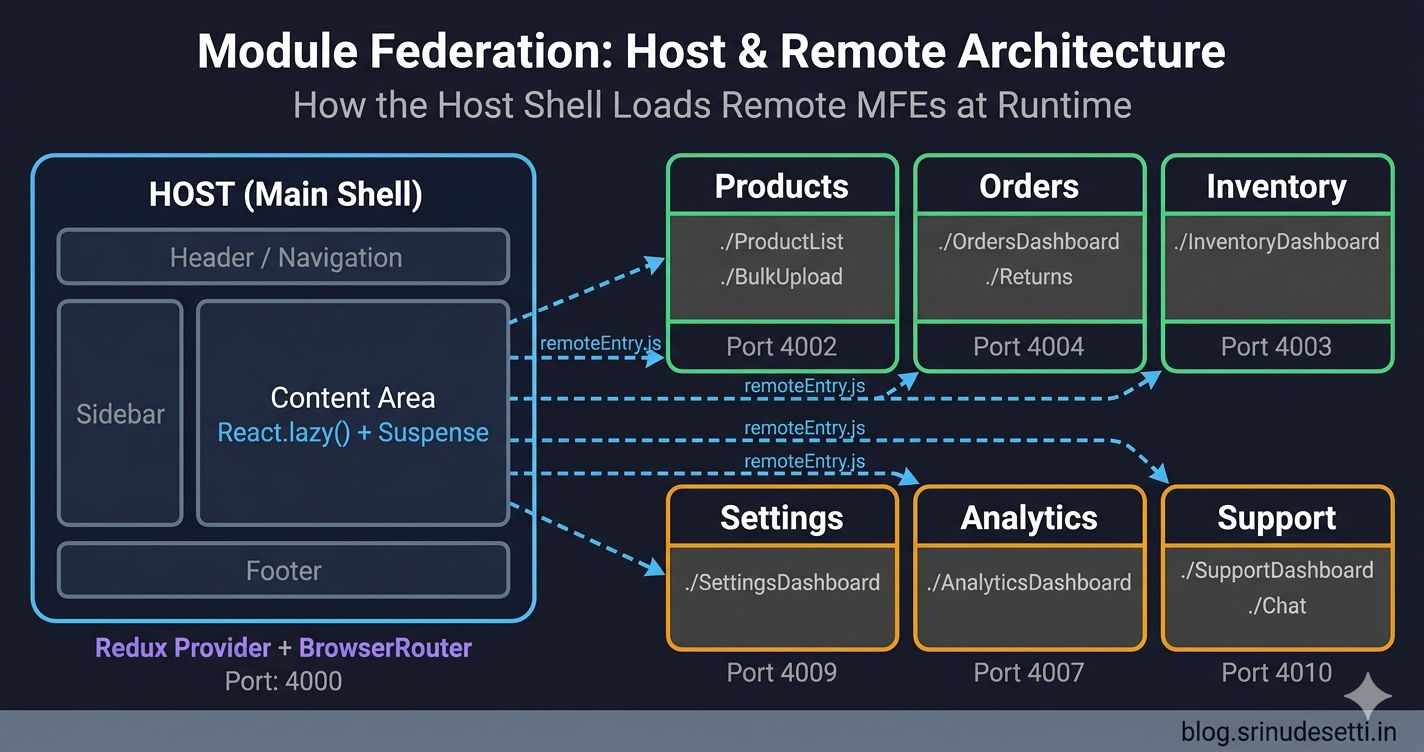
Module Federation host and remote app architecture diagram showing host shell loading multiple remote micro frontends

What Does Each App Do?

Before diving into code, understand the clear separation of responsibilities between the module federation host app and each remote app.

ResponsibilityHost AppRemote App
RoutingOwns top-level routesHandles sub-routes within its domain
LayoutProvides shell (header, sidebar, nav)Renders content area only
State storeCreates and provides Redux storeAccesses store via shared package
AuthenticationManages auth state and tokensReads auth state from shared store
Error handlingErrorBoundary wraps each remoteHandles internal component errors
Loading statesSuspense fallback for lazy loadingN/A (host controls this)
Shared dependenciesLoads React, Router, Redux firstUses host's shared instances
Build & deployDeploys as main entry pointDeploys independently to its own path
Dev serverRuns on port 4000 (main port)Runs on port 4001-4011
publicPath//mfe-name/ (e.g., /products/)

The host owns the shell — everything the user sees regardless of which page they are on (header, sidebar, navigation, footer). The remote owns the content — the actual feature UI that renders inside the host's content area. This separation mirrors the micro frontends concept described by Martin Fowler (opens in a new tab) — each team owns a vertical slice of the product. The host team never touches product code, and the products team never touches navigation.

The host is the orchestrator, not the owner. The host does not know what the Products component renders internally. It only knows that Products/ProductList exists and where to find it. This is the core principle of micro frontend architecture — independent team ownership.

Host App Structure

The host app is the main entry point. It contains the layout shell, routing configuration, Redux store provider, and React.lazy() imports for all remote modules.

apps/host/ — folder structure
apps/host/
├── src/
│   ├── index.js              # Async entry — import("./bootstrap")
│   ├── bootstrap.js          # React render + Provider + Router
│   ├── App.jsx               # Routes + React.lazy() remote loading
│   ├── index.html            # Single HTML shell
│   ├── components/
│   │   ├── Layout.jsx        # Shared layout (header, sidebar, footer)
│   │   ├── LoadingFallback.jsx # Suspense fallback for remote loading
│   │   └── ErrorBoundary.jsx # Catches remote load failures
│   └── routes/
│       └── AppRoutes.jsx     # All route definitions
├── webpack.config.js         # ModuleFederationPlugin with remotes
├── package.json
└── certs/                    # Local HTTPS certificates
    ├── localhost.pem
    └── localhost-key.pem

The Bootstrap Entry Point

Every Module Federation app — host or remote — needs the async bootstrap pattern. The host's bootstrap wraps the entire app with BrowserRouter, Redux Provider, and the shared store.

apps/host/src/index.js + bootstrap.js
// apps/host/src/index.js — async entry point
import("./bootstrap");

// apps/host/src/bootstrap.js — actual app rendering
import React from "react";
import { createRoot } from "react-dom/client";
import { Provider } from "react-redux";
import { BrowserRouter } from "react-router-dom";
import { store } from "@myapp/store";
import App from "./App.jsx";

const root = createRoot(document.getElementById("root"));
root.render(
  <BrowserRouter>
    <Provider store={store}>
      <App />
    </Provider>
  </BrowserRouter>
);

The import("./bootstrap") in index.js creates the async boundary. Webpack uses this gap to load all remoteEntry.js files, negotiate shared dependency versions, and resolve singletons — all before bootstrap.js executes. Without this pattern, you get the "Shared module is not available for eager consumption" error.

Host Webpack Configuration

The host's webpack.config.js defines the remotes object — a map of every MFE the host can consume. The URLs are completely different between local development and production.

apps/host/webpack.config.js
const path = require("path");
const HtmlWebpackPlugin = require("html-webpack-plugin");
const { ModuleFederationPlugin } = require("webpack").container;

module.exports = {
  mode: "development",
  entry: path.resolve(__dirname, "src", "index.js"),
  output: {
    path: path.resolve(__dirname, "dist"),
    filename: "[name].bundle.js",
    publicPath: "/",
  },
  devServer: {
    port: 4000,
    hot: true,
    historyApiFallback: true,
    https: {
      key: "./certs/localhost-key.pem",
      cert: "./certs/localhost.pem",
    },
    headers: {
      "Access-Control-Allow-Origin": "*",
    },
  },
  plugins: [
    new ModuleFederationPlugin({
      name: "Host",
      // Host does NOT expose anything — it only consumes
      // No "filename" or "exposes" needed
      remotes: {
        Products: "Products@https://localhost:4002/remoteEntry.js",
        Orders: "Orders@https://localhost:4004/remoteEntry.js",
        Inventory: "Inventory@https://localhost:4003/remoteEntry.js",
        Settings: "Settings@https://localhost:4009/remoteEntry.js",
        Analytics: "Analytics@https://localhost:4007/remoteEntry.js",
        Onboarding: "Onboarding@https://localhost:4001/remoteEntry.js",
        Pricing: "Pricing@https://localhost:4005/remoteEntry.js",
        Earnings: "Earnings@https://localhost:4006/remoteEntry.js",
        Reports: "Reports@https://localhost:4008/remoteEntry.js",
        Reviews: "Reviews@https://localhost:4011/remoteEntry.js",
        Support: "Support@https://localhost:4010/remoteEntry.js",
      },
      shared: {
        react: { singleton: true, requiredVersion: "^18.3.1" },
        "react-dom": { singleton: true, requiredVersion: "^18.3.1" },
        "react-router-dom": { singleton: true, requiredVersion: "^7.1.5" },
        "@reduxjs/toolkit": { singleton: true, requiredVersion: "^2.6.0" },
        "react-redux": { singleton: true, requiredVersion: "^9.2.0" },
        "@myapp/store": { singleton: true, requiredVersion: "0.0.1" },
      },
    }),
    new HtmlWebpackPlugin({
      template: path.resolve(__dirname, "src", "index.html"),
    }),
  ],
  optimization: {
    splitChunks: false,
  },
}
⚠️

The host does NOT need filename or exposes. The host only consumes remotes — it does not expose anything. Only remote apps need filename: "remoteEntry.js" and exposes. If the host also needs to expose modules (bi-directional federation), see the bi-directional section below.

Loading Remotes with React.lazy() and Error Handling

The host uses React.lazy() to dynamically import remote modules. Each import includes a .catch() handler that returns a fallback component when the remote is unavailable — this prevents the entire host from crashing if one MFE is down.

apps/host/src/App.jsx
// apps/host/src/App.jsx — loading all remotes with React.lazy()
import React, { lazy, Suspense } from "react";
import { Routes, Route } from "react-router-dom";
import Layout from "./components/Layout";
import LoadingFallback from "./components/LoadingFallback";

// Each React.lazy() call maps to a remote's exposed module
// Webpack resolves "Products/ProductList" using the remotes config
const ProductList = lazy(() =>
  import("Products/ProductList").catch((err) => {
    console.error("Failed to load ProductList", err);
    return { default: () => <div>Products module unavailable</div> };
  })
);

const OrdersDashboard = lazy(() =>
  import("Orders/OrdersDashboard").catch((err) => {
    console.error("Failed to load OrdersDashboard", err);
    return { default: () => <div>Orders module unavailable</div> };
  })
);

const InventoryDashboard = lazy(() =>
  import("Inventory/InventoryDashboard").catch((err) => {
    console.error("Failed to load InventoryDashboard", err);
    return { default: () => <div>Inventory module unavailable</div> };
  })
);

const SettingsDashboard = lazy(() =>
  import("Settings/SettingsDashboard").catch((err) => {
    console.error("Failed to load SettingsDashboard", err);
    return { default: () => <div>Settings module unavailable</div> };
  })
);

const OnboardingApp = lazy(() =>
  import("Onboarding/OnboardingApp").catch((err) => {
    console.error("Failed to load OnboardingApp", err);
    return { default: () => <div>Onboarding module unavailable</div> };
  })
);

function App() {
  return (
    <Layout>
      <Suspense fallback={<LoadingFallback />}>
        <Routes>
          <Route path="/products/*" element={<ProductList />} />
          <Route path="/orders/*" element={<OrdersDashboard />} />
          <Route path="/inventory/*" element={<InventoryDashboard />} />
          <Route path="/settings/*" element={<SettingsDashboard />} />
          <Route path="/onboarding/*" element={<OnboardingApp />} />
        </Routes>
      </Suspense>
    </Layout>
  );
}

The .catch() on each import() is critical. Without it, a single remote failing to load crashes the entire host application. With .catch(), the failed remote renders a fallback message while every other route continues working normally. This pattern follows the React documentation on code splitting (opens in a new tab) — each lazy-loaded boundary is an independent failure domain.

Remote App Structure

Each remote app is a fully independent React application that can run on its own. It exposes specific components to the host via Module Federation's exposes config, but it also has its own App.jsx, routing, and HTML template for standalone development.

apps/products/ — folder structure
apps/products/
├── src/
│   ├── index.js              # Async entry — import("./bootstrap")
│   ├── bootstrap.js          # Standalone dev render
│   ├── App.jsx               # Standalone dev wrapper
│   ├── index.html            # Standalone dev HTML
│   └── components/
│       ├── ProductList.jsx   # ← Exposed to host
│       ├── ProductCatalog.jsx # ← Exposed to host
│       ├── ProductImages.jsx  # ← Exposed to host
│       ├── BulkUpload.jsx    # ← Exposed to host
│       └── SingleUpload.jsx  # ← Exposed to host
├── webpack.config.js         # ModuleFederationPlugin with exposes
└── package.json

Remote Webpack Configuration

The remote's webpack.config.js uses the same ModuleFederationPlugin but with exposes instead of remotes. The publicPath is the most critical difference between local and production — it must match the URL the host uses to fetch chunks.

apps/products/webpack.config.js
const path = require("path");
const HtmlWebpackPlugin = require("html-webpack-plugin");
const { ModuleFederationPlugin } = require("webpack").container;

module.exports = {
  mode: "development",
  entry: path.resolve(__dirname, "src", "index.js"),
  output: {
    path: path.resolve(__dirname, "dist"),
    filename: "[name].bundle.js",
    publicPath: "https://localhost:4002/",
    clean: true,
  },
  devServer: {
    port: 4002,
    hot: true,
    historyApiFallback: true,
    https: {
      key: "./certs/localhost-key.pem",
      cert: "./certs/localhost.pem",
    },
    headers: {
      "Access-Control-Allow-Origin": "*",
    },
  },
  plugins: [
    new ModuleFederationPlugin({
      name: "Products",
      filename: "remoteEntry.js",
      exposes: {
        "./ProductList": "./src/components/ProductList",
        "./ProductCatalog": "./src/components/ProductCatalog",
        "./ProductImages": "./src/components/ProductImages",
        "./BulkUpload": "./src/components/BulkUpload",
        "./SingleUpload": "./src/components/SingleUpload",
      },
      shared: {
        react: { singleton: true, requiredVersion: "^18.3.1" },
        "react-dom": { singleton: true, requiredVersion: "^18.3.1" },
        "react-router-dom": { singleton: true, requiredVersion: "^7.1.5" },
        "@myapp/store": { singleton: true, requiredVersion: "0.0.1" },
      },
    }),
    new HtmlWebpackPlugin({
      template: path.resolve(__dirname, "src", "index.html"),
    }),
  ],
  optimization: {
    splitChunks: false,
  },
}

Standalone Remote Development

Every remote needs its own bootstrap.js and App.jsx for standalone development. This lets developers work on the Products MFE without running the host or any other MFE — the remote renders its own UI on https://localhost:4002.

apps/products/src/bootstrap.js
// apps/products/src/index.js — async entry (same pattern as host)
import("./bootstrap");

// apps/products/src/bootstrap.js — standalone development render
import React from "react";
import { createRoot } from "react-dom/client";
import { Provider } from "react-redux";
import { BrowserRouter } from "react-router-dom";
import { store } from "@myapp/store";
import App from "./App.jsx";

// This only runs when the remote is loaded directly (standalone dev)
// When loaded by the host, the host's bootstrap handles rendering
const root = createRoot(document.getElementById("root"));
root.render(
  <BrowserRouter>
    <Provider store={store}>
      <App />
    </Provider>
  </BrowserRouter>
);
apps/products/src/App.jsx
// apps/products/src/App.jsx — standalone development wrapper
import React from "react";
import { Routes, Route } from "react-router-dom";
import ProductList from "./components/ProductList";
import ProductCatalog from "./components/ProductCatalog";
import ProductImages from "./components/ProductImages";
import BulkUpload from "./components/BulkUpload";
import SingleUpload from "./components/SingleUpload";

// This App.jsx is ONLY used when running the remote standalone
// When loaded by the host, the host imports individual components
// from the exposes config — this file is never used in that case

function App() {
  return (
    <div>
      <h1>Products MFE  Standalone Development</h1>
      <Routes>
        <Route path="/" element={<ProductList />} />
        <Route path="/catalog" element={<ProductCatalog />} />
        <Route path="/images" element={<ProductImages />} />
        <Route path="/bulk-upload" element={<BulkUpload />} />
        <Route path="/single-upload" element={<SingleUpload />} />
      </Routes>
    </div>
  );
}

The standalone App.jsx is never loaded by the host. When the host imports Products/ProductList, it only gets the ProductList component from exposes — the remote's App.jsx, bootstrap.js, and routing are completely ignored. The standalone setup exists purely for independent development and testing.

Error Handling — ErrorBoundary for Remote Components

The .catch() on React.lazy() handles load failures (network errors, remote not running). But what about render failures — when the remote loads successfully but throws an error during rendering? For this, you need a React Error Boundary.

apps/host/src/components/ErrorBoundary.jsx
// apps/host/src/components/ErrorBoundary.jsx
import React from "react";

class ErrorBoundary extends React.Component {
  constructor(props) {
    super(props);
    this.state = { hasError: false, error: null };
  }

  static getDerivedStateFromError(error) {
    return { hasError: true, error };
  }

  componentDidCatch(error, errorInfo) {
    console.error("Remote MFE failed to render:", error, errorInfo);
  }

  render() {
    if (this.state.hasError) {
      return (
        <div style={{ padding: "20px", textAlign: "center" }}>
          <h2>Something went wrong loading this module</h2>
          <p>{this.state.error?.message}</p>
          <button onClick={() => this.setState({ hasError: false })}>
            Try Again
          </button>
        </div>
      );
    }
    return this.props.children;
  }
}

Combining ErrorBoundary with Suspense

The recommended pattern wraps each remote in both ErrorBoundary (for render errors) and Suspense (for loading states):

apps/host/src/App.jsx — ErrorBoundary + Suspense
// apps/host/src/App.jsx — wrapping each remote with ErrorBoundary
import React, { lazy, Suspense } from "react";
import { Routes, Route } from "react-router-dom";
import ErrorBoundary from "./components/ErrorBoundary";
import LoadingFallback from "./components/LoadingFallback";

const ProductList = lazy(() => import("Products/ProductList"));
const OrdersDashboard = lazy(() => import("Orders/OrdersDashboard"));

function App() {
  return (
    <Routes>
      <Route
        path="/products/*"
        element={
          <ErrorBoundary>
            <Suspense fallback={<LoadingFallback />}>
              <ProductList />
            </Suspense>
          </ErrorBoundary>
        }
      />
      <Route
        path="/orders/*"
        element={
          <ErrorBoundary>
            <Suspense fallback={<LoadingFallback />}>
              <OrdersDashboard />
            </Suspense>
          </ErrorBoundary>
        }
      />
    </Routes>
  );
}
apps/host/src/components/LoadingFallback.jsx
// apps/host/src/components/LoadingFallback.jsx
import React from "react";

function LoadingFallback() {
  return (
    <div style={{ padding: "40px", textAlign: "center" }}>
      <div className="shimmer-block" style={{
        width: "100%",
        height: "200px",
        background: "linear-gradient(90deg, #f0f0f0 25%, #e0e0e0 50%, #f0f0f0 75%)",
        backgroundSize: "200% 100%",
        animation: "shimmer 1.5s infinite",
        borderRadius: "8px",
      }} />
      <p style={{ color: "#888", marginTop: "16px" }}>
        Loading module...
      </p>
    </div>
  );
}

export default LoadingFallback;

The loading order is: ErrorBoundarySuspenseRemoteComponent. If the import fails, .catch() provides a fallback. If the import succeeds but rendering fails, ErrorBoundary catches the error. If the import is in progress, Suspense shows the loading shimmer.

Permission-Based Remote Loading

In real-world applications, not every user should access every MFE. The host can guard remote routes with a permission check that reads from the shared Redux store.

apps/host/src/components/PermissionRoute.jsx
// apps/host/src/components/PermissionRoute.jsx
import React from "react";
import { useSelector } from "react-redux";

function PermissionRoute({ permissionKey, children }) {
  const permissions = useSelector(
    (state) => state.auth.user?.permissions || []
  );

  if (!permissions.includes(permissionKey)) {
    return (
      <div style={{ padding: "40px", textAlign: "center" }}>
        <h2>Access Denied</h2>
        <p>You do not have permission to view this module.</p>
      </div>
    );
  }

  return children;
}

export default PermissionRoute;
permission-route-usage.jsx
// Using PermissionRoute to guard remote MFE access
import PermissionRoute from "./components/PermissionRoute";

const ProductList = lazy(() =>
  import("Products/ProductList").catch(() => ({
    default: () => <div>Products module unavailable</div>,
  }))
);

// In your routes:
<Route
  path="/products/*"
  element={
    <PermissionRoute permissionKey="products_view">
      <ErrorBoundary>
        <Suspense fallback={<LoadingFallback />}>
          <ProductList />
        </Suspense>
      </ErrorBoundary>
    </PermissionRoute>
  }
/>

The PermissionRoute component reads the user's permissions from the shared Redux store and either renders the remote or shows an access denied message. The remote MFE itself does not need to know about permissions — the host handles it before the remote even loads.
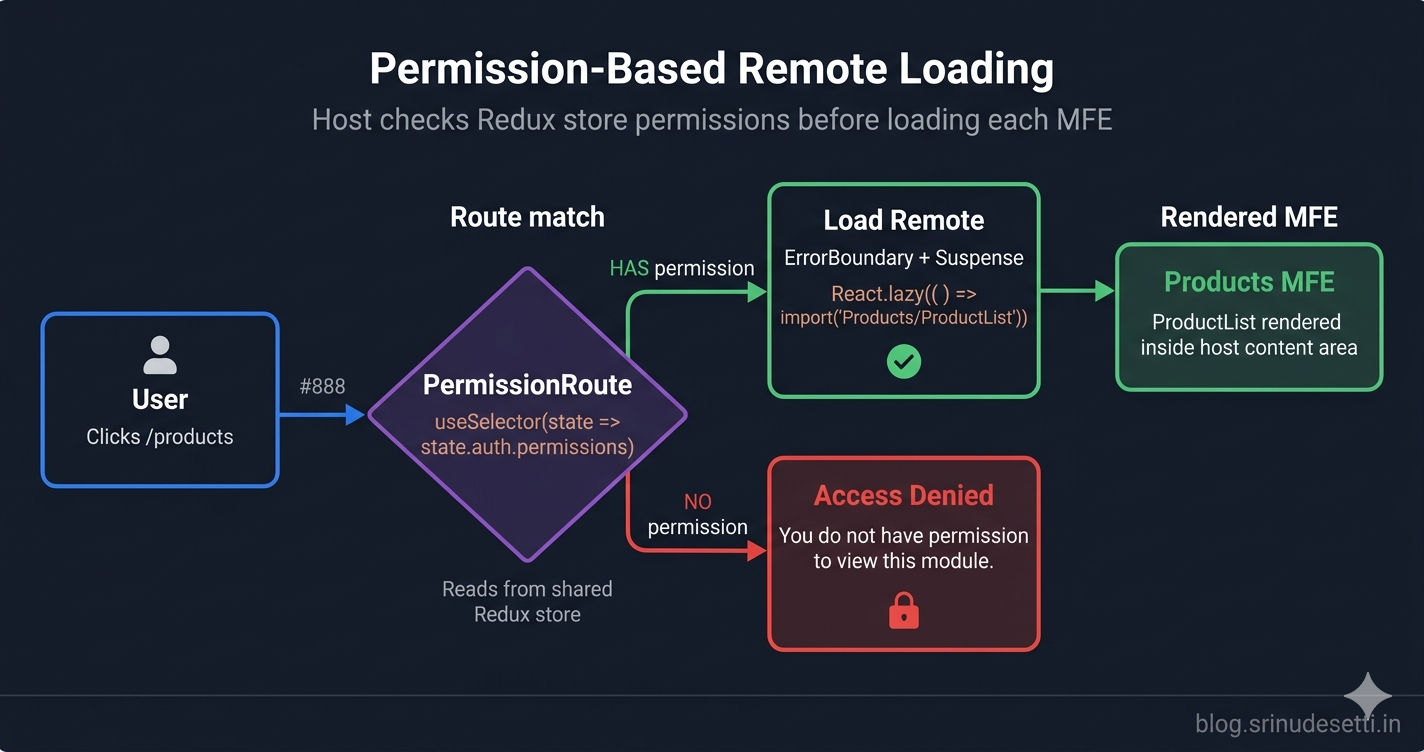
Permission-based routing diagram showing host checking user permissions before loading remote micro frontend modules

Bi-Directional Federation

A Module Federation app can be both a host and a remote at the same time. This is useful when an MFE needs to consume components from other remotes while also exposing its own components.

bi-directional-config.js
// An app can be BOTH a host AND a remote simultaneously
// This is called bi-directional federation

const { ModuleFederationPlugin } = require("webpack").container;

new ModuleFederationPlugin({
  name: "Dashboard",
  filename: "remoteEntry.js",  // ← This makes it a REMOTE

  // Exposes modules for other apps to consume
  exposes: {
    "./AnalyticsWidget": "./src/components/AnalyticsWidget",
    "./RevenueChart": "./src/components/RevenueChart",
  },

  // Consumes modules from other remotes — this makes it a HOST
  remotes: {
    Products: "Products@https://localhost:4002/remoteEntry.js",
    Orders: "Orders@https://localhost:4004/remoteEntry.js",
  },

  shared: {
    react: { singleton: true, requiredVersion: "^18.3.1" },
    "react-dom": { singleton: true, requiredVersion: "^18.3.1" },
  },
})

// Now another app can do: import("Dashboard/AnalyticsWidget")
// AND Dashboard can do: import("Products/ProductList")

In this example, Dashboard exposes AnalyticsWidget and RevenueChart (making it a remote), while also consuming Products/ProductList and Orders/OrdersDashboard (making it a host). Any other app can import("Dashboard/AnalyticsWidget") to embed the analytics widget in their own UI.

⚠️

Avoid circular dependencies. If App A consumes App B and App B consumes App A, you create a circular remote dependency. Webpack can handle this at the config level, but it creates complex load ordering issues. If two apps need each other's components, extract the shared components into a third "shared components" remote instead.

React Host vs Next.js Host

If your host app uses Next.js instead of React, the remote loading pattern changes. Next.js uses next/dynamic with ssr: false instead of React.lazy(), and the plugin is NextFederationPlugin instead of ModuleFederationPlugin.

Next.js host — loading remotes
// Next.js Host — loading remotes with next/dynamic (NOT React.lazy)
import dynamic from "next/dynamic";

// next/dynamic with ssr: false — prevents server-side rendering
// of the remote component (remote JS only exists in the browser)
const RemoteLogin = dynamic(() => import("Auth/Login"), {
  ssr: false,
  loading: () => <div>Loading login...</div>,
});

const RemoteShoppingBag = dynamic(() => import("Cart/ShoppingBag"), {
  ssr: false,
  loading: () => <div>Loading cart...</div>,
});

const RemoteProductPage = dynamic(
  () => import("Products/ProductDetailPage").catch(() => ({
    default: () => <div>Product page unavailable</div>,
  })),
  { ssr: false }
);

// Usage in a Next.js page component:
export default function LoginPage() {
  return (
    <div>
      <RemoteLogin />
    </div>
  );
}

Key Differences

FeatureReact Host (Webpack)Next.js Host (NextFederationPlugin)
PluginModuleFederationPluginNextFederationPlugin
Config filewebpack.config.jsnext.config.js
Loading remotesReact.lazy() + Suspensenext/dynamic with ssr: false
Error handling.catch() on import().catch() on import()
SSR supportNo (client-side only)Yes (with isServer check)
Remote entry path (React)/mfe-name/remoteEntry.js/mfe-name/remoteEntry.js
Remote entry path (Next)N/A/mfe/_next/static/chunks/remoteEntry.js
Shared deps configshared: { react: ... }shared: { react: ... }
Extra optionsNoneexposePages, enableImageLoaderFix
Bootstrap patternRequired (index.jsbootstrap.js)Not needed (Next.js handles it)

The most important difference: Next.js remotes serve remoteEntry.js at _next/static/chunks/remoteEntry.js (not at the root path like React remotes). The Next.js host config uses an isServer check to load ssr/remoteEntry.js during server rendering and chunks/remoteEntry.js in the browser. This is covered in detail in a dedicated Next.js Module Federation article later in this series.

Development Workflow

Running a Module Federation setup locally requires starting the host and whichever remotes you are working on. You do not need to run all remotes — the host's .catch() fallback handles missing ones gracefully.

development-workflow.sh
# Development workflow — running host + remotes together

# Terminal 1: Start the host app
cd apps/host
npm start
# → Host running at https://localhost:4000

# Terminal 2: Start the Products remote
cd apps/products
npm start
# → Products running at https://localhost:4002

# Terminal 3: Start the Orders remote
cd apps/orders
npm start
# → Orders running at https://localhost:4004

# With Turborepo — start everything in one command:
npx turbo run dev
# → All MFEs start in parallel on their assigned ports

# The host loads remoteEntry.js from each running remote
# If a remote is NOT running, the host shows the .catch() fallback

Production Deployment

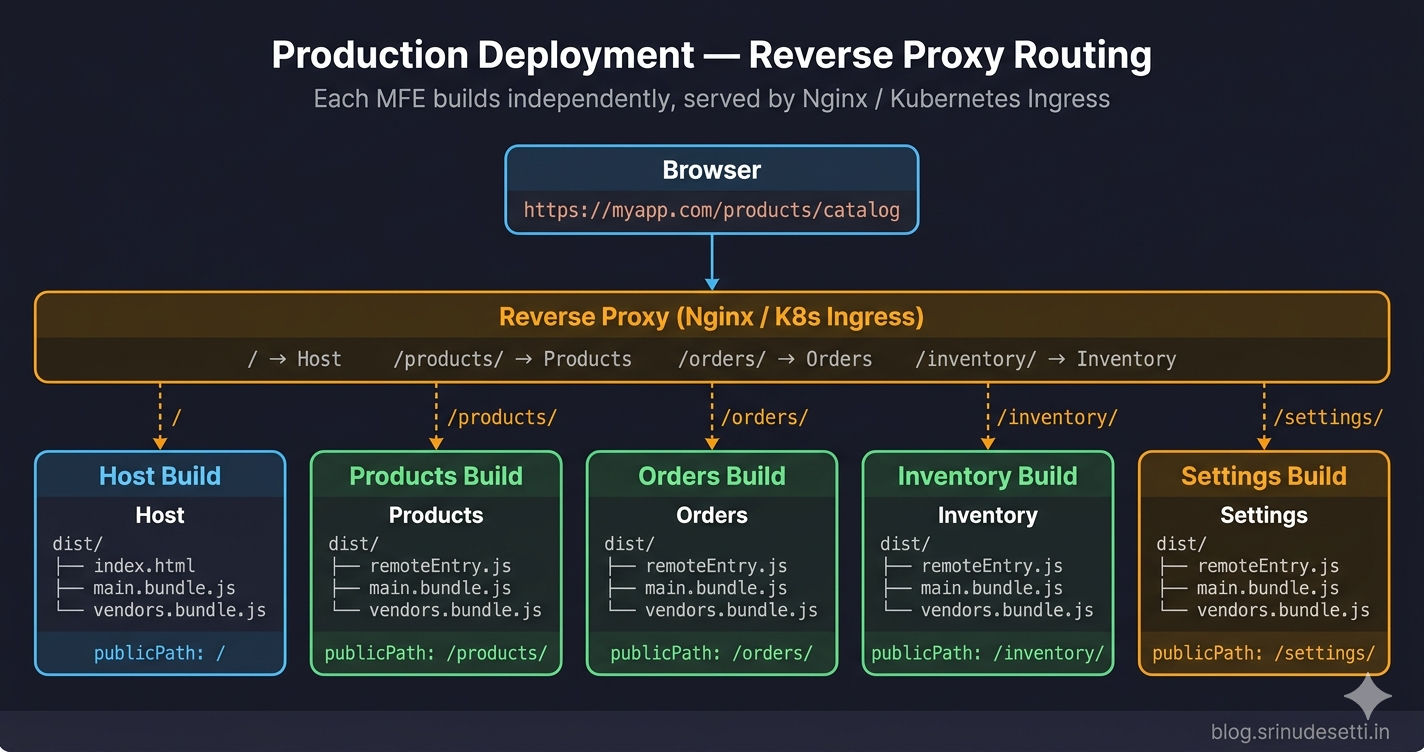
In production, each MFE builds independently and deploys to its own URL path. A reverse proxy (Nginx, Kubernetes Ingress, or CDN) routes requests to the correct MFE's static assets based on the URL path.
production-deploy.sh
# Production deployment — each MFE builds independently

# Step 1: Build each remote
cd apps/products && npm run build
# → Output: apps/products/dist/
#   ├── remoteEntry.js          (manifest)
#   ├── main.bundle.js          (app code)
#   └── vendors.bundle.js       (shared vendor chunks)

cd apps/orders && npm run build
# → Output: apps/orders/dist/

# Step 2: Build the host
cd apps/host && npm run build
# → Output: apps/host/dist/

# Step 3: Serve via reverse proxy (Nginx / Kubernetes Ingress)
# /                 → apps/host/dist/
# /products/        → apps/products/dist/
# /orders/          → apps/orders/dist/
# /inventory/       → apps/inventory/dist/

# Each MFE's publicPath must match its serving path:
# products webpack: publicPath: "/products/"
# Nginx: location /products/ { root /srv/products/dist; }

Production deployment architecture showing reverse proxy routing to independent micro frontend builds

The key rule: each remote's publicPath (opens in a new tab) must exactly match the URL path that the reverse proxy maps to its assets. If the reverse proxy serves Products at /products/, the Products webpack config must have publicPath: "/products/". A mismatch causes chunk loading errors — remoteEntry.js loads but subsequent chunk requests go to the wrong path.

What's Next?

← Back to Webpack Module Federation — Complete Guide

Continue to Shared Dependencies & Singleton Pattern →


Frequently Asked Questions

What is the difference between a host and remote in Module Federation?

The host is the main application shell that defines which remotes to consume via the remotes config. It owns top-level routing, layout, authentication, and the Redux store. The remote is an independently built app that exposes specific components via the exposes config. The host loads these components at runtime using React.lazy() or next/dynamic. Each remote can also run standalone for independent development.

Can an app be both a host and a remote at the same time?

Yes — this is called bi-directional federation. An app can define both remotes (to consume other apps) and exposes with a filename (to let other apps consume its modules). For example, a Dashboard app can expose analytics widgets while consuming product and order components from other MFEs.

How do you handle errors when a remote app fails to load?

Use two layers of error handling. First, add a .catch() callback to the dynamic import inside React.lazy() — this handles network failures and returns a fallback component. Second, wrap each remote with a React ErrorBoundary component — this catches runtime rendering errors after the module loads successfully. Together, they ensure the host app never crashes when a remote is unavailable.

Why does the remote need its own bootstrap.js for standalone development?

The bootstrap.js file in a remote app serves two purposes. First, it creates the async boundary that Module Federation requires to negotiate shared dependencies before app code runs. Second, it provides a standalone render setup (ReactDOM.createRoot, BrowserRouter, Redux Provider) so developers can run and test the remote independently on its own port without needing the host running.

What is the difference between React.lazy() and next/dynamic for loading remote modules?

React.lazy() is used in React host apps with Webpack's ModuleFederationPlugin. It requires a Suspense wrapper for loading states. next/dynamic is used in Next.js host apps with NextFederationPlugin. It must include ssr: false to prevent server-side rendering of remote components (since remote JS only exists in the browser). Both support .catch() for error handling, but next/dynamic has a built-in loading option instead of requiring a separate Suspense component.

How does publicPath differ between host and remote in production?

The host app typically uses publicPath: '/' since it serves as the main entry point at the root domain. Each remote uses publicPath: '/mfe-name/' (e.g., /products/, /orders/) matching the reverse proxy route that serves its static assets. In local development, the host uses publicPath: '/' while remotes use publicPath: 'https://localhost:PORT/' with their assigned dev server port.