Micro Frontend vs Microservices: Key Differences
Micro Frontend vs Microservices is one of the most commonly confused comparisons in modern software architecture. Both patterns split a monolith into smaller, independent pieces — but they operate on completely different layers of the stack. Microservices decompose the backend. Micro Frontends decompose the frontend. Understanding this distinction is critical before you decide which pattern to adopt — or whether you need both.
In this article, you'll learn what Microservices architecture is, how it differs from Micro Frontend, how they connect in a real production system with code examples, and when to use each approach.
What is Microservices Architecture?
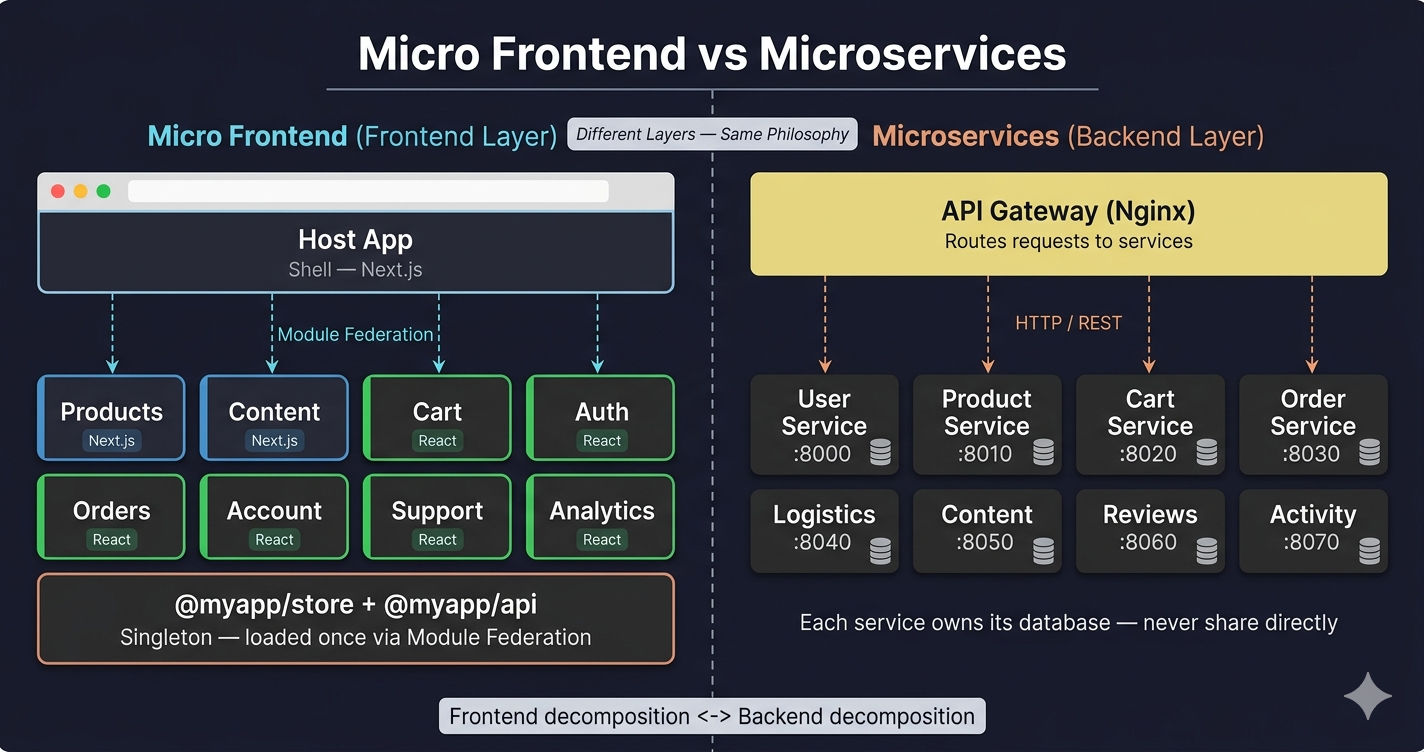
Microservices is a backend architecture pattern where a large backend application is decomposed into small, independent services — each responsible for a single business domain, with its own database, deployment pipeline, and API.
Instead of one monolithic backend handling everything (users, products, cart, orders, payments, logistics), each domain becomes a standalone service:
| Microservice | Responsibility | Port |
|---|---|---|
| User Service | Authentication, profiles, sessions | 8000 |
| Product Service | Product catalog, categories, search | 8010 |
| Cart Service | Cart, checkout, coupons | 8020 |
| Order Service | Order placement, tracking | 8030 |
| Logistics Service | Shipping, delivery, pincode | 8040 |
| Content Service | CMS, banners, FAQs, media | 8050 |
| Reviews Service | Ratings and reviews | 8060 |
| Activity Service | Analytics, events, logs | 8070 |
Each service runs as a separate process, has its own database (or schema), and exposes a REST API or gRPC interface. Services communicate with each other over the network — never by sharing a database directly.
For a deeper understanding of Microservices, read Martin Fowler's original article on Microservices (opens in a new tab).
What is Micro Frontend Architecture?
Micro Frontend is a frontend architecture pattern where a large frontend application is decomposed into small, independent applications — each responsible for a single UI domain, loaded at runtime by a Host (shell) application using Webpack Module Federation (opens in a new tab).
Instead of one monolithic frontend rendering all pages (products, cart, orders, account, support), each domain becomes a standalone frontend application:
| Micro Frontend | Responsibility | Framework |
|---|---|---|
| Host App | Shell, routing, layout | Next.js |
| Products MFE | Product pages, search | Next.js |
| Content MFE | CMS pages, banners | Next.js |
| Cart MFE | Shopping bag, checkout | React |
| Orders MFE | Order history, tracking | React |
| Account MFE | Profile, addresses, wishlist | React |
| Auth MFE | Login, signup, OTP | React |
| Support MFE | Help center, tickets | React |
Each MFE is a separate application with its own package.json, Webpack or Next.js config, build pipeline, and deployment. The Host app loads them at runtime via remoteEntry.js files.
New to Micro Frontend? Read What is Micro Frontend Architecture? for the complete introduction.
Side-by-Side Comparison
Here's the fundamental difference between Micro Frontend and Microservices:
| Feature | Micro Frontend | Microservices |
|---|---|---|
| Layer | Frontend (UI) | Backend (API) |
| What it splits | User interface into MFE apps | Business logic into services |
| Language | JavaScript, TypeScript (React, Next.js) | Any — Node.js, Python, Java, Go |
| Communication | Module Federation, shared store, events | HTTP/REST, gRPC, message queues |
| Loading | Runtime (browser loads remoteEntry.js) | Network (HTTP calls between services) |
| Deployment | Static files (HTML/JS/CSS) or SSR containers | Backend containers (Docker + Kubernetes) |
| Database | None (frontend has no database) | Each service owns its database |
| Shared state | Redux store via Module Federation singleton | None — services are stateless |
| Discovery | Module Federation remote URLs | Service registry, DNS, Kubernetes Service |
| Scaling | Scale MFE static assets via CDN | Scale service containers via Kubernetes |
| Dev server | Each MFE runs on its own localhost port | Each service runs on its own port |
| Build tool | Webpack, Turborepo | Docker, CI/CD pipelines |
| Gateway | Nginx routes to MFE static files | API Gateway routes to service endpoints |
| Team ownership | Frontend team owns a UI domain | Backend team owns a business domain |
Key insight: Micro Frontend and Microservices are not competing patterns — they are complementary. One decomposes the frontend, the other decomposes the backend. Many production systems use both together.
How They Work Together
In a fully decomposed system, the architecture looks like this:
- User visits the website → Nginx serves the Host app
- Host loads MFE → Module Federation loads the Products MFE at runtime
- MFE makes API call → Products MFE calls
/product-service/api/v1/products - API Gateway routes → Nginx forwards the request to the Product microservice
- Microservice responds → Product Service queries its database and returns JSON
- MFE renders → Products MFE displays the product data in React components
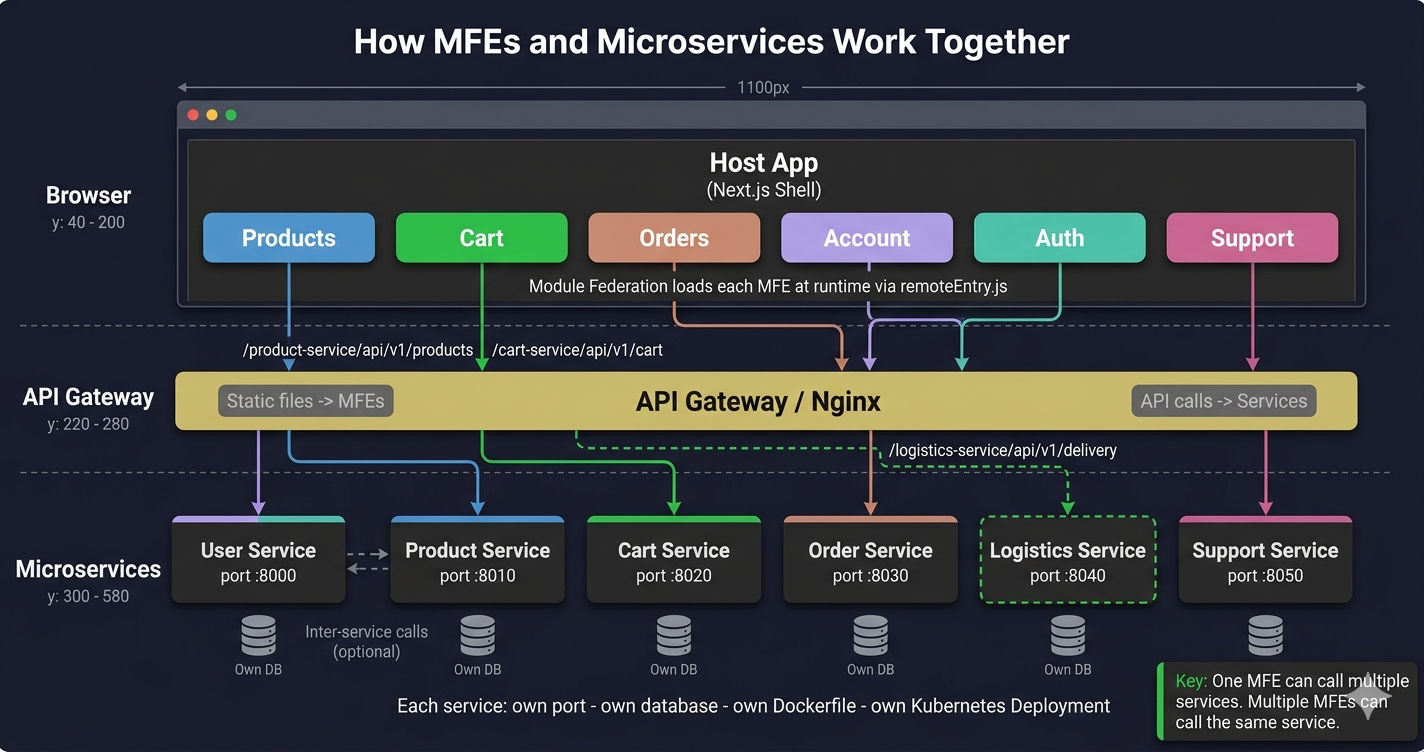
Each Micro Frontend maps to one or more backend Microservices:
| Micro Frontend | Calls These Microservices |
|---|---|
| Products MFE | Product Service, Reviews Service |
| Cart MFE | Cart Service, Logistics Service |
| Orders MFE | Order Service, Logistics Service |
| Account MFE | User Service |
| Auth MFE | User Service |
| Content MFE | Content Service |
| Support MFE | Support Service |
The API Config Pattern
In production MFE applications, a shared API config maps each business domain to its backend microservice. Every MFE uses this config to route API calls to the correct service.
Shared API Layer (All MFEs → All Microservices)
All Micro Frontends share a single axios (opens in a new tab) instance via Module Federation singleton. This shared API layer handles JWT tokens, automatic token refresh on 401 errors, and error handling — so no MFE manages auth logic individually.
The pattern is the same across different MFE portals, but the refresh endpoint differs based on the user type (customer, seller, admin):
Why a shared API package? Without it, every MFE would implement its own token management, refresh logic, and error handling — leading to duplicated code and inconsistent behavior. The shared @myapp/api package solves this once for all MFEs. Read more in MFE Communication Patterns.
Each MFE Calls Its Microservice
With the shared API layer and API config in place, each MFE makes API calls to its corresponding microservice through clean, domain-specific functions. Notice how a single MFE can call multiple microservices — Cart MFE calls both the Cart Service and the Logistics Service:
How MFE Configs Connect to Microservices
The Module Federation config determines how MFEs load each other at runtime — but it also controls how the shared API package reaches microservices. The @myapp/api package is declared as a singleton in Module Federation, meaning all MFEs use the exact same axios instance with the same interceptors and token state.
Local Development and Production configs are fundamentally different. Locally, each MFE runs on its own localhost port with HTTPS certificates and CORS headers. In production, Nginx routes each path to the correct MFE's static files. The shared API package connects to microservices the same way in both — but the MFE remote URLs change completely.
React MFE Host (Webpack — ModuleFederationPlugin)
Next.js MFE Host (NextFederationPlugin)
The Next.js Host is completely different from the React Host. It uses NextFederationPlugin (not ModuleFederationPlugin), has basePath/assetPrefix for routing, checks isServer for SSR vs client-side remoteEntry paths, and includes Content Security Policy headers that whitelist the microservice API domain.
Key Differences Between React and Next.js MFE Configs
| Aspect | React MFE (Webpack) | Next.js MFE |
|---|---|---|
| Plugin | ModuleFederationPlugin | NextFederationPlugin |
| Config file | webpack.config.js | next.config.js |
| remoteEntry path | /remoteEntry.js (root) | static/chunks/remoteEntry.js |
| SSR support | No | Yes (isServer check) |
| Remote URLs (local) | https://localhost:PORT/remoteEntry.js | N/A (uses Next.js dev server) |
| Remote URLs (prod) | /path/remoteEntry.js | https://domain/path/_next/static/chunks/remoteEntry.js |
| Routing | publicPath: '/products/' | basePath: '/products' + assetPrefix |
| CSP headers | None | Full CSP whitelisting microservice domains |
| Image optimization | None | images.remotePatterns for CDN |
| Shared deps | requiredVersion: '^18.2.0' (pinned) | requiredVersion: false, eager: false (flexible) |
| splitChunks | Manual (disabled local, enabled prod) | Handled by Next.js |
| HTTPS (local) | Manual cert setup (localhost.pem) | Built into Next.js dev server |
| Extra options | None | exposePages, enableImageLoaderFix, automaticAsyncBoundary |
For a deeper dive into these configs, read MFE Folder Structure which covers the complete monorepo layout.
What Does a Microservice Look Like?
Each backend Microservice is a standalone Express.js (opens in a new tab) application. It handles only its own domain routes, manages its own database, and exposes a health check endpoint for Kubernetes (opens in a new tab) liveness probes. The CORS whitelist is critical — it must allow requests from all MFE origins (both local dev ports and production domains).
Key characteristics every microservice shares:
- Single responsibility — each service handles only its own domain endpoints
- CORS whitelist — allows requests from MFE origins (localhost ports for dev, production domains for prod)
- Health check —
/healthendpoint for Kubernetes readiness/liveness probes, checking database connectivity - Own port — each service runs independently (8000, 8010, 8020, 8030…)
- Own database — connects to its own MongoDB instance (not shared with other services)
- Custom headers — accepts
x-device-info,x-guest-id,x-service-keyfrom MFE requests
Dockerized Microservice
Each microservice runs in its own Docker (opens in a new tab) container with a multi-stage build for minimal image size, non-root user for security, and a health check for Kubernetes.
Running MFEs + Microservices Together
In development, you need to run both the MFE applications and the backend microservices. A docker-compose.yml file orchestrates everything — MFE dev servers, microservice containers, API Gateway (Nginx), and the database.
In production, the same components run as separate Kubernetes (opens in a new tab) Deployments with independent scaling, health checks, and rolling updates.
Anti-Pattern: Direct API Calls vs Shared API Package
One of the most common mistakes when combining MFE with Microservices is having each MFE create its own API instance. This leads to duplicated auth logic, token refresh race conditions, and inconsistent error handling.
Can You Use Micro Frontends Without Microservices?
Yes — absolutely. Micro Frontend architecture is completely independent of your backend architecture. You can:
- Split your frontend into MFEs while keeping a monolithic backend
- Have all MFEs call a single REST API
- Use MFEs with a serverless backend (AWS Lambda, Cloudflare Workers)
- Use MFEs with a BaaS (Firebase, Supabase)
The frontend decomposition does not require backend decomposition. Many teams adopt MFE first because their frontend scaling problems (merge conflicts, slow builds, deployment bottlenecks) appear before backend scaling problems.
Can You Use Microservices Without Micro Frontends?
Yes. This is actually the more common scenario. Many companies run Microservices on the backend while their frontend remains a monolith. The frontend is a single React or Next.js application that calls different microservice endpoints through an API Gateway.
This works fine when:
- The frontend team is small (1–5 developers)
- The frontend codebase is manageable
- There's no need for independent frontend deployments
You only need Micro Frontends when the frontend itself becomes a bottleneck — too many developers, too many features, too-slow builds, or too many merge conflicts.
Common Misconceptions
"Micro Frontend is just Microservices for the frontend"
Partially true, but misleading. The philosophy is similar — decompose a monolith into independent, deployable units. But the implementation is fundamentally different:
- Microservices communicate over HTTP/gRPC (network calls between servers)
- Micro Frontends communicate via shared Redux store, callback props, and events (in-browser JavaScript)
- Microservices each have their own database
- Micro Frontends have no database — they render UI and call APIs
- Microservices are backend containers (Docker + Kubernetes)
- Micro Frontends are static files (HTML, JS, CSS served via CDN or Nginx) or SSR containers
"You need Microservices before Micro Frontends"
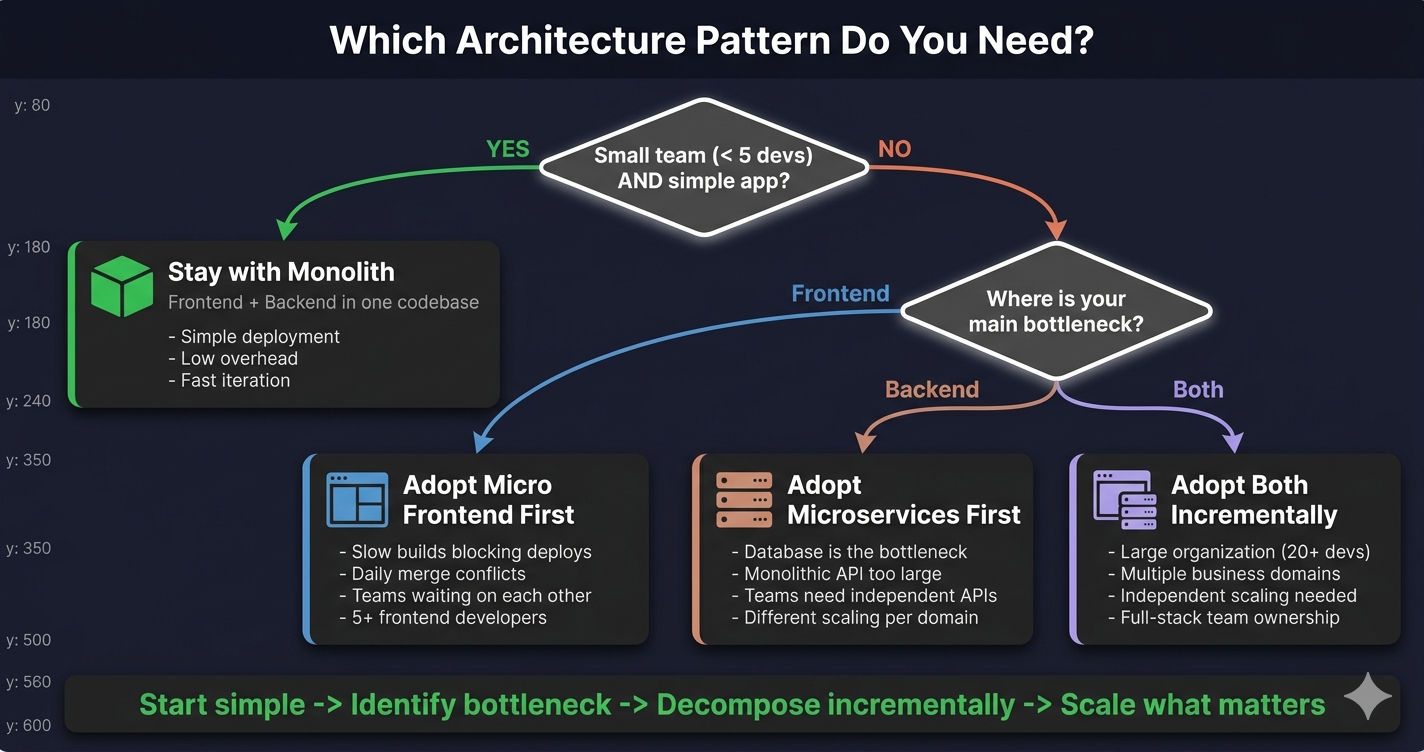
False. There's no dependency between them. Adopt whichever pattern solves your current bottleneck:
| Bottleneck | Solution |
|---|---|
| Backend teams blocked by monolithic API | Adopt Microservices first |
| Frontend teams blocked by monolithic UI | Adopt Micro Frontends first |
| Both teams blocked | Adopt both incrementally |
"Each Micro Frontend must have its own backend"
False. An MFE is a frontend application — it calls backend APIs but doesn't run a server. Multiple MFEs can call the same microservice, and a single MFE can call multiple microservices. The mapping is flexible.
When to Use Each Pattern
| Scenario | Recommendation |
|---|---|
| Small team, simple app | Neither — use a monolith (both frontend and backend) |
| Large frontend team, small backend | Micro Frontend only |
| Small frontend team, large backend | Microservices only |
| Large teams on both sides | Both — Micro Frontend + Microservices |
| High traffic with domain-specific load patterns | Both — scale frontend and backend independently |
| MVP or early-stage startup | Neither — start with monolith, migrate when needed |
Do NOT adopt both patterns simultaneously from day one. Start with a monolith. Identify your bottleneck. Adopt the pattern that solves it. Then add the other when the need arises. Over-engineering early is a common and expensive mistake.
Real-World Adoption Patterns
| Company | Frontend | Backend | Notes |
|---|---|---|---|
| Amazon | Micro Frontend | Microservices | Each product team owns both frontend and backend |
| Spotify | Micro Frontend | Microservices | Independent squads per feature area |
| Netflix | Monolith (React) | Microservices | Backend decomposed first, frontend stayed unified |
| IKEA | Micro Frontend | Microservices | Independent teams for catalog, cart, checkout |
| Most startups | Monolith | Monolith | Too small for either decomposition pattern |
Notice the pattern — Microservices is typically adopted before Micro Frontends. Backend scaling problems (database bottlenecks, deployment frequency, team conflicts) tend to appear earlier than frontend scaling problems. Micro Frontends are adopted later, as the frontend team and application complexity grow.
For more on when to adopt Micro Frontend specifically, read Micro Frontend vs Monolith: How to Choose.
Summary
| Aspect | Micro Frontend | Microservices |
|---|---|---|
| Decomposes | Frontend UI | Backend API |
| Communication | Module Federation, Redux, events | HTTP, gRPC, message queues |
| Deployment | Static files or SSR containers | Backend containers |
| Database | None | Each service owns its database |
| Scaling | CDN + Nginx | Kubernetes pods |
| Team | Frontend engineers | Backend engineers |
| Works without the other? | Yes | Yes |
| Best together? | Yes — full-stack decomposition | Yes — full-stack decomposition |
Micro Frontend and Microservices are not competitors — they are partners. One handles the frontend, the other handles the backend. Together, they enable full-stack independent deployment, team autonomy, and domain-driven scaling.
What's Next?
Now that you understand the difference between Micro Frontend and Microservices, the next article compares Micro Frontend vs Single Page Application (SPA) — helping you decide whether your frontend needs decomposition or if a traditional SPA is the better fit.
← Back to Micro Frontend Folder Structure
Continue to Micro Frontend vs SPA →
Frequently Asked Questions
Are Micro Frontends and Microservices the same thing?
No. Microservices decompose the backend into independent services that communicate over HTTP, gRPC, or message queues. Micro Frontends decompose the frontend into independent applications loaded at runtime via Module Federation. They operate on different layers of the stack but follow the same principle — split a monolith into independently deployable units.
Can you use Micro Frontends without Microservices?
Yes. Micro Frontend architecture is completely independent of your backend architecture. You can split your frontend into MFEs while keeping a monolithic backend, or have all MFEs call a single REST API. The frontend decomposition does not require backend decomposition.
How do Micro Frontends and Microservices work together?
In a full-stack decomposition, each Micro Frontend calls its corresponding Microservice through an API Gateway. For example, the Products MFE calls the Product Service, the Cart MFE calls the Cart Service, and the Orders MFE calls the Order Service. A shared API layer with centralized auth interceptors handles token management across all MFEs.
Is Microservices frontend or backend?
Microservices is a backend architecture pattern. Each microservice is a standalone backend application (Node.js, Python, Java, Go) that handles a specific business domain — user authentication, product catalog, order processing, etc. Micro Frontend is the frontend equivalent, splitting the UI into independent applications.
Which should I adopt first — Micro Frontend or Microservices?
It depends on where your bottleneck is. If backend teams are blocked by a monolithic API, start with Microservices. If frontend teams are blocked by a monolithic UI, start with Micro Frontends. Many companies adopt Microservices first because backend scaling hits the wall earlier, then add Micro Frontends as the frontend team grows.
What are the 3 C's of Microservices?
The 3 C's of Microservices are: Componentization (each service is an independent, replaceable component), Communication (services communicate over lightweight protocols like HTTP/REST or gRPC), and Coordination (services coordinate via API Gateways, service discovery, and orchestration tools like Kubernetes). These same principles apply to Micro Frontends at the UI layer.