Published: April 18, 2026 · 12 min read
Lazy Loading Micro Frontend Components with React Suspense
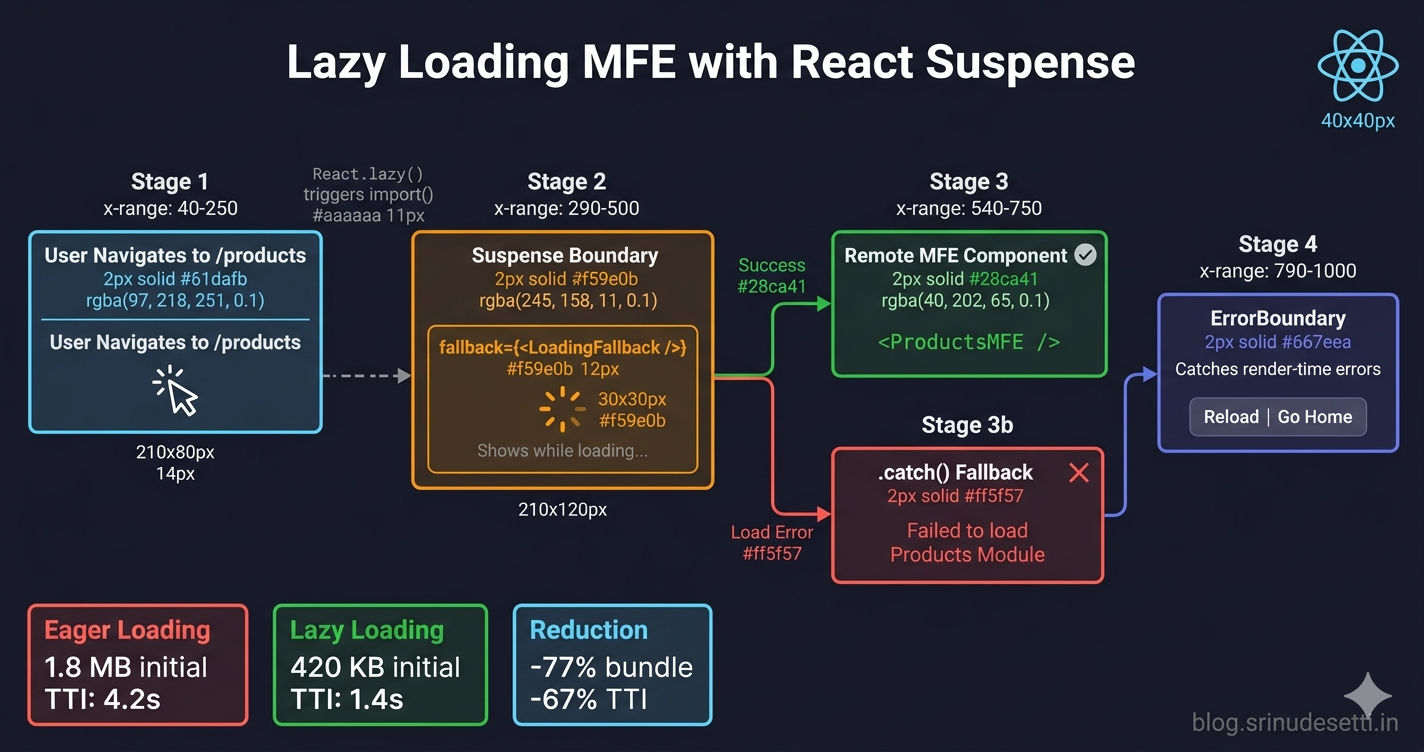
Your host application loads nine remote micro frontends via Module Federation. The user logs in, lands on the dashboard — and waits 4 seconds staring at a blank screen. Every remote's remoteEntry.js is fetched, parsed, and executed before the first pixel renders, even though the user only needs the dashboard. Lazy loading micro frontend components with React.lazy() and Suspense solves this by loading each remote only when its route is visited — cutting the initial bundle by 77% and the time to interactive from 4.2 seconds to 1.4 seconds.
This is Article 16 in the Micro Frontend Architecture series and the final article in the React MFE section. If you haven't set up dynamic remote resolution yet, start with Dynamic Remote Loading.
The Problem — Loading All Remotes Upfront
When you import Module Federation remotes at the top of your host's App.jsx using standard ES module imports, Webpack resolves every remote immediately. Each remoteEntry.js triggers a network request regardless of whether the user will ever visit that route.
This is eager loading — every remote pays its cost upfront. With nine remotes at ~50KB each, the user downloads and parses ~450KB of JavaScript they may never use. On slower connections (3G mobile), this adds 5-8 seconds to the initial load. The dashboard itself might be 30KB, but the user waits for all nine remotes before seeing it.
How React.lazy() and Suspense Work
React.lazy() (opens in a new tab) wraps a dynamic import() call and returns a component that React can render. The import only executes when the component is first rendered — not when the file is parsed. Suspense (opens in a new tab) provides a loading fallback while the lazy component's import is in flight.
The mechanism:
React.lazy(() => import("..."))creates a lazy component that holds an unresolved promise- When React tries to render the lazy component, it discovers the promise is pending
- React walks up the tree until it finds the nearest
<Suspense>boundary - Suspense renders the
fallbackprop instead of the lazy component - When the import resolves, React re-renders with the actual component
For Module Federation remotes, the import("Products/ProductsMFE") call triggers Webpack's runtime to load the remote's remoteEntry.js, negotiate shared dependencies, and retrieve the exposed component — all deferred until the user navigates to that route.
Lazy Loading Module Federation Remotes
Replace standard imports with React.lazy() wrapping each Module Federation import. Add .catch() to handle load failures gracefully — the host application continues working even when a remote is unavailable.
The .catch() return value must have a default property. React.lazy() expects the import to resolve to a module with a default export. The .catch() handler returns { default: () => <div>...</div> } — a module shape with a fallback component as the default export. Without this shape, React throws a "lazy component resolved to undefined" error.
Building Loading Fallback Components
The <Suspense fallback={}> prop controls what the user sees while a lazy component loads. Two common approaches: a simple spinner for quick transitions, and a shimmer skeleton that mirrors the expected page layout.
A spinner works well for short load times (under 500ms). It signals "something is loading" without committing to a specific layout. Use this as the default fallback when you don't know the remote component's layout in advance — which is common in micro frontend architectures where each team owns their MFE's design.
Shimmer skeletons work best when the host team knows the remote's layout. In micro frontend architectures with independent teams, the remote's layout can change without the host knowing. If the shimmer no longer matches the real layout, the visual transition feels worse than a simple spinner. Default to spinners unless you have a stable contract for the remote's page structure.
ErrorBoundary for Render-Time Errors
The .catch() on the lazy import only handles load-time errors — network failures, 404 responses, remote server downtime. But what about errors that happen after the component loads successfully? A remote component might throw during rendering due to null references, missing props, or a shared dependency version mismatch.
React's Error Boundaries (opens in a new tab) catch render-time errors and display a recovery UI instead of crashing the entire host application.
The ErrorBoundary provides two recovery paths: Reload Page resets the error state and refreshes (useful for transient errors), and Go Home navigates to the root (useful when the remote is persistently broken). The collapsible error details help developers debug in development without overwhelming end users.
The Complete Pattern — ErrorBoundary + Suspense + Lazy
Three layers handle three different failure modes. Here is how they fit together in the host application's route configuration:
The order matters: ErrorBoundary wraps Suspense, which wraps the lazy component. If you reverse ErrorBoundary and Suspense, the ErrorBoundary cannot catch errors thrown by the Suspense boundary itself.
Each MFE route has its own ErrorBoundary > Suspense > LazyComponent stack. If the Products remote crashes, only the products content area shows the error UI — the sidebar, header, and other routes continue working normally.
Granular vs App-Level Suspense Boundaries
A common mistake is wrapping all routes in a single Suspense boundary at the app level.
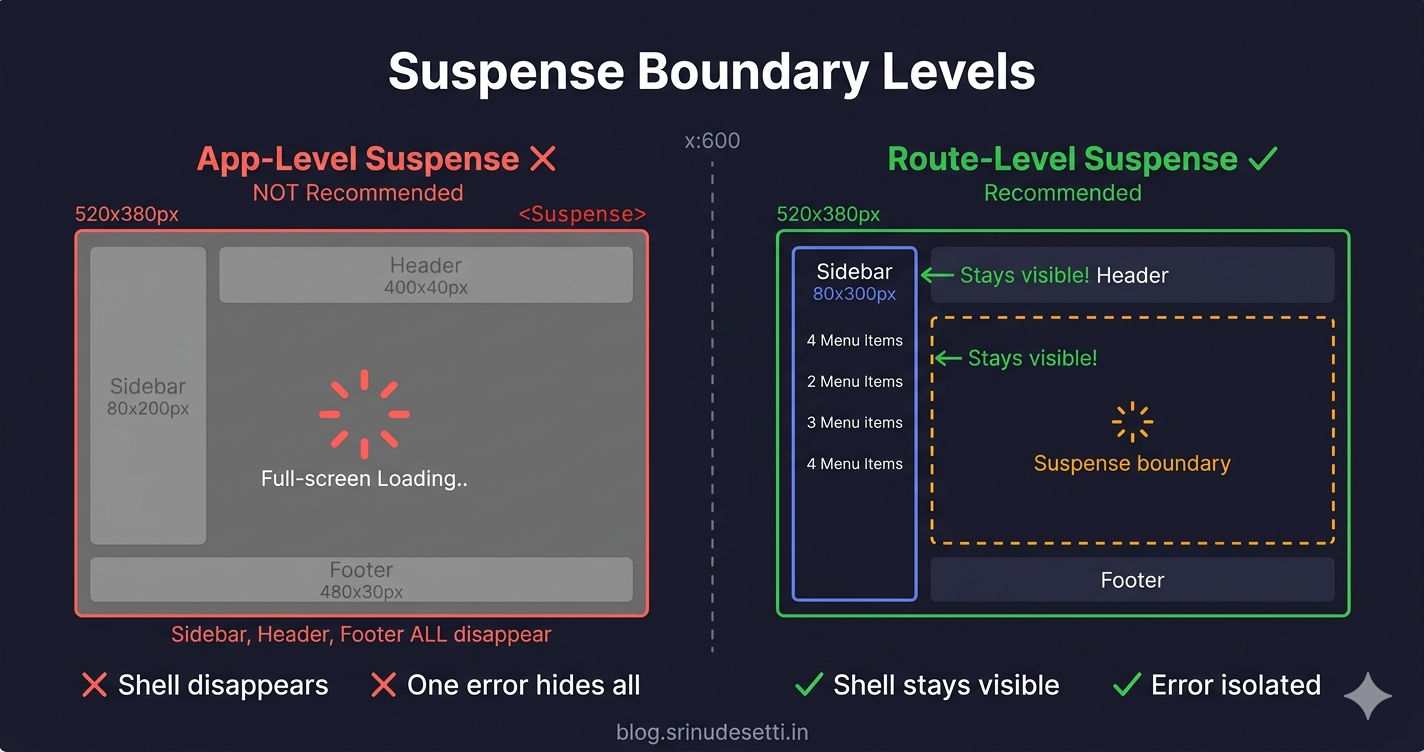
Route-level boundaries (one Suspense per MFE route) provide better UX because:
| Aspect | App-Level Suspense | Route-Level Suspense |
|---|---|---|
| Loading state | Entire page replaced by spinner | Only content area shows spinner |
| Shell layout | Sidebar/header disappear during load | Sidebar/header stay visible |
| Error isolation | One failing remote hides all content | Only the broken route shows error UI |
| Navigation | User loses orientation during transitions | User sees consistent shell layout |
| ErrorBoundary | One boundary for all routes | Per-route error handling and recovery |
The sidebar and header should never flash a loading spinner. These are part of the host shell — they render from the host's own bundle, not from a remote. Wrapping them inside a Suspense boundary alongside lazy remotes causes them to disappear during route transitions. Keep Suspense boundaries inside the route content area, not around the layout.
Lazy Loading in Next.js — next/dynamic vs React.lazy
If your host application uses Next.js with NextFederationPlugin (opens in a new tab), you use next/dynamic instead of React.lazy(). The pattern is similar but has key differences for server-side rendering.
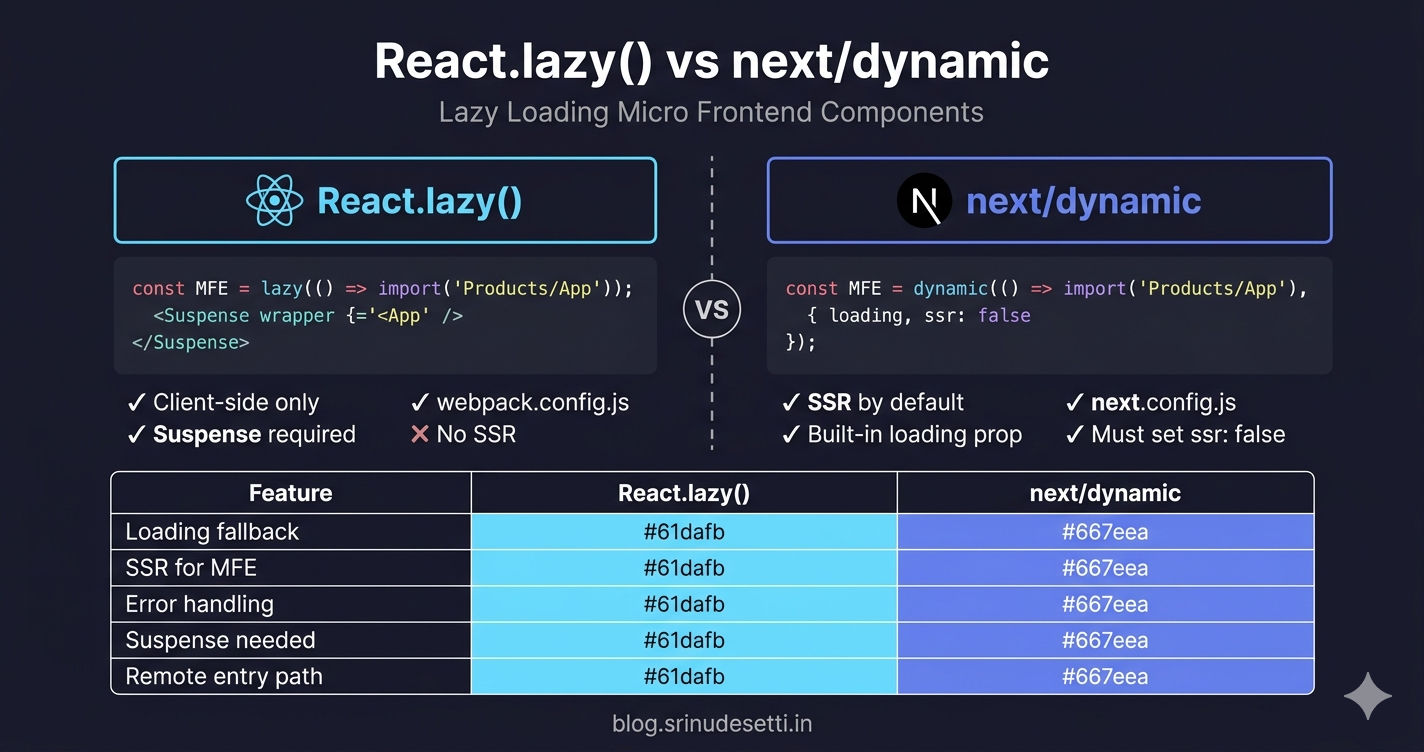
| Feature | React.lazy() | next/dynamic |
|---|---|---|
| Import | import { lazy } from "react" | import dynamic from "next/dynamic" |
| Loading fallback | <Suspense fallback={<Spinner />}> | { loading: () => <Spinner /> } |
| SSR support | No (client-side only) | Yes by default, disable with ssr: false |
| Error handling | .catch() + ErrorBoundary | .catch() + ErrorBoundary |
| When component loads | On first render (when route matches) | On first render (when page loads) |
| Chunk naming | webpackChunkName magic comment | Automatic based on import path |
| Use for MFE remotes | Yes — wrap Module Federation import | Yes — wrap Module Federation import |
| SSR for MFE remotes | Not applicable | Must set ssr: false (remotes are client-only) |
| Config file | webpack.config.js | next.config.js |
| Suspense required | Yes — must wrap in <Suspense> | Optional — loading prop handles it |
The critical difference: ssr: false is mandatory for Module Federation remotes in Next.js. Remote entry scripts run in the browser — they attach containers to the window object, which does not exist during server-side rendering. Without ssr: false, Next.js attempts to import the remote on the server, fails to find window, and throws a build error.
Performance Impact
Lazy loading transforms the loading profile of a micro frontend application from "download everything upfront" to "download on demand."
The key insight: most users visit 2-3 routes per session. With 9 remotes, eager loading forces every user to download 6-7 remotes they never use. Lazy loading shifts that cost to zero — unused remotes are never fetched.
To further reduce the on-demand loading delay, combine lazy loading with the preloading strategies covered in the previous article — requestIdleCallback can prefetch remote entries for likely navigation targets during browser idle time, so the remote is already cached when the user clicks.
What's Next?
This completes the React MFE section of the series. You have built a full React micro frontend architecture: monorepo setup, shared packages, Webpack 5 configuration, Tailwind CSS, Module Federation, host and remote apps, shared dependencies, dynamic remote loading, and lazy loading with Suspense.
The next section covers Next.js micro frontends — how NextFederationPlugin differs from ModuleFederationPlugin, how to set up a Next.js host with React remotes, and how SSR changes the Module Federation setup.
← Back to Dynamic Remote Loading
Continue to NextFederationPlugin vs ModuleFederationPlugin →
Frequently Asked Questions
What is lazy loading in micro frontend architecture?
Lazy loading in micro frontend architecture means loading each remote MFE module only when the user navigates to its route, instead of downloading all remote entry scripts on the initial page load. In React, this is done using React.lazy() which wraps the dynamic import() call for Module Federation remotes. Combined with Suspense for loading states and ErrorBoundary for error handling, lazy loading reduces the initial bundle size by 60-80% — the host shell loads in under 500KB while each remote loads on demand at 50-150KB per route.
How do I lazy load a micro frontend component with React.lazy?
Wrap the Module Federation import in React.lazy() with a .catch() handler: const ProductsMFE = lazy(() => import("Products/ProductsMFE").catch(err => ({ default: () => <div>Failed to load</div> }))). Then wrap the component in <Suspense> with a fallback: <Suspense fallback={<LoadingFallback />}><ProductsMFE /></Suspense>. The .catch() handles load-time failures (network errors, remote server down), while Suspense shows a loading spinner during the import. Add an ErrorBoundary around Suspense to catch render-time errors after the component loads.
What is the difference between React.lazy and next/dynamic for micro frontends?
React.lazy() requires wrapping the component in a <Suspense> boundary for loading states, while next/dynamic accepts a loading prop directly in its options object. The key difference for micro frontends is SSR: next/dynamic supports server-side rendering by default and must be explicitly disabled with ssr: false for Module Federation remotes (since remote entry scripts are client-side only). React.lazy() is client-side only by design. Both use the same .catch() pattern for error handling and both work with ErrorBoundary for render-time errors. Use React.lazy() in React MFE hosts and next/dynamic in Next.js MFE hosts.
Why do I need ErrorBoundary with lazy loaded micro frontends?
ErrorBoundary and .catch() handle different failure points. The .catch() on the dynamic import handles load-time errors — network failures, 404 responses, remote server downtime. ErrorBoundary catches render-time errors — when the component loaded successfully but throws during rendering due to null references, missing props, incompatible shared dependency versions, or React version mismatches between host and remote. Without ErrorBoundary, a render-time error in one MFE crashes the entire host application. With ErrorBoundary wrapping each route, the error is isolated — the user sees a recovery UI with Reload and Go Home options while the rest of the application continues working.
Should I use one Suspense boundary or multiple Suspense boundaries for micro frontends?
Use multiple route-level Suspense boundaries — one per MFE route. A single app-level Suspense boundary causes the entire page (sidebar, header, footer) to be replaced by the loading fallback whenever any lazy component loads. With route-level boundaries, only the content area shows a loading spinner while the shell layout stays visible. This provides a better user experience because the sidebar navigation remains interactive during route transitions, each MFE has its own loading and error state, and a slow or failing remote does not affect the rest of the application.