Micro Frontend vs Monolith: How to Choose
One of the most common questions developers ask after learning about Micro Frontend architecture is: "Should I use Micro Frontend or stick with a Monolith?"
The honest answer is — it depends. There is no universally correct choice. The wrong architecture for your team size and project complexity will slow you down instead of speeding you up.
In this article, you'll get a clear comparison between Monolith and Micro Frontend architectures, a practical decision framework, a migration path if you decide to switch, and the trade-offs you must understand before making the call.
New to Micro Frontend? Start with What is Micro Frontend Architecture? before reading this article.
The Real Problem: Choosing the Wrong Architecture
Teams make architecture decisions for the wrong reasons:
- "Big tech companies use Micro Frontend, so we should too" — This ignores that those companies have 50–500 frontend developers, not 3.
- "Our monolith is getting complex, so let's split everything" — Complexity caused by poor code organization is not solved by splitting into MFEs. You'll just have multiple poorly-organized applications.
- "Micro Frontend is the future, Monolith is old" — Both are valid architectures. The question is which fits your current constraints.
Choosing the wrong architecture creates more problems than it solves. Let's understand both approaches clearly before making a decision.
What is a Monolithic Frontend?
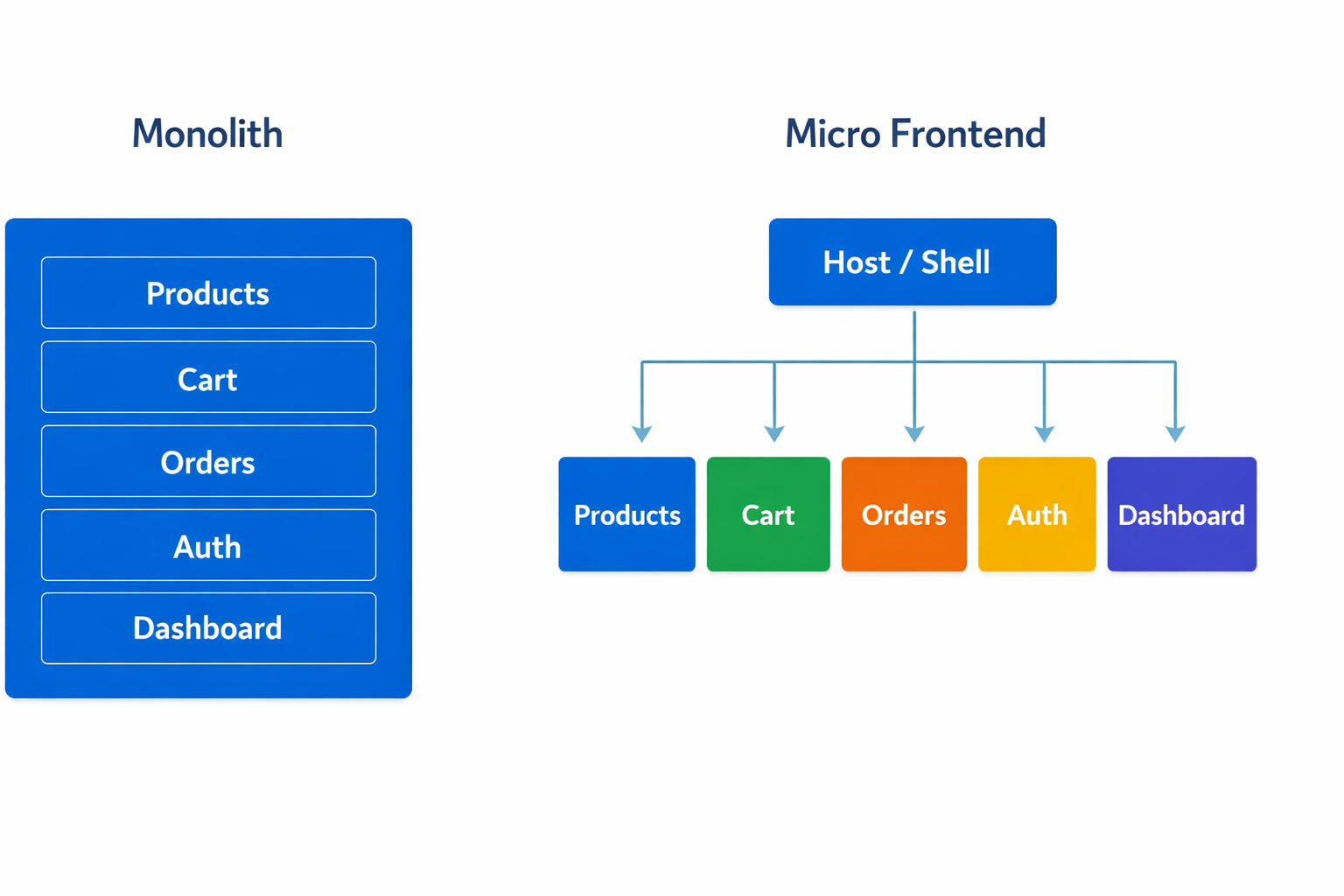
A Monolithic Frontend is a single application where all features, pages, and components live in one codebase, one repository, and one deployment unit.
One codebase. One build. One deployment.
When you update the Cart page, you rebuild and redeploy the entire application — including Products, Orders, and User Profile — even though none of them changed.
What is a Micro Frontend?
A Micro Frontend is a set of independently deployed applications, each owning a specific business domain, loaded at runtime by a Host (shell) application.
Multiple codebases. Multiple builds. Independent deployments.
When the Cart team updates their MFE, only the Cart app is rebuilt and redeployed. Products and Orders teams are not involved, not blocked, and not affected.
Side-by-Side Comparison
| Feature | Monolith | Micro Frontend |
|---|---|---|
| Codebase | Single repository | Multiple repos or monorepo |
| Build | One full build | Each MFE builds independently |
| Deployment | Entire app redeployed | Only changed MFE redeployed |
| Team structure | One large team | Multiple small autonomous teams |
| Tech stack | Single framework | Mixed frameworks possible |
| Startup time | Fast (one dev server) | Slower (multiple dev servers) |
| Shared state | Easy (same store) | Harder (shared package or events) |
| Debugging | Straightforward | Complex (cross-MFE boundaries) |
| Build time | Increases with codebase size | Stays fast per MFE |
| Deployment risk | High (whole app ships) | Low (one MFE ships) |
| Infrastructure cost | Lower | Higher (multiple services) |
| Setup complexity | Low | High (federation, shared deps) |
| Independent scaling | Scale entire app together | Scale each domain independently |
| Best for | Small teams, low-traffic, single domain | Any team size with high-traffic or multiple domains |
Decision Framework
Use this framework to decide which architecture fits your situation:
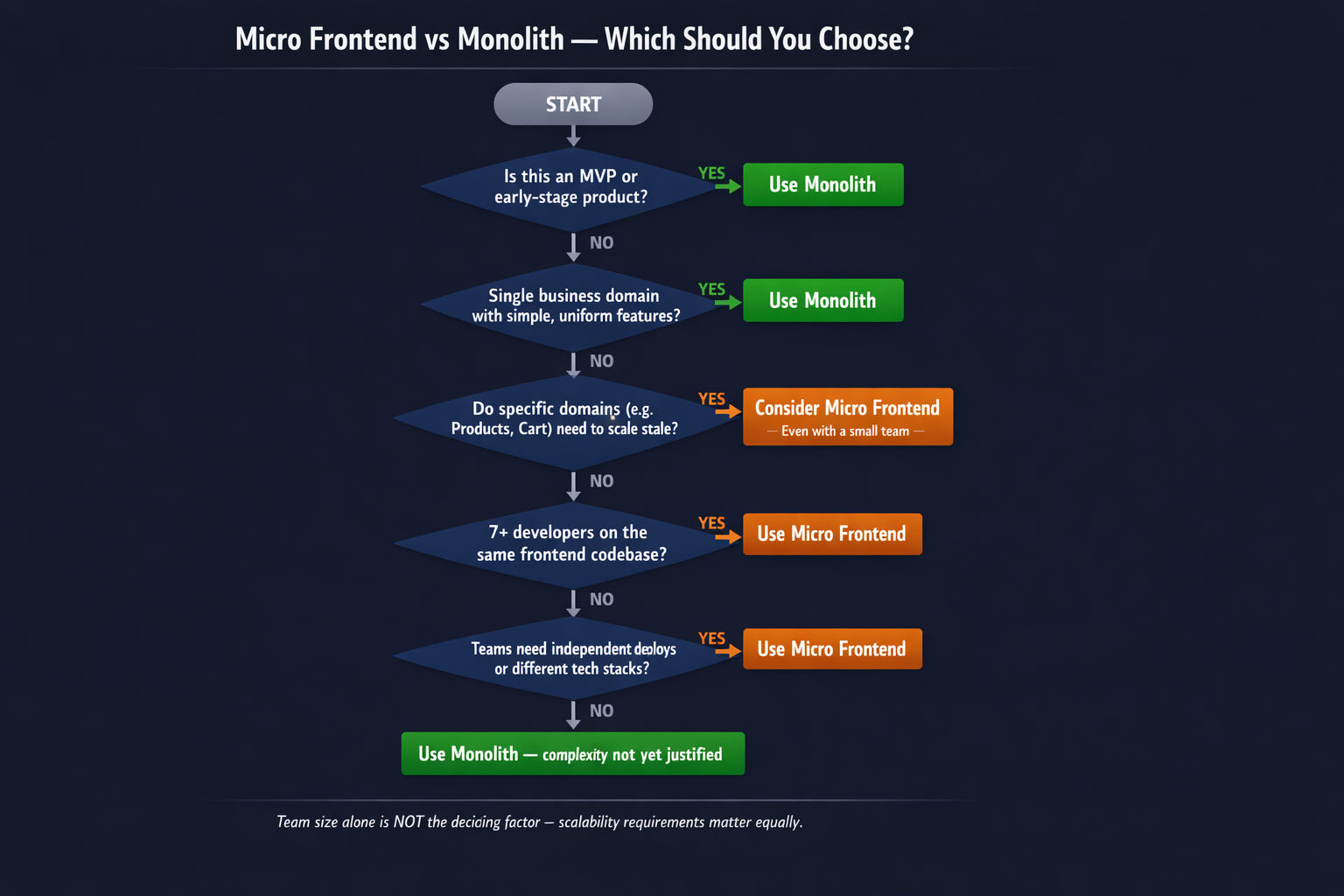
Choose Monolith when:
- Small team AND low-traffic application — coordination overhead of MFE is not justified
- Single business domain — e.g., a portfolio site, a blog, a simple internal tool
- Early stage product — requirements change frequently, you need to move fast
- No independent scaling requirement — all parts of the app share similar traffic patterns
- Limited DevOps maturity — managing multiple pipelines requires experience
- Startup or MVP — over-engineering early is one of the most common startup mistakes
Important: Team size alone is NOT the deciding factor. A small team building a high-traffic application with clear domain boundaries and independent scaling needs should still consider Micro Frontend.
Choose Micro Frontend when:
- Large team (7+ developers) working on the same frontend codebase
- OR: Application requires independent domain scaling — some domains (Products, Cart) get 10x traffic during peak seasons while others (Settings, Dashboard) stay idle
- Multiple business domains each with clear ownership — Products, Orders, Cart, Payments, Auth
- Different release cadences — one domain ships daily, another ships monthly
- Technology diversity needed — some domains need SSR (Next.js) for SEO, others are client-only React
- Organizational alignment — your company structure maps to business domains (Conway's Law)
- Fault isolation matters — a crash in one domain must not bring down the whole application
Scalability is a valid reason to choose MFE even with a small team. If your application is designed for high traffic with domain-specific load patterns — for example, a platform where Products and Cart experience massive traffic spikes during sales events while other sections stay quiet — Micro Frontend lets you scale only the high-load domains independently. A Monolith forces you to scale everything together, which wastes infrastructure resources and increases cost significantly.
Conway's Law: "Organizations design systems that mirror their communication structure." If your company has separate teams for Products, Orders, and Payments — your architecture will naturally evolve toward separation too. Micro Frontend formalizes this.
Practical Decision Checklist
Before committing to Micro Frontend, answer these questions honestly:
| Question | Monolith | Micro Frontend |
|---|---|---|
| How many frontend developers? | 1–6 | 7+ |
| Is the application designed for high traffic at scale? | No | Yes → consider MFE |
| Do different domains have different traffic patterns? | No | Yes → consider MFE |
| Do you need to scale Products/Cart independently of Settings/Auth? | No | Yes → consider MFE |
| How many distinct business domains? | 1–2 | 3+ |
| Do teams need to deploy independently? | No | Yes |
| Do different parts need different frameworks? | No | Yes |
| Is your DevOps team experienced with multiple pipelines? | No | Yes |
| Are you building an MVP or early-stage product? | Yes | No |
| Do you have clear domain boundaries between features? | No | Yes |
Notice: Team size is just one signal. If your application is built for high traffic with domains that need to scale independently, that alone justifies Micro Frontend — regardless of how many developers are on your team today.
Disadvantages of Micro Frontend (Often Ignored)
Most articles only celebrate Micro Frontend. Here are the real trade-offs you must accept:
1. Multiple Dev Servers to Run Locally
In a Monolith, you run one command: npm run dev. In Micro Frontend, you must start every MFE dev server separately — each on its own port — before the Host application works fully.
This is why teams typically use concurrently or turbo to start all apps with one command.
2. Shared State is Harder
In a Monolith, you have one Redux store — every component accesses the same state seamlessly. In Micro Frontend, the store must be shared as an npm package, imported by every MFE as a singleton.
If the shared store version mismatches between MFEs at runtime, you get subtle bugs that are hard to trace.
3. Cross-MFE Communication is Complex
When the Cart MFE needs to notify the Header MFE that the item count changed, you need a communication mechanism — custom events, a shared store, or a pub/sub system. In a Monolith, it's just a function call or a Redux action.
4. Debugging Across Boundaries
When a bug spans two MFEs (e.g., data from Products affects behavior in Cart), debugging requires understanding the boundary between them — their separate codebases, separate states, and the communication mechanism.
Migration: Monolith to Micro Frontend
If you currently have a Monolith and want to migrate, use the Strangler Fig Pattern — a concept described by Martin Fowler (opens in a new tab) — extract one domain at a time, incrementally, while the Monolith keeps running.
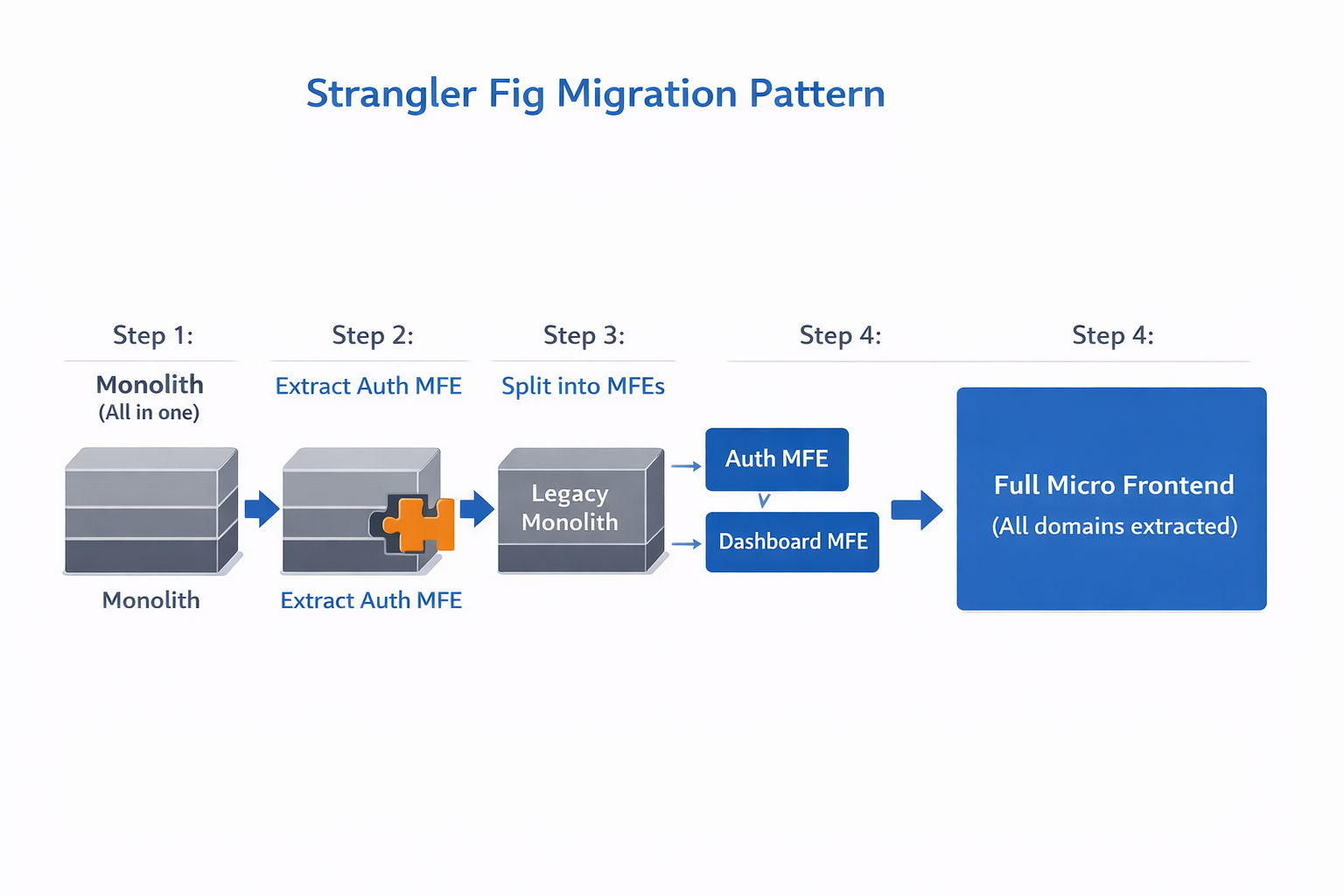
Repeat for each domain until the Monolith is fully replaced.
Warning: Do not try to migrate everything at once. Teams that attempt a full rewrite in one go almost always fail or end up with a broken product. Migrate incrementally — one domain per sprint or release cycle.
Real-World Patterns
| Company | Started With | Moved To | Why |
|---|---|---|---|
| Zalando | Monolith | Micro Frontend (Project Mosaic) | 200+ engineers, multiple product teams |
| IKEA | Monolith | Micro Frontend | Independent catalog, cart, checkout teams |
| Spotify | Monolith | Micro Frontend | Independent squads per product area |
| Most startups | Monolith | Stay Monolith | Team too small to justify MFE complexity |
Notice the pattern — companies moved to Micro Frontend after they hit the scaling wall with a Monolith. They didn't start with MFE from day one. For a deeper look at real-world adoption, read ThoughtWorks Technology Radar on Micro Frontends (opens in a new tab) and Cam Jackson's comprehensive guide (opens in a new tab) on Martin Fowler's blog.
Summary: Which Should You Choose?
| Situation | Recommendation |
|---|---|
| Building an MVP or new product | Monolith |
| Team of 1–6 developers | Monolith |
| Simple application, one domain | Monolith |
| Team of 7+ with multiple domains | Micro Frontend |
| Multiple teams needing independent deploys | Micro Frontend |
| Migrating a growing Monolith | Strangler Fig → Micro Frontend |
The best architecture is the simplest one that solves your current problem. Start with a Monolith. Move to Micro Frontend when the pain of staying in the Monolith exceeds the cost of the migration.
What's Next?
Now that you understand when to choose Micro Frontend over a Monolith, the next step is to understand the core patterns and communication strategies in Micro Frontend — how MFEs share state, communicate events, and handle routing.
← Back to What is Micro Frontend Architecture?
Continue to Micro Frontend Patterns and Communication →
Frequently Asked Questions
Should I always use Micro Frontend instead of Monolith?
No. Micro Frontend is not a silver bullet. For small teams (1–4 developers) or simple applications, a Monolith is faster to build and easier to maintain. Use Micro Frontend only when team size, deployment independence, or domain complexity justifies the overhead.
How many developers do you need before switching to Micro Frontend?
A commonly cited threshold is 5–8 developers working on the same frontend codebase. Below that, the coordination overhead of Micro Frontend outweighs the benefits. Above that, independent teams with clear domain ownership start delivering faster with MFE.
Can I migrate from a Monolith to Micro Frontend without rewriting everything?
Yes. The strangler fig pattern lets you migrate incrementally. You extract one domain at a time — starting with the lowest-risk, most independent part of the application. The Monolith continues running while you extract pieces one by one over weeks or months.
What are the biggest disadvantages of Micro Frontend?
The main disadvantages are: increased operational complexity (multiple build pipelines, deployments, and dev servers), shared state management across MFEs is harder, initial setup takes more time, and debugging across MFE boundaries is more difficult than in a Monolith.
Which is better for SEO — Monolith or Micro Frontend?
A well-implemented Monolith with SSR has a slight SEO advantage because the HTML is fully rendered on the server in one request. With Micro Frontend, you need to ensure the Host application uses SSR (Next.js) and that critical content is not loaded lazily. Both can achieve excellent SEO with the right implementation.