Published: May 1, 2026 · 18 min read
Shared Redux Store in Next.js Module Federation: Cross-Remote State
You log in through the Auth React micro frontend at /login, then navigate to /products. The Products Next.js remote loads, and its header still shows the Login button — even though you literally just logged in. Open Redux DevTools and you see two stores: one created by the Auth remote, one created by the Products remote. Each remote dispatched into its own store and the other never knew. This is the cross-cutting state problem in a hybrid micro frontend, and the fix is a properly federated Redux store next.js module federation singleton — one store, shared by every React and Next.js remote in the application. In the previous article on mixing React and Next.js micro frontends, you saw the dual-plugin host configuration that loads both remote types. This article covers the singleton store package, the Provider setup that prevents window-related SSR crashes, the strictVersion contract that keeps deployed remotes in sync, and the seven gotchas that account for almost every "state is not propagating" bug.
In this guide, you will:
- See the complete store architecture for a hybrid Next.js host loading React and Next.js remotes
- Build a federated
@myapp/storepackage withconfigureStore, slices, and re-exportedreact-reduxprimitives - Wire up the ClientReduxProvider wrapper with
ssr: falseso the federated container loads only in the browser - Mirror the singleton declaration across the host (
NextFederationPlugin) and every remote (ModuleFederationPlugin+NextFederationPlugin) - Compare local development vs production webpack/next.config blocks for both remote types
- Read and write the same store from a React remote (
OTPVerify) and a Next.js remote (ProductCard) - Understand why each remote keeps its own
ClientReduxProviderfor standalone development - Avoid the seven federated-Redux gotchas that surface only in production
The Cross-Remote State Problem
A hybrid micro frontend has authentication state, cart state, support tickets, and chat messages — all of which need to be visible to multiple remotes. The user logs in through the Auth remote, adds a product to the cart from the Products remote, opens a support ticket through the Support remote, and the header on the host's home page must reflect all three. There is no parent component to lift state into; the remotes are loaded lazily and may not even be on screen at the same time.
The naive options all fail:
- Prop drilling is impossible — the host does not directly render every remote's children.
localStoragepolling is racy and forces every remote to re-implement the same read/write logic.- Custom event buses require every remote to subscribe to every event, and there is no schema enforcement.
- Per-remote stores create the exact problem from the first paragraph — state mutations stay isolated to whichever store the dispatch happened to hit.
A single Redux store, federated as a Module Federation singleton, sidesteps all four. The host owns the store. Every remote imports useSelector and useDispatch from the same federated package. Module Federation's runtime guarantees there is exactly one store instance regardless of how many remotes are mounted.
The same pattern works for any global state library. Zustand, Jotai, and TanStack Query store instances all federate the same way as long as the store creation function lives inside a singleton package. Redux Toolkit is the example here because it is what the real codebase uses — see Module Federation shared dependencies for the underlying mechanism.
Federated Store Architecture
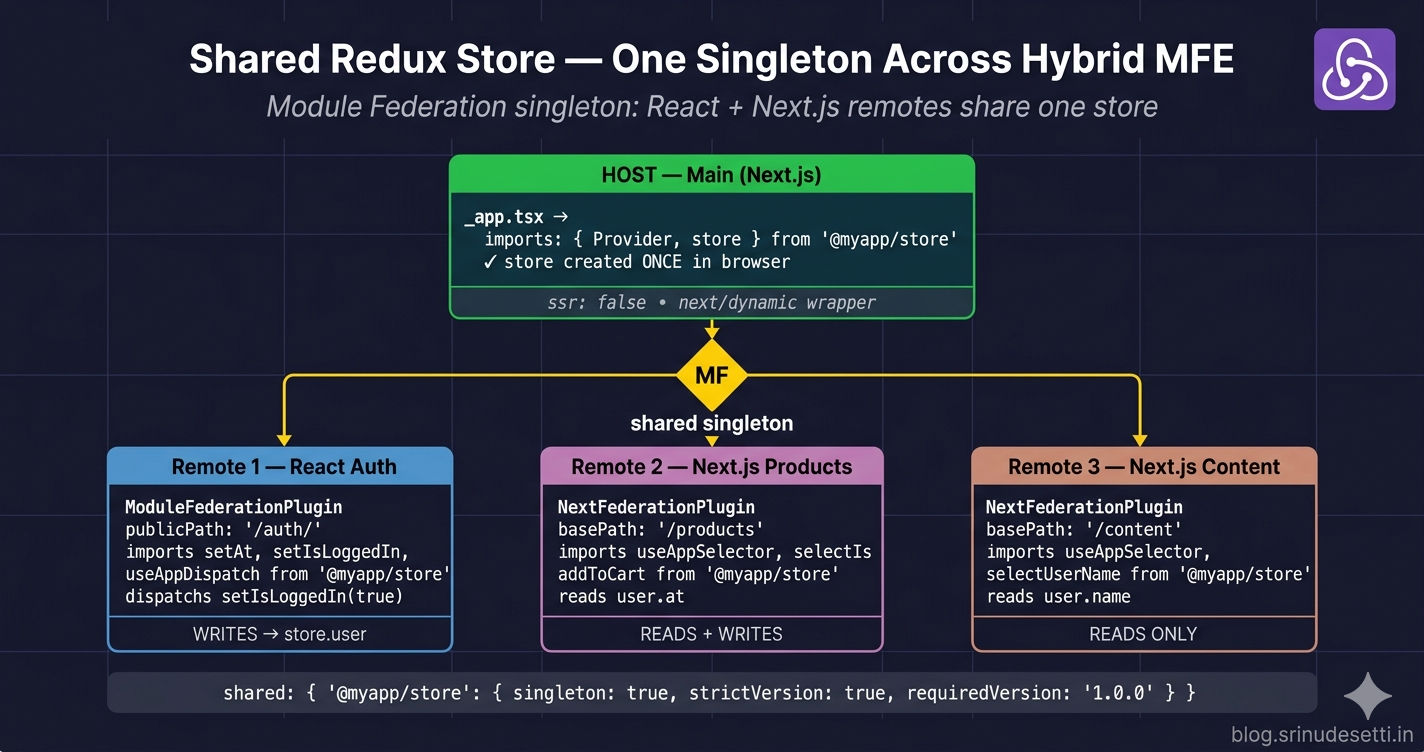
The architecture below shows the host owning a single store instance and three remotes — one React (Auth) and two Next.js (Products, Content) — all consuming the same store via Module Federation singletons. The store package is published as a workspace dependency at version 1.0.0, locked across every webpack and next.config block.
The crucial property is that the store is created once, in the host, on the client. Every remote that later imports from the store package receives the host's instance, not a fresh copy. Module Federation's singleton: true flag is what makes this guarantee binding — without it, each remote would silently bundle its own copy and you would be back to the cross-remote state problem.
Step 1 — Build the Federated Store Package
The store lives in a workspace package — the same Turborepo or pnpm workspace pattern from the React MFE monorepo guide. Three files matter: package.json (versioning contract), src/store.js (the configureStore call), and index.js (the public API every remote imports).
Package manifest with version locking
The package.json is small but every field matters. The version field is what Module Federation matches against requiredVersion: '1.0.0' in every remote's shared block. The peerDependencies declare React without bundling it, so the federated singleton React from the host is the one that gets used.
Store factory and singleton
configureStore runs once at module load. The makeStore() factory exists to support per-request server stores (used in rare SSR cases), and store is the default browser singleton that the host imports.
serializableCheck: false is required because the cart slice carries Date objects in some payloads. Without it, Redux Toolkit emits a warning on every dispatch — harmless, but noisy. The trade-off is that you must not store non-serializable values you cannot recreate from JSON.
A representative slice
The user slice owns authentication state. The Auth remote dispatches setAt, setIsLoggedIn, and setUser. Every other remote — including Next.js remotes — reads with selectors like selectIsLoggedIn and selectAccessToken.
The selectors are the API surface that remotes depend on. Adding a new field to initialState is safe; renaming a field requires bumping version because every consumer references the field by name.
Public API — what remotes actually import
The index.js is the only entry point remotes touch. It re-exports actions, selectors, hooks, and — critically — Provider, useSelector, and useDispatch from react-redux. Routing those primitives through the store package guarantees that every remote uses the same federated react-redux instance.
Step 2 — Wrap the Host with ClientReduxProvider
The host is a Next.js application. The Provider can only run on the client because Module Federation containers attach to window. If _app.tsx imports Provider directly at the top, Next.js's server build crashes with ReferenceError: window is not defined the moment the federated store package loads.
The solution is a thin wrapper component imported with next/dynamic and ssr: false.
_app.tsx then loads ClientReduxProvider dynamically:
Do NOT import Provider or store at the top of _app.tsx. The server build evaluates that import during next build and crashes inside packages/store/index.js. Always go through a next/dynamic wrapper with ssr: false. This is the same pattern from the SSR vs CSR Next.js Module Federation article — federated containers cannot run on the server.
Step 3 — Declare the Singleton in the Host's next.config.js
The host's NextFederationPlugin shared block is where the singleton contract is signed. Five packages need the singleton flag, and three need strict versioning.
The shared block is the entire reason the federation works. react, react-dom, react-redux, and @reduxjs/toolkit use requiredVersion: false because Next.js bundles its own React version and we let the host's version win. @myapp/store and @myapp/api use strictVersion: true because they are in-house packages — any drift between deployments is a bug, not a tolerable variation.
Step 4 — Mirror the Singleton in Every Remote
Every remote — React or Next.js — must declare the same shared block. Module Federation matches package names as literal strings, so a typo creates a second store. Local development and production configs differ in mode, output paths, and dev server settings — but the shared block is identical across both.
The crucial difference between the React local and production configs is everything outside the shared block — mode: 'development', publicPath: 'https://localhost:4101/', an HTTPS dev server with CORS, and splitChunks: false for fast HMR. The shared block stays identical, which is why the singleton contract holds across both environments.
Federation Negotiation — What Happens at Runtime
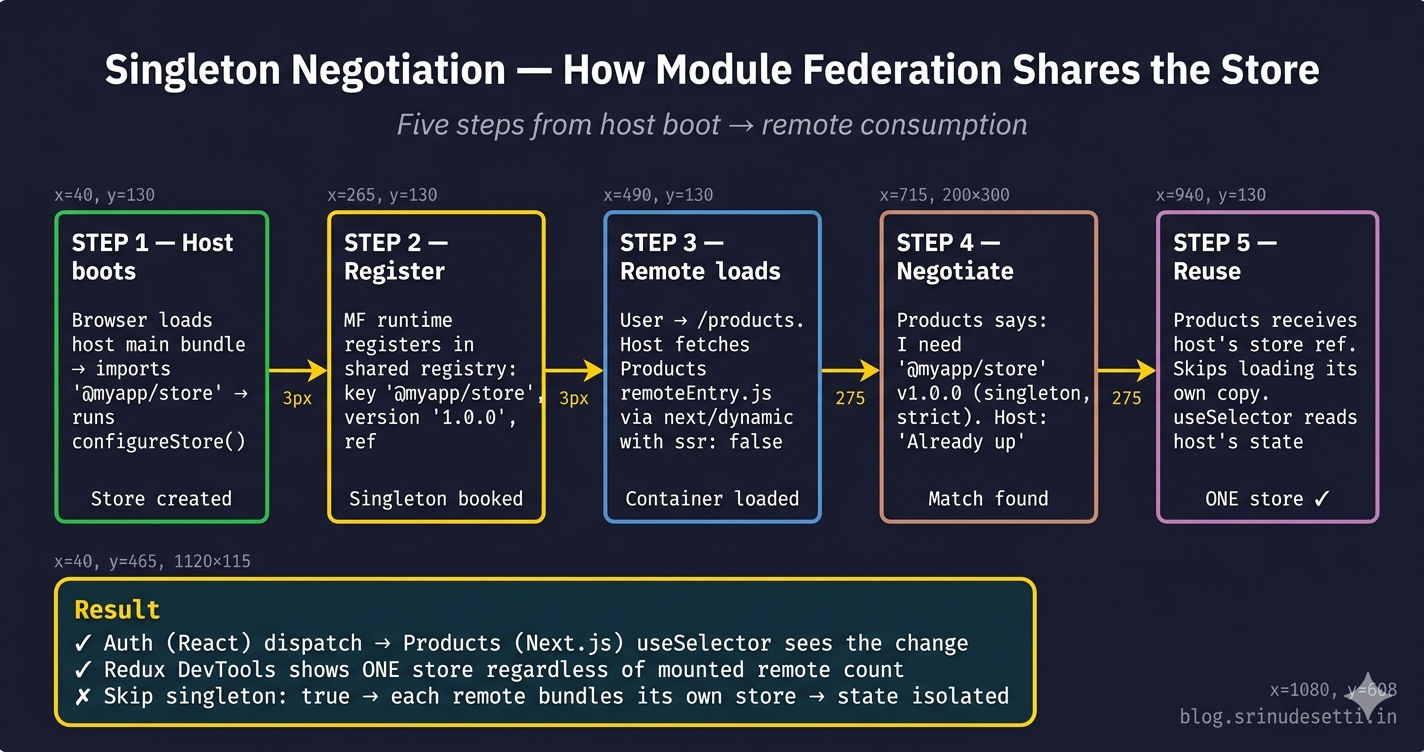
The configuration above is declarative. The actual store-sharing happens at runtime, in five steps, when the host loads its first remote.
| Step | What happens | Where it runs |
|---|---|---|
| 1 | Host's main bundle imports @myapp/store | Browser, host main chunk |
| 2 | Host registers @myapp/store@1.0.0 in the shared module registry | Module Federation runtime |
| 3 | User navigates to /products — host fetches Products's chunks/remoteEntry.js | Browser, dynamic import |
| 4 | Products's shared registry says it needs @myapp/store@1.0.0 (singleton, strict) | Module Federation runtime |
| 5 | Host's registry returns the already-loaded reference; Products skips loading its own copy | Module Federation runtime |
The same five steps run when the host loads a React remote (Auth) — ModuleFederationPlugin and NextFederationPlugin use the exact same negotiation API. The fact that one was built with webpack standalone and the other was built through Next.js does not matter; they both register against the same shared module registry.
Step 5 — Use the Store Inside a React Remote
The Auth React remote dispatches into the federated store. Notice every import goes through @myapp/store — never react-redux directly.
When verifyOTP runs and dispatches setIsLoggedIn({ isLoggedIn: true }), the action lands in the host's store. Within milliseconds, every Next.js remote currently mounted re-renders with the new value. The Auth remote does not know any other remote exists — it just dispatches into its imported store and React-Redux handles the subscribe/notify.
Step 6 — Use the Store Inside a Next.js Remote
The Products Next.js remote uses the same hooks the same way. The only difference from the React remote is the 'use client' directive and TypeScript annotations.
The proof that the singleton is working: log in through the Auth remote, then navigate to /products. ProductCard.handleAddToCart reads accessToken from the same store the Auth remote dispatched into five seconds ago — no event bus, no localStorage, no prop chain.
Why Each Remote Keeps Its Own ClientReduxProvider
Open any remote in this codebase and you will find a ClientReduxProvider.tsx file that looks identical to the host's. New developers usually flag this as duplication — but the duplication is intentional.
The remote's ClientReduxProvider is used only when the remote runs standalone for local development (cd apps/Products && next dev -p 3001). When the remote is loaded inside the host as a federated module, the host's Provider is already wrapping the entire tree — wrapping again would create nested Providers (harmless because both point to the same singleton, but React emits a warning).
The rule is simple: only the standalone _app.tsx of a remote uses ClientReduxProvider. Every component exposed via Module Federation (BeautyCare, ProductDetailPage, FAQ, Login, OTPVerify) renders without its own Provider and relies on the host's Provider being the closest ancestor.
SSR Hydration with Federated Redux
SSR plus Redux is normally well-trodden territory — Next.js documents the per-request store pattern, and react-redux 9.x exports first-class hooks for it. SSR plus federated Redux is a different story because Module Federation containers cannot run on the server.
The chosen pattern in this codebase: skip SSR for federated state entirely. The first paint is a plain HTML shell with no user-specific content. The client takes over, mounts the Provider, federates the store, and rerenders the user-specific UI within ~200ms. What you give up is "Welcome back, John" on the very first paint. What you keep is zero hydration mismatches and one source of truth across React and Next.js remotes.
For the broader SSR-vs-CSR trade-off, the Next.js SSR vs CSR article covers the rendering decision in detail. For background on the React-Redux Provider model, the official react-redux docs (opens in a new tab) explain the context propagation — once the federated store is in place, the rest is the standard react-redux mental model.
Debugging Tip — Expose the Store on window (Dev Only)
The single most useful debugging trick when verifying federation is to expose the store on window in development. Combined with the Redux DevTools browser extension (opens in a new tab), you can confirm at a glance that exactly one store exists, regardless of how many remotes are mounted.
Then in the DevTools console:
__myapp_store.getState()                            // Dump full state
__myapp_store.getState().user.isLoggedIn            // Verify auth flag
__myapp_store.dispatch({ type: 'user/clearUser' })  // Force logout from console
If you mount the Auth remote and the Products remote, then run __myapp_store.getState().cart.items.length after adding to cart from /products, you should see the count update — even though Auth never participated in the cart action. That round-trip is the federation working.
Singleton Safety Net — strictVersion in Action
The strictVersion: true flag is the single most important safety mechanism for an in-house store package. With it, Module Federation refuses to load a remote that ships a different version than the host requires.
| Situation | strictVersion off | strictVersion on |
|---|---|---|
| All remotes pinned to 1.0.0 | Works | Works |
| One remote bumped to 1.1.0 (slice rename) | Other remotes silently get 1.0.0; renamed slice crashes selectors | Build error: Unsatisfied version 1.1.0 from Products of shared singleton module @myapp/store |
| Two remotes deployed at different times | First-loaded version wins; reads against the other version are undefined | Browser refuses to mount the second remote until versions align |
| Forgotten version bump in one workspace | Production silently runs mixed versions; bugs surface randomly | CI fails before deploy; mismatch caught early |
The behavior is intentional. A federated store is a contract between the host and every remote. Half-migrated state is worse than a build failure — the strictVersion failure mode forces every workspace to bump together.
Common Gotchas When Federating a Redux Store
After running this pattern in production for months, seven specific gotchas account for the vast majority of incidents. Every one of them is a deviation from the singleton contract — either a missing singleton: true, a missing strictVersion: true, or an import that bypasses @myapp/store.
If you only remember one debugging step, it is this: open Redux DevTools and count the stores. If there is more than one, the singleton negotiation has failed and the rest of your investigation is a waste of time until the shared blocks are fixed.
Federated Store vs Per-Remote State — Decision Guide
Not every piece of state belongs in the federated store. Some state is local to a single remote and forcing it into the global store creates coupling that defeats the point of micro frontends.
| State Type | Where it lives | Why |
|---|---|---|
Authentication (user.at, user.isLoggedIn) | Federated store | Every remote needs to know if the user is logged in |
Cart state (cart.items, cart.totalItems) | Federated store | Multiple remotes (Cart, Account, Header) read it |
Support ticket list (tickets) | Federated store | Cross-remote — Support creates, Account displays |
| Form input state (e.g., login form fields) | Local useState | Belongs to one remote, never read elsewhere |
| Modal open/close, accordion state | Local useState | Pure UI state |
| Per-page filters, sort order | Local useReducer or URL search params | Specific to one route |
| Server-cached query data | TanStack Query / SWR | Has its own caching layer; not Redux's job |
| WebSocket connection status | Local useState in the WebSocket-owning remote | Only the chat remote cares |
The general rule: if exactly one remote ever reads or writes the state, it does not belong in the federated store. Local state stays local.
What's Next
You now have a single Redux store that is genuinely shared across React and Next.js remotes — the federated @myapp/store package, the ClientReduxProvider wrapper, the matching shared blocks across host and remotes, the runtime negotiation flow, the SSR hydration pattern, and the seven gotchas that account for almost every "state is not propagating" bug. The next article covers image optimization in Next.js micro frontends — the remotePatterns configuration, AVIF and WebP formats, device sizes, cache TTL, and the enableImageLoaderFix extra option that makes next/image work correctly when a Next.js host loads remotes from different domains.
← Back to Mixing React + Next.js Micro Frontends
Continue to Image Optimization in Next.js Micro Frontend →
Frequently Asked Questions
How does a single Redux store stay shared across React and Next.js remotes?
Module Federation negotiates shared dependencies as singletons when both ModuleFederationPlugin and NextFederationPlugin declare the same package with singleton: true. The store package (e.g., @myapp/store) is declared as a singleton with strictVersion: true and requiredVersion: '1.0.0' in the host AND every remote. The host creates the store once inside a ClientReduxProvider component. When a remote imports useSelector or useDispatch from @myapp/store, Module Federation's runtime says the store package is already loaded and returns the host's instance instead of building a new one. Both React remotes (built with ModuleFederationPlugin) and Next.js remotes (built with NextFederationPlugin) receive the SAME store reference, so dispatch in one remote triggers re-renders in every other remote consuming the same slice.
Why must I use ssr: false on the ClientReduxProvider wrapper?
Module Federation containers attach to the window object during runtime initialization. The federated @myapp/store can only register on the client, not during Next.js's server render. If _app.tsx imports the Provider directly at the top of the file, Next.js's server build attempts to run packages/store/index.js on the server and crashes with ReferenceError: window is not defined. Wrapping the Provider in a separate ClientReduxProvider component and importing it via next/dynamic with ssr: false ensures Next.js never tries to render the federated store on the server. The first paint is plain HTML without user-specific state, and the client takes over to mount the Provider once the browser has loaded the federated container.
Why does each remote also have its own ClientReduxProvider file?
Each remote keeps a ClientReduxProvider file for standalone development — when you run a remote independently with next dev or webpack-dev-server, there is no host to provide the Redux Provider. The remote's pages/_app.tsx wraps itself with ClientReduxProvider so useSelector and useDispatch still work in isolation. When the same remote is loaded inside the production host, it does NOT wrap its exposed components in <Provider> — those components rely on the host's provider being the closest ancestor in the React tree. Both providers point to the same federated store singleton, so even nested usage works, but the convention is to wrap only the standalone _app.tsx and leave exposed components free of <Provider>.
What happens if I bump @myapp/store from 1.0.0 to 1.1.0 in only one remote?
Module Federation's strictVersion: true with requiredVersion: '1.0.0' fails the runtime federation check. The browser console reports Unsatisfied version 1.1.0 from Products of shared singleton module @myapp/store (required =1.0.0 from Main). The remote refuses to load and the page shows a federation error. This refusal is the safety guarantee — without strictVersion, Module Federation would silently choose one version, and remotes built against the other version would crash on slice shape mismatches. To upgrade the store, bump @myapp/store to 1.1.0 in every workspace, rebuild every remote, and deploy them together. There is no half-migrated state where some remotes use 1.0.0 and others use 1.1.0.
Can I use server-side rendering for a page that reads from the federated Redux store?
Not directly. The federated @myapp/store only initializes on the client because Module Federation containers attach to the window. The recommended pattern is to skip SSR for federated state entirely — set ssr: false on the ClientReduxProvider and on every remote import. The server renders a plain HTML shell with no user-specific data, and the client mounts the Provider once the federated container loads. SSR continues to work for everything that does NOT depend on federated state — product titles, FAQ content, marketing copy, blog posts. For the small cases where you really need server-side user data (e.g., personalized SSR), use makeServerStore() to build a fresh per-request store, populate it from cookies on the server, and serialize the state into the HTML response — but accept that your hydration code now has to reconcile the server's per-request store with the client's federated singleton.
Should remotes import useSelector from react-redux or from @myapp/store?
Always import from @myapp/store. The store package re-exports useSelector, useDispatch, and Provider from react-redux, plus typed wrappers useAppSelector and useAppDispatch. Importing through @myapp/store guarantees that Module Federation's singleton negotiation routes the call to the host's react-redux instance. If a remote imports react-redux directly, webpack might bundle a separate copy at build time, and the bundled copy disagrees with the federated copy on internal state — leading to subtle production bugs where useSelector returns stale values or undefined. Centralizing all Redux primitives behind @myapp/store also lets you swap react-redux for a wrapper or upgrade major versions without touching every remote.
How do I debug a federated Redux store when state changes are not propagating between remotes?
Three checks in order. First, install the Redux DevTools browser extension (opens in a new tab) and verify that exactly one store appears in the Stores panel — multiple stores means singleton negotiation failed and you have one store per remote. Second, expose the store on window in development (window.__myapp_store = store) and run __myapp_store.getState() from any page; both Auth and Products should mutate the same object. Third, audit the shared block in every webpack.config.js and next.config.js — every remote must declare @myapp/store, react, react-dom, react-redux, and @reduxjs/toolkit as singletons with the exact same requiredVersion. The most common bug is one remote forgetting react-redux: { singleton: true } in its shared block, which silently bundles its own react-redux and creates a second store instance even though @myapp/store is correctly federated.