Published: April 14, 2026 · 12 min read
Module Federation Shared Dependencies and Singleton Pattern
You've configured host and remote apps with module federation shared dependencies — the host consumes remotes, each remote exposes components, and remoteEntry.js ties it together. But one section of every webpack config was copy-pasted without question: the shared object. What does singleton: true actually do? What happens when one remote has React 18.2 and another has React 18.3? And why does removing one shared dependency crash the entire application with an "Invalid hook call" error?
This article explains the module federation singleton pattern, version negotiation, requiredVersion vs strictVersion vs eager, what you should and should not share, and how to debug shared dependency issues at runtime.
This is Article 14 in the Micro Frontend Architecture series. If you haven't set up host and remote apps yet, start with Module Federation Host and Remote Apps.
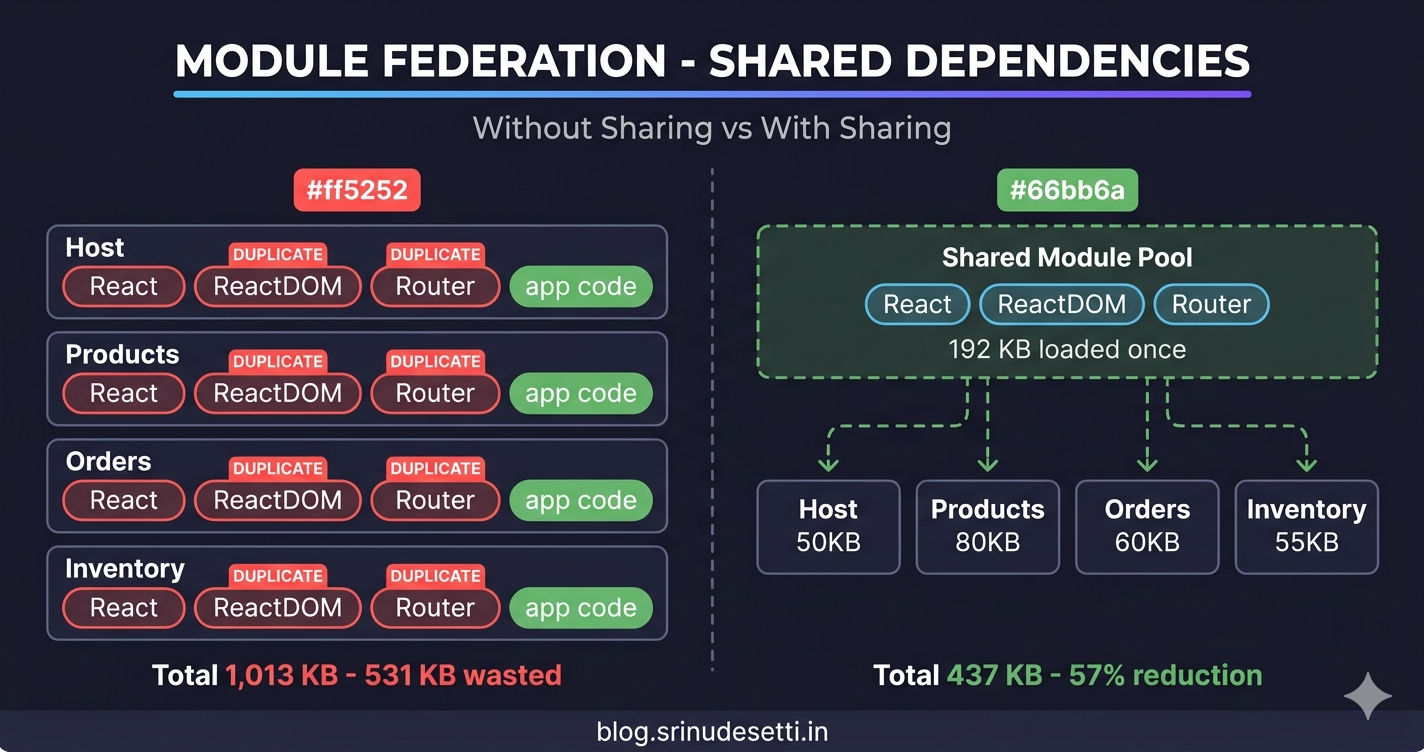
The Duplicate Bundle Problem
Without the shared configuration, every MFE bundles its own copy of every dependency. If your host and three remotes all use React, ReactDOM, and React Router — you load four copies of each library.
That is 531 KB of duplicate JavaScript the browser downloads, parses, and executes for no reason. But the performance waste is not even the worst problem. Multiple React instances break hooks. React's useState, useEffect, and useContext hooks maintain internal state in a module-level registry. When two copies of React exist, a component rendered by React instance #1 tries to read hooks from React instance #2 — and React throws the infamous "Invalid hook call" error.
The shared configuration in ModuleFederationPlugin (opens in a new tab) solves both problems — it eliminates duplicate bundles and ensures a single instance of critical libraries.
How Module Federation Shared Dependencies Work
The shared object tells Webpack which dependencies should be loaded once and reused across all federated modules. When the host app loads, it initializes a shared scope — a registry of available modules and their versions. When a remote loads, its remoteEntry.js checks this scope before bundling its own copy.
The negotiation happens automatically during the async boundary created by the bootstrap pattern. This is why import("./bootstrap") is required — it gives Webpack the async gap to load all remoteEntry.js files and resolve shared versions before any application code runs.
The shared config does NOT change between environments. Unlike remotes (where URLs differ between localhost:4002 and /products/), the shared object is identical in local development and production. The same version negotiation rules apply in both environments.
The Singleton Pattern
The most important property in the shared config is singleton: true. Without it, Webpack may create separate instances of a module even when the versions match. With it, Webpack guarantees exactly one instance exists in the browser.
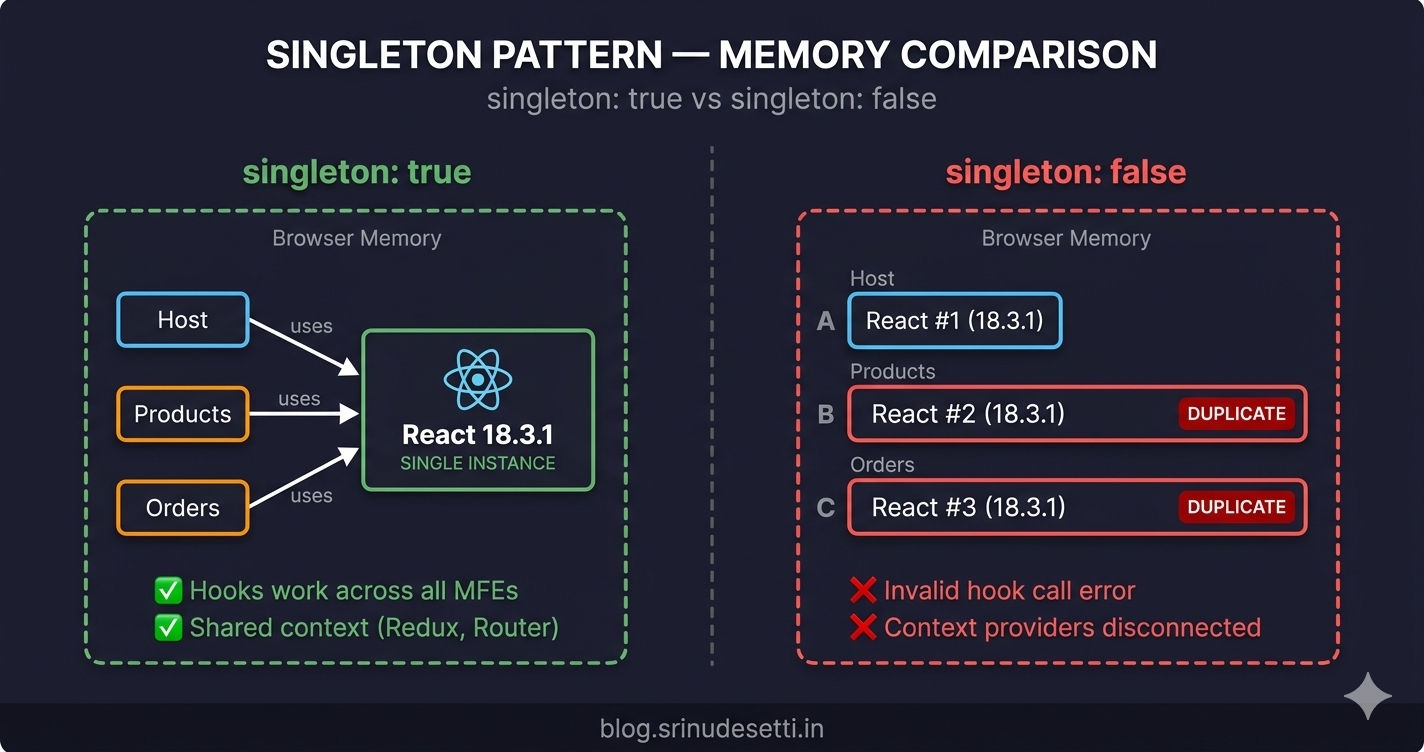
The singleton pattern is mandatory for any library that maintains module-level state — React (hook registry), ReactDOM (reconciler), React Router (navigation context), Redux (store instance), and any custom shared package that holds state. Without singleton, each MFE gets its own isolated instance and cross-MFE state sharing breaks silently.
Both host AND remote must declare singleton: true. If only the host sets singleton but the remote does not, the remote may still bundle its own copy. The singleton flag must be declared on both sides for Webpack to enforce the single-instance constraint.
requiredVersion and Version Negotiation
The requiredVersion property tells Webpack what version range a module expects. During negotiation, Webpack checks whether the loaded version satisfies each app's requiredVersion constraint. There are four strategies for setting this value.
When the loaded version does not satisfy requiredVersion, Webpack logs a console warning: "Unsatisfied version X of shared singleton module Y (required Z)". The app continues running with the mismatched version. If you want mismatches to crash the app immediately (so you catch them in development), use strictVersion: true.
Use strictVersion: true for custom monorepo packages where any version difference signals a real problem. Leave it off for third-party packages like React where minor version differences (18.3.0 vs 18.3.1) are intentionally backward-compatible.
The eager Option and the Bootstrap Pattern
The eager property controls whether a shared module is included in the initial bundle or loaded asynchronously. In React apps with Webpack, eager is almost never needed because the async bootstrap pattern handles the timing. In Next.js, eager: false is critical because Next.js has its own module loading system.
If you see the "Shared module is not available for eager consumption" error, it means your entry point is importing shared modules synchronously before federation negotiation completes. The fix is always the async bootstrap pattern — never set eager: true as a workaround, because that bundles the shared module into the initial chunk and defeats the purpose of sharing.
Host vs Remote — Shared Config Differences
The host and remote declare the same shared modules but the host typically lists more dependencies than each individual remote. This is because the host is the orchestrator — it provides shared instances for every library used anywhere in the application.
Notice the differences: the host declares @reduxjs/toolkit and react-redux because it creates and provides the Redux store. The Products remote does not directly import these — it accesses Redux through @myapp/store, which re-exports the configured store. The Onboarding remote adds swiper because it uses a carousel component that another remote also needs.
Rule of thumb: Only declare a dependency in shared if your code directly imports it. If you access a library indirectly through a shared package, the shared package handles the sharing.
React vs Next.js — Shared Config Differences
When your host uses Next.js instead of React with Webpack, the shared configuration changes significantly. Next.js uses NextFederationPlugin (opens in a new tab) instead of ModuleFederationPlugin, and the shared properties use different defaults.
Key Differences
| Property | React (Webpack MFP) | Next.js (NextFederationPlugin) |
|---|---|---|
singleton | true (always for React/Redux) | true (always for React/Redux) |
requiredVersion | dependencies.react or "^18.3.1" | false (Next.js manages versions) |
strictVersion | Not commonly used | true for custom packages (@myapp/*) |
eager | Not needed (bootstrap pattern handles) | false (prevents SSR hydration issues) |
| Custom packages | @myapp/store with exact version | @myapp/store + @myapp/api + @myapp/seo |
| Config file | webpack.config.js | next.config.js |
| Version source | package.json dependencies | false — framework-managed |
The biggest difference is eager: false in Next.js. React apps handle this through the bootstrap pattern (import("./bootstrap")), but Next.js has its own module loading mechanism — setting eager: false ensures shared modules are loaded through federation's async resolution rather than bundled into Next.js' initial chunks. Setting eager: true in Next.js causes hydration mismatches and SSR errors.
The second difference is strictVersion: true for custom packages. The Next.js codebase uses this for @myapp/store, @myapp/api, and @myapp/seo — monorepo packages where version consistency is critical for SSR/client rendering to produce identical output.
What You Should Share
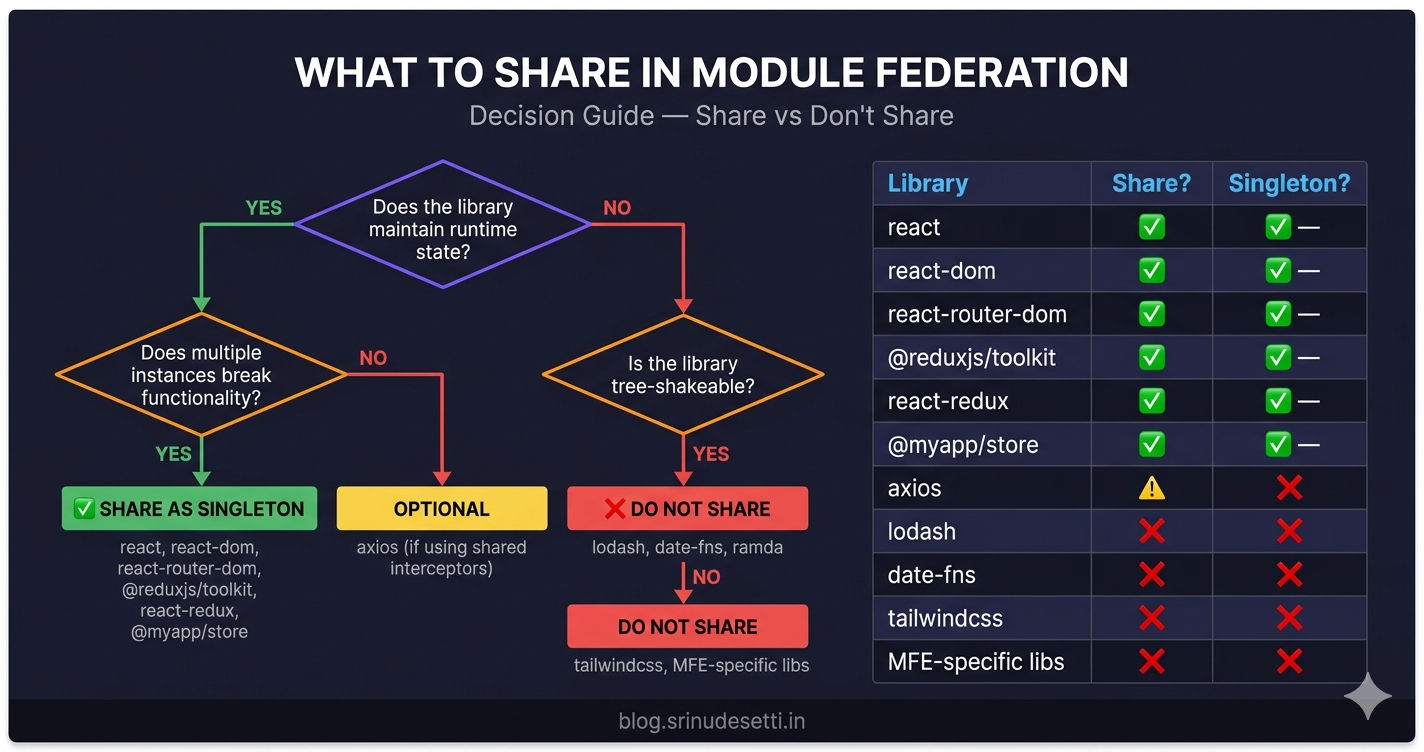
Not every dependency belongs in the shared config. Share too little and you get duplicate instances and broken hooks. Share too much and you slow down federation negotiation and prevent tree-shaking.
| Library | Share? | Singleton? | Reason |
|---|---|---|---|
react | Yes | Yes | Multiple instances break hooks and context |
react-dom | Yes | Yes | Must match react version — one renderer per app |
react-router-dom | Yes | Yes | One router context needed for URL sync across MFEs |
@reduxjs/toolkit | Yes | Yes | One Redux store instance for shared state |
react-redux | Yes | Yes | Provider context must match the store |
@myapp/store | Yes | Yes | Custom shared package — all MFEs read the same store |
axios | Maybe | No | Stateless — duplicates waste bytes but do not break logic |
lodash | No | No | Tree-shaken per MFE — sharing prevents tree-shaking |
date-fns | No | No | Each MFE imports different functions — sharing bloats all |
tailwindcss | No | No | CSS framework — not a JS runtime dependency |
| MFE-specific UI libs | No | No | Only used by one MFE — zero benefit from sharing |
The rule is simple: share libraries that maintain state or context. React, ReactDOM, Router, Redux, and custom stores must be singletons because multiple instances break cross-MFE communication. Stateless utility libraries (lodash, date-fns, axios) can safely be duplicated — the extra bytes are a minor cost compared to the complexity of managing shared versions.
What NOT to Share
These categories of libraries should never go in the shared config:
-
Tree-shakeable utilities — lodash, date-fns, ramda. If the Products MFE imports
formatfrom date-fns and the Orders MFE importsaddDays, sharing forces both MFEs to load the entire library instead of just the functions they use. -
CSS-only dependencies — Tailwind CSS, styled-components (at build time), PostCSS plugins. These are build-time tools that produce CSS output. They are not runtime JavaScript dependencies.
-
MFE-specific libraries — A charting library used only in the Analytics MFE, or a rich text editor used only in Content. Sharing these adds them to the global scope where no other MFE benefits.
-
Dev-only dependencies — ESLint, Prettier, testing libraries. These never run in the browser — sharing them is meaningless.
Sharing axios is debatable. Axios is stateless — duplicate copies do not break functionality. But if you attach interceptors (auth headers, error handling) to a shared axios instance in the host, you want all MFEs to use that same configured instance. In that case, create a @myapp/api shared package that exports the configured axios client, and share that package as a singleton.
Debugging Shared Dependencies
When shared dependencies misbehave — hooks break, state does not sync, or warnings fill the console — you can inspect the shared scope at runtime.
Common issues and fixes:
| Symptom | Cause | Fix |
|---|---|---|
| "Invalid hook call" | Multiple React instances | Add singleton: true to BOTH host and remote |
| "Shared module not available for eager consumption" | Missing async bootstrap | Use import("./bootstrap") entry pattern |
| "Unsatisfied version X of shared singleton module Y" | Version mismatch | Align versions in all package.json files |
| Remote loads but state is empty | Shared store not declared | Add @myapp/store to remote's shared config |
| Hooks work locally but break in production | Different shared configs between environments | Verify shared config is identical in both builds |
What's Next?
← Back to Module Federation Host and Remote Apps
Continue to Dynamic Remote Loading →
Frequently Asked Questions
What does singleton: true do in Module Federation shared config?
singleton: true ensures that only one instance of a shared module exists in the browser at any time. When the host loads React 18.3.1 first, every remote that also declares react as a singleton shared dependency reuses that exact same instance instead of loading its own copy. This prevents the "Invalid hook call" error caused by multiple React instances, ensures hooks work across MFE boundaries, and keeps context providers (Redux, Router) consistent across the entire application.
What happens if two MFEs have different React versions with singleton: true?
When singleton: true is set and two MFEs declare different React versions, Webpack picks the highest version that satisfies all requiredVersion constraints. If the host has React 18.3.1 and a remote requires ^18.2.0, the host's 18.3.1 satisfies ^18.2.0 — so both use 18.3.1 with no issue. If the versions are incompatible (e.g., host has 17.0.2 and remote requires ^18.0.0), Webpack logs a warning and uses the first loaded version. With strictVersion: true, this becomes a runtime error.
Should I share all dependencies in Module Federation?
No. Only share libraries that must exist as a single instance — React, ReactDOM, react-router-dom, Redux, and custom shared packages like your monorepo store. Libraries like lodash and date-fns should not be shared because they are stateless (duplicates do not cause bugs) and tree-shakeable (sharing forces the entire library to load even if each MFE only uses a few functions). Sharing everything increases the initial shared scope size and slows down federation's version negotiation.
What is the difference between requiredVersion and strictVersion?
requiredVersion declares what version range a module expects (e.g., "^18.3.1"). If the loaded version does not satisfy this range, Webpack logs a console warning but the app continues running. strictVersion: true upgrades that warning to a runtime error — the app crashes immediately when a version mismatch is detected. Use requiredVersion alone for third-party packages where minor differences are safe. Use strictVersion: true for custom monorepo packages where even a patch difference can introduce breaking changes.
Why does the host app share more dependencies than remote apps?
The host declares every shared dependency used across the application — React, ReactDOM, Router, Redux Toolkit, react-redux, and custom packages. Remote apps only declare dependencies they directly import in their own code. A remote might not import @reduxjs/toolkit directly because it accesses Redux through a shared store package. The remote still uses Redux at runtime — but through the shared store which re-exports the configured store instance.
How do I debug shared dependency issues in Module Federation?
Open DevTools Console and inspect __webpack_share_scopes__.default — this object contains every shared module, its loaded version, which app provided it, and whether it was eagerly consumed. For a healthy setup, each module key should have exactly one version entry. If you see two version keys for react, singleton is not enforced — check that both host and remote declare singleton: true. Common warnings: "Unsatisfied version" (version mismatch) and "Shared module is not available for eager consumption" (missing async bootstrap pattern).