Dynamic Remote Loading

Published: April 17, 2026 · 14 min read

Dynamic Remote Loading in Module Federation

You have host and remote apps configured with shared dependencies and everything works in local development. Then you need to deploy. The remote URLs in your webpack config point to https://localhost:4002 — but production serves from /products/. You rebuild the host with production URLs, deploy, and move on. Next week, the staging environment needs different URLs. Another rebuild. A new remote team onboards — another rebuild of the host just to add their URL. Dynamic remote loading solves this by resolving remote URLs at runtime instead of baking them into the webpack build.

This is Article 15 in the Micro Frontend Architecture series. If you haven't configured shared dependencies yet, start with Module Federation Shared Dependencies.
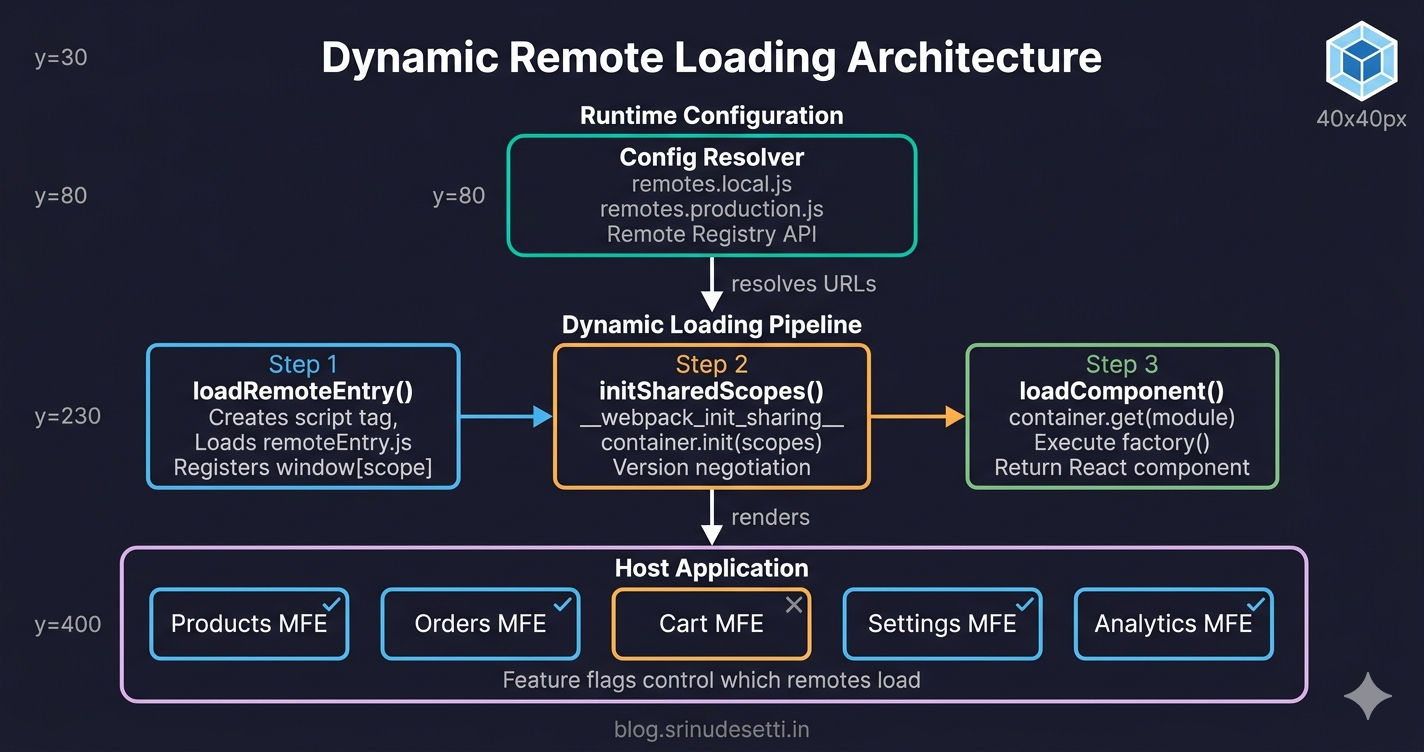
Dynamic remote loading architecture diagram showing runtime module resolution in Webpack Module Federation micro frontends

The Problem with Static Remotes

In every article so far, remote URLs have been hardcoded strings inside webpack.config.js. This is called static remote loading — Webpack bakes the URL into the build output at compile time.

apps/host/webpack.config.js
// apps/host/webpack.config.js — Static remotes (build-time URLs)

remotes: {
  Products: "Products@https://localhost:4002/remoteEntry.js",
  Orders: "Orders@https://localhost:4004/remoteEntry.js",
  Inventory: "Inventory@https://localhost:4003/remoteEntry.js",
  Settings: "Settings@https://localhost:4009/remoteEntry.js",
}

// Problem: These URLs are HARDCODED at build time.
//
// To deploy to staging, you rebuild with staging URLs.
// To deploy to production, you rebuild with production URLs.
// To add a new remote, you rebuild the entire host.
//
// 3 environments × 10 remotes = 30 URLs to manage manually
// Every URL change requires a full rebuild and redeploy of the host

This works fine when you have one environment and a few remotes. But in real projects with multiple environments (local, staging, production) and multiple teams deploying independently, static remotes create a bottleneck: every URL change requires rebuilding and redeploying the host application. The host becomes the release gatekeeper for every remote team.

⚠️

Static remotes also block independent deployments. If the Products team deploys a new version to a different URL (e.g., a versioned CDN path), the host must be rebuilt to pick up the new URL. This defeats one of the core benefits of micro frontend architecture — independent team deployments.

What is Dynamic Remote Loading?

Dynamic remote loading resolves remote URLs at runtime instead of at build time. Instead of hardcoding "Products@https://localhost:4002/remoteEntry.js" in the webpack config, you load the URL from a configuration file, an environment variable, or an API call when the application starts in the browser.

This means:

  • The same host build works in local, staging, and production — only the config changes
  • New remotes can be added without rebuilding the host
  • Remotes can be feature-flagged — disabled or enabled at runtime
  • Each remote team can deploy independently to versioned URLs
  • A/B testing becomes possible — different users can load different remote versions

How Dynamic Remote Loading Works

Dynamic remote loading follows a three-step process that mirrors what Webpack does internally with static remotes — but you control when and how each step happens.
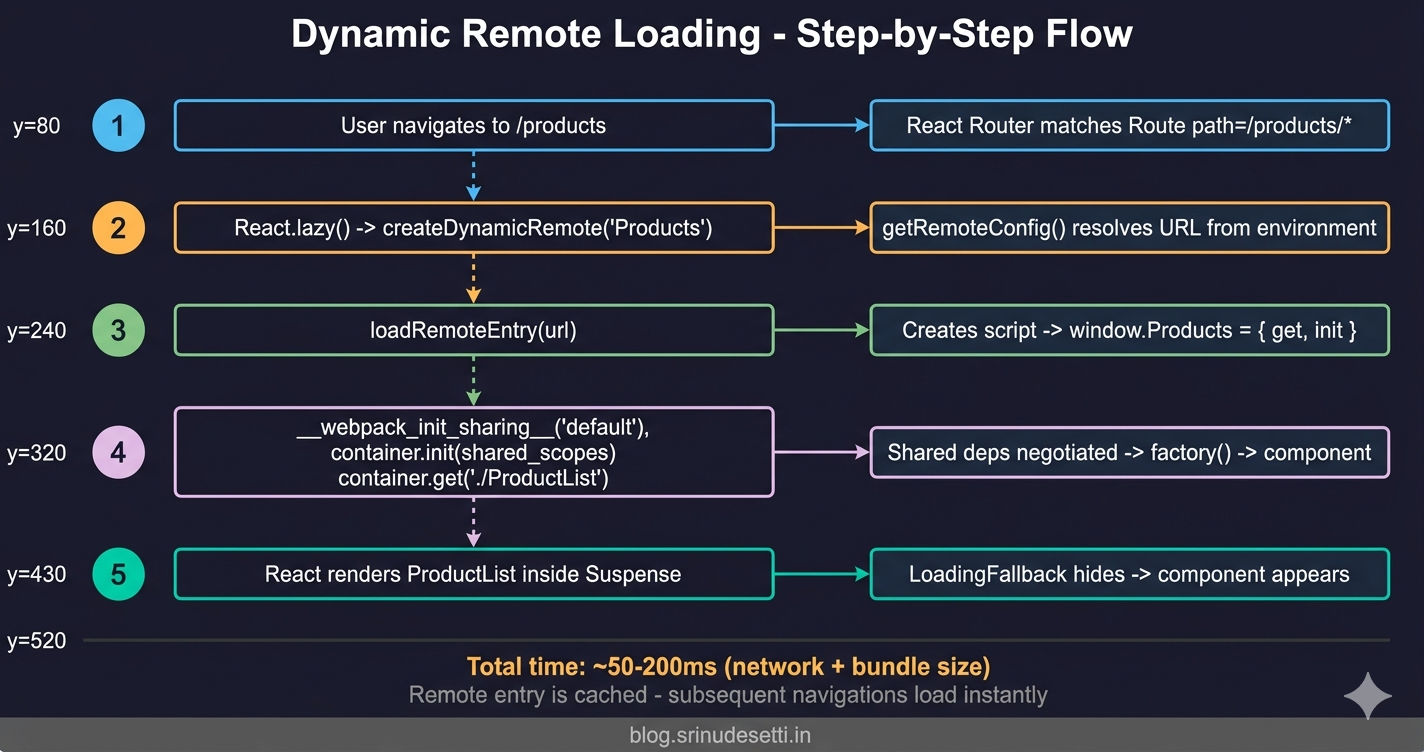
dynamic-loading-flow.txt
Dynamic Remote Loading — Step-by-Step Flow:

1. User navigates to /products
   └── React Router matches the <Route path="/products/*" />

2. React.lazy() triggers createDynamicRemote("Products")
   └── getRemoteConfig() resolves environment-specific URL
   └── Returns: { scope: "Products", url: "/products/remoteEntry.js", module: "./ProductList" }

3. loadRemoteEntry("/products/remoteEntry.js")
   └── Creates <script src="/products/remoteEntry.js" async />
   └── Browser fetches and executes the script
   └── Script registers window.Products = { get, init }

4. loadComponent("Products", "./ProductList")
   ├── __webpack_init_sharing__("default")
   │   └── Makes host's shared deps available (React, Redux, etc.)
   ├── window.Products.init(__webpack_share_scopes__.default)
   │   └── Remote checks: "Does the host already have React 18.3.1?"
   │   └── Yes → Remote reuses host's React (no duplicate)
   └── window.Products.get("./ProductList")
       └── Returns factory function → factory() → ProductList component

5. React renders <ProductList /> inside <Suspense>
   └── Suspense fallback (<LoadingFallback />) hides during steps 2-4
   └── Component appears when loadComponent resolves

Total time: ~50-200ms (depends on network + remote bundle size)

Dynamic remote loading flow diagram showing loadRemoteEntry and loadComponent steps in Module Federation

Step 1: Load the Remote Entry Script

The first utility loads a remote's remoteEntry.js file by dynamically injecting a <script> tag. When the script executes, it registers the remote container as a global variable on window (e.g., window.Products).

utils/loadRemoteEntry.js
// utils/loadRemoteEntry.js
// Dynamically injects a <script> tag to load a remote's entry point

function loadRemoteEntry(url) {
  return new Promise((resolve, reject) => {
    // Check if this remote entry is already loaded
    const existingScript = document.querySelector(
      'script[data-remote-entry="' + url + '"]'
    );

    if (existingScript) {
      resolve();
      return;
    }

    const script = document.createElement("script");
    script.src = url;
    script.type = "text/javascript";
    script.async = true;
    script.setAttribute("data-remote-entry", url);

    script.onload = () => {
      resolve();
    };

    script.onerror = () => {
      reject(new Error("Failed to load remote entry: " + url));
    };

    document.head.appendChild(script);
  });
}

export default loadRemoteEntry;

Step 2: Load the Component from the Container

Once the remote container is available on window, the second utility initializes shared dependency negotiation and retrieves the specific exposed module.

utils/loadComponent.js
// utils/loadComponent.js
// Retrieves a specific module from a loaded remote container

async function loadComponent(scope, module) {
  // Step 1: Initialize Webpack's shared dependency negotiation
  // This makes shared modules (React, Redux, etc.) available to the remote
  await __webpack_init_sharing__("default");

  // Step 2: Get the remote container from the global window object
  // When remoteEntry.js loads, it registers the container as window[scope]
  const container = window[scope];

  if (!container) {
    throw new Error('Remote container "' + scope + '" not found on window');
  }

  // Step 3: Initialize the container with the host's shared scopes
  // This is where version negotiation happens — the remote checks which
  // shared dependencies the host already provides and reuses them
  await container.init(__webpack_share_scopes__.default);

  // Step 4: Get the module factory from the container
  // The module path must match the "exposes" key in the remote's webpack config
  // e.g., "./ProductList" matches exposes: { "./ProductList": "./src/..." }
  const factory = await container.get(module);

  // Step 5: Execute the factory to get the actual exported module
  const Module = factory();

  return Module;
}

export default loadComponent;

__webpack_init_sharing__ and __webpack_share_scopes__ are Webpack runtime globals. They exist automatically in any application built with ModuleFederationPlugin (opens in a new tab). You do not need to import or declare them — Webpack injects them at build time. These globals power the shared dependency system covered in the previous article.

Step 3: Combine with Caching

The third utility wraps both steps into a single function with a cache to prevent re-fetching the same module on subsequent renders or navigation.

utils/dynamicRemoteLoader.js
// utils/dynamicRemoteLoader.js
// Combines loadRemoteEntry + loadComponent with caching

import loadRemoteEntry from "./loadRemoteEntry";
import loadComponent from "./loadComponent";

const remoteCache = new Map();

async function loadDynamicRemote({ scope, module, url }) {
  const cacheKey = scope + ":" + module;

  // Return cached module if already loaded
  if (remoteCache.has(cacheKey)) {
    return remoteCache.get(cacheKey);
  }

  // Step 1: Load the remote entry script (creates window[scope])
  await loadRemoteEntry(url);

  // Step 2: Load the component from the container
  const component = await loadComponent(scope, module);

  // Cache for subsequent renders — prevents re-fetching on navigation
  remoteCache.set(cacheKey, component);

  return component;
}

export default loadDynamicRemote;

Environment-Based Remote Configuration

The most common use case for dynamic remote loading is environment-based configuration — using different remote URLs for local development, staging, and production without rebuilding the host.

config/remotes.local.js
// config/remotes.local.js — Local Development
// Each remote runs on its own localhost port with HTTPS

const remoteConfig = {
  Products: {
    scope: "Products",
    url: "https://localhost:4002/remoteEntry.js",
    module: "./ProductList",
  },
  Orders: {
    scope: "Orders",
    url: "https://localhost:4004/remoteEntry.js",
    module: "./OrdersDashboard",
  },
  Inventory: {
    scope: "Inventory",
    url: "https://localhost:4003/remoteEntry.js",
    module: "./InventoryDashboard",
  },
  Settings: {
    scope: "Settings",
    url: "https://localhost:4009/remoteEntry.js",
    module: "./SettingsDashboard",
  },
  Analytics: {
    scope: "Analytics",
    url: "https://localhost:4007/remoteEntry.js",
    module: "./AnalyticsDashboard",
  },
};

export default remoteConfig;

The resolver picks the correct config at runtime based on the environment.

config/remoteResolver.js
// config/remoteResolver.js
// Resolves remote configuration based on the current environment

const ENV = process.env.NODE_ENV;
const REMOTE_BASE = process.env.REACT_APP_REMOTE_BASE_URL;

async function getRemoteConfig() {
  // Environment variable override — highest priority
  if (REMOTE_BASE) {
    const { default: config } = await import("./remotes.production.js");
    // Prefix all relative URLs with the base URL
    const resolved = {};
    for (const [name, remote] of Object.entries(config)) {
      resolved[name] = {
        ...remote,
        url: remote.url.startsWith("/")
          ? REMOTE_BASE + remote.url
          : remote.url,
      };
    }
    return resolved;
  }

  if (ENV === "production") {
    const { default: config } = await import("./remotes.production.js");
    return config;
  }

  const { default: config } = await import("./remotes.local.js");
  return config;
}

export default getRemoteConfig;

Now the host's App.jsx uses the resolver to create lazy components that load from the right URLs automatically.

src/App.jsx
// src/App.jsx — Loading remotes dynamically at runtime
import React, { lazy, Suspense } from "react";
import { Routes, Route } from "react-router-dom";
import loadDynamicRemote from "./utils/dynamicRemoteLoader";
import getRemoteConfig from "./config/remoteResolver";
import LoadingFallback from "./components/LoadingFallback";
import ErrorBoundary from "./components/ErrorBoundary";

// Factory function — creates a lazy component from runtime config
function createDynamicRemote(remoteName) {
  return lazy(async () => {
    const config = await getRemoteConfig();
    const remote = config[remoteName];

    if (!remote) {
      return { default: () => <div>Remote "{remoteName}" not configured</div> };
    }

    try {
      const module = await loadDynamicRemote({
        scope: remote.scope,
        module: remote.module,
        url: remote.url,
      });
      return module;
    } catch (error) {
      console.error("Failed to load " + remoteName + ":", error);
      return {
        default: () => <div>{remoteName} module unavailable</div>,
      };
    }
  });
}

// Create dynamic remote components — URLs resolved at runtime
const ProductsMFE = createDynamicRemote("Products");
const OrdersMFE = createDynamicRemote("Orders");
const InventoryMFE = createDynamicRemote("Inventory");
const SettingsMFE = createDynamicRemote("Settings");
const AnalyticsMFE = createDynamicRemote("Analytics");

function App() {
  return (
    <Routes>
      <Route
        path="/products/*"
        element={
          <ErrorBoundary>
            <Suspense fallback={<LoadingFallback />}>
              <ProductsMFE />
            </Suspense>
          </ErrorBoundary>
        }
      />
      <Route
        path="/orders/*"
        element={
          <ErrorBoundary>
            <Suspense fallback={<LoadingFallback />}>
              <OrdersMFE />
            </Suspense>
          </ErrorBoundary>
        }
      />
      <Route
        path="/inventory/*"
        element={
          <ErrorBoundary>
            <Suspense fallback={<LoadingFallback />}>
              <InventoryMFE />
            </Suspense>
          </ErrorBoundary>
        }
      />
      <Route
        path="/settings/*"
        element={
          <ErrorBoundary>
            <Suspense fallback={<LoadingFallback />}>
              <SettingsMFE />
            </Suspense>
          </ErrorBoundary>
        }
      />
      <Route
        path="/analytics/*"
        element={
          <ErrorBoundary>
            <Suspense fallback={<LoadingFallback />}>
              <AnalyticsMFE />
            </Suspense>
          </ErrorBoundary>
        }
      />
    </Routes>
  );
}

export default App;

The createDynamicRemote factory replaces static React.lazy() imports. Instead of lazy(() => import("Products/ProductList")) which requires webpack to know the remote URL at build time, the factory resolves the URL at runtime from the config. The rest of the pattern — Suspense, ErrorBoundary, route wrapping — stays identical to the host and remote setup.

Promise-Based Remotes in Webpack Config

Webpack Module Federation supports an alternative approach: promise-based remotes directly in the webpack config. Instead of a static URL string, you pass a promise that resolves to the remote container at runtime.

webpack.config.js
// webpack.config.js — Promise-based dynamic remotes
// URLs are resolved at RUNTIME, not baked into the build

const { ModuleFederationPlugin } = require("webpack").container;

module.exports = {
  plugins: [
    new ModuleFederationPlugin({
      name: "Host",
      remotes: {
        // Instead of a static string, pass a promise that resolves
        // to the remote container at runtime
        Products: "promise new Promise((resolve, reject) => {" +
          "const url = (window.__REMOTE_CONFIG__ " +
          "&& window.__REMOTE_CONFIG__.Products) " +
          "|| '/products/remoteEntry.js';" +
          "const script = document.createElement('script');" +
          "script.src = url;" +
          "script.onload = () => {" +
          "  const proxy = {" +
          "    get: (request) => window.Products.get(request)," +
          "    init: (arg) => {" +
          "      try { return window.Products.init(arg); }" +
          "      catch (e) { console.log('Products already initialized'); }" +
          "    }," +
          "  };" +
          "  resolve(proxy);" +
          "};" +
          "script.onerror = reject;" +
          "document.head.appendChild(script);" +
          "})",
      },
      shared: {
        react: { singleton: true, requiredVersion: "^18.3.1" },
        "react-dom": { singleton: true, requiredVersion: "^18.3.1" },
        "@myapp/store": { singleton: true, requiredVersion: "0.0.1" },
      },
    }),
  ],
};

// Inject runtime config BEFORE the host app loads:
// <script>
//   window.__REMOTE_CONFIG__ = {
//     Products: "https://cdn.myapp.com/products/remoteEntry.js",
//     Orders: "https://cdn.myapp.com/orders/remoteEntry.js",
//   };
// </script>

This approach keeps dynamic loading inside the webpack config without requiring separate utility files. However, the config becomes harder to read and debug. For most projects, the utility-based approach (loadRemoteEntry + loadComponent) is cleaner.

Remote Registry Pattern

For large-scale projects with many remotes and multiple teams, an API-driven remote registry provides centralized control over which remote versions are loaded.

services/remoteRegistry.js
// services/remoteRegistry.js
// Fetches remote configuration from an API at runtime

const REGISTRY_URL = "/api/v1/remote-registry";

let registryCache = null;
let cacheTimestamp = 0;
const CACHE_TTL = 5 * 60 * 1000; // 5 minutes

async function fetchRemoteRegistry() {
  const now = Date.now();

  // Return cached registry if still valid
  if (registryCache && now - cacheTimestamp < CACHE_TTL) {
    return registryCache;
  }

  try {
    const response = await fetch(REGISTRY_URL);

    if (!response.ok) {
      throw new Error("Registry responded with " + response.status);
    }

    const registry = await response.json();
    registryCache = registry;
    cacheTimestamp = now;

    return registry;
  } catch (error) {
    console.error("Failed to fetch remote registry:", error);

    // Fall back to stale cache if available
    if (registryCache) {
      console.warn("Using stale registry cache");
      return registryCache;
    }

    throw error;
  }
}

// Example API response:
// {
//   "remotes": {
//     "Products": {
//       "url": "https://cdn.myapp.com/products/v2.1.0/remoteEntry.js",
//       "scope": "Products",
//       "module": "./ProductList",
//       "version": "2.1.0",
//       "enabled": true
//     },
//     "Cart": {
//       "url": "https://cdn.myapp.com/cart/v1.8.3/remoteEntry.js",
//       "scope": "Cart",
//       "module": "./ShoppingBag",
//       "version": "1.8.3",
//       "enabled": false
//     }
//   }
// }

export default fetchRemoteRegistry;

The registry pattern enables:

  • Versioned deployments — each remote has a version in its URL, so the backend can roll back to a previous version by changing the URL
  • Gradual rollouts — serve the new version to 10% of users, then 50%, then 100%
  • Instant rollbacks — if a remote breaks in production, update the registry to point back to the previous version — no host rebuild needed

Feature Flags and Conditional Remote Loading

Combining the remote registry with feature flags lets you enable or disable entire micro frontends at runtime.

utils/featureFlagLoader.js
// utils/featureFlagLoader.js
// Conditionally loads remotes based on feature flags from the registry

import loadDynamicRemote from "./dynamicRemoteLoader";
import fetchRemoteRegistry from "../services/remoteRegistry";

function FallbackComponent({ name }) {
  return <div>The {name} module is currently unavailable.</div>;
}

async function loadRemoteWithFeatureFlag(remoteName) {
  try {
    const registry = await fetchRemoteRegistry();
    const remote = registry.remotes[remoteName];

    // Feature flag check — "enabled" comes from backend config
    if (!remote || !remote.enabled) {
      console.log('Remote "' + remoteName + '" is disabled by feature flag');
      return {
        default: () => <FallbackComponent name={remoteName} />,
      };
    }

    return await loadDynamicRemote({
      scope: remote.scope,
      module: remote.module,
      url: remote.url,
    });
  } catch (error) {
    console.error("Feature flag load failed for " + remoteName + ":", error);
    return {
      default: () => <FallbackComponent name={remoteName} />,
    };
  }
}

export default loadRemoteWithFeatureFlag;

// Usage with React.lazy:
// const CartMFE = lazy(() => loadRemoteWithFeatureFlag("Cart"));
//
// If "Cart" has enabled: false in the registry,
// CartMFE renders the fallback instead of loading the remote.
// No rebuild needed — toggle the flag in the backend.

This is powerful for:

  • Gradual feature releases — enable a new MFE for internal users first, then beta users, then everyone
  • Kill switches — instantly disable a broken remote without deploying anything
  • Region-based features — load different remotes based on user geography

Error Handling and Retry Strategies

Dynamic loading introduces more failure points than static loading — network timeouts, CDN outages, DNS resolution failures. Retry logic with exponential backoff handles transient failures gracefully.

utils/retryRemoteLoad.js
// utils/retryRemoteLoad.js
// Adds exponential backoff retry logic for remote loading failures

async function loadWithRetry(loadFn, options = {}) {
  const { maxRetries = 3, baseDelay = 1000 } = options;
  let lastError;

  for (let attempt = 1; attempt <= maxRetries; attempt++) {
    try {
      return await loadFn();
    } catch (error) {
      lastError = error;
      console.warn(
        "Attempt " + attempt + "/" + maxRetries + " failed:",
        error.message
      );

      if (attempt < maxRetries) {
        // Exponential backoff: 1s, 2s, 4s
        const backoff = baseDelay * Math.pow(2, attempt - 1);
        await new Promise((resolve) => setTimeout(resolve, backoff));
      }
    }
  }

  throw new Error(
    "Failed after " + maxRetries + " attempts: " + lastError.message
  );
}

export default loadWithRetry;

// Usage with dynamicRemoteLoader:
//
// import loadDynamicRemote from "./dynamicRemoteLoader";
// import loadWithRetry from "./retryRemoteLoad";
//
// const ProductsMFE = lazy(() =>
//   loadWithRetry(
//     () => loadDynamicRemote({
//       scope: "Products",
//       module: "./ProductList",
//       url: "/products/remoteEntry.js",
//     }),
//     { maxRetries: 3, baseDelay: 1000 }
//   ).catch(() => ({
//     default: () => <div>Products unavailable after retries</div>,
//   }))
// );

The retry pattern is especially important in production where network conditions are unpredictable. A single failed fetch should not permanently break a page — the user might be on a slow connection that recovers after one retry.

Preloading Remote Entries for Performance

Dynamic loading adds a small overhead: the browser must fetch remoteEntry.js when the user first navigates to a remote's route. You can eliminate this delay by preloading remote entries during browser idle time.

utils/preloadRemotes.js
// utils/preloadRemotes.js
// Preloads remote entries during browser idle time

import loadRemoteEntry from "./loadRemoteEntry";
import getRemoteConfig from "../config/remoteResolver";

async function preloadRemoteEntries(remoteNames) {
  const config = await getRemoteConfig();

  const preloadPromises = remoteNames.map((name) => {
    const remote = config[name];
    if (!remote) return Promise.resolve();

    // Use requestIdleCallback for non-blocking preload
    if (window.requestIdleCallback) {
      return new Promise((resolve) => {
        window.requestIdleCallback(() => {
          loadRemoteEntry(remote.url)
            .then(resolve)
            .catch(() => {
              // Preload failures are non-critical — log and continue
              console.warn("Preload failed for " + name);
              resolve();
            });
        });
      });
    }

    // Fallback for browsers without requestIdleCallback
    return new Promise((resolve) => {
      setTimeout(() => {
        loadRemoteEntry(remote.url)
          .then(resolve)
          .catch(() => resolve());
      }, 100);
    });
  });

  await Promise.allSettled(preloadPromises);
}

export default preloadRemoteEntries;

// Usage in App.jsx — preload remotes the user is likely to visit:
//
// useEffect(() => {
//   preloadRemoteEntries(["Products", "Orders"]);
// }, []);
//
// This loads remoteEntry.js scripts during idle time.
// When the user navigates to /products, the script is already cached
// and loadComponent() resolves instantly.

Preloading works best for remotes the user is likely to visit. Analyze your navigation patterns — if 80% of users visit Products after logging in, preload the Products remote entry during idle time after the login page renders.

Security: Validating Remote Origins

Dynamic remote loading loads and executes arbitrary JavaScript from URLs resolved at runtime. Without validation, a compromised config or registry could inject a malicious remoteEntry.js. Always validate remote URLs against a whitelist of trusted origins.

utils/validateRemoteOrigin.js
// utils/validateRemoteOrigin.js
// Prevents loading remote entries from untrusted origins

const TRUSTED_ORIGINS = [
  "https://cdn.myapp.com",
  "https://static.myapp.com",
  "https://localhost:4001",
  "https://localhost:4002",
  "https://localhost:4003",
  "https://localhost:4004",
  "https://localhost:4005",
  "https://localhost:4006",
  "https://localhost:4007",
  "https://localhost:4008",
  "https://localhost:4009",
];

function isOriginTrusted(url) {
  try {
    // Relative URLs are same-origin — always trusted
    if (url.startsWith("/")) {
      return true;
    }

    const parsedUrl = new URL(url, window.location.origin);
    return TRUSTED_ORIGINS.includes(parsedUrl.origin);
  } catch {
    return false;
  }
}

// Wrap loadRemoteEntry with origin validation
import loadRemoteEntry from "./loadRemoteEntry";

async function loadRemoteEntrySafe(url) {
  if (!isOriginTrusted(url)) {
    throw new Error(
      "Blocked: untrusted remote origin — " + url +
      ". Add the origin to TRUSTED_ORIGINS to allow loading."
    );
  }

  return loadRemoteEntry(url);
}

export { isOriginTrusted, loadRemoteEntrySafe };
⚠️

Never load remote entries from user-provided URLs. Remote entry scripts execute immediately when the <script> tag loads — they have full access to the page's DOM, cookies, and JavaScript context. Always validate against a hardcoded list of trusted origins. If your registry API is compromised, the origin validation acts as a second line of defense.

Dynamic Remote Loading in Next.js

Next.js uses NextFederationPlugin (opens in a new tab) instead of ModuleFederationPlugin, and the remote entry paths differ — Next.js serves them from _next/static/chunks/remoteEntry.js (client) and _next/static/ssr/remoteEntry.js (server).

next.config.js
// next.config.js — Next.js host with environment-based remote URLs
const { NextFederationPlugin } = require("@module-federation/nextjs-mf");

const REMOTE_BASE = process.env.REMOTE_BASE_URL || "http://localhost:3000";

// Helper: builds remote URL with SSR/client differentiation
function getRemoteUrl(name, path) {
  const isServer = typeof window === "undefined";
  const entryPath = isServer
    ? "_next/static/ssr/remoteEntry.js"
    : "_next/static/chunks/remoteEntry.js";

  return name + "@" + REMOTE_BASE + "/" + path + "/" + entryPath;
}

module.exports = {
  webpack(config, options) {
    config.plugins.push(
      new NextFederationPlugin({
        name: "Host",
        filename: "static/chunks/remoteEntry.js",
        remotes: {
          Content: getRemoteUrl("Content", "content"),
          Products: getRemoteUrl("Products", "products"),
        },
        shared: {
          react: { singleton: true, requiredVersion: false },
          "react-dom": { singleton: true, requiredVersion: false },
          "@myapp/store": {
            singleton: true,
            strictVersion: true,
            requiredVersion: "1.0.0",
          },
        },
        extraOptions: {
          exposePages: true,
          enableImageLoaderFix: true,
          automaticAsyncBoundary: true,
        },
      })
    );
    return config;
  },
};

// Deploy with different remote base URLs per environment:
// REMOTE_BASE_URL=https://staging.myapp.com npm run build
// REMOTE_BASE_URL=https://myapp.com npm run build

Key Differences from React

AspectReact (Webpack)Next.js
PluginModuleFederationPluginNextFederationPlugin
Loading methodReact.lazy()next/dynamic with ssr: false
Remote entry path/remoteEntry.js/_next/static/chunks/remoteEntry.js
SSR supportNot applicableisServer check for SSR/client paths
Config filewebpack.config.jsnext.config.js
Shared versionrequiredVersion: "^18.3.1"requiredVersion: false

Static vs Dynamic Remotes — When to Use Each
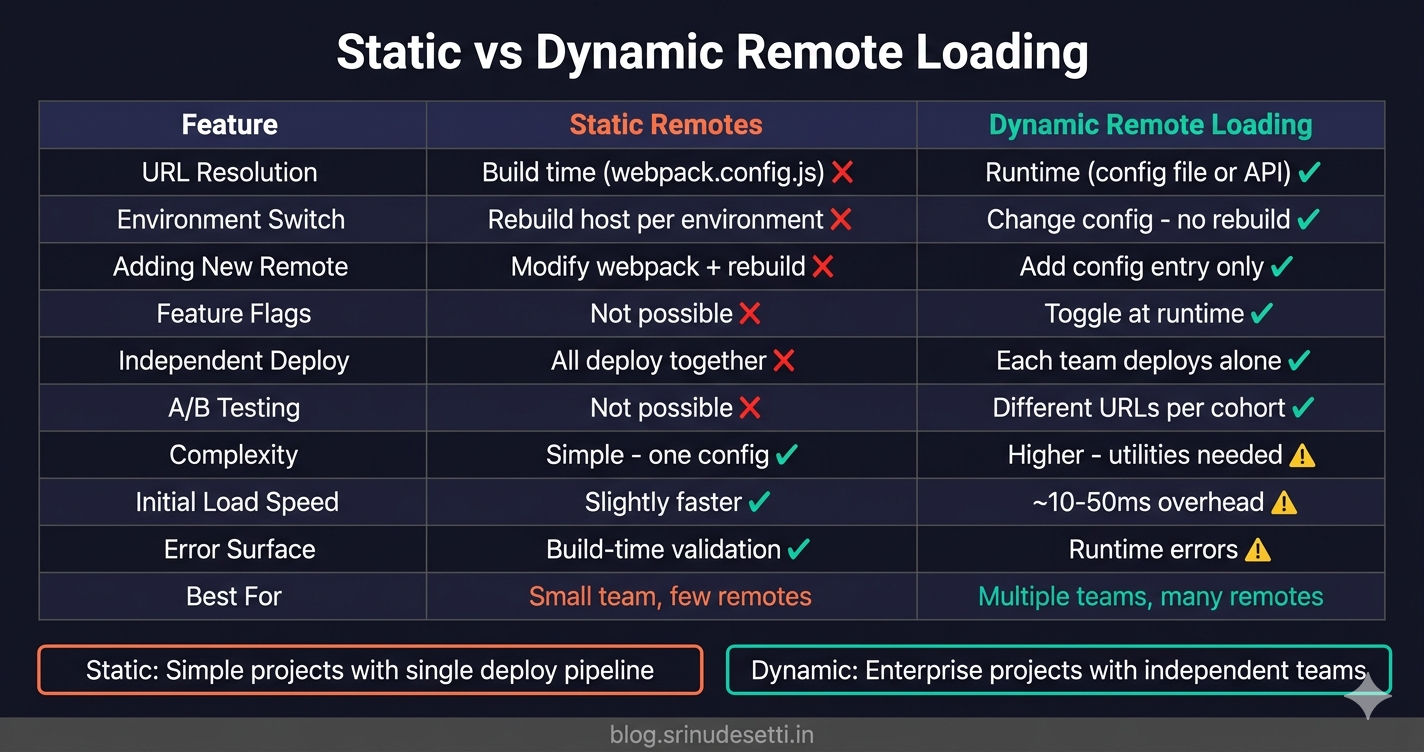
Static vs dynamic remote loading comparison chart for micro frontend Module Federation architecture

FeatureStatic RemotesDynamic Remote Loading
URL resolutionBuild time (webpack.config.js)Runtime (config file or API)
Environment switchRebuild host per environmentChange config — no rebuild needed
Adding a new remoteModify webpack config + rebuild hostAdd entry to config file or registry
Feature flagsNot possible without rebuildToggle enabled/disabled at runtime
Versioned deploymentsAll remotes deploy at onceEach remote can deploy independently
A/B testingNot possibleLoad different remote URLs per user cohort
ComplexitySimple — one config fileHigher — loader utils, config management
Initial load performanceSlightly faster (no config fetch)~10-50ms overhead for config resolution
Error surfaceWebpack catches missing remotes at buildRuntime errors — need robust error handling
When to useSmall team, few remotes, single deployMultiple teams, many remotes, CI/CD per MFE

Use static remotes when you have a small team, a handful of remotes, and a single deployment pipeline. The simplicity is worth more than the flexibility.

Use dynamic remote loading when you have multiple teams deploying independently, multiple environments with different remote URLs, or requirements for feature flags and gradual rollouts. The added complexity pays for itself in deployment flexibility.

What's Next?

← Back to Module Federation Shared Dependencies

Continue to Lazy Loading MFE Components with React Suspense →


Frequently Asked Questions

What is the difference between static and dynamic remote loading in Module Federation?

Static remote loading hardcodes remote URLs in webpack.config.js at build time — changing the URL requires rebuilding the host application. Dynamic remote loading resolves remote URLs at runtime using configuration files, environment variables, or API calls. This means the same host build can point to different remote URLs in development, staging, and production without rebuilding. Dynamic loading also enables feature flags, A/B testing, and independent deployments where each remote team deploys on their own schedule.

How do I load a remote micro frontend dynamically at runtime?

Dynamic remote loading follows three steps. First, inject a <script> tag with the remote's entry URL to load its remoteEntry.js file — this registers the remote container on the window object. Second, call __webpack_init_sharing__("default") to initialize the shared dependency scope, then call container.init(__webpack_share_scopes__.default) to let the remote negotiate shared dependencies with the host. Third, call container.get("./ModuleName") to retrieve the module factory, then execute the factory to get the actual component. Wrapping these steps in a utility function and combining it with React.lazy() gives you a clean dynamic loading pattern.

Can I change remote URLs without rebuilding the host application?

Yes. With dynamic remote loading, remote URLs come from runtime configuration instead of the webpack build. You can use environment-specific config files (remotes.local.js, remotes.production.js), inject URLs via a <script> tag in index.html (window.__REMOTE_CONFIG__), or fetch URLs from an API endpoint at startup. Each approach lets you deploy the same host build to any environment — only the configuration changes. The remote registry pattern takes this further by letting a backend API control which remote versions are loaded.

How do I handle errors when a dynamic remote fails to load?

Dynamic remote loading can fail for several reasons — network errors, remote server downtime, or version mismatches. Build multiple layers of protection: use .catch() on the lazy import to return a fallback component, wrap remote components in React ErrorBoundary to catch render-time errors, implement retry logic with exponential backoff (1s, 2s, 4s delays) for transient network failures, and validate remote origins before loading scripts to prevent loading from untrusted sources. The combination of graceful fallbacks and retry logic ensures the host application stays functional even when individual remotes are unavailable.

What is the promise-based remote pattern in Webpack Module Federation?

The promise-based remote pattern replaces the static remote string in webpack.config.js with a promise that resolves to the remote container at runtime. Instead of writing Products: "Products@/products/remoteEntry.js", you write Products: "promise new Promise(...)" where the promise creates a <script> tag, loads the remote entry, and resolves with a proxy object that delegates get() and init() calls to the actual container on window. This approach keeps dynamic loading inside the webpack config without requiring utility functions, but it makes the config harder to read.

Is dynamic remote loading slower than static remote loading?

Dynamic remote loading adds 10-50ms of overhead for configuration resolution (reading a config file or fetching from an API). The actual remote entry loading and module resolution take the same time as static loading — the browser still fetches remoteEntry.js and the component bundle. You can minimize the overhead by caching the configuration, preloading remote entries during browser idle time using requestIdleCallback, and caching loaded modules to prevent re-fetching on navigation. In practice, the overhead is imperceptible to users and is a worthwhile trade-off for the deployment flexibility it provides.