Published: April 22, 2026 · 15 min read
SSR vs CSR in Next.js Module Federation Explained
You deploy a Next.js micro frontend host that loads remote components via NextFederationPlugin. The page renders on the server, sends HTML to the browser, and then React hydrates it. But the remote component attached to window — which does not exist on the server. The build crashes: ReferenceError: window is not defined. Understanding SSR vs CSR in Next.js Module Federation is the difference between a working production deployment and a wall of hydration errors. In the previous article, you configured remote MFEs with basePath and assetPrefix. Now it is time to understand what happens under the hood when those remotes render on the server and in the browser.
In this guide, you will:
- Understand why Next.js runs webpack twice and what the isServer flag does
- Learn why NextFederationPlugin generates two remoteEntry.js files (SSR + CSR)
- See the complete rendering timeline from server HTML to remote component mount
- Understand why ssr: false is mandatory for all remote component imports
- Learn why eager: false prevents hydration mismatch errors
- See real production patterns for hybrid SSR + CSR pages with Module Federation
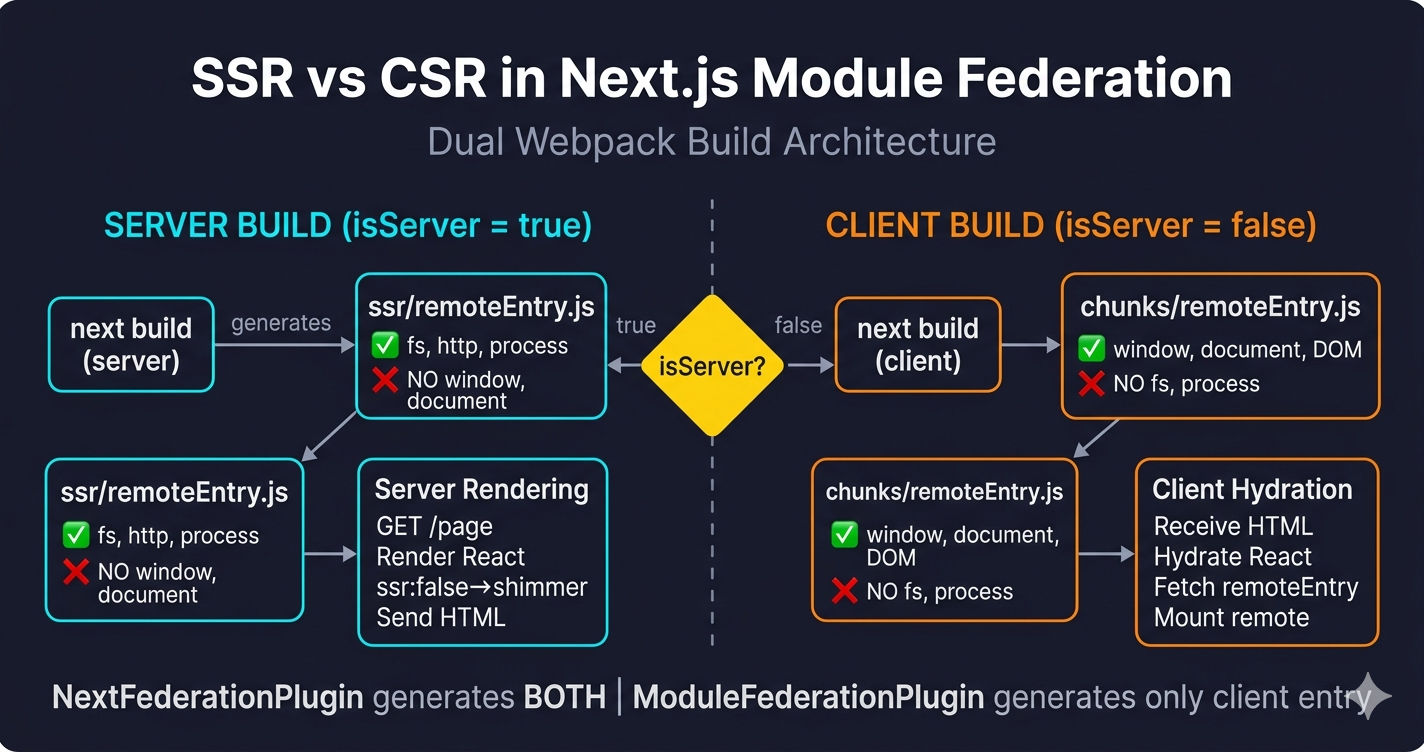
The Dual Build — Why Next.js Runs Webpack Twice
When you run next build, Next.js executes webpack two separate times — once for the server and once for the client. Each build produces a completely different output with different module formats, different available APIs, and different entry points.
This dual build is the reason NextFederationPlugin exists. ModuleFederationPlugin (opens in a new tab) generates a single remoteEntry.js for the browser. NextFederationPlugin hooks into both webpack runs and generates two separate remote entries — one compatible with Node.js (for SSR) and one compatible with the browser (for CSR).
The isServer flag is NOT a runtime check. It is a build-time constant provided by Next.js to the webpack function in next.config.js. During the server build, isServer is true. During the client build, isServer is false. The ternary in the remotes config produces two different URLs at build time — not one URL that switches at runtime.
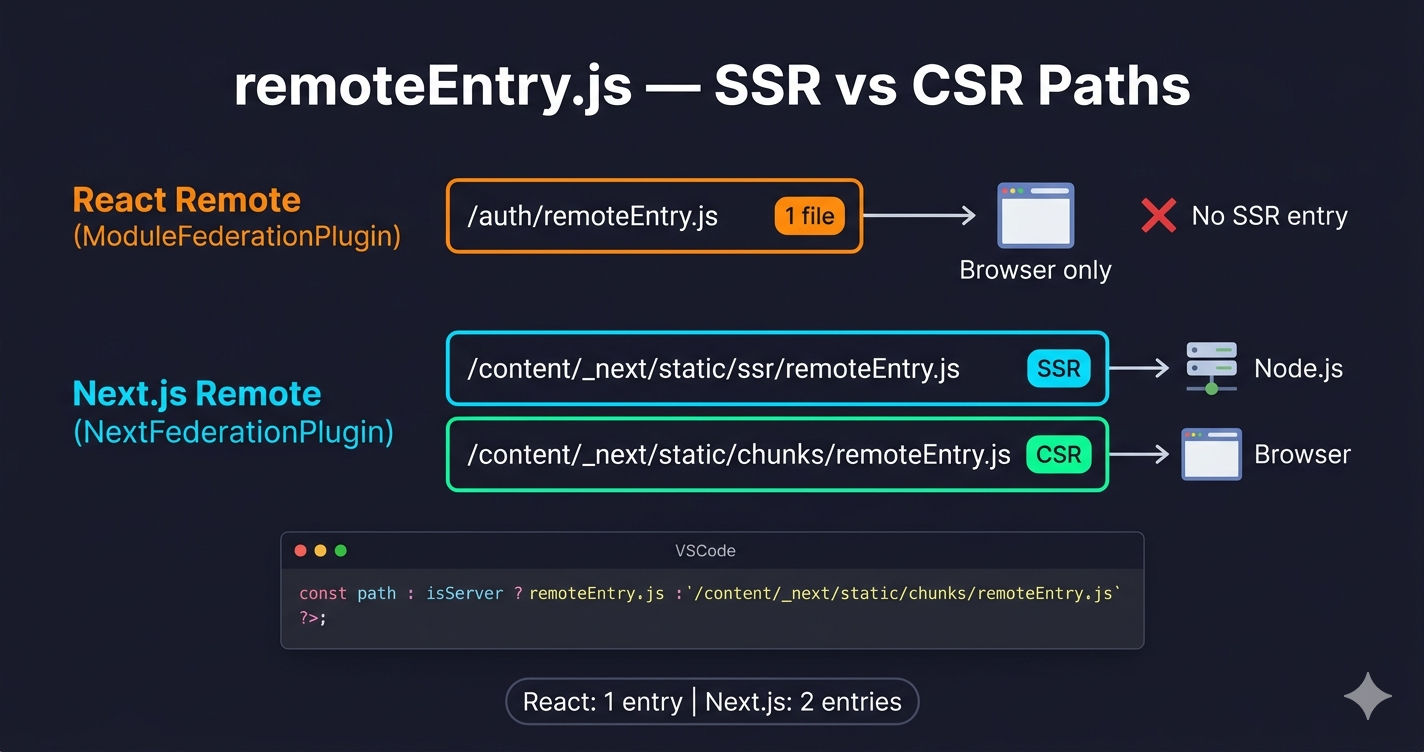
Two remoteEntry.js Files — SSR vs CSR
NextFederationPlugin generates two remote entry files for every Next.js remote. The host uses the isServer flag to load the correct one during each webpack build.
The host configuration uses isServer to select the correct entry for each build:
React Remotes vs Next.js Remotes — Entry File Count
| Remote Type | remoteEntry Files | isServer Needed? | Why |
|---|---|---|---|
| React (ModuleFederationPlugin) | 1 — remoteEntry.js at root | No | Browser-only — no SSR build exists |
| Next.js (NextFederationPlugin) | 2 — ssr/ + chunks/ | Yes | Dual build — server needs Node.js compatible entry |
React remotes built with ModuleFederationPlugin produce a single remoteEntry.js that only works in the browser. The host loads them with ssr: false via next/dynamic, so the server build never tries to fetch their remote entry. For a detailed comparison, see the NextFederationPlugin vs ModuleFederationPlugin article.
SSR vs CSR Comparison
| Aspect | SSR (Server-Side Rendering) | CSR (Client-Side Rendering) |
|---|---|---|
| Where it runs | Node.js on the server | Browser on the client |
| remoteEntry path | _next/static/ssr/remoteEntry.js | _next/static/chunks/remoteEntry.js |
| Module format | CommonJS (require/exports) | ES modules / webpack runtime |
| DOM access | No (no window, document) | Yes (full DOM API) |
| Node.js access | Yes (fs, http, process) | No |
| When it executes | On every page request | After hydration completes |
| Data fetching | getStaticProps / getServerSideProps | useEffect + API calls |
| Redux store | Not available (client-only) | Shared singleton via MF |
| localStorage | Not available | Available |
| HTML output | Complete HTML with data | Loading placeholder |
| First Contentful Paint | Fast (HTML has content) | Slower (JS must load first) |
| Time to Interactive | Slower (hydration needed) | Faster (no hydration) |
| SEO | Excellent (content in HTML) | Poor (empty HTML, needs JS) |
| Generated by | NextFederationPlugin only | Both plugins |
Why ssr: false Is Mandatory for Remote Components
Every remote component — whether it comes from a React remote or a Next.js remote — must be loaded with ssr: false in next/dynamic. This is not optional. Without it, the server build attempts to render the remote component and crashes because Module Federation containers attach to window.
The Host _app.tsx — CSR-First Architecture
In production Next.js micro frontend architectures, the host's _app.tsx wraps every component in ssr: false dynamic imports. The Redux store, authentication, layout, and route protection all run exclusively on the client.
This creates a CSR-first architecture inside an SSR-capable framework. The server sends minimal HTML (loading placeholders), and the browser renders everything after hydration. The trade-off: you lose SSR's SEO and First Contentful Paint benefits for interactive sections, but you avoid hydration mismatches and keep Module Federation's singleton state management working correctly.
The Complete Rendering Timeline
Here is exactly what happens from the moment a user requests a page to the moment the remote component finishes rendering:
Error Handling for Remote Components
Remote components can fail at three different points: network fetch, component initialization, or runtime rendering. A production setup layers three error handling mechanisms.
Hydration and Module Federation — No Mismatch
A common concern: "If the server renders a shimmer but the client renders the full component, won't React throw a hydration mismatch error?" The answer is no — and here is why.
Why eager: false Prevents Hydration Errors
The eager setting in shared dependency configuration controls when shared modules load. In Next.js, eager: true breaks hydration by creating duplicate React instances.
For a deep dive into shared dependency configuration, see Shared Dependencies and Singleton Pattern.
Hybrid Pages — SSR Data + CSR Remotes
The most powerful pattern in Next.js Module Federation is combining server-rendered static content with client-rendered remote components on the same page. The host uses getStaticProps (or getServerSideProps) for data that must be in the initial HTML, while remote components load after hydration.
This hybrid approach gives you:
- Fast First Contentful Paint — the server sends real content (banners, headings, structured data) in the initial HTML
- SEO-friendly markup — search engines see the pre-rendered content without executing JavaScript
- Independent deployability — remote MFEs update independently without rebuilding the host
- Resilient architecture — if a remote fails to load, the SSR content still displays
How Remote Components Fetch Data
Remote components exposed via Module Federation are regular React components — not Next.js page components. They cannot use getServerSideProps or getStaticProps. All data fetching happens client-side via useEffect.
The Client Redux Provider — Why Redux Is Client-Only
The shared Redux store is the backbone of state management across remote MFEs. It must be a singleton — one store instance shared by every component. This singleton lives on the client, not the server.
Browser API Guards — Defensive Coding
Even with ssr: false, browser API guards (typeof window !== 'undefined') serve as a safety net. The module code is bundled into both builds — the guard prevents crashes if the code path is reached during the server build.
automaticAsyncBoundary — Replacing bootstrap.js
React MFEs require a manual bootstrap.js file to create an async entry point for shared dependency negotiation. Next.js MFEs using NextFederationPlugin replace this with automaticAsyncBoundary: true.
Common SSR + CSR Mistakes
-
Forgetting
ssr: falseon remote imports — The server tries to render the remote component, encounterswindow, and crashes. Everyimport('RemoteName/Component')must be wrapped innext/dynamicwithssr: false. -
Using
eager: truefor shared dependencies — Creates duplicate React instances during hydration. Useeager: falsefor all shared deps in Next.js. See the host app setup guide for the complete shared config. -
Expecting
getServerSidePropsin remote components — Remote components are regular React components, not Next.js pages. They fetch data viauseEffect, not Next.js data fetching methods. -
Using React-style remote paths for Next.js remotes — Writing
Content@/content/remoteEntry.jsinstead of the Next.js path withisServerternary. The SSR build needsssr/remoteEntry.js, not the browser entry. See the basePath and assetPrefix guide for path details. -
Assuming SSR content for remote sections — Remote MFE sections render as loading placeholders in the server HTML. If SEO requires content in those sections, move the critical data to the host's
getStaticPropsand pass it as props. -
Not using
automaticAsyncBoundary— Without it, shared dependency negotiation can fail silently. NextFederationPlugin'sautomaticAsyncBoundary: truereplaces the manualbootstrap.jspattern from React MFEs.
What's Next
You now understand how SSR and CSR work together in Next.js Module Federation — the dual webpack build, two remoteEntry files, isServer flag, ssr: false requirement, and the complete rendering timeline from server HTML to client-rendered remote. The next article covers mixing React and Next.js micro frontends together — how to load React remotes (ModuleFederationPlugin) and Next.js remotes (NextFederationPlugin) in the same host application, handle routing differences, and manage shared state across both frameworks.
← Back to Next.js Remote MFE with basePath and assetPrefix
Continue to Mixing React and Next.js Micro Frontends →
Frequently Asked Questions
Why does NextFederationPlugin generate two remoteEntry.js files?
NextFederationPlugin generates two remoteEntry.js files because Next.js runs webpack twice — once for the server (Node.js) and once for the client (browser). The SSR entry at _next/static/ssr/remoteEntry.js is a CommonJS module that runs in Node.js with no window or document access. The CSR entry at _next/static/chunks/remoteEntry.js is a browser script that attaches to window and uses DOM APIs. The host uses the isServer flag to pick the correct file for each build. React MFEs built with ModuleFederationPlugin only generate one remoteEntry.js because they run exclusively in the browser.
Why must all remote components use ssr: false in next/dynamic?
Remote components must use ssr: false because Module Federation remotes attach their module container to the window object, which does not exist on the server. Without ssr: false, the server attempts to import the remote during rendering and crashes with ReferenceError: window is not defined. Setting ssr: false tells Next.js to skip the component during server rendering and render the loading fallback instead. The remote loads only after hydration completes in the browser.
What is the isServer flag in Next.js Module Federation?
The isServer flag is a boolean passed by Next.js to the webpack function in next.config.js. It is true during the server build (Node.js) and false during the client build (browser). In Module Federation, it is used to select the correct remoteEntry.js path for Next.js remotes — ssr/remoteEntry.js for the server build and chunks/remoteEntry.js for the client build. React remotes do not need this check because they use a single remoteEntry.js that only runs in the browser.
How does hydration work with Module Federation remote components?
When a remote component has ssr: false, the server renders the loading fallback (e.g., a shimmer placeholder) instead of the component. The browser receives this HTML and React hydrates it — attaching event listeners to the existing shimmer div. After hydration completes, next/dynamic triggers the Module Federation import, fetches the remote's remoteEntry.js, resolves the component, and React replaces the shimmer with the actual remote component. This is not a hydration mismatch because React knows the component was excluded from SSR.
Why is eager: false required for shared dependencies in Next.js?
Setting eager: false ensures shared dependencies load asynchronously after hydration, not synchronously during chunk evaluation. With eager: true, webpack loads shared modules (like React) immediately when the chunk evaluates — creating a second React instance before hydration finishes. Two React instances cause hydration mismatch errors like Cannot read properties of null or Rendered fewer hooks than expected. With eager: false, Module Federation's async negotiation runs after hydration, finds React already loaded, and reuses the existing instance.
Can remote MFE components use getServerSideProps or getStaticProps?
No. Remote MFE components exposed via Module Federation are regular React components, not Next.js page components. getServerSideProps and getStaticProps only work for files inside the pages/ directory of the app that owns them. Exposed components cannot use these data fetching methods because they are imported dynamically at runtime, not routed to by Next.js. Remote components fetch data client-side using useEffect hooks and API calls instead.