Content Security Policy in Next.js MFE

Published: May 8, 2026 · 17 min read

Content Security Policy in Next.js Micro Frontend

You ship a hardened Content-Security-Policy header to staging on Friday afternoon. The host renders. Every federated remote shows a blank white box. The browser console is full of red: Refused to load the script 'https://dev.myapp.com/products/_next/static/chunks/remoteEntry.js' because it violates the following Content Security Policy directive: "script-src 'self'" — followed by a second error, Refused to evaluate a string as JavaScript because 'unsafe-eval' is not an allowed source of script. You add the remote URL to script-src. Now the host crashes the moment a Redux thunk fires — Refused to connect to 'https://api.dev.myapp.com'. You add the API to connect-src. The page renders, but Razorpay checkout opens a blank iframe and the Pay button does nothing. This is the content security policy next.js micro frontend problem: every directive (script-src, connect-src, frame-src, img-src, style-src, font-src) gates a different category of network call, and Module Federation, payment gateways, and analytics each need entries in two or three of them. In the previous article on next.js image optimization, you saw how every Next.js application in the federation has its own images.remotePatterns allowlist. CSP is the same coordination problem, except a missing entry is a security control, not just a 404. This article walks the complete headers() block, breaks down every directive, separates local vs production, covers the four security headers that complete the lockdown, and shows how to roll a CSP out in Report-Only mode without breaking production.

In this guide, you will:

  • See the exact CSP errors that block Module Federation remotes, API calls, and payment iframes
  • Build a complete headers() function with Content-Security-Policy plus six security headers
  • Compare local development vs production CSP configs (the http://localhost:* and ws://localhost:* entries that must NEVER ship to production)
  • Understand why unsafe-eval is non-negotiable for Module Federation in mid-2026
  • Map every analytics, payment, and CDN dependency to the right directive — script-src, connect-src, frame-src
  • Add the six security headers beyond CSP: X-Content-Type-Options, X-Frame-Options, X-XSS-Protection, Referrer-Policy, Permissions-Policy, Strict-Transport-Security
  • Roll the policy out in Report-Only mode with a /api/csp-report endpoint before promoting to a blocking header
  • See the strict-nonce CSP pattern and why it does not yet work with Module Federation
  • Avoid the ten CSP gotchas that surface only after a real-world deploy
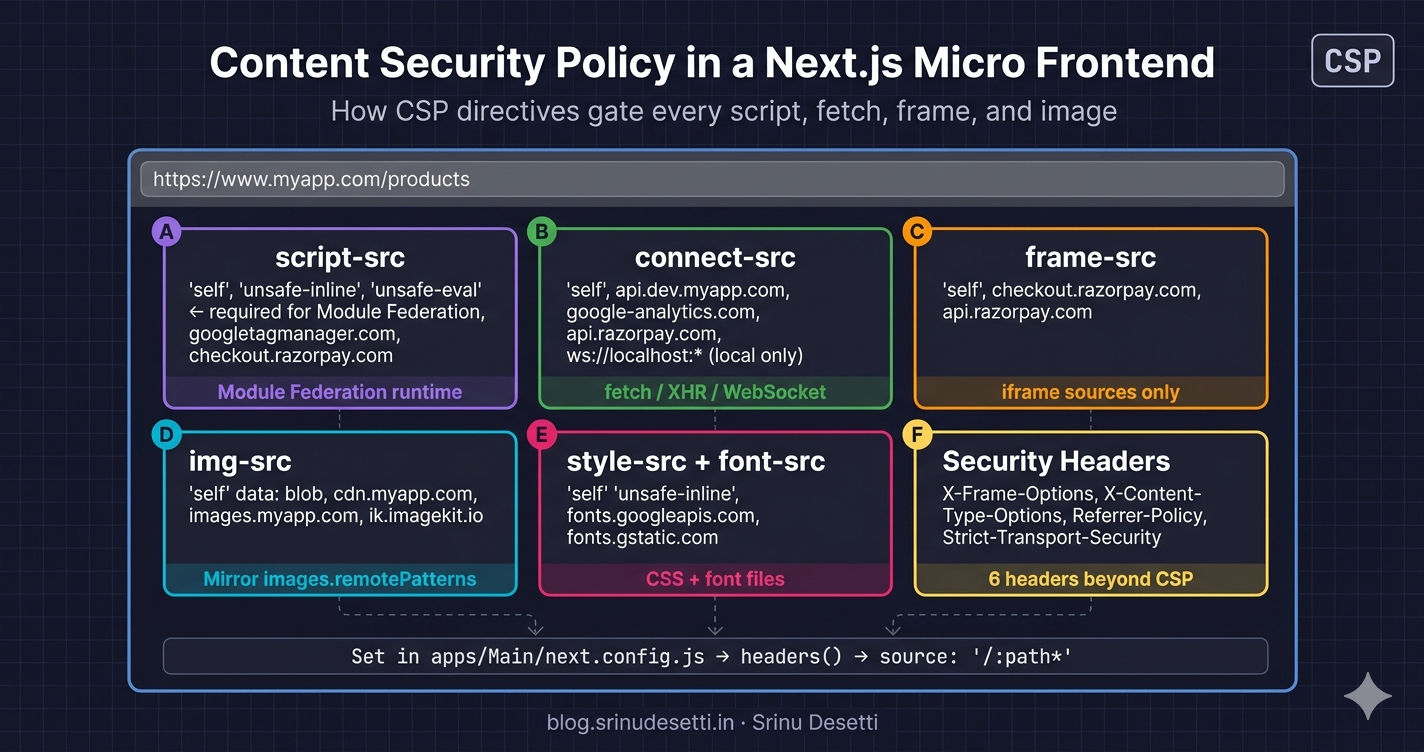
Next.js content security policy micro frontend architecture diagram showing how CSP directives gate Module Federation remotes, API calls, payment iframes, and analytics across host and remotes

Why CSP Is Harder in a Module Federation MFE

A Content Security Policy is a response header that tells the browser exactly which origins are allowed for each category of subresource — scripts, styles, images, fonts, fetch destinations, frames, fonts, and a few rarer categories. In a single-app Next.js project, every category typically has two or three entries: 'self', your CDN, your analytics provider. In a Module Federation MFE, every category gains entries because the federation runtime, every remote's bundle, every remote's API, every payment gateway, and every analytics provider all have their own URLs. Miss one and the feature half-breaks in a way that looks like a CORS error, a 404, or a silent UI freeze.

The CSP errors a real Module Federation deploy starts with
# What you see in the browser console when CSP blocks
# a Module Federation remote from loading:
#
#   Refused to load the script
#     'https://dev.myapp.com/products/_next/static/chunks/remoteEntry.js'
#   because it violates the following Content Security Policy directive:
#     "script-src 'self'".
#
#   Refused to evaluate a string as JavaScript because
#   'unsafe-eval' is not an allowed source of script in the
#   following Content Security Policy directive:
#     "script-src 'self'".
#
# Why CSP is harder in a Module Federation MFE than a single Next.js app:
#
#   1. The host loads remoteEntry.js from a different origin/path
#      at runtime. 'self' is not enough — the remote's URL must
#      be in script-src.
#
#   2. webpack's Module Federation runtime calls eval() to
#      bootstrap shared chunks. If 'unsafe-eval' is missing,
#      every remote refuses to mount and you get a white screen.
#
#   3. The host fetches the API from api.dev.myapp.com over fetch().
#      That URL must be in connect-src, or the Redux thunks fail
#      with a CSP error that looks identical to a CORS error.
#
#   4. Razorpay's checkout opens in an iframe from
#      checkout.razorpay.com. Without that origin in frame-src,
#      checkout shows a blank box and the Pay button does nothing.
#
#   5. Google Analytics injects a <script src="googletagmanager.com">
#      tag at runtime. Missing it from script-src means GA never
#      loads and your conversion funnel goes dark.

The root cause of most of these is a single line — webpack's federation runtime calls eval() to bootstrap a remote's shared scope. Without 'unsafe-eval' in script-src, the runtime crashes before a single remote module mounts. Until NextFederationPlugin (opens in a new tab) supports nonce-passthrough that lets remote chunks ride the host's per-request nonce, 'unsafe-eval' is non-negotiable. The right strategy is to keep that single relaxation in script-src and lock down every other directive as tightly as possible — pin specific origins, never wildcard, never list data: in script-src.

CSP is a defense-in-depth control, not a magic shield. A perfectly tuned CSP does not stop a server-side injection; it raises the cost of an XSS by orders of magnitude. The goal is to make every realistic XSS vector require a separate browser bug. See the MDN CSP guide (opens in a new tab) for the underlying threat model.

Step 1 — The Complete headers() Block (Production)

The CSP lives in Next.js's headers() async function. Every directive is a string, joined by ; into a single Content-Security-Policy header value. Six additional security headers go into the same block. The whole thing applies to every route via source: '/:path*'.

apps/Main/next.config.js — host CSP block (production)
// apps/Main/next.config.js — Host CSP headers (production)
const { NextFederationPlugin } = require('@module-federation/nextjs-mf');

module.exports = {
  reactStrictMode: false,
  output: 'standalone',
  compress: true,

  transpilePackages: ['@myapp/seo', '@myapp/store', '@myapp/api'],

  // CSP + security headers applied to every route
  async headers() {
    return [
      {
        source: '/:path*',
        headers: [
          {
            key: 'Content-Security-Policy',
            value: [
              // Default — fallback for any directive not listed below
              "default-src 'self' https://dev.myapp.com",

              // Scripts — Module Federation runtime + analytics + payment gateway
              "script-src 'self' 'unsafe-inline' 'unsafe-eval' " +
                "https://www.googletagmanager.com https://www.google-analytics.com " +
                "https://checkout.razorpay.com https://lumberjack.razorpay.com " +
                "https://static.cloudflareinsights.com",

              // Styles — Tailwind injected at runtime + font CDN
              "style-src 'self' 'unsafe-inline' " +
                "https://www.gstatic.com https://*.googleapis.com https://fonts.googleapis.com",

              // Images — every CDN that next/image is allowed to render from
              "img-src 'self' data: blob: " +
                "https://cdn.myapp.com https://images.myapp.com " +
                "https://ik.imagekit.io https://www.google-analytics.com " +
                "https://www.googletagmanager.com",

              // Fonts — self-hosted + Google Fonts CDN
              "font-src 'self' data: https://fonts.gstatic.com https://www.gstatic.com",

              // Connect — XHR/fetch/WebSocket destinations (API + analytics + payment)
              "connect-src 'self' " +
                "https://api.dev.myapp.com " +
                "https://www.google-analytics.com https://analytics.google.com " +
                "https://region1.google-analytics.com " +
                "https://api.razorpay.com https://lumberjack.razorpay.com",

              // Frames — iframe sources (payment checkout)
              "frame-src 'self' " +
                "https://checkout.razorpay.com https://api.razorpay.com",

              // Lockdown
              "object-src 'none'",
              "base-uri 'self'",
              "form-action 'self'",
              "frame-ancestors 'self'",
              "upgrade-insecure-requests",
            ].join('; '),
          },
          { key: 'X-Content-Type-Options', value: 'nosniff' },
          { key: 'X-Frame-Options',        value: 'SAMEORIGIN' },
          { key: 'X-XSS-Protection',       value: '1; mode=block' },
          { key: 'Referrer-Policy',        value: 'strict-origin-when-cross-origin' },
          { key: 'Permissions-Policy',     value: 'camera=(), microphone=(), geolocation=(self)' },
          { key: 'Strict-Transport-Security', value: 'max-age=63072000; includeSubDomains; preload' },
        ],
      },
    ];
  },
};

The block is long because real production traffic touches a lot of origins. Trim aggressively for your own stack — drop googletagmanager if you do not use Google Analytics, drop razorpay if you use Stripe, drop cloudflareinsights if you are not behind Cloudflare. The structure stays the same; only the per-directive entries change.

DirectivePurposeWhat goes wrong if missing
default-srcFallback for any directive not explicitly listedA new directive (e.g. worker-src) silently inherits a stricter policy than you intended
script-srcSources for <script>, inline eval, federation runtimeWhite screen on every remote, GA fails to load
style-srcSources for <style> tags and style="..." attributesTailwind injected styles disappear, layout breaks
img-srcSources for <img>, <picture>, CSS background-imageEvery CDN image breaks even if next/image remotePatterns allows it
font-srcSources for @font-face URLsCustom fonts fall back to system serif
connect-srcSources for fetch, XHR, WebSocket, sendBeaconEvery API call and HMR connection fails
frame-srcSources for <iframe> and <frame>Razorpay/Stripe checkout shows blank box
object-srcSources for <object>, <embed>, <applet> (legacy)Set to 'none' — modern apps never need this
base-uriWhat can appear in <base href="...">Set to 'self' — prevents an injected <base> redirecting all relative URLs
frame-ancestorsOrigins allowed to embed THIS page in an iframeCSP-3 replacement for X-Frame-Options
form-actionAllowed <form action="..."> targetsPrevents form-based exfiltration
upgrade-insecure-requestsAuto-rewrite http:// URLs to https://Stops mixed-content warnings on a fully-HTTPS site

Step 2 — Local vs Production: Four Differences That Matter

Local development needs entries production must NOT have, and the production config has one header (HSTS) that would brick a developer's machine for two years if it leaked into local dev. Mirror the same shape in both environments — only the per-directive entries diverge.

apps/Main/next.config.js (production)
// apps/Main/next.config.js — Host CSP headers (production)
const { NextFederationPlugin } = require('@module-federation/nextjs-mf');

module.exports = {
  reactStrictMode: false,
  output: 'standalone',
  compress: true,

  transpilePackages: ['@myapp/seo', '@myapp/store', '@myapp/api'],

  // CSP + security headers applied to every route
  async headers() {
    return [
      {
        source: '/:path*',
        headers: [
          {
            key: 'Content-Security-Policy',
            value: [
              // Default — fallback for any directive not listed below
              "default-src 'self' https://dev.myapp.com",

              // Scripts — Module Federation runtime + analytics + payment gateway
              "script-src 'self' 'unsafe-inline' 'unsafe-eval' " +
                "https://www.googletagmanager.com https://www.google-analytics.com " +
                "https://checkout.razorpay.com https://lumberjack.razorpay.com " +
                "https://static.cloudflareinsights.com",

              // Styles — Tailwind injected at runtime + font CDN
              "style-src 'self' 'unsafe-inline' " +
                "https://www.gstatic.com https://*.googleapis.com https://fonts.googleapis.com",

              // Images — every CDN that next/image is allowed to render from
              "img-src 'self' data: blob: " +
                "https://cdn.myapp.com https://images.myapp.com " +
                "https://ik.imagekit.io https://www.google-analytics.com " +
                "https://www.googletagmanager.com",

              // Fonts — self-hosted + Google Fonts CDN
              "font-src 'self' data: https://fonts.gstatic.com https://www.gstatic.com",

              // Connect — XHR/fetch/WebSocket destinations (API + analytics + payment)
              "connect-src 'self' " +
                "https://api.dev.myapp.com " +
                "https://www.google-analytics.com https://analytics.google.com " +
                "https://region1.google-analytics.com " +
                "https://api.razorpay.com https://lumberjack.razorpay.com",

              // Frames — iframe sources (payment checkout)
              "frame-src 'self' " +
                "https://checkout.razorpay.com https://api.razorpay.com",

              // Lockdown
              "object-src 'none'",
              "base-uri 'self'",
              "form-action 'self'",
              "frame-ancestors 'self'",
              "upgrade-insecure-requests",
            ].join('; '),
          },
          { key: 'X-Content-Type-Options', value: 'nosniff' },
          { key: 'X-Frame-Options',        value: 'SAMEORIGIN' },
          { key: 'X-XSS-Protection',       value: '1; mode=block' },
          { key: 'Referrer-Policy',        value: 'strict-origin-when-cross-origin' },
          { key: 'Permissions-Policy',     value: 'camera=(), microphone=(), geolocation=(self)' },
          { key: 'Strict-Transport-Security', value: 'max-age=63072000; includeSubDomains; preload' },
        ],
      },
    ];
  },
};

The four lines that differ between local and production:

AspectLocal DevelopmentProduction
http://localhost:* in script-src, style-src, img-src, frame-srcYes — every React remote runs from http://localhost:4001..4011No — strip every localhost entry before deploy
ws://localhost:* and wss://localhost:* in connect-srcYes — required by webpack hot-reloadNo — production has no HMR
https://localhost:* in script/style/connect/frameYes — some remotes run with next dev --experimental-httpsNo
Strict-Transport-Security headerAbsent — HSTS on localhost cert breaks every other dev serverPresent — max-age=63072000; includeSubDomains; preload

The discipline is the same as for shared dependencies in Module Federation — every workspace declares the same shape; only environment-specific values change. A NODE_ENV check at the top of next.config.js is the simplest enforcement: a single const isDev = process.env.NODE_ENV !== 'production' flag that gates every dev-only entry.

⚠️

Never ship http://localhost:* to production CSP. Leaving the entry in production means a request like https://www.myapp.com/_next/image?url=http://localhost/admin becomes a valid CSP-allowed fetch — and on a server where Next.js itself can reach loopback, that is an open proxy into anything bound to 127.0.0.1. Same risk as the http://localhost entry in images.remotePatterns covered in the previous article.

Step 3 — script-src: Why 'unsafe-eval' Stays

Every script that ever loads on the page is gated by script-src. In an MFE, that includes the Next.js page chunks, the federation runtime, every remote's remoteEntry.js, every analytics SDK, and every payment gateway loader. The directive is the most-touched one in any CSP, and the one most teams trim too aggressively.

script-src — what every entry actually does
# script-src — directive-by-directive breakdown for a Next.js MFE
# ──────────────────────────────────────────────────────────────
#
# script-src 'self' 'unsafe-inline' 'unsafe-eval'
#            https://www.googletagmanager.com
#            https://www.google-analytics.com
#            https://checkout.razorpay.com
#            https://lumberjack.razorpay.com
#            https://static.cloudflareinsights.com
#
#   'self'              The host's own origin — Next.js page chunks
#                       (/_next/static/chunks/*) load from here.
#
#   'unsafe-inline'     Required by:
#                         • Next.js inline bootstrap script (__NEXT_DATA__)
#                         • Tailwind injected runtime style="..." (no CSS)
#                         • Any analytics snippet pasted inline
#                       Removable only with a per-request nonce — see
#                       "Stricter CSP with nonces" later in this article.
#
#   'unsafe-eval'       NON-NEGOTIABLE for Module Federation.
#                       webpack's federation runtime calls eval() to
#                       bootstrap the remote container. Strip it and
#                       every remote dies with:
#                         "Refused to evaluate a string as JavaScript"
#                       This is the single biggest reason CSP is "harder"
#                       in MFE than in a single-page app.
#
#   googletagmanager    The GA bootstrap script tag injected by
#                       <Script src="https://www.googletagmanager.com/
#                                     gtag/js?id=G-XXXX" />
#
#   google-analytics    Where GTM forwards events.
#
#   checkout.razorpay   The script tag for Razorpay's checkout SDK.
#                       Loaded on demand when a user clicks Pay.
#
#   lumberjack.razorpay Razorpay's analytics endpoint (yes, two
#                       different subdomains for one feature).
#
#   cloudflareinsights  Cloudflare's beacon — if your site is behind
#                       Cloudflare with Web Analytics enabled.
#
# What is MISSING and why:
#
#   • No 'data:' in script-src — never let JavaScript come from a
#     data: URL. Even if you do not use them, listing data: opens
#     XSS via attacker-controlled <script src="data:...">
#
#   • No '*' wildcard — wildcard script-src defeats CSP entirely.
#     If a CDN expands, add the specific subdomain.
#
#   • No remote MFE host in production script-src — because every
#     remote is served through the host's nginx /products/* proxy,
#     so it loads from 'self'. If a remote is served from a
#     SEPARATE origin (e.g. https://products.myapp.com), add it here.

The single most important entry is 'unsafe-eval'. Webpack's Module Federation runtime — the code that NextFederationPlugin generates — calls eval() to materialize a remote container's shared scope before any module from the remote can mount. Strip 'unsafe-eval' from script-src and every remote silently dies with Refused to evaluate a string as JavaScript. The host's static shell still renders, but every federated route is a blank box. This is the single biggest reason a CSP that worked perfectly in a single-app Next.js project does not survive the first day of an MFE rollout.

The second most-overlooked detail: googletagmanager.com and google-analytics.com are different subdomains, both required. GTM injects the bootstrap script (script-src entry: googletagmanager.com); GA collects the events GTM forwards (script-src + connect-src entry: google-analytics.com). Listing only one breaks the analytics chain in a way that is hard to spot — pageviews still record from cached sessions, but new sessions go dark.

Step 4 — connect-src: API + Federation + WebSocket

connect-src gates every URL that JavaScript actively connects to via fetch(), XMLHttpRequest, WebSocket, EventSource, navigator.sendBeacon(), and the WebRTC/WebTransport APIs. In an MFE, that includes every Redux thunk, every analytics beacon, every webpack HMR socket, and every Module Federation manifest fetch.

connect-src — every connection-opening API
# connect-src — what actually opens an XHR / fetch / WebSocket
# ────────────────────────────────────────────────────────────
#
# connect-src 'self'
#             https://api.dev.myapp.com
#             https://www.google-analytics.com
#             https://analytics.google.com
#             https://region1.google-analytics.com
#             https://api.razorpay.com
#             https://lumberjack.razorpay.com
#
#   'self'                       Every relative-URL fetch. A Redux
#                                thunk that does fetch('/api/cart')
#                                lands here. Also the federation
#                                runtime when it fetches a remote's
#                                container manifest.
#
#   api.dev.myapp.com            The shared API gateway. The Axios
#                                base URL declared in @myapp/api.
#                                Without this entry, every Redux
#                                fetch fails — and the failure looks
#                                IDENTICAL to a CORS error in the
#                                browser console. The way to tell
#                                them apart: a CORS error has the
#                                word "CORS" in it; a CSP error
#                                has the words "Content Security
#                                Policy". They are unrelated.
#
#   google-analytics + region1   GA's regional collection endpoints.
#                                The "region1" subdomain is for
#                                EEA/UK traffic — added automatically
#                                by GTM when the user's IP geolocates
#                                inside the EU.
#
#   api.razorpay.com             Where the order-creation REST call
#                                from /api/checkout lands.
#
#   lumberjack.razorpay.com      Razorpay's analytics beacon. Even
#                                if you do not call it directly, the
#                                checkout iframe pings it from the
#                                parent context.
#
# Local-dev-only additions:
#
#   ws://localhost:*  wss://localhost:*
#     webpack-dev-server's hot-reload protocol. Without this entry,
#     every save in a React remote silently stops triggering a
#     browser refresh — page works but HMR is dead.
#
#   http://localhost:*
#     Every React remote running its dev server (4001..4011 in this
#     example). Without it, the host's federation runtime cannot
#     fetch a remote's manifest in local dev.

A common confusion is mistaking a connect-src violation for a CORS error. The browser console wording is different — a CORS error contains the word "CORS"; a CSP violation contains "Content Security Policy" or "Refused to connect". CORS is enforced by the response server's headers; CSP is enforced by the browser based on the page's response headers. They are unrelated controls that can both fail on the same request, but the fix is different: CORS = update the API server's Access-Control-Allow-Origin; CSP = update the host's connect-src directive.
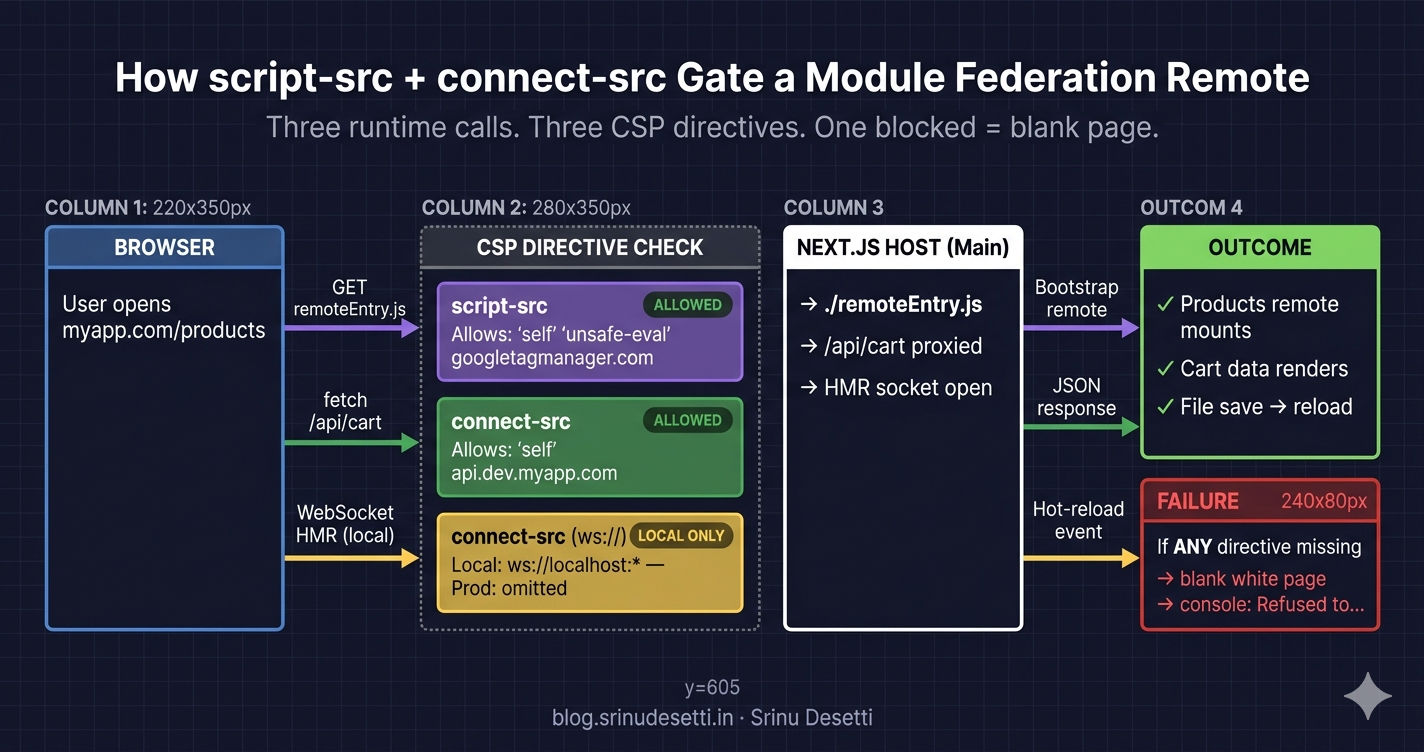
Module Federation CSP script-src and connect-src directive flow showing how host loads remoteEntry.js, fetches API, and opens hot-reload WebSocket

Step 5 — img-src, style-src, font-src: The Static-Asset Trio

Three directives govern the assets that decorate a page: images, styles, and fonts. Each one is mostly straightforward, but each one has a subtle gotcha — img-src mostly sees 'self' because of next/image, style-src requires 'unsafe-inline' for almost every CSS-in-JS library, and font-src needs both the CSS subdomain (fonts.googleapis.com) AND the binary subdomain (fonts.gstatic.com).

img-src + style-src + font-src directives
# img-src + style-src + font-src — the static-asset directives
# ────────────────────────────────────────────────────────────
#
# img-src 'self' data: blob:
#         https://cdn.myapp.com
#         https://images.myapp.com
#         https://ik.imagekit.io
#         https://www.google-analytics.com
#         https://www.googletagmanager.com
#
#   'self'                   The host's /_next/image optimizer endpoint.
#                            Since next/image rewrites every image to
#                            /_next/image?url=..., the request lands on
#                            'self' even though the source is a CDN.
#
#   data:                    Inline base64 placeholders (blurDataURL on
#                            <Image placeholder="blur" />).
#
#   blob:                    Required for any URL.createObjectURL()
#                            usage — in-browser image cropping, file
#                            uploads, downloaded reports.
#
#   cdn.myapp.com            Source CDN — must mirror the entry already
#                            in next.config.js images.remotePatterns.
#                            See the [previous article on image
#                            optimization](/micro-frontend/nextjs/
#                            image-optimization-nextjs-micro-frontend)
#                            for why both lists need the same entry.
#
#   ik.imagekit.io           Blog/marketing image CDN.
#
#   google-analytics         The 1x1 tracking pixel GA fires on
#                            every pageview.
#
# style-src 'self' 'unsafe-inline'
#           https://www.gstatic.com
#           https://*.googleapis.com
#           https://fonts.googleapis.com
#
#   'unsafe-inline'          Tailwind, styled-jsx, emotion, and many
#                            third-party widgets all inject style="..."
#                            attributes or <style> tags. Without this,
#                            most CSS-in-JS libraries fail silently.
#
#   fonts.googleapis.com     The CSS file that defines @font-face rules.
#                            The actual font binary is in font-src.
#
# font-src 'self' data:
#          https://fonts.gstatic.com
#          https://www.gstatic.com
#
#   data:                    Encoded font glyphs (Material Icons inline).
#
#   fonts.gstatic.com        Google Fonts binary delivery. Different
#                            subdomain from the CSS — both are needed.

img-src mostly looks like 'self' because next/image rewrites every CDN URL to /_next/image?url=... — the actual browser request lands on the host's optimizer endpoint. The CDN entries in img-src are still required for two cases: images that bypass next/image (<img src="https://cdn.myapp.com/...">) and background-image: url(...) rules in CSS. Mirror the entries to the same CDNs already in images.remotePatterns.

Step 6 — frame-src: Payment Iframes and Embedded Widgets

frame-src controls every origin allowed inside an <iframe> on your page. The most common producer of frame-src entries is a payment gateway — Razorpay, Stripe, PayPal each open a checkout iframe from a different origin. A frame-src miss looks like a payment failure to the user but is silent in the JavaScript console: the iframe simply renders blank.

frame-src — iframe sources only
# frame-src — only iframes and frame parents
# ──────────────────────────────────────────
#
# frame-src 'self'
#           https://checkout.razorpay.com
#           https://api.razorpay.com
#
#   When a user clicks "Pay", Razorpay opens an <iframe src="https://
#   checkout.razorpay.com/v1/checkout.js#..."> inside your page. CSP
#   gates iframe sources separately from script-src — the script tag
#   that loads the SDK is governed by script-src; the iframe the SDK
#   subsequently renders is governed by frame-src. Both must allow
#   the same origin or the iframe shows a blank white box.
#
#   If you switch payment gateways, both directives change:
#
#     Stripe:    script-src + frame-src += https://js.stripe.com
#                                          https://hooks.stripe.com
#     PayPal:    script-src           += https://www.paypal.com
#                frame-src            += https://www.paypal.com
#
# Why frame-ancestors matters too:
#
#   frame-ancestors 'self'
#
#   This is the CSP-3 replacement for X-Frame-Options. It says
#   "this page CAN ONLY be embedded inside an iframe whose top
#   window is from 'self'". Setting both X-Frame-Options:
#   SAMEORIGIN and frame-ancestors 'self' is belt-and-suspenders —
#   browsers prefer frame-ancestors when both are present.
#
# What about embedding the host inside another site (e.g. a
# co-branded landing page)? You would relax frame-ancestors:
#
#     frame-ancestors 'self' https://partner.example.com
#
#   And REMOVE X-Frame-Options entirely (X-Frame-Options has no
#   syntax for an allowlist — only DENY / SAMEORIGIN / one origin
#   that most browsers ignore anyway).

The companion directive is frame-ancestors, which controls who is allowed to embed YOUR page inside an iframe. frame-ancestors 'self' is the modern replacement for X-Frame-Options: SAMEORIGIN — both should be sent (browsers prefer frame-ancestors when both are present, and older browsers fall back to X-Frame-Options).

Step 7 — Six Security Headers Beyond CSP

CSP is the largest header in the security block, but six more headers close attack vectors that CSP does not cover. Add them to the same headers array.

apps/Main/next.config.js — security headers beyond CSP
// Beyond CSP — six headers every Next.js host should also send
//
// Add these to the same headers array as Content-Security-Policy.
// Each one closes a separate attack vector that CSP does NOT cover.

[
  // 1. Stops the browser from MIME-sniffing a response. If the server
  //    sends an HTML file with Content-Type: image/png, the browser
  //    MUST still treat it as an image. Without this, an attacker who
  //    uploads a "JPEG" containing <script> can get it executed.
  { key: 'X-Content-Type-Options', value: 'nosniff' },

  // 2. Legacy clickjacking defense. SAMEORIGIN means only your own
  //    domain can render the page in an iframe. Modern browsers prefer
  //    frame-ancestors (in CSP) but X-Frame-Options is still honored
  //    by older clients.
  { key: 'X-Frame-Options', value: 'SAMEORIGIN' },

  // 3. Legacy reflected-XSS filter. Modern Chrome/Firefox ignore it
  //    in favor of CSP, but Safari and older browsers still react.
  //    Cost: zero. Benefit: small. Worth keeping.
  { key: 'X-XSS-Protection', value: '1; mode=block' },

  // 4. Controls what the Referer header leaks to other origins.
  //    'strict-origin-when-cross-origin' = full URL on same-origin,
  //    only the origin (no path) on cross-origin, nothing on HTTPS->HTTP.
  //    This is the right default for an MFE — analytics still works,
  //    but you do not leak query strings to third-party CDNs.
  { key: 'Referrer-Policy', value: 'strict-origin-when-cross-origin' },

  // 5. Disables APIs that no MFE in this federation needs.
  //    geolocation=(self) means only your own origin can read
  //    location; cross-origin iframes (Razorpay, Translate) cannot.
  { key: 'Permissions-Policy',
    value: 'camera=(), microphone=(), geolocation=(self), payment=(self)' },

  // 6. Forces every browser that has ever connected over HTTPS to
  //    refuse plain HTTP for the next 2 years (max-age=63072000).
  //    'preload' opts in to the Chrome HSTS preload list — once added
  //    there, no browser EVER tries HTTP for your domain again.
  //
  //    DO NOT enable this header in local development — HSTS on
  //    https://localhost will block every other dev server on
  //    that hostname for the same duration.
  { key: 'Strict-Transport-Security',
    value: 'max-age=63072000; includeSubDomains; preload' },
]
HeaderCloses
X-Content-Type-Options: nosniffMIME-sniffing attacks (uploaded JPEG executed as HTML)
X-Frame-Options: SAMEORIGINLegacy clickjacking — modern browsers prefer frame-ancestors
X-XSS-Protection: 1; mode=blockLegacy reflected-XSS filter (Safari/older clients)
Referrer-Policy: strict-origin-when-cross-originURL/query-string leakage to third-party CDNs
Permissions-Policy: camera=(), microphone=(), geolocation=(self)Cross-origin iframe access to sensitive APIs
Strict-Transport-Security: max-age=63072000; includeSubDomains; preloadForces HTTPS for two years and opts in to Chrome's preload list

The one rule with HSTS: never send it in local development. A single https://localhost cert that ships HSTS will block every other dev server on localhost for the same max-age duration. Recovery requires chrome://net-internals/#hsts and "Delete domain security policies". The local next.config.js block in the Tabs above explicitly omits Strict-Transport-Security for this reason.

Step 8 — Roll It Out in Report-Only Mode First

Shipping a blocking CSP straight to production is the single biggest cause of "we deployed Friday and rolled back Monday" stories. The right pattern is to send the same policy as Content-Security-Policy-Report-Only, leave it on for at least seven days of real user traffic, and only promote to a blocking header after the violation rate drops to zero across a full traffic cycle.

Content-Security-Policy-Report-Only rollout — config + endpoint
// Step 1 — Roll out in Report-Only mode FIRST
//
// Content-Security-Policy-Report-Only sends the same browser
// validations as Content-Security-Policy, but every violation is
// reported instead of blocked. The page still works. You collect
// real-user violations for a week, then promote the policy to the
// blocking header. Skipping this step is how teams deploy a CSP
// on Friday night and roll it back at 9am Monday.

async headers() {
  return [
    {
      source: '/:path*',
      headers: [
        // Send BOTH headers during rollout — the strict policy in
        // Report-Only mode + a permissive enforced policy.
        {
          key: 'Content-Security-Policy-Report-Only',
          value: [
            "default-src 'self'",
            "script-src 'self' 'unsafe-inline' 'unsafe-eval' " +
              "https://www.googletagmanager.com https://checkout.razorpay.com",
            "report-uri /api/csp-report",     // <- where violations land
            "report-to csp-endpoint",         // <- modern equivalent
          ].join('; '),
        },
        {
          key: 'Reporting-Endpoints',
          value: 'csp-endpoint="/api/csp-report"',
        },
      ],
    },
  ];
}

// Step 2 — Implement /api/csp-report to log violations
// pages/api/csp-report.ts
import type { NextApiRequest, NextApiResponse } from 'next';

export default async function handler(req: NextApiRequest, res: NextApiResponse) {
  if (req.method !== 'POST') {
    return res.status(405).end();
  }

  // The browser POSTs a JSON body shaped like:
  //   { "csp-report": {
  //       "blocked-uri": "https://...",
  //       "violated-directive": "script-src",
  //       "document-uri": "https://www.myapp.com/products/123",
  //       ...
  //     }
  //   }
  console.log('[CSP VIOLATION]', JSON.stringify(req.body));

  // In production, ship to your log aggregator instead:
  //   await logToDatadog(req.body)

  return res.status(204).end();
}

// Step 3 — After 7 days of zero new violations, promote
// Replace 'Content-Security-Policy-Report-Only' with
// 'Content-Security-Policy'. The header is now blocking.

Two flagged inputs you will see in the report stream that are NOT real bugs: browser extensions (Honey, Grammarly, AdBlock Plus) inject scripts under chrome-extension:// and moz-extension:// schemes, and crawlers send synthetic User-Agent strings that fail 'self' checks. Filter both before paging anyone — 90% of CSP violations in production come from extensions on user machines, not from your own code.

The rollout pipeline:

  1. Deploy Content-Security-Policy-Report-Only with the strict policy. Keep an existing permissive policy (or no policy) blocking.
  2. Watch /api/csp-report for a full week including a weekend.
  3. Treat new directive misses as code: add the legitimate origin to the policy, ship a new build.
  4. Once the violation rate is zero for 48 hours, rename the header from Content-Security-Policy-Report-Only to Content-Security-Policy.
  5. Production now blocks. The rollout is done.

The Strict-Nonce CSP — Why It Does Not Yet Work With Module Federation

The strongest possible CSP replaces 'unsafe-inline' with a per-request nonce: every <script> tag the server emits carries a nonce="..." attribute, the same nonce appears in script-src 'nonce-...', and any inline script an attacker injects via XSS does not have the matching nonce, so the browser refuses to execute it.

middleware.ts — generate per-request nonce (does not yet support Module Federation)
// Stricter alternative — drop 'unsafe-inline' with per-request nonces
//
// 'unsafe-inline' is the weakest part of every CSP in this article.
// Strict CSP replaces it with a per-request nonce that is generated
// in middleware and attached to every <script> and <style> tag the
// server emits. Inline scripts injected by an attacker do NOT have
// the nonce, so the browser rejects them.
//
// The trade-off: every Module Federation remote would have to read
// the nonce from a request header and stamp it onto its own emitted
// scripts. NextFederationPlugin does not pass a nonce through to
// remotes today, so a strict-nonce CSP is incompatible with
// Module Federation as of mid-2026. The recommended path is:
//
//   1. Keep 'unsafe-inline' in script-src for now.
//   2. Pin every other directive as tightly as possible.
//   3. Track the upstream issue and migrate when nonce-passthrough
//      lands in NextFederationPlugin.

// middleware.ts — generates a per-request nonce
import { NextResponse } from 'next/server';
import type { NextRequest } from 'next/server';

export function middleware(request: NextRequest) {
  // crypto.randomUUID() works in the Edge runtime
  const nonce = Buffer.from(crypto.randomUUID()).toString('base64');

  const csp = [
    "default-src 'self'",
    `script-src 'self' 'nonce-${nonce}' 'strict-dynamic'`,
    `style-src 'self' 'nonce-${nonce}'`,
    "img-src 'self' data: https://cdn.myapp.com",
    "connect-src 'self' https://api.dev.myapp.com",
    "frame-src 'self' https://checkout.razorpay.com",
    "object-src 'none'",
  ].join('; ');

  // Pass the nonce through the request so every Server Component
  // can read it via headers().get('x-nonce') and stamp it on
  // every inline <script>.
  const headers = new Headers(request.headers);
  headers.set('x-nonce', nonce);
  headers.set('Content-Security-Policy', csp);

  return NextResponse.next({ request: { headers } });
}

The pattern works perfectly in a single-app Next.js project. In a Module Federation MFE it does not — NextFederationPlugin does not pass the host's nonce through to the chunks emitted by remote builds, so a strict-nonce CSP rejects every remote chunk the moment it loads. Track the upstream issue on the @module-federation/universe (opens in a new tab) repo. Until nonce-passthrough lands, the strongest realistic CSP for an MFE is the directive-by-directive allowlist this article walks through — 'unsafe-inline' and 'unsafe-eval' stay in script-src, every other directive is pinned to specific origins.
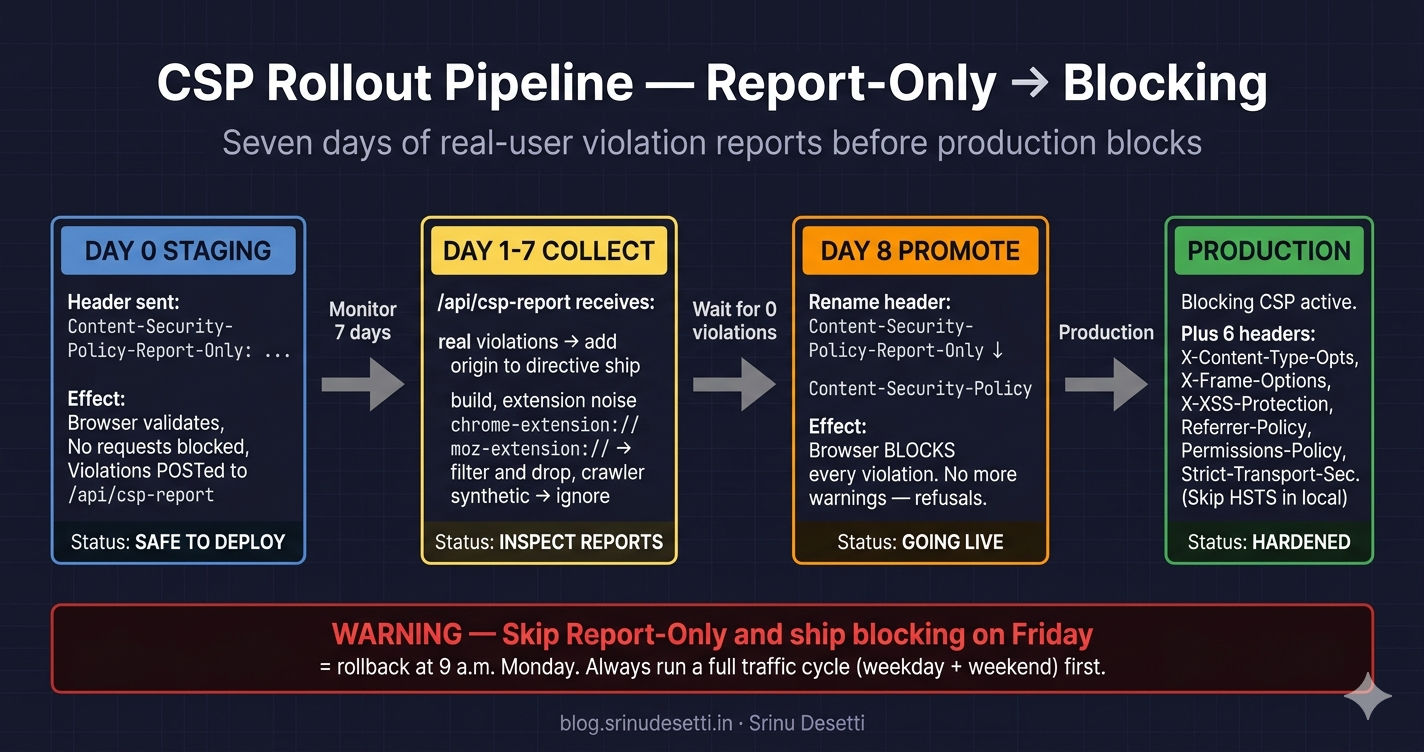
Next.js CSP headers flow diagram showing the eight CSP directives, six security headers, and the report-only rollout path from staging to blocking production

Common Gotchas When Hardening a Next.js MFE With CSP

After running this CSP in production for months, ten gotchas account for almost every CSP-related incident. Every one of them is either a missing directive entry, a directive sent in the wrong environment, or a third-party (analytics, browser extension, payment gateway) doing something the policy did not anticipate.

CSP gotchas — what breaks and how to fix it
# CSP Gotchas in a Next.js MFE — Real-World Failure Modes
# ────────────────────────────────────────────────────────
#
# 1. White screen on every remote after deploy
#    SYMPTOM: Localhost works. Staging is a blank page.
#             Console: "Refused to evaluate a string as JavaScript"
#    CAUSE:   'unsafe-eval' missing from script-src in production.
#             webpack's federation runtime calls eval() to bootstrap.
#    FIX:     Keep 'unsafe-eval' in script-src until NextFederationPlugin
#             supports nonce-passthrough.
#
# 2. Razorpay checkout shows blank white iframe
#    SYMPTOM: Pay button does nothing visible.
#    CAUSE:   checkout.razorpay.com missing from frame-src.
#    FIX:     Add it to BOTH script-src (the SDK loader) AND frame-src
#             (the checkout iframe). Two directives, one feature.
#
# 3. Every API call fails with what looks like a CORS error
#    SYMPTOM: Network tab shows requests blocked. Console says
#             "Refused to connect to 'https://api.dev.myapp.com'".
#    CAUSE:   API hostname missing from connect-src. Looks like CORS
#             but is actually CSP — read the exact wording in the
#             console error.
#    FIX:     Add the API base URL to connect-src.
#
# 4. Hot-reload silently dies in local dev
#    SYMPTOM: File save no longer refreshes the browser. Page works
#             but every change requires a manual reload.
#    CAUSE:   ws://localhost:* missing from connect-src in the local
#             config.
#    FIX:     Add ws://localhost:* AND wss://localhost:* to the
#             local-only connect-src.
#
# 5. Production CSP works, local dev shows CSP errors
#    SYMPTOM: After deploy works. cd apps/Main && next dev shows
#             "Refused to load script http://localhost:4001/..."
#    CAUSE:   You forgot to add http://localhost:* to the local
#             config — production has only https://dev.myapp.com.
#    FIX:     Maintain TWO config branches via NODE_ENV check, or
#             ship two next.config.js files (production sources only).
#
# 6. HSTS persists from local dev into production browser
#    SYMPTOM: Developer cannot reach http://localhost:3000 anymore.
#             Every request auto-rewrites to https://localhost:3000
#             which has no cert and refuses.
#    CAUSE:   Strict-Transport-Security: includeSubDomains was
#             served once from a localhost cert. Browser remembers
#             for 2 years.
#    FIX:     NEVER send HSTS in development. To recover: chrome://
#             net-internals/#hsts → "Delete domain security policies"
#             → enter "localhost".
#
# 7. Google Analytics stops collecting from EU users only
#    SYMPTOM: GA reports show traffic from US/Asia. Zero from EU.
#    CAUSE:   region1.google-analytics.com missing from connect-src.
#             GTM auto-routes EEA/UK traffic to the regional endpoint.
#    FIX:     Add region1.google-analytics.com to connect-src AND
#             every other regional GA endpoint your audience uses.
#
# 8. Inline <Script> tag from a remote is blocked
#    SYMPTOM: A federated remote uses next/script with strategy=
#             "afterInteractive" and the script never runs.
#    CAUSE:   Remote emitted an inline bootstrap that requires a
#             nonce that does not exist (you migrated to nonce-CSP
#             before NextFederationPlugin supported nonce passthrough).
#    FIX:     Roll back to 'unsafe-inline' in script-src for now.
#             Track the upstream issue.
#
# 9. CSP report-uri endpoint floods the logs
#    SYMPTOM: /api/csp-report receives thousands of POSTs per minute
#             after deploy.
#    CAUSE:   A real violation, OR a browser extension injecting
#             scripts (Honey, Grammarly, AdBlock plus). 90% of CSP
#             violations in production come from extensions.
#    FIX:     Filter report-uri logs by document-uri AND by whether
#             the blocked-uri matches a known extension scheme
#             (chrome-extension://, moz-extension://). Drop those.
#
#10. CSP works in Chrome, breaks in Safari
#    SYMPTOM: Same page renders fine in Chrome but Safari shows a
#             CSP violation that no one else sees.
#    CAUSE:   Safari implements CSP3 differently. Specifically,
#             'strict-dynamic' is honored more strictly. Some legacy
#             webpack runtime hashes do not match.
#    FIX:     Test the policy in Safari Technology Preview before
#             promoting from Report-Only. Report-Only catches this.

If you remember one debugging step: read the CSP error word-for-word in the browser console and match the directive name to the right headers() entry. The error always names the violated directive (script-src, connect-src, frame-src, ...) and the blocked URI. The fix is always either adding the URI to that directive or removing the call site if the URI was unintended.

What's Next

You now have a complete CSP block for a Next.js Module Federation MFE — script-src with 'unsafe-eval' for the federation runtime, connect-src mirroring the API gateway and analytics endpoints, frame-src allowing payment-gateway iframes, img-src/style-src/font-src mirroring the CDN allowlist already in images.remotePatterns, six security headers beyond CSP, and a Report-Only rollout path that proves the policy on real user traffic before promoting to blocking. The next article kicks off Section 4 — Shared State Management with the pillar piece on sharing a Redux store across micro frontends — the singleton pattern, the shared package layout, the host-side Provider setup, and how a React MFE and a Next.js MFE both read from and write to the same store at runtime. The Next.js-specific Redux store article covered the Next.js half — the next article is the cross-framework version that works across React and Next.js remotes alike.

← Back to Image Optimization in Next.js Micro Frontend

Continue to Sharing Redux Store Across Micro Frontends →


Frequently Asked Questions

Why does Module Federation need 'unsafe-eval' in CSP script-src?

Webpack's Module Federation runtime calls eval() to bootstrap the remote container. When the host fetches a remote's remoteEntry.js, the federation runtime parses the manifest and uses eval() to materialize the shared scope before any remote module can mount. If 'unsafe-eval' is missing from script-src, the browser refuses to evaluate the runtime's eval() calls and every remote silently fails with a CSP violation that reads "Refused to evaluate a string as JavaScript". The whole page renders blank or shows only the host's static shell. Until NextFederationPlugin ships nonce-passthrough that lets a strict CSP cover federated chunks, 'unsafe-eval' is non-negotiable for any production MFE that uses Module Federation. The right mitigation is to keep every other CSP directive as tight as possible — pin script-src to specific origins, lock down connect-src to your API and analytics, and never wildcard a directive.

Where do I configure CSP headers in a Next.js micro frontend — host, every remote, or both?

Configure CSP in the host's next.config.js headers() function. The host is the only Next.js application whose origin the browser actually sees in the address bar — when a user opens https://www.myapp.com/products, the response from the host carries the CSP header that governs every script, image, and fetch on that page, including those emitted by the federated Products remote. Each remote should still set its own CSP for the case where a developer runs the remote standalone (cd apps/Products && next dev -p 3001), but in production, the host's policy is the one the browser enforces for every request that originates from the user-visible page. Mirror the same allowlist across host and remotes so a developer running a single remote in isolation does not see CSP errors that production never shows.

What's the difference between connect-src and frame-src in CSP?

connect-src governs URLs that JavaScript actively connects to via fetch(), XMLHttpRequest, WebSocket, EventSource, navigator.sendBeacon(), and the WebRTC/WebTransport APIs. Every Redux thunk that calls fetch('/api/cart'), every analytics beacon, every webpack hot-reload WebSocket — all gated by connect-src. frame-src governs which origins are allowed inside <iframe> and <frame> elements on your page. Razorpay's checkout opens as an iframe from checkout.razorpay.com — that is frame-src. Razorpay's order-creation REST call lands at api.razorpay.com — that is connect-src. The same vendor often shows up in both directives because one feature uses both an iframe (UI) and a REST endpoint (API). Missing either one makes the feature half-broken in a way that is hard to diagnose without reading the console error word-for-word.

How do I roll out a CSP without breaking production?

Use Content-Security-Policy-Report-Only as the rollout header for at least seven days. The browser still validates every directive, but instead of blocking violations, it POSTs a JSON report to the report-uri endpoint. Implement /api/csp-report as a Next.js API route that logs the body and returns 204. After a week of real user traffic, audit the violations: real ones become new directive entries, browser-extension noise (chrome-extension://, moz-extension://) gets filtered out. Once the violation rate is zero across a full traffic cycle (weekday + weekend), promote the same policy from Content-Security-Policy-Report-Only to Content-Security-Policy. Production never breaks because the blocking policy was already proven on real traffic in report-only mode. The only teams that get burned by CSP rollouts are the ones that skip Report-Only and ship the blocking header straight to prod on a Friday.

What security headers should I set besides Content-Security-Policy?

Set six additional headers alongside CSP, all from the same headers() block. X-Content-Type-Options: nosniff stops the browser from MIME-sniffing a wrong Content-Type and treating an HTML upload as an executable. X-Frame-Options: SAMEORIGIN is the legacy clickjacking defense — modern browsers honor frame-ancestors in CSP first, but older clients still react to X-Frame-Options. X-XSS-Protection: 1; mode=block is the legacy reflected-XSS filter, harmless to keep on. Referrer-Policy: strict-origin-when-cross-origin keeps full URLs on same-origin requests but only sends the origin (no path) cross-origin, which is the right default for an MFE that talks to multiple analytics endpoints. Permissions-Policy: camera=(), microphone=(), geolocation=(self) disables APIs no remote in this federation needs, denying them to embedded iframes too. Strict-Transport-Security: max-age=63072000; includeSubDomains; preload forces HTTPS for the next two years and opts in to the Chrome HSTS preload list — but never set it in local development because HSTS on localhost will block every other dev server on that hostname for the same duration.

Can I use a strict CSP with nonces in a Module Federation app?

Not yet, in mid-2026. A strict-nonce CSP generates a per-request nonce in Next.js middleware, attaches it to every script and style tag the server emits, and rejects every inline script that does not carry the nonce. The pattern works perfectly in a single-app Next.js project. In a Module Federation MFE, NextFederationPlugin does not pass the host's nonce through to the remote's emitted scripts, so a strict-nonce CSP rejects every chunk a remote produces. The recommended pattern today is: keep 'unsafe-inline' and 'unsafe-eval' in script-src for the federation runtime, lock down every other directive as tightly as possible (specific origins, no wildcards, no data: in script-src), and track the upstream issue. When nonce-passthrough lands, swap 'unsafe-inline' for 'nonce-...' in middleware. Until then, the strongest realistic CSP for an MFE is the directive-by-directive allowlist this article walks through.

Why does my CSP work in Chrome but break in Safari?

Safari implements CSP3 with stricter handling of 'strict-dynamic' and is the most likely browser to surface a runtime-hash mismatch from a webpack-emitted bootstrap chunk. Chrome and Firefox tend to be more permissive when a directive is ambiguous; Safari interprets the spec literally. The defense is the same as for any other browser-specific CSP issue: roll the policy out in Report-Only mode first, monitor /api/csp-report for at least a full week of real traffic, and check the user-agent breakdown of the violations. Safari-only violations almost always point to either a 'strict-dynamic' usage that the federation runtime cannot satisfy, or a script chunk whose hash drifted between build and deploy. Reproduce in Safari Technology Preview before promoting the policy to blocking mode.