5 Micro Frontend Integration Patterns You Should Know
There is no single way to integrate Micro Frontends. The approach you choose directly impacts performance, developer experience, shared state capabilities, and deployment independence. Choosing the wrong pattern early can force a costly rewrite later.
In this article, you will learn the five main Micro Frontend integration patterns, see real code examples for each one, understand the trade-offs, and learn why Module Federation with shared npm packages is the most widely adopted approach for production applications.
New to Micro Frontend? Start with What is Micro Frontend Architecture? first. Already decided on MFE? Read Micro Frontend vs Monolith for the decision framework.
Overview: 5 Integration Patterns
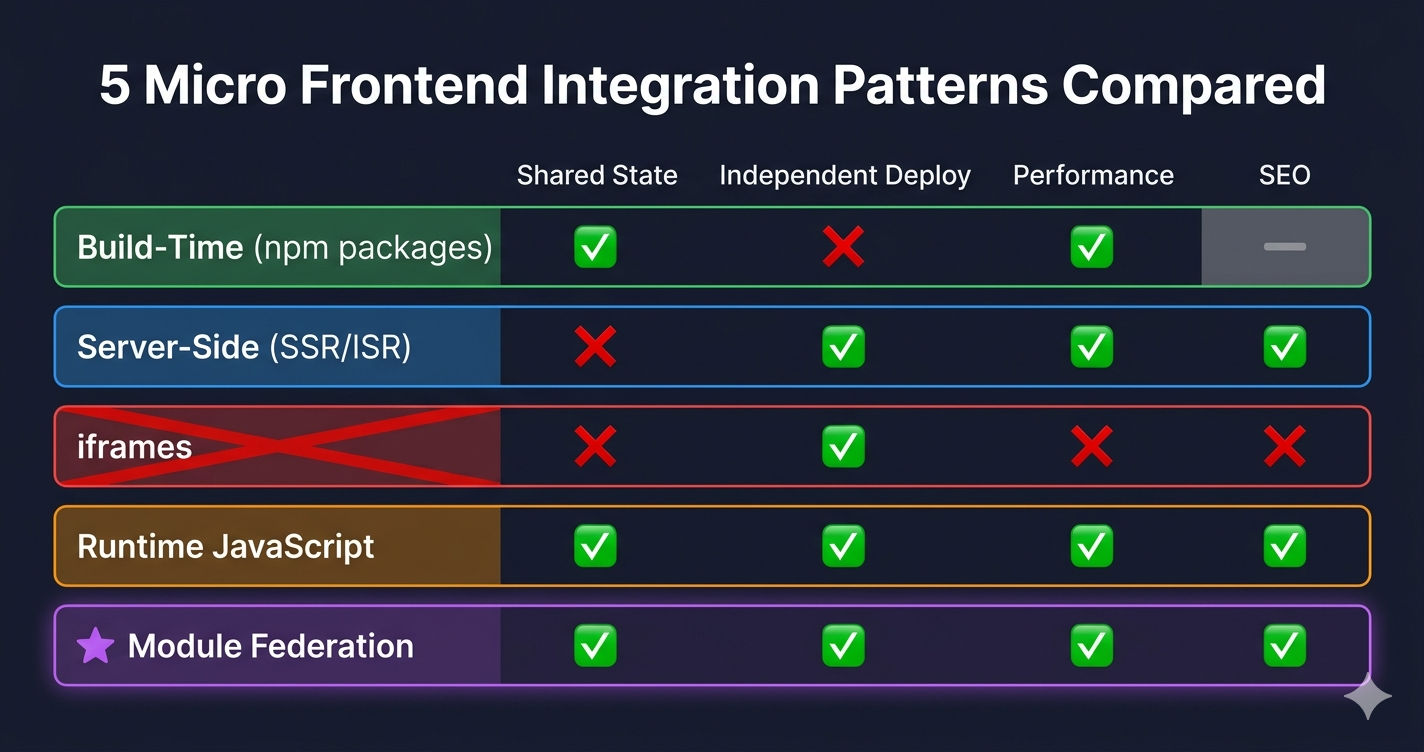
| Pattern | How It Works | Shared State | Independent Deploy | Performance |
|---|---|---|---|---|
| Build-Time (npm packages) | Shared code as workspace packages | Yes (same bundle) | No (rebuild needed) | Excellent |
| Server-Side (SSR/ISR) | Server composes HTML before sending | Limited | Yes | Excellent |
| iframes | Each MFE in a separate iframe | No | Yes | Poor |
| Runtime JavaScript | Lazy-load remote bundles at runtime | Via shared store | Yes | Good |
| Module Federation | Webpack shares modules at runtime | Yes (singleton) | Yes | Excellent |
Most production MFE applications use Pattern 1 + Pattern 5 together — shared npm workspace packages for common code (store, API, SEO) and Module Federation for runtime integration of independent MFE applications.
Pattern 1: Build-Time Integration (npm Workspace Packages)
Shared code — Redux store, API client, SEO utilities — is packaged as npm workspace packages that all MFEs import at build time. This is not technically "runtime integration" but it is a critical piece of every MFE architecture.
How It Works
- Create shared packages in a
packages/directory - Configure npm workspaces (opens in a new tab) or Turborepo (opens in a new tab) in the root
package.json - Every MFE imports from the shared package name (e.g.,
@myapp/store) - When you run
npm install, workspaces symlink the packages automatically
Code Example
What Gets Shared as Build-Time Packages
| Package | Purpose | Used By |
|---|---|---|
@myapp/store | Redux store, slices, typed hooks | All MFEs |
@myapp/api | Axios instance with auth interceptors | All MFEs |
@myapp/seo | Optimized image components, JSON-LD schemas | Next.js MFEs |
Build-Time packages + Module Federation work together. The shared packages are bundled into each MFE at build time, but Module Federation's singleton: true ensures only one instance is loaded at runtime. So @myapp/store is in every MFE's bundle, but at runtime, all MFEs share the same store instance.
When to Use
| Use When | Avoid When |
|---|---|
| Shared utilities needed by all MFEs (store, API, types) | Code specific to one MFE only |
| You want type safety and IDE autocompletion | Runtime flexibility is more important |
| Monorepo with Turborepo or npm workspaces | Polyrepo (separate Git repositories per MFE) |
Pattern 2: Server-Side Integration (SSR / ISR)
In a Next.js MFE architecture, the server can pre-render pages before sending HTML to the browser. This includes Static Site Generation (SSG), Server-Side Rendering (SSR), and Incremental Static Regeneration (ISR) — where pages are statically generated but automatically refreshed at intervals.
How It Works
- Next.js MFE uses
getStaticPropswithrevalidatefor ISR - Page is generated as static HTML at build time
- After the revalidate interval (e.g., 300 seconds), Next.js regenerates the page in the background
- Users always get fast static HTML — no loading spinner
- A CMS can trigger on-demand revalidation via an API route
Code Example
When to Use
| Use When | Avoid When |
|---|---|
| SEO-critical pages (product listings, landing pages) | Client-only interactive pages (cart, checkout) |
| Content that changes infrequently (product catalog) | Real-time data that changes per user |
| You want fast initial page load (no JavaScript needed) | Pages that require authentication to render |
Not all MFEs need SSR. In a mixed architecture, Next.js MFEs (Products, Content) use SSR/ISR for SEO, while React MFEs (Auth, Cart, Account) are client-only because they require user authentication to render meaningful content. Use the right rendering strategy per domain.
Pattern 3: Runtime Integration via iframes
Each MFE is loaded inside an <iframe> element. The MFEs are completely isolated — separate DOM, separate JavaScript context, separate CSS.
Code Example
Why This Pattern Is NOT Recommended
| Problem | Impact |
|---|---|
| No shared Redux store | Cart MFE cannot read auth state from Auth MFE |
| No shared authentication | User must log in separately in each iframe |
| Duplicate bundles | Each iframe loads its own React, Redux, etc. |
| No CSS consistency | Styles don't cross iframe boundaries |
| Accessibility issues | Screen readers struggle to navigate iframes |
| SEO invisible | Google cannot crawl content inside iframes |
| Mobile layout issues | iframes don't resize responsively |
Avoid iframes for Micro Frontend integration. Module Federation solves every problem that iframes have — shared state, shared auth, shared dependencies, consistent styling — while still keeping MFEs independently deployable. The only valid use case for iframes is embedding third-party content you don't control (like a payment gateway or embedded video).
Pattern 4: Runtime Integration via JavaScript
MFE components are loaded at runtime using React.lazy() (React apps) or next/dynamic (Next.js apps). The remote bundle is fetched over the network when needed, and the component renders like a normal React component.
This pattern relies on Module Federation to make remote imports work (see Pattern 5), but the loading mechanism itself is standard React.
Code Example — React Host (React.lazy)
Code Example — Next.js Host (next/dynamic)
React.lazy vs next/dynamic
| Feature | React.lazy() | next/dynamic |
|---|---|---|
| Framework | React (Webpack) | Next.js |
| SSR support | No | Yes (configurable with ssr: false) |
| Loading fallback | Requires <Suspense> wrapper | Built-in loading option |
| Error handling | .catch() on import | .catch() on import |
| Use case | React-only Host (Webpack devServer) | Next.js Host (SSR + pages router) |
Always add .catch() to remote imports. If a Remote MFE is down or fails to load, the .catch() handler returns a fallback component instead of crashing the entire Host application. This is critical for production — one MFE failure should not bring down the whole site.
Pattern 5: Module Federation (Webpack 5) — The Recommended Approach
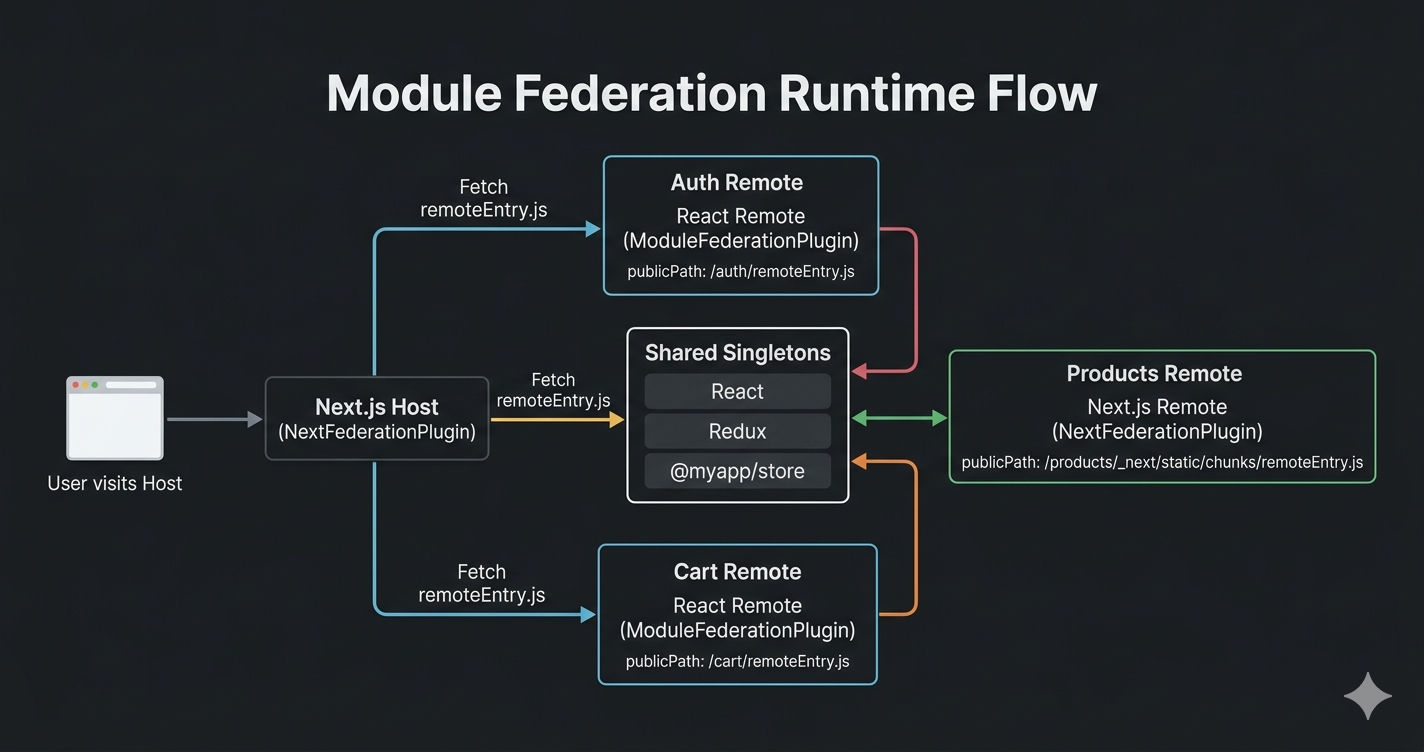
Webpack Module Federation (opens in a new tab) is a Webpack 5 plugin that allows separate builds to share modules at runtime. Each MFE exposes components via a remoteEntry.js file. The Host declares remotes and loads them dynamically. Shared dependencies (React, Redux) are loaded as singletons — one instance for all MFEs.
For Next.js applications, use NextFederationPlugin (opens in a new tab) which extends Module Federation for SSR, page routing, and Next.js-specific asset loading.
How It Works
- Each Remote MFE exposes components via
remoteEntry.js - The Host declares remotes — URLs pointing to each MFE's
remoteEntry.js - At runtime, the Host fetches the remote bundle and renders the component
- Shared dependencies (React, Redux, store packages) are loaded once as singletons
Code Example — Mixed Architecture (Next.js Host + React & Next.js Remotes)
Next.js Host (NextFederationPlugin)
Local Development and Production configs are different. Locally, remotes point to localhost:PORT. On the server, Nginx routes each path to the correct MFE build. Always update remote URLs when switching environments.
React Remote (ModuleFederationPlugin)
Next.js Remote (NextFederationPlugin)
Next.js Remotes require basePath and assetPrefix. These ensure all static assets and routes are served under the correct sub-path (e.g., /products/). This config stays the same for local and production — only the Host's remote URLs change.
React Host (ModuleFederationPlugin)
Key Differences: Local vs Production
| Setting | Local Development | Production / Server |
|---|---|---|
| mode | development | production |
| Remote URLs (React) | https://localhost:4002/remoteEntry.js | /productmanagement/remoteEntry.js |
| Remote URLs (Next.js) | http://localhost:3005/products/_next/static/chunks/remoteEntry.js | /products/_next/static/chunks/remoteEntry.js |
| publicPath (React Remote) | https://localhost:PORT/ | /app-name/ |
| filename | [name].bundle.js | [name].[contenthash].js |
| devServer | Enabled (port, CORS headers) | Not used |
| splitChunks | Disabled (false) | Enabled (vendor chunks) |
NextFederationPlugin vs ModuleFederationPlugin
| Feature | ModuleFederationPlugin | NextFederationPlugin |
|---|---|---|
| Source | Built into Webpack 5 | @module-federation/nextjs-mf package |
| Use with | React apps (Webpack devServer) | Next.js apps (pages router) |
| SSR support | No | Yes (separate ssr/ and chunks/ remoteEntry) |
| remoteEntry path | /remoteEntry.js | /static/chunks/remoteEntry.js (client) |
| basePath/assetPrefix | Not needed | Required for Next.js sub-path routing |
| transpilePackages | Not needed | Required for shared workspace packages |
| extraOptions | Not available | exposePages, enableImageLoaderFix, automaticAsyncBoundary |
Mixing React and Next.js remotes is fully supported. A Next.js Host can load both Next.js remotes (Products, Content — with basePath and assetPrefix) and plain React remotes (Auth, Cart, Account — with standard publicPath). The Host's remotes config uses different URL patterns for each type.
Key Configuration Rules
singleton: trueon all shared dependencies — prevents duplicate React instancesstrictVersion: trueon shared workspace packages — catches version mismatches immediatelyeager: falseon shared deps — loaded on demand, not upfrontbasePath+assetPrefixon Next.js remotes — required for sub-path routing (e.g.,/products/)isServer ? 'ssr' : 'chunks'in remote URLs — Next.js needs different remoteEntry for SSR vs client
Which Pattern Should You Choose?
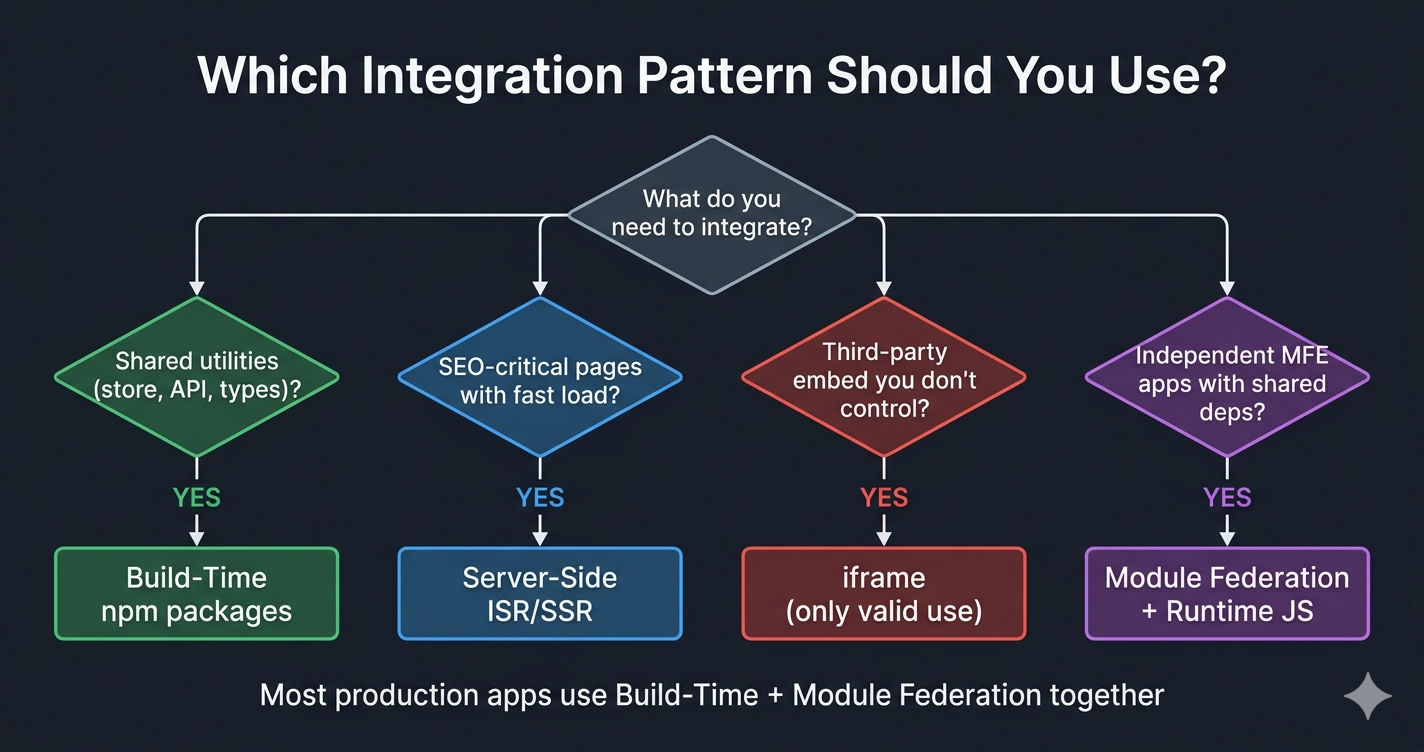
| Situation | Recommended Pattern |
|---|---|
| Shared Redux store, API client, types | Pattern 1: Build-Time (npm packages) |
| SEO-critical product pages | Pattern 2: Server-Side (ISR/SSR) |
| Embedding third-party content you don't control | Pattern 3: iframes (only valid use) |
| Loading MFE components on demand | Pattern 4: Runtime JavaScript |
| Full MFE architecture with independent deploys | Pattern 5: Module Federation |
| Production e-commerce with mixed React + Next.js | Pattern 1 + 4 + 5 combined |
The Recommended Stack
Build-Time packages (Pattern 1) for shared utilities + Module Federation (Pattern 5) for runtime integration + Runtime JavaScript (Pattern 4) for lazy loading = the most battle-tested MFE architecture for production applications.
For official documentation, see the Webpack Module Federation docs (opens in a new tab), NextFederationPlugin on npm (opens in a new tab), and Turborepo docs (opens in a new tab).
Summary
| Pattern | Independence | Shared State | Performance | SEO | Recommended? |
|---|---|---|---|---|---|
| Build-Time | Low (rebuild needed) | Yes | Excellent | N/A | Yes (for shared code) |
| Server-Side | Medium | Limited | Excellent | Excellent | Yes (for SEO pages) |
| iframes | High | No | Poor | No | No (avoid) |
| Runtime JS | High | Via shared store | Good | Depends | Yes (with Module Fed) |
| Module Federation | High | Yes (singleton) | Excellent | Yes (with SSR) | Yes (primary) |
What's Next?
Now that you understand the five integration patterns, the next step is learning how MFEs communicate with each other — shared state, callback props, URL routing, and shared API layers.
← Back to Micro Frontend vs Monolith
Continue to Micro Frontend Communication Patterns →
Frequently Asked Questions
What are the different Micro Frontend integration patterns?
There are 5 main integration patterns: Build-Time Integration (npm packages shared via workspaces), Server-Side Integration (SSR/ISR with Next.js), Runtime via iframes (isolated but limited), Runtime via JavaScript (React.lazy or next/dynamic loading remote bundles), and Module Federation (Webpack 5 plugin that loads remote components at runtime with shared dependencies).
Why is Module Federation the best approach for Micro Frontends?
Module Federation allows MFEs to share dependencies like React and Redux as singletons at runtime — avoiding duplicate bundles. Each MFE deploys independently with its own remoteEntry.js file. The Host loads remote components on demand without rebuilding. Combined with shared npm workspace packages for state and API layers, it provides the best balance of independence and shared functionality.
What is the difference between NextFederationPlugin and ModuleFederationPlugin?
ModuleFederationPlugin is Webpack 5's built-in plugin for standard React apps. NextFederationPlugin from @module-federation/nextjs-mf extends it for Next.js — handling SSR chunks, page routing, static asset loading, and the distinction between server-side (ssr/) and client-side (chunks/) remoteEntry.js files. Use NextFederationPlugin when your Host or Remote is a Next.js application.
Why should you avoid iframes for Micro Frontend integration?
Iframes create completely isolated contexts — no shared Redux state, no shared authentication, no shared CSS. Each iframe loads a full React bundle independently, causing poor performance. Screen readers struggle with iframe content, and Google cannot crawl iframe-loaded content for SEO. Module Federation solves all of these problems while still keeping MFEs independently deployable.
Can you mix React and Next.js Micro Frontends in the same application?
Yes. A Next.js Host can load both Next.js remotes (using NextFederationPlugin with basePath and assetPrefix) and plain React remotes (using standard ModuleFederationPlugin). Next.js remotes have a different remoteEntry.js path pattern (_next/static/chunks/ for client, _next/static/ssr/ for server) while React remotes serve remoteEntry.js directly from their publicPath.