Micro Frontend vs SPA: Which Architecture Should You Choose?

Micro Frontend vs SPA is a decision every frontend team faces as their application grows. A Single Page Application (SPA) starts simple — one codebase, one build, one deployment. But as teams grow and features multiply, that simplicity becomes a bottleneck. Every feature shares the same build pipeline, every developer commits to the same repo, and a bug in one page blocks deployment of everything else.

In this article, you'll learn how SPA and Micro Frontend architectures compare, see real code examples showing both approaches, and get a clear decision framework to choose the right architecture for your project.

The Problem with Large SPAs

A Single Page Application works great for small teams and simple products. But here's what happens when a SPA grows over two years with 8+ developers:

package.json
// The SPA Scaling Problem — Real Example
// package.json of a large SPA after 2 years of development

{
  "name": "my-ecommerce-spa",
  "dependencies": {
    "react": "^18.2.0",
    "react-dom": "^18.2.0",
    "react-router-dom": "^6.0.0",
    "@reduxjs/toolkit": "^2.6.0",
    "axios": "^1.7.0",
    "tailwindcss": "^3.4.0",
    "chart.js": "^4.0.0",        // Only used by Analytics page
    "react-quill": "^2.0.0",     // Only used by Support page
    "react-dropzone": "^14.0.0", // Only used by Upload page
    "xlsx": "^0.18.0",           // Only used by Reports page
    "react-pdf": "^7.0.0",       // Only used by Orders page
    "leaflet": "^1.9.0",         // Only used by Tracking page
    "socket.io-client": "^4.0.0" // Only used by Chat widget
  }
}
// Problem: EVERY user downloads ALL dependencies on first load
// chart.js, xlsx, leaflet, react-pdf — loaded even on the homepage
// Bundle size: 2.8 MB (gzipped: 890 KB)
// First Contentful Paint: 3.2 seconds on 4G

Every user who visits your homepage downloads every dependency — including chart.js (for Analytics), xlsx (for Reports), and leaflet (for Tracking) — even though they only wanted to browse products. The bundle grows, the build slows down, and the team starts stepping on each other's toes.

This is the exact problem that Micro Frontend architecture solves.

What is a Single Page Application (SPA)?

A Single Page Application is a frontend architecture where the entire application — all pages, components, state, and routing — lives in a single codebase and produces a single build output. The browser loads one HTML file, and JavaScript handles all navigation without full page reloads.

Popular SPA frameworks include React (opens in a new tab), Angular (opens in a new tab), and Vue.js (opens in a new tab). Most frontend applications start as SPAs because they are simple to set up, have excellent tooling, and work well for small-to-medium projects.

webpack.config.js
// webpack.config.js — Traditional SPA (Single Build)
const path = require('path')
const HtmlWebpackPlugin = require('html-webpack-plugin')

module.exports = {
  mode: 'production',
  entry: './src/index.js',  // ONE entry point for the entire app
  output: {
    path: path.resolve(__dirname, 'dist'),
    filename: '[name].[contenthash].js',
    publicPath: '/',
    clean: true,
  },
  plugins: [
    new HtmlWebpackPlugin({
      template: './public/index.html',
    }),
  ],
  optimization: {
    splitChunks: {
      chunks: 'all',
      cacheGroups: {
        vendor: {
          test: /[\\/]node_modules[\\/]/,
          name: 'vendors',
        },
      },
    },
  },
}
// Problem: ONE build pipeline for ALL features
// Problem: ONE deployment for the ENTIRE frontend
// Problem: ALL teams commit to the SAME repo and build

The key characteristic of a SPA: one entry point, one build, one deployment.

What is Micro Frontend?

Micro Frontend is a frontend architecture where the application is decomposed into multiple independent applications — each with its own codebase, build pipeline, and deployment. A Host (shell) application loads these remote MFEs at runtime using Webpack Module Federation (opens in a new tab).

Instead of one giant application, you get multiple small applications that come together in the browser:

apps/host/webpack.config.js
// apps/host/webpack.config.js — MFE Host App (LOCAL)
const { ModuleFederationPlugin } = require('webpack').container
const path = require('path')

module.exports = {
  mode: 'development',
  output: { publicPath: '/' },
  devServer: {
    port: 4000,
    historyApiFallback: true,
    headers: {
      'Access-Control-Allow-Origin': '*',
      'Access-Control-Allow-Methods': 'GET, POST, PUT, DELETE, PATCH, OPTIONS',
    },
  },
  plugins: [
    new ModuleFederationPlugin({
      name: 'Host',
      // Each remote MFE runs on its own localhost port
      remotes: {
        Products:   'Products@https://localhost:4001/remoteEntry.js',
        Orders:     'Orders@https://localhost:4002/remoteEntry.js',
        Cart:       'Cart@https://localhost:4003/remoteEntry.js',
        Pricing:    'Pricing@https://localhost:4004/remoteEntry.js',
        Analytics:  'Analytics@https://localhost:4005/remoteEntry.js',
        Settings:   'Settings@https://localhost:4006/remoteEntry.js',
        Support:    'Support@https://localhost:4007/remoteEntry.js',
      },
      shared: {
        react:              { singleton: true, requiredVersion: '^18.2.0' },
        'react-dom':        { singleton: true, requiredVersion: '^18.2.0' },
        'react-router-dom': { singleton: true, requiredVersion: '^6.0.0' },
        '@reduxjs/toolkit':  { singleton: true, requiredVersion: '^2.6.0' },
        '@myapp/api':       { singleton: true, requiredVersion: '0.0.1' },
        '@myapp/store':     { singleton: true, requiredVersion: '0.0.1' },
      },
    }),
  ],
  optimization: {
    splitChunks: false,  // Disabled in local dev
  },
}

Each import() statement loads code from a different application running on a different port — not from the same bundle. This is the fundamental difference from a SPA.

New to Micro Frontend? Start with What is Micro Frontend Architecture? for the complete introduction.

Side-by-Side Comparison

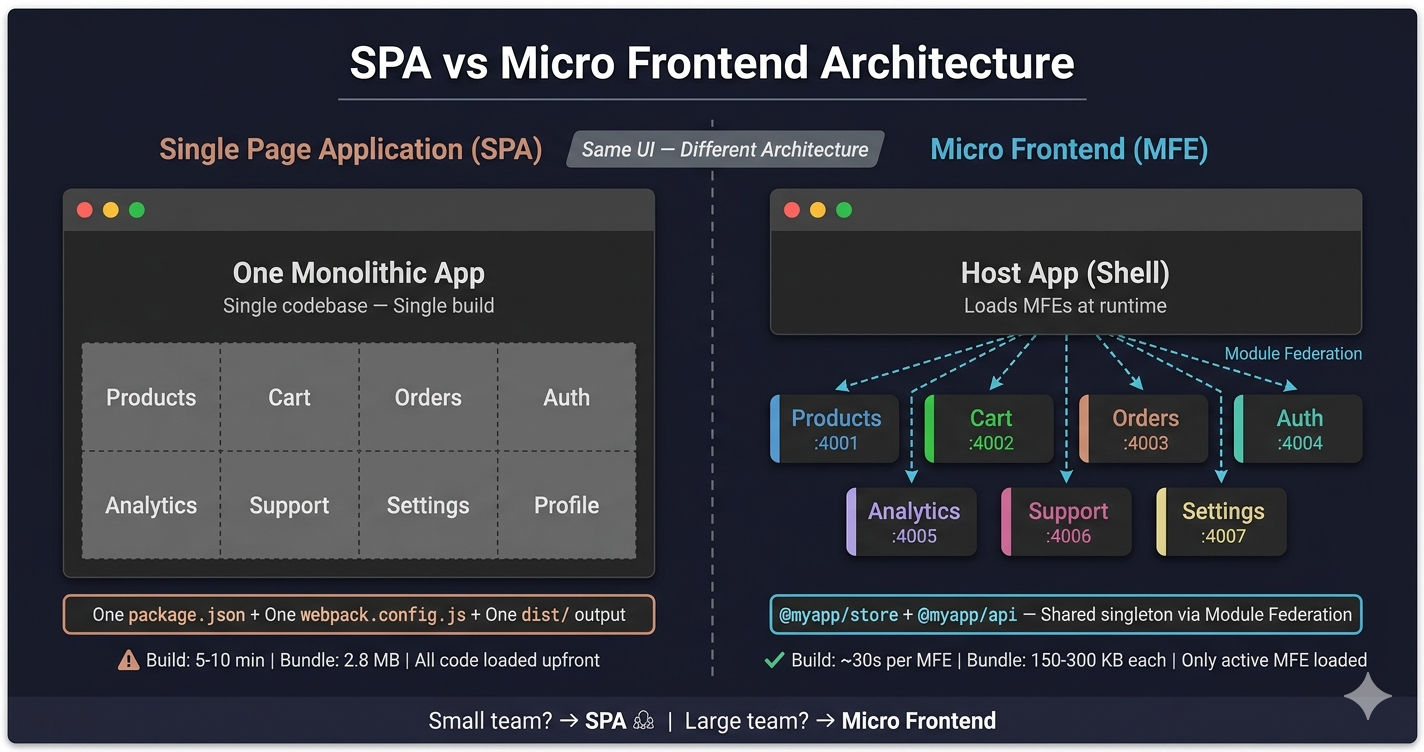
Here is the fundamental difference between SPA and Micro Frontend architecture:

FeatureSPA (Single Page Application)Micro Frontend
CodebaseSingle repository, single package.jsonMonorepo with independent apps, each with own package.json
BuildOne build pipeline for everythingEach MFE builds independently
DeploymentDeploy entire app at onceDeploy each MFE independently
Team scalingAll devs commit to same repo — merge conflictsEach team owns their MFE — no conflicts
Build timeGrows with app size (5-10 min for large apps)~30 seconds per MFE (parallel via Turborepo)
Bundle sizeAll dependencies loaded on first visitOnly active MFE's dependencies loaded
RoutingReact Router in one fileHost routes to remote MFE components
Shared stateOne Redux store in the same bundleShared Redux store via Module Federation singleton
TechnologyLocked to one framework versionEach MFE can use different versions
Failure isolationBug anywhere blocks entire deploymentBug in one MFE only affects that MFE
Dev serverOne port (e.g., localhost:3000)Each MFE on its own port (4000, 4001, 4002...)
InfrastructureSimple — one build, one serverMore complex — Nginx routing, Module Federation config

Micro Frontend vs SPA architecture comparison diagram showing single codebase SPA on the left and independent MFE applications on the right

Key insight: SPA and Micro Frontend are not competing patterns for the same problem. SPA is the right choice for small teams. Micro Frontend is the right choice when the SPA model breaks down due to team size, build time, or deployment conflicts.

Folder Structure: SPA vs Micro Frontend

The folder structure reveals the fundamental architectural difference.

SPA Folder Structure

Project Structure
# Traditional SPA  Single Application
my-ecommerce-app/
 package.json          # ONE package.json for everything
 webpack.config.js     # ONE build config
 src/
    index.js          # Single entry point
    App.js            # Single root component
    store/            # One global Redux store
       store.js
       userSlice.js
       productSlice.js
       cartSlice.js
       orderSlice.js
    pages/            # ALL pages in one directory
       ProductList.jsx
       ProductDetail.jsx
       Cart.jsx
       Checkout.jsx
       Orders.jsx
       Profile.jsx
       Login.jsx
       Support.jsx
    components/       # ALL shared components together
       Header.jsx
       Footer.jsx
       Sidebar.jsx
       ProductCard.jsx
    api/              # ALL API calls in one layer
       products.js
       cart.js
       orders.js
       auth.js
    styles/
        global.css    # Shared styles for the entire app
 public/
    index.html        # Single HTML file
 dist/                 # Single build output
     main.a1b2c3.js
     vendors.d4e5f6.js
     index.html

Everything lives under one roof — one package.json, one webpack.config.js, one dist/ output. Simple and effective for small projects.

Micro Frontend Folder Structure

Project Structure
# Micro Frontend  Monorepo with Independent Apps
my-ecommerce-platform/
 turbo.json              # Turborepo  parallel builds
 package.json            # Workspaces: apps , packages 
 apps/
    Host/               # Shell app  routing + layout
       package.json    # Own dependencies
       webpack.config.js
       src/
           index.js
           App.jsx     # Loads remote MFEs
           routes.jsx
    Products/           # Independent MFE  own build
       package.json
       webpack.config.js
       src/
           ProductCatalog.jsx
           ProductDetail.jsx
           ProductImages.jsx
    Cart/               # Independent MFE  own build
       package.json
       webpack.config.js
       src/
           ShoppingBag.jsx
           Checkout.jsx
    Orders/             # Independent MFE  own build
    Analytics/          # Independent MFE  own build
    Settings/           # Independent MFE  own build
    Support/            # Independent MFE  own build
 packages/               # Shared code  used by ALL MFEs
    core/
       api/            # Shared axios + auth interceptors
          package.json
          index.js
          api.config.js
       store/          # Shared Redux store
           package.json
           store.js
           slices/
               userSlice.js
               cartSlice.js
    ui-components/      # Shared UI library
        package.json
        src/
            Button.jsx
            Modal.jsx
 configs/                # Shared ESLint, Prettier, Tailwind
     eslint-config/
     tailwind-config/

Each app under apps/ is a fully independent application with its own build. Shared code lives in packages/ and is loaded as a Module Federation singleton — not bundled into each MFE.

For a detailed breakdown of MFE folder structure, read Micro Frontend Folder Structure Best Practices.

Routing: SPA vs Micro Frontend

SPA Routing — All Routes in One File

src/App.js
// src/App.js — SPA Routing (ALL routes in ONE file)
import { BrowserRouter, Routes, Route } from 'react-router-dom'
import Header from './components/Header'
import Footer from './components/Footer'
import ProductList from './pages/ProductList'
import ProductDetail from './pages/ProductDetail'
import Cart from './pages/Cart'
import Checkout from './pages/Checkout'
import Orders from './pages/Orders'
import Profile from './pages/Profile'
import Login from './pages/Login'
import Support from './pages/Support'

function App() {
  return (
    <BrowserRouter>
      <Header />
      <Routes>
        <Route path="/" element={<ProductList />} />
        <Route path="/product/:id" element={<ProductDetail />} />
        <Route path="/cart" element={<Cart />} />
        <Route path="/checkout" element={<Checkout />} />
        <Route path="/orders" element={<Orders />} />
        <Route path="/profile" element={<Profile />} />
        <Route path="/login" element={<Login />} />
        <Route path="/support" element={<Support />} />
      </Routes>
      <Footer />
    </BrowserRouter>
  )
}
// Problem: Every developer works in this same file and repo
// Problem: Adding a route means redeploying the ENTIRE app
// Problem: A bug in /support can block deployment of /cart

MFE Routing — Lazy-Load Remote Applications

apps/host/src/App.jsx
// apps/host/src/App.jsx — MFE Routing (Lazy-loads remote apps)
import { BrowserRouter, Routes, Route } from 'react-router-dom'
import React, { Suspense, lazy } from 'react'
import Header from './components/Header'
import Footer from './components/Footer'
import Loading from './components/Loading'

// Each MFE is loaded at RUNTIME — not bundled at build time
const Products = lazy(() => import('Products/ProductCatalog'))
const ProductDetail = lazy(() => import('Products/ProductDetail'))
const Cart = lazy(() => import('Cart/ShoppingBag'))
const Checkout = lazy(() => import('Cart/Checkout'))
const Orders = lazy(() => import('Orders/OrderHistory'))
const Settings = lazy(() => import('Settings/SettingsPage'))
const Support = lazy(() => import('Support/HelpCenter'))

function App() {
  return (
    <BrowserRouter>
      <Header />
      <Suspense fallback={<Loading />}>
        <Routes>
          <Route path="/" element={<Products />} />
          <Route path="/product/:id" element={<ProductDetail />} />
          <Route path="/cart" element={<Cart />} />
          <Route path="/checkout" element={<Checkout />} />
          <Route path="/orders/*" element={<Orders />} />
          <Route path="/settings/*" element={<Settings />} />
          <Route path="/support/*" element={<Support />} />
        </Routes>
      </Suspense>
      <Footer />
    </BrowserRouter>
  )
}
// Each import() loads from a DIFFERENT remote app (different port/URL)
// Products MFE can be deployed WITHOUT touching Cart or Orders
// Teams work in separate repos/apps — no code conflicts

The critical difference: in a SPA, import ProductList from './pages/ProductList' loads code from the same bundle. In a Micro Frontend, import('Products/ProductCatalog') loads code from a completely different application via Module Federation at runtime.

Webpack Configuration: SPA vs Micro Frontend

SPA — One Build Config

A SPA has one webpack.config.js that builds everything into a single dist/ folder.

Micro Frontend — Host and Remote Configs

In a Micro Frontend architecture, the Host app and each Remote MFE have their own webpack configs. The configs are different for Local Development and Production.

Local Development and Production configs are different. In local dev, remotes point to localhost:PORT. In production, Nginx serves each MFE's static files from a subpath like /products/remoteEntry.js.

apps/host/webpack.config.js — Host
// apps/host/webpack.config.js — MFE Host App (LOCAL)
const { ModuleFederationPlugin } = require('webpack').container
const path = require('path')

module.exports = {
  mode: 'development',
  output: { publicPath: '/' },
  devServer: {
    port: 4000,
    historyApiFallback: true,
    headers: {
      'Access-Control-Allow-Origin': '*',
      'Access-Control-Allow-Methods': 'GET, POST, PUT, DELETE, PATCH, OPTIONS',
    },
  },
  plugins: [
    new ModuleFederationPlugin({
      name: 'Host',
      // Each remote MFE runs on its own localhost port
      remotes: {
        Products:   'Products@https://localhost:4001/remoteEntry.js',
        Orders:     'Orders@https://localhost:4002/remoteEntry.js',
        Cart:       'Cart@https://localhost:4003/remoteEntry.js',
        Pricing:    'Pricing@https://localhost:4004/remoteEntry.js',
        Analytics:  'Analytics@https://localhost:4005/remoteEntry.js',
        Settings:   'Settings@https://localhost:4006/remoteEntry.js',
        Support:    'Support@https://localhost:4007/remoteEntry.js',
      },
      shared: {
        react:              { singleton: true, requiredVersion: '^18.2.0' },
        'react-dom':        { singleton: true, requiredVersion: '^18.2.0' },
        'react-router-dom': { singleton: true, requiredVersion: '^6.0.0' },
        '@reduxjs/toolkit':  { singleton: true, requiredVersion: '^2.6.0' },
        '@myapp/api':       { singleton: true, requiredVersion: '0.0.1' },
        '@myapp/store':     { singleton: true, requiredVersion: '0.0.1' },
      },
    }),
  ],
  optimization: {
    splitChunks: false,  // Disabled in local dev
  },
}
apps/products/webpack.config.js — Remote
// apps/products/webpack.config.js — Remote MFE (LOCAL)
const { ModuleFederationPlugin } = require('webpack').container
const path = require('path')

module.exports = {
  mode: 'development',
  output: {
    publicPath: 'https://localhost:4001/',
    clean: true,
  },
  devServer: {
    port: 4001,
    historyApiFallback: true,
    headers: {
      'Access-Control-Allow-Origin': '*',
    },
  },
  plugins: [
    new ModuleFederationPlugin({
      name: 'Products',
      filename: 'remoteEntry.js',
      exposes: {
        './ProductCatalog':   './src/pages/ProductCatalog',
        './ProductDetail':    './src/pages/ProductDetail',
        './ProductImages':    './src/pages/ProductImages',
        './BulkUpload':       './src/pages/BulkUpload',
      },
      shared: {
        react:              { singleton: true, requiredVersion: '^18.2.0' },
        'react-dom':        { singleton: true, requiredVersion: '^18.2.0' },
        'react-router-dom': { singleton: true, requiredVersion: '^6.0.0' },
        '@reduxjs/toolkit':  { singleton: true, requiredVersion: '^2.6.0' },
        '@myapp/api':       { singleton: true, requiredVersion: '0.0.1' },
        '@myapp/store':     { singleton: true, requiredVersion: '0.0.1' },
      },
    }),
  ],
}

Next.js Micro Frontend — Different Plugin

If your Host app uses Next.js instead of React, the configuration uses NextFederationPlugin instead of ModuleFederationPlugin:

apps/host/next.config.js
// apps/host/next.config.js — Next.js MFE Host (PRODUCTION)
const { NextFederationPlugin } = require('@module-federation/nextjs-mf')

module.exports = {
  reactStrictMode: false,
  output: 'standalone',

  webpack(config, { isServer }) {
    config.plugins.push(
      new NextFederationPlugin({
        name: 'Host',
        filename: 'static/chunks/remoteEntry.js',
        remotes: {
          // Next.js remotes — different remoteEntry path for SSR
          Content:  'Content@https://www.example.com/content/_next/static/'
            + (isServer ? 'ssr' : 'chunks') + '/remoteEntry.js',
          Products: 'Products@https://www.example.com/products/_next/static/'
            + (isServer ? 'ssr' : 'chunks') + '/remoteEntry.js',
          // React remotes — standard remoteEntry at root
          Auth:     'Auth@https://www.example.com/auth/remoteEntry.js',
          Cart:     'Cart@https://www.example.com/cart/remoteEntry.js',
          Account:  'Account@https://www.example.com/account/remoteEntry.js',
          Support:  'Support@https://www.example.com/support/remoteEntry.js',
        },
        shared: {
          react:              { singleton: true, requiredVersion: false },
          'react-dom':        { singleton: true, requiredVersion: false },
          'react-redux':      { singleton: true, requiredVersion: false },
          '@reduxjs/toolkit':  { singleton: true, requiredVersion: false },
          '@myapp/store':     { singleton: true, strictVersion: true },
          '@myapp/api':       { singleton: true, strictVersion: true },
        },
        extraOptions: {
          exposePages: true,
          enableImageLoaderFix: true,
          enableUrlLoaderFix: true,
          automaticAsyncBoundary: true,
        },
      })
    )
    return config
  },
}

For a detailed comparison of these two plugins, read 5 Micro Frontend Integration Patterns.

Deployment: SPA vs Micro Frontend

SPA Deployment — Single Build, Single Deploy

deploy.sh
# SPA Deployment  ONE build, ONE deployment
npm run build          # Builds EVERYTHING into dist/
scp -r dist/* ubuntu@server:/var/www/my-app/

# Problem: A typo in the Support page blocks deployment
# of Products, Cart, and Orders changes too
# Problem: Build takes 5-10 minutes as the app grows
# Problem: ALL teams must coordinate on a single release

MFE Deployment — Independent Per Team

deploy.sh
# MFE Deployment  Independent builds per team
# Products team deploys ONLY their MFE
cd apps/Products && npm run build
scp -r dist/* ubuntu@server:/var/www/products/

# Cart team deploys ONLY their MFE (independently)
cd apps/Cart && npm run build
scp -r dist/* ubuntu@server:/var/www/cart/

# No coordination needed — each team deploys on their own schedule
# Build time: ~30 seconds per MFE (vs 5-10 min for entire SPA)
# A bug in Support does NOT block Products deployment

Turborepo orchestrates MFE builds in parallel, making the total monorepo build time comparable to or faster than a large SPA build.

turbo.json
// turbo.json — Turborepo orchestrates parallel MFE builds
{
  "$schema": "https://turbo.build/schema.json",
  "globalDependencies": ["**/.env.*local"],
  "pipeline": {
    "build": {
      "dependsOn": ["^build"],
      "outputs": ["dist/**", ".next/**"]
    },
    "dev": {
      "cache": false,
      "persistent": true
    },
    "start": {
      "dependsOn": ["build"],
      "cache": false
    }
  }
}
// Run "turbo run build" — builds ALL MFEs in parallel
// Each MFE builds independently in ~30 seconds
// Total monorepo build: ~1-2 minutes (parallel) vs 5-10 min (SPA sequential)

Performance: SPA vs Micro Frontend

SPA Bundle Size Problem

In a SPA, the browser downloads all code on the first page load — including features the user may never visit. Code splitting helps, but all chunks still come from the same build.

MFE Targeted Loading

In a Micro Frontend, the browser only loads the Host app and the active MFE. If the user visits the Products page, only the Products MFE is downloaded. Analytics, Support, and Reports MFE code is never loaded until the user navigates there.

Module Federation Shared Dependencies
// MFE Shared Dependencies — Only load what each MFE needs
// webpack.config.js — shared config in EVERY MFE
shared: {
  // These are loaded ONCE and shared across ALL MFEs (singleton)
  react:              { singleton: true, requiredVersion: '^18.2.0' },
  'react-dom':        { singleton: true, requiredVersion: '^18.2.0' },
  'react-router-dom': { singleton: true, requiredVersion: '^6.0.0' },
  '@reduxjs/toolkit':  { singleton: true, requiredVersion: '^2.6.0' },
  '@myapp/api':       { singleton: true, requiredVersion: '0.0.1' },
  '@myapp/store':     { singleton: true, requiredVersion: '0.0.1' },
}
// Products MFE: only loads react + product-specific libraries
// Analytics MFE: loads react + chart.js (chart.js is NOT shared)
// Support MFE: loads react + react-quill (react-quill is NOT shared)

// Result: Homepage loads ONLY Host + Products MFE
// chart.js, xlsx, leaflet never downloaded until user visits that page
// Bundle per MFE: 150-300 KB each
// First Contentful Paint: 1.4 seconds on 4G
MetricSPA (Large App)Micro Frontend
Initial bundle2-3 MB (all features)400-600 KB (Host + one MFE)
First Contentful Paint2.5-3.5s on 4G1.2-1.8s on 4G
Per-page loadAlready loaded (fast navigation)~150-300 KB per MFE (lazy loaded)
Unused code downloadedYes — all featuresNo — only active MFE
CachingOne vendor chunk invalidated on any changeEach MFE cached independently
⚠️

For small applications (under 500 KB bundle), SPA is faster. The overhead of Module Federation's remoteEntry.js files and runtime negotiation adds ~50-100ms per remote. This only pays off when the alternative is loading megabytes of unused code.

When SPA is the Better Choice

Choose a SPA when:

  1. Small team — fewer than 5 frontend developers
  2. Single business domain — the app serves one purpose (e.g., a dashboard, a CMS, a blog)
  3. Quick MVP or prototype — you need to ship fast with minimal infrastructure
  4. Simple deployment — one build, one server, no Nginx routing complexity
  5. Build time under 2 minutes — the build pipeline is not a bottleneck yet
  6. No independent release cycles needed — the whole team deploys together on the same schedule

SPAs are battle-tested, well-documented, and have the largest ecosystem of tooling and libraries. There is no shame in staying with a SPA when it works.

When Micro Frontend is the Better Choice

Choose Micro Frontends when:

  1. Large team — 5 or more frontend developers across multiple feature areas
  2. Multiple business domains — products, cart, orders, analytics, support, settings
  3. Independent release cycles — the Products team should not wait for the Analytics team
  4. Build time exceeds 5 minutes — the SPA build pipeline is slowing down development
  5. Deployment conflicts — teams block each other because they deploy the same artifact
  6. Technology migration needed — you want to upgrade React 17 to React 18 one MFE at a time
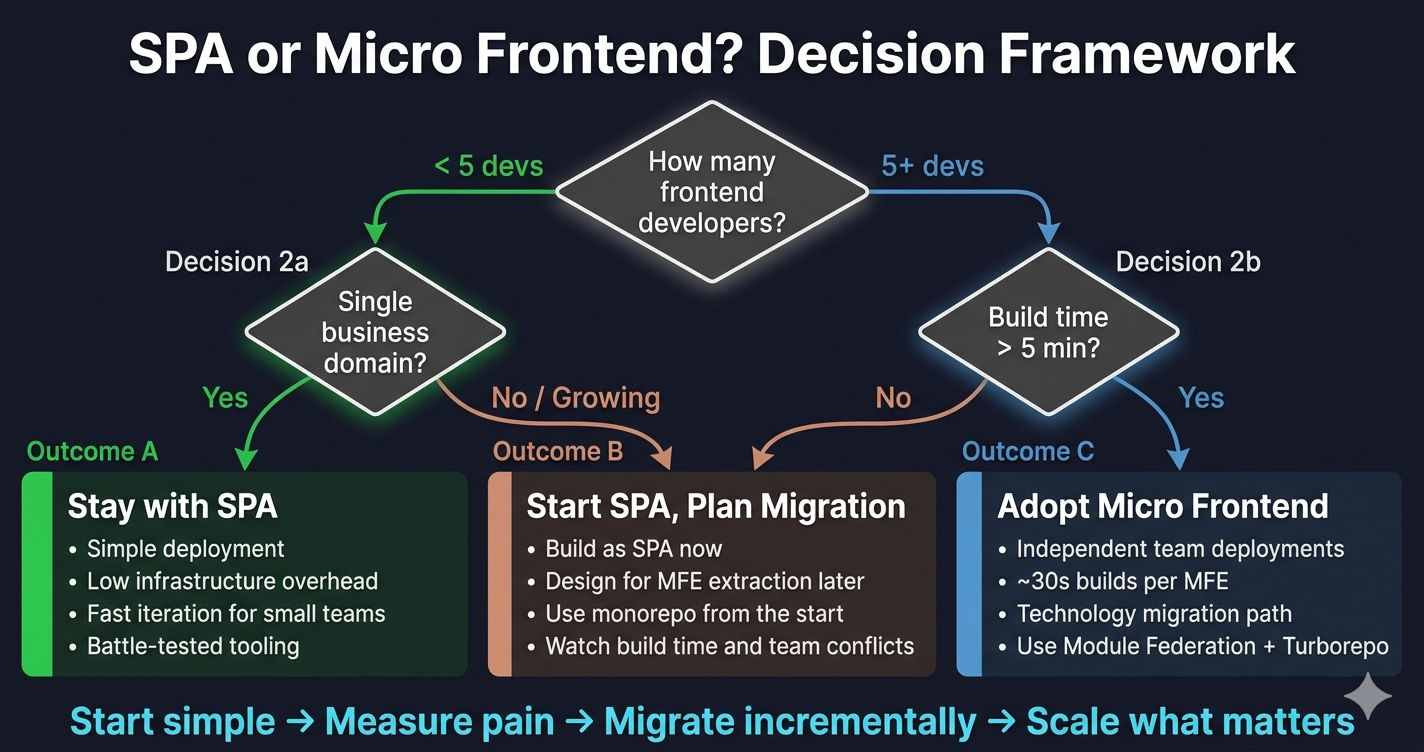
Decision framework flowchart showing when to use SPA vs Micro Frontend based on team size, domains, and deployment needs

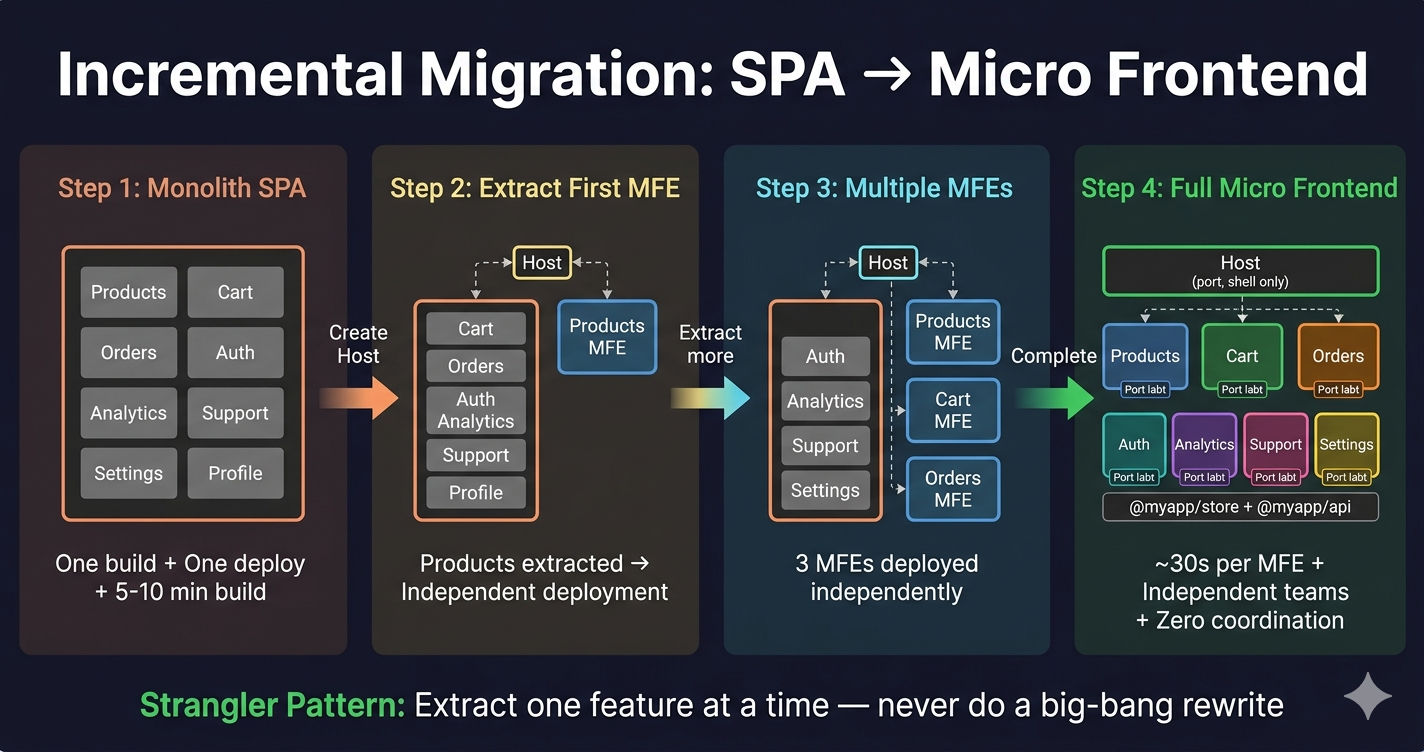
SPA to Micro Frontend incremental migration steps showing strangler pattern extracting features from monolith SPA into independent MFE applications

Can You Migrate from SPA to Micro Frontend?

Yes — and you should do it incrementally, not as a big-bang rewrite. The strangler pattern works well:

Step 1: Create a Host app with Module Federation. Keep your existing SPA running alongside it.

Step 2: Extract one feature (e.g., Products) into a standalone MFE with its own webpack.config.js and Module Federation exposes. The Host loads it via remotes.

Step 3: Gradually extract more features into independent MFEs. Each extraction reduces the SPA and adds a new remote.

Step 4: Once all features are extracted, the original SPA becomes the Host shell — routing, layout, and navigation only.

This is exactly the approach described in Micro Frontend vs Monolith: When to Migrate.

Real-World Companies and Their Architecture

CompanyArchitectureNotes
SpotifyMicro FrontendEach squad owns a feature MFE independently
IKEAMicro FrontendCatalog, cart, and checkout as separate MFEs
AmazonMicro FrontendEach product team owns their frontend slice
VercelSPA (Next.js)Small team, single product — SPA makes sense
LinearSPA (React)Small team, single domain — fast SPA
NotionSPA (React)Single product, one deployment pipeline
Most startupsSPATeam too small for MFE overhead

The pattern is clear: small teams and single-domain products stay with SPA. Large organizations with multiple product teams adopt Micro Frontends.

For more on how Micro Frontends connect to backend Microservices in production, read Micro Frontend vs Microservices: Key Differences.

Summary

AspectSPAMicro Frontend
Best forSmall teams, single domainLarge teams, multiple domains
CodebaseOne repo, one buildMonorepo with independent apps
DeploymentDeploy everything togetherDeploy each MFE independently
Build timeGrows with app size~30 seconds per MFE
BundleAll code loaded upfrontOnly active MFE loaded
ComplexityLowHigher (Module Federation, Nginx)
Team autonomyLow — shared codebaseHigh — independent repos/apps
MigrationN/AIncremental (strangler pattern)

Start with a SPA. Migrate to Micro Frontend when the SPA model breaks. The decision is driven by team size, deployment conflicts, and build time — not by trend or resume-driven development. If your 3-person team is shipping just fine with a SPA, you do not need Micro Frontends.

What's Next?

This completes the MFE Fundamentals section. You now understand what Micro Frontends are, how they compare to monoliths, SPAs, and microservices, and when to adopt them.

The next section dives into hands-on implementation — setting up a React Micro Frontend monorepo with Turborepo, Webpack 5, and Module Federation from scratch.

← Back to Micro Frontend vs Microservices

Continue to React MFE Monorepo Setup with Turborepo →


Frequently Asked Questions

What is the difference between a SPA and a Micro Frontend?

A Single Page Application (SPA) is one monolithic frontend application where all features share a single codebase, build pipeline, and deployment. A Micro Frontend splits the frontend into multiple independent applications — each with its own codebase, build, and deployment — loaded at runtime by a Host app using Webpack Module Federation.

When should I use SPA instead of Micro Frontend?

Use a SPA when your team is small (fewer than 5 frontend developers), the application has a single business domain, you need a quick MVP or prototype, and deployment coordination is not a bottleneck. SPAs have less infrastructure overhead and are simpler to set up and maintain for small projects.

When should I use Micro Frontend instead of SPA?

Use Micro Frontends when you have 5 or more frontend developers, multiple business domains (products, cart, orders, analytics), teams that need independent release cycles, or when your SPA build time exceeds 5 minutes. Micro Frontends enable independent deployment, parallel development, and team autonomy.

Can you migrate from SPA to Micro Frontend?

Yes. You can migrate incrementally by first creating a Host app with Module Federation, then extracting one feature (like Products) into a remote MFE while keeping the rest in the SPA. Gradually extract more features into independent MFEs. This strangler pattern avoids a risky big-bang rewrite.

Is Micro Frontend better than SPA for performance?

It depends on the application size. For small apps, SPAs are faster because there is no overhead from loading remote entry files. For large apps with many features, Micro Frontends perform better because users only download the code for the MFE they are visiting — not the entire application. Each MFE typically loads 150-300 KB compared to 2-3 MB for a large SPA.

Do Micro Frontends replace React Router?

No. Micro Frontends still use React Router (or Next.js routing) for navigation. The Host app uses React Router to map URL paths to remote MFE components loaded via Module Federation. Each MFE can also have its own internal routing. Module Federation handles code loading, not routing.