Mixing React + Next.js Micro Frontends

Published: April 29, 2026 · 17 min read

Mixing React and Next.js Micro Frontends Together: Hybrid Architecture Guide

You have a Next.js host that needs to render /products and /content with server-side rendering for SEO, while /login, /cart, /account, and /support are interactive client-only experiences. Building everything in Next.js wastes a Node.js process and 200 MB of RAM per page that does not need SSR. Building everything in React loses SEO on the pages that need it. The answer is mixing React and Next.js micro frontends in a single host application — using ModuleFederationPlugin for client-only React remotes and NextFederationPlugin for SSR-capable Next.js remotes. This article shows the complete hybrid architecture, the exact dual-plugin host config, and the deployment differences between the two remote types. In the previous article, you learned why Next.js needs two remoteEntry.js files and the isServer flag — now you will see how that same flag lets one host load remotes built with either plugin.

In this guide, you will:

  • See the full hybrid architecture diagram with React and Next.js remotes side by side
  • Configure the Next.js host to load 4 React remotes and 2 Next.js remotes from one next.config.js
  • Compare ModuleFederationPlugin vs NextFederationPlugin remote outputs and URL patterns
  • Wire up real host pages that consume both remote types using next/dynamic with ssr: false
  • Share a single Redux singleton across both remote types using @myapp/store
  • Set up an Nginx reverse proxy that serves React remotes statically and routes Next.js remotes to Node.js
  • Avoid the 8 most common pitfalls when mixing remote types
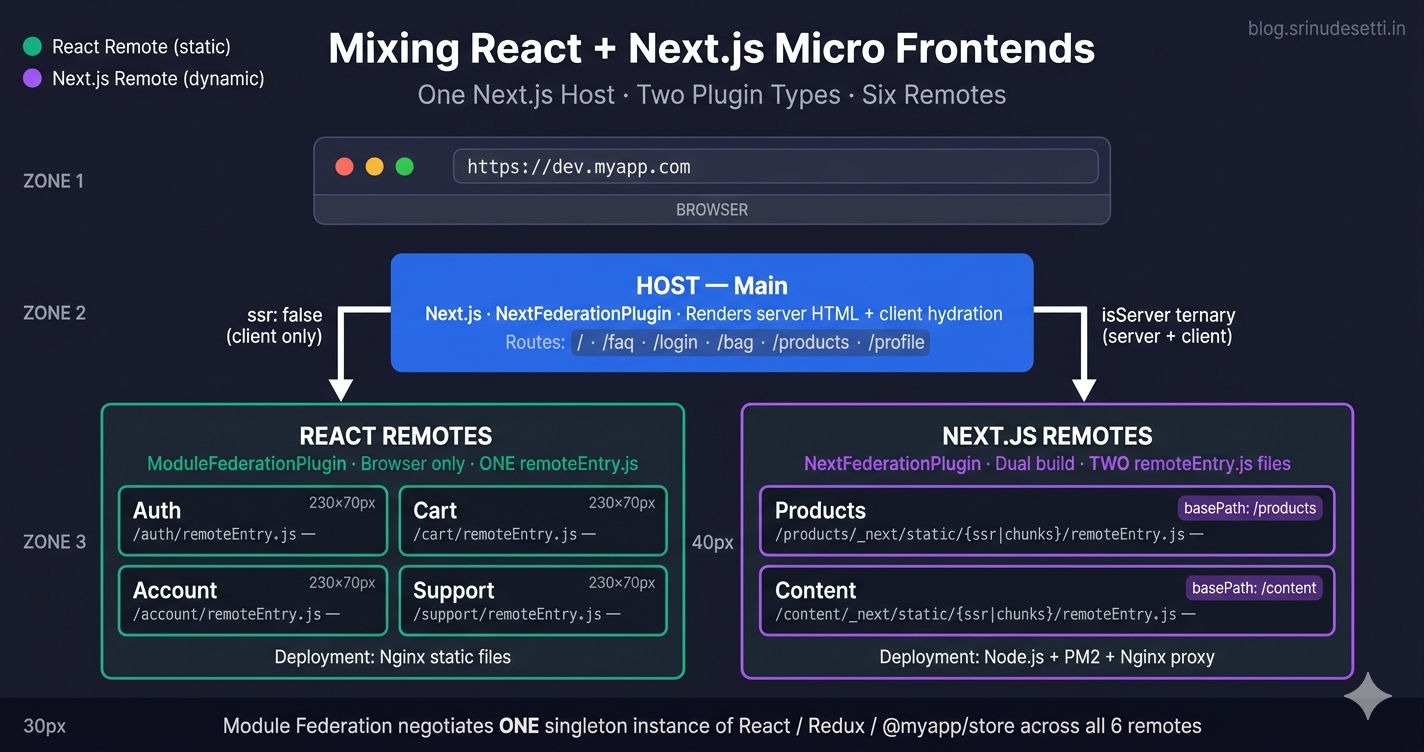
Mixing React and Next.js micro frontends hybrid architecture diagram showing Next.js host loading four React remotes and two Next.js remotes via Module Federation

Why Mix React and Next.js Micro Frontends?

Not every page in a large application needs server-side rendering. Pages like /products/[slug] and /faq benefit massively from SSR — search engines crawl pre-rendered HTML for product titles, prices, and FAQ content. Pages like /login, /bag, and /profile are interactive client-only experiences — their content depends on localStorage auth tokens and Redux state that only exists in the browser. Forcing those interactive pages through Next.js means running a Node.js process per remote that adds memory pressure for zero SEO benefit.

A hybrid architecture splits the application by rendering need:

  • Next.js remotes (SSR + CSR) for pages where Google needs to see real HTML — Products, Content (FAQ, Privacy Policy, Terms, Size Guide).
  • React remotes (CSR only) for pages that are interactive, auth-gated, or behind a login wall — Auth, Cart, Account, Support.

This mirrors how a real e-commerce frontend works. The home page, category pages, and product detail pages must rank in Google. The cart, checkout, and account pages do not. Mixing the two remote types lets each page use the right tool without forcing one architecture across the entire app.

Hybrid is also a migration strategy. If you already have a React MFE monorepo built with Webpack 5 — like the one in the React MFE monorepo guide — you can introduce Next.js for new SSR-heavy pages without rewriting the existing React remotes. The Next.js host loads them as-is.

Hybrid Architecture — One Host, Two Plugin Types

A single Next.js host loads both remote types simultaneously. The remote URL pattern in the host's next.config.js tells Module Federation which plugin built each remote. The runtime negotiates shared dependencies across all of them — React, Redux, and the shared @myapp/store package are loaded once and reused by every remote regardless of its plugin.

Hybrid architecture overview
# Hybrid Micro Frontend Architecture
# ────────────────────────────────────────────────────────
#
#   Browser
#     │
#     ▼
#   ┌─────────────────────────────────────────────────────┐
#   │  HOST — Main (Next.js + NextFederationPlugin)        │
#   │  Routes: /, /faq, /login, /bag, /products, /profile  │
#   │  Renders: server HTML  +  client hydration           │
#   └─────────────────────────────────────────────────────┘
#     │                                          │
#     │  ssr: false (client only)                │  isServer ternary
#     ▼                                          ▼
#   ┌──────────────────┐                ┌────────────────────────┐
#   │  React Remotes   │                │  Next.js Remotes       │
#   │  (ModuleFedPlug) │                │  (NextFederationPlug)  │
#   │                  │                │                        │
#   │  Auth     /auth  │                │  Products  /products   │
#   │  Cart     /cart  │                │  Content   /content    │
#   │  Account  /acct  │                │                        │
#   │  Support  /supp  │                │  basePath + assetPrefix│
#   │                  │                │  Two remoteEntry files │
#   │  ONE remoteEntry │                │  /ssr/ + /chunks/      │
#   │  /remoteEntry.js │                │                        │
#   └──────────────────┘                └────────────────────────┘
#
# Key Insight:
# A single Next.js host can load BOTH plugin types simultaneously.
# The remote URL pattern tells you which plugin built each remote:
#   - Plain /remoteEntry.js → React (ModuleFederationPlugin)
#   - /_next/static/.../remoteEntry.js → Next.js (NextFederationPlugin)

The key insight is that the host does not care how the remote was built. It only cares about three things: the remote's name, its remoteEntry.js URL, and its shared dependency list. As long as the shared list matches across the host and the remote, Module Federation handles the rest.

Remote URL Pattern — How the Host Tells Them Apart

The host config distinguishes the two remote types entirely through the URL string. There is no flag, no plugin-specific option, and no separate plugin instance — just a different URL pattern.

Pattern ElementReact Remote (Auth)Next.js Remote (Products)
PluginModuleFederationPluginNextFederationPlugin
Config filewebpack.config.jsnext.config.js
Output modestatic dist/ folder.next/standalone + .next/static
Public pathpublicPath: '/auth/'basePath + assetPrefix: '/products'
Filename pattern[name].[contenthash].js_next/static/chunks/[name]-[hash].js
remoteEntry location/auth/remoteEntry.js/products/_next/static/chunks/remoteEntry.js
SSR remoteEntryNOT generated/products/_next/static/ssr/remoteEntry.js
Server runtimeNone — static filesNode.js (server.js standalone)
Deployment targetNginx static hostingPM2 / Docker / Kubernetes
RoutingHost-controlled (props)basePath isolates routes
Host importimport('Auth/Login')import('Content/FAQ')
isServer ternaryNOT neededRequired in remotes config
BootstrapManual bootstrap.js OR automaticAsyncBoundaryautomaticAsyncBoundary: true
Image loaderPlain img tags or externalnext/image with enableImageLoaderFix

Notice the two columns are completely different — different file paths, different runtimes, different deployment targets. Yet the host configuration uses the same remotes: object for both.

The Dual-Plugin Host Configuration

Here is the complete next.config.js for the host. It uses one NextFederationPlugin instance to declare all six remotes — four React (Auth, Account, Cart, Support) and two Next.js (Content, Products).

apps/Main/next.config.js
// apps/Main/next.config.js — Next.js host loading BOTH React and Next.js remotes
const { NextFederationPlugin } = require('@module-federation/nextjs-mf');
const withBundleAnalyzer = require('@next/bundle-analyzer')({
  enabled: process.env.ANALYZE === 'true',
});

const withPWA = require('next-pwa')({
  dest: 'public',
  register: true,
  skipWaiting: true,
  disable: process.env.NODE_ENV === 'development',
});

module.exports = withBundleAnalyzer(
  withPWA({
    reactStrictMode: false,
    output: 'standalone',
    transpilePackages: ['@myapp/seo', '@myapp/store', '@myapp/api'],

    webpack(config, { isServer }) {
      // Exclude Node.js core modules from browser bundle
      if (!isServer) {
        config.resolve.fallback = {
          ...config.resolve.fallback,
          fs: false,
          stream: false,
          zlib: false,
        };
      }

      config.plugins.push(
        new NextFederationPlugin({
          name: 'Main',
          filename: 'static/chunks/remoteEntry.js',
          remotes: {
            // React remotes — ModuleFederationPlugin output (browser-only)
            // ONE remoteEntry.js file at root of the served path
            Auth:    'Auth@https://dev.myapp.com/auth/remoteEntry.js',
            Account: 'Account@https://dev.myapp.com/account/remoteEntry.js',
            Cart:    'Cart@https://dev.myapp.com/cart/remoteEntry.js',
            Support: 'Support@https://dev.myapp.com/support/remoteEntry.js',

            // Next.js remotes — NextFederationPlugin output (dual build)
            // TWO remoteEntry.js files — isServer picks the right one
            Content: `Content@https://dev.myapp.com/content/_next/static/${
              isServer ? 'ssr' : 'chunks'
            }/remoteEntry.js`,
            Products: `Products@https://dev.myapp.com/products/_next/static/${
              isServer ? 'ssr' : 'chunks'
            }/remoteEntry.js`,
          },
          shared: {
            react:             { singleton: true, requiredVersion: false, eager: false },
            'react-dom':       { singleton: true, requiredVersion: false, eager: false },
            'react-redux':     { singleton: true, requiredVersion: false, eager: false },
            '@reduxjs/toolkit':{ singleton: true, requiredVersion: false, eager: false },
            '@myapp/store':    { singleton: true, strictVersion: true, requiredVersion: '1.0.0' },
            '@myapp/api':      { singleton: true, strictVersion: true, requiredVersion: '1.0.0' },
            '@myapp/seo':      { singleton: true, strictVersion: true, requiredVersion: '1.0.0' },
          },
          extraOptions: {
            exposePages: true,
            enableImageLoaderFix: true,
            enableUrlLoaderFix: true,
            automaticAsyncBoundary: true,
          },
        })
      );

      return config;
    },
  })
);

// Why this works:
// NextFederationPlugin understands BOTH remote URL patterns.
// React remotes loaded via plain remoteEntry.js — no dual build needed
// since ssr: false in next/dynamic skips them on the server.
// Next.js remotes loaded via the /ssr/ vs /chunks/ ternary so each
// webpack pass picks the matching entry.

The crucial line is the remotes block. The four React remotes get plain /[name]/remoteEntry.js URLs because they were built with ModuleFederationPlugin which only emits one entry. The two Next.js remotes use the isServer ternary because NextFederationPlugin generates two entries — one for the Node.js server build, one for the browser build.

⚠️

Do not put the isServer ternary on React remote URLs. React remotes have no _next/static/ssr/ folder — that path returns 404. The server build then fails to fetch the remote, and the host crashes with a build error. Plain /[name]/remoteEntry.js only.

React Remote Configuration — ModuleFederationPlugin

Each React remote uses Webpack 5 Module Federation (opens in a new tab) via ModuleFederationPlugin. Production and local development configs differ significantly — production uses content hashes for long-lived caching while local development uses HTTPS dev server with CORS headers and disables code splitting for fast HMR.

Local development and production webpack configs are different. In dev, the remote runs on its own HTTPS port (e.g., https://localhost:4101) with CORS headers. In production, the remote is built once and served as static files from a path like /auth/.

apps/Auth/webpack.config.js (local)
// apps/Auth/webpack.config.js — LOCAL development variant
const path = require('path');
const fs = require('fs');
const MiniCssExtractPlugin = require('mini-css-extract-plugin');
const HtmlWebpackPlugin = require('html-webpack-plugin');
const { ModuleFederationPlugin } = require('webpack').container;
const dependencies = require('./package.json').dependencies;

const certPath = path.join(__dirname, '../../localhost.pem');
const keyPath = path.join(__dirname, '../../localhost-key.pem');

const httpsConfig =
  fs.existsSync(certPath) && fs.existsSync(keyPath)
    ? { type: 'https', options: { cert: fs.readFileSync(certPath), key: fs.readFileSync(keyPath) } }
    : { type: 'https', options: { requestCert: false, rejectUnauthorized: false } };

module.exports = {
  mode: 'development',
  entry: path.resolve(__dirname, 'src', 'index.js'),
  output: {
    path: path.resolve(__dirname, 'dist'),
    filename: '[name].bundle.js',          // <- No contenthash in dev
    publicPath: 'https://localhost:4101/', // <- Full URL for cross-origin loading
    chunkFilename: '[name].bundle.js',
  },
  devServer: {
    server: httpsConfig,                    // <- HTTPS required for module federation cross-origin
    static: { directory: path.resolve(__dirname, 'dist') },
    open: true,
    port: 4101,
    historyApiFallback: true,
    headers: {
      'Access-Control-Allow-Origin': '*',
      'Access-Control-Allow-Methods': 'GET, POST, PUT, DELETE, PATCH, OPTIONS',
      'Access-Control-Allow-Headers': 'X-Requested-With, content-type, Authorization',
    },
  },
  plugins: [
    new ModuleFederationPlugin({
      name: 'Auth',
      filename: 'remoteEntry.js',
      exposes: {
        './Login':     './src/components/Login.jsx',
        './OTPVerify': './src/components/OTPVerify.jsx',
        './Register':  './src/components/Register.jsx',
      },
      shared: {
        react:       { singleton: true, requiredVersion: dependencies.react, eager: false },
        'react-dom': { singleton: true, requiredVersion: dependencies['react-dom'], eager: false },
        // ...same shared list as production
      },
    }),
    new MiniCssExtractPlugin(),
    new HtmlWebpackPlugin({ template: path.resolve(__dirname, 'public', 'index.html') }),
  ],
  optimization: {
    splitChunks: false,                    // <- Disabled in dev for fast HMR
  },
};

// Local Auth remote runs on https://localhost:4101/remoteEntry.js
// Each React remote runs on its own port (4101, 4102, 4103, 4104)
// The host's webpack config swaps in localhost URLs for development.

The Auth remote exposes Login, OTPVerify, and Register — three components the host pulls in when the user navigates to /login, /otpverify, or /register. Cart, Account, and Support follow the same pattern with their own exposed components and their own publicPath (/cart/, /account/, /support/).

Next.js Remote Configuration — NextFederationPlugin

Each Next.js remote uses NextFederationPlugin from @module-federation/nextjs-mf and declares basePath plus assetPrefix to scope all of its routes and static assets under a unique path. Without basePath, two Next.js remotes would both write main-[hash].js to /_next/static/chunks/ and overwrite each other.

apps/Products/next.config.js
// apps/Products/next.config.js — Next.js remote (NextFederationPlugin)
const NextFederationPlugin = require('@module-federation/nextjs-mf');

module.exports = {
  reactStrictMode: true,
  output: 'standalone',                    // <- Required for Docker/Node.js deployment

  // basePath isolates routes — every Products page lives under /products
  basePath: '/products',
  // assetPrefix prefixes all static asset URLs — no asset path collisions
  assetPrefix: '/products',

  transpilePackages: ['@myapp/seo', '@myapp/store', '@myapp/api'],

  webpack(config, { isServer }) {
    config.module.rules.push({
      test: /\.(tsx?|jsx?)$/,
      include: /packages/,
      use: ['next/babel'],
    });

    config.plugins.push(
      new NextFederationPlugin({
        name: 'Products',
        filename: 'static/chunks/remoteEntry.js',  // <- /_next/static/chunks/remoteEntry.js
        exposes: {
          './BeautyCare':        './components/BeautyCare.tsx',
          './ProductDetailPage': './pages/products/index.tsx',
        },
        shared: {
          react:             { singleton: true, requiredVersion: false, eager: false },
          'react-dom':       { singleton: true, requiredVersion: false, eager: false },
          'react-redux':     { singleton: true, requiredVersion: false, eager: false },
          '@reduxjs/toolkit':{ singleton: true, requiredVersion: false, eager: false },
          '@myapp/store':    { singleton: true, strictVersion: true, requiredVersion: '1.0.0' },
          '@myapp/api':      { singleton: true, strictVersion: true, requiredVersion: '1.0.0' },
          '@myapp/seo':      { singleton: true, strictVersion: true, requiredVersion: '1.0.0' },
        },
        extraOptions: {
          automaticAsyncBoundary: true,    // <- No manual bootstrap.js needed
        },
      })
    );

    return config;
  },
};

// Built artifacts (after next build):
//   .next/standalone/server.js               <- Node.js entry for production
//   .next/static/chunks/remoteEntry.js       <- Browser remote entry
//   .next/static/ssr/remoteEntry.js          <- Node.js (server) remote entry
//
// In production these are served at:
//   https://dev.myapp.com/products/_next/static/chunks/remoteEntry.js
//   https://dev.myapp.com/products/_next/static/ssr/remoteEntry.js

output: 'standalone' is essential — it produces a self-contained Node.js bundle inside .next/standalone/ that includes only the dependencies the app actually uses. That bundle is what gets deployed to the Node.js server (or container). For full details on basePath and assetPrefix, see the Next.js Remote MFE basePath guide.
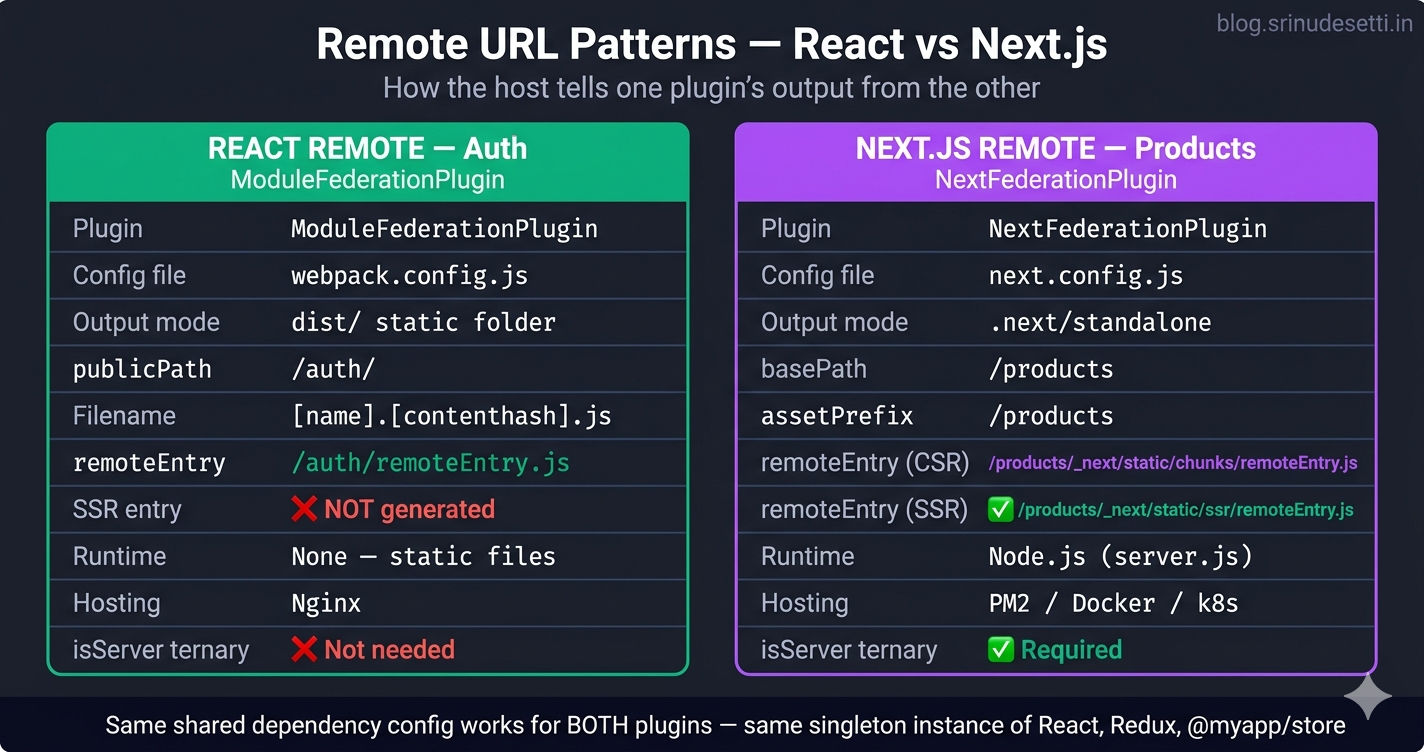
Hybrid micro frontend remote URL patterns showing ModuleFederationPlugin React remotes and NextFederationPlugin Next.js remotes side by side

How the Host Consumes a React Remote

The host loads the React Auth/Login component using next/dynamic with ssr: false. The wrapper page passes a navigation callback into the remote — the remote does not import next/navigation directly, keeping it framework-agnostic.

apps/Main/pages/login/index.tsx
// apps/Main/pages/login/index.tsx — Host page consuming a REACT remote
import dynamic from 'next/dynamic';
import { Suspense } from 'react';
import { useRouter } from 'next/navigation';

// Dynamic import of remote Login component
//   Auth/Login   → resolves to https://dev.myapp.com/auth/remoteEntry.js
//                  → exposes './Login' from src/components/Login.jsx
const RemoteLogin = dynamic(
  () => import('Auth/Login'),
  {
    loading: () => <LoadingState />,
    ssr: false,                            // <- Required: React remote has NO ssr/ entry
  }
);

function LoadingState() {
  return (
    <div style={styles.loading}>
      <div style={styles.spinner}></div>
      <p>Loading Login...</p>
    </div>
  );
}

export default function LoginPage() {
  const router = useRouter();

  // Bridge function — the React remote does NOT use Next.js router.
  // It calls back into the host with a path string + state, and the
  // host's useRouter pushes the new route. This keeps the React remote
  // framework-agnostic and reusable in non-Next.js hosts.
  const handleNavigate = (path: string, state?: any) => {
    if (state?.mobileNumber) {
      sessionStorage.setItem('mobileNumber', state.mobileNumber);
    }
    router.push(path);
  };

  return (
    <div style={styles.container}>
      <div style={styles.content}>
        <Suspense fallback={<LoadingState />}>
          <RemoteLogin onNavigate={handleNavigate} />
        </Suspense>
      </div>
    </div>
  );
}

// Why React remotes need a bridge function:
// 1. The Auth MFE was originally built for a React-only host (no Next.js)
// 2. It cannot import next/navigation — it would break the React-only build
// 3. The host owns routing — passes a callback into the remote via props
// 4. This pattern lets the SAME Auth remote work in any host framework

The bridge pattern (onNavigate prop) is critical for hybrid setups. The Auth remote was originally built for a React-only host that uses react-router-dom, not next/navigation. By passing the router callback in via props, the same Auth remote runs unmodified inside any host — Next.js, Create React App, or a Vite-based shell.

How the Host Consumes a Next.js Remote

The host loads the Content/FAQ component the same way — next/dynamic with ssr: false. The remote is imported by name (Content/FAQ), and Module Federation resolves it to the exposed component declared in the Content remote's next.config.js.

apps/Main/pages/faq/index.tsx
// apps/Main/pages/faq/index.tsx — Host page consuming a NEXT.JS remote
import dynamic from 'next/dynamic';
import { Suspense } from 'react';
import Head from 'next/head';

// Content/FAQ → resolves to /content/_next/static/{ssr|chunks}/remoteEntry.js
//             → exposes './FAQ' from components/FAQ
const RemoteFAQ = dynamic(
  () => import('Content/FAQ'),
  {
    loading: () => <LoadingState />,
    ssr: false,                            // <- Required even for Next.js remotes
  }
);

function LoadingState() {
  return (
    <div style={styles.loading}>
      <div style={styles.spinner}></div>
      <p>Loading FAQs...</p>
    </div>
  );
}

export default function FAQPage() {
  return (
    <>
      <Head>
        <title>Frequently Asked Questions | MyApp</title>
        <meta name="description" content="Find answers to common questions" />
      </Head>
      <div style={styles.container}>
        <div style={styles.content}>
          <Suspense fallback={<LoadingState />}>
            <RemoteFAQ />
          </Suspense>
        </div>
      </div>
    </>
  );
}

// Why ssr: false for the Next.js remote too?
// Even though Content has an /ssr/ remoteEntry.js, the host loads it with
// ssr: false because the FAQ component reads from the shared Redux store
// (window-only) and uses useEffect for data fetching. Setting ssr: true
// would still trigger client-side hydration mismatch the moment Redux
// initializes. The /ssr/ entry exists for cases where Next.js needs to
// import the federated MODULE during the server build — not because the
// component itself renders on the server.

Even though the Content remote has an /ssr/remoteEntry.js, the host still uses ssr: false. The reason: the FAQ component reads from the shared Redux store (which only exists on the client), and rendering it on the server would either crash or trigger a hydration mismatch. The /ssr/ entry exists so that Next.js's server build can import the federated module without crashing — not so that the component renders on the server. See the SSR vs CSR guide for the full explanation.

Shared Dependencies — Same Singleton, Both Plugins

Module Federation negotiates shared dependencies across all remotes regardless of which plugin built them. As long as both ModuleFederationPlugin and NextFederationPlugin declare the same package as a singleton, the host's instance is the one that gets used.

Shared dependency negotiation
# Shared Dependencies Across Both Remote Types
# ────────────────────────────────────────────
#
# Module Federation enforces dependency singletons via the 'shared' config.
# When the host loads two remotes built with DIFFERENT plugins, the runtime
# still negotiates a single instance for each shared package.
#
# Negotiation Sequence:
#   1. Host boots → loads its own React, react-redux, @myapp/store
#   2. Host requests Auth/Login → fetches /auth/remoteEntry.js
#      → Auth's shared registry says: 'I need react ^18.2 (singleton)'
#      → Host registry: 'I have react 18.2.0' → reuse host's React
#   3. Host requests Content/FAQ → fetches /content/_next/static/chunks/remoteEntry.js
#      → Content's shared registry says: 'I need react (singleton, no version)'
#      → Host registry: 'I have react 18.2.0' → reuse host's React
#
# Critical rules for hybrid setups:
#
# 1. Same package names everywhere
#    - Both React remote AND Next.js remote share '@myapp/store' (NOT '@myapp/shared-store')
#    - Webpack matches strings literally — a typo creates a duplicate instance
#
# 2. Same major version
#    - All remotes share react: 18.x
#    - Mixing 17.x and 18.x produces: 'Invalid hook call' or hydration crashes
#
# 3. eager: false everywhere
#    - Both ModuleFederationPlugin and NextFederationPlugin require eager: false
#    - Eager loading bypasses the singleton negotiation → duplicate React instances
#
# 4. strictVersion: true for in-house packages
#    - @myapp/store, @myapp/api use strictVersion + requiredVersion: '1.0.0'
#    - Forces every remote to use EXACTLY 1.0.0 — no silent drift between deploys
#
# 5. requiredVersion: false for framework deps
#    - react, react-dom, react-redux use requiredVersion: false
#    - Lets the host's installed version win — matches whatever Next.js bundles

This is why a single Redux store works across both remote types. The shared @myapp/store package is declared with singleton: true, strictVersion: true, requiredVersion: '1.0.0' in the host, in every React remote's webpack.config.js, and in every Next.js remote's next.config.js. Module Federation enforces that exactly one instance loads at runtime.

packages/store/src/index.js
// packages/store/src/index.js — Singleton Redux store shared by both remote types
import { configureStore } from '@reduxjs/toolkit';
import authReducer from './slices/authSlice';
import cartReducer from './slices/cartSlice';
import productsReducer from './slices/productsSlice';

export const store = configureStore({
  reducer: {
    auth:     authReducer,
    cart:     cartReducer,
    products: productsReducer,
  },
});

export { Provider } from 'react-redux';
export { useSelector, useDispatch } from 'react-redux';
export * from './slices/authSlice';
export * from './slices/cartSlice';
export * from './slices/productsSlice';

// HOW BOTH REMOTE TYPES USE THIS STORE
// ────────────────────────────────────
//
// React remote (apps/Auth/src/components/Login.jsx):
//   import { useSelector, useDispatch, setUser } from '@myapp/store';
//
// Next.js remote (apps/Products/components/BeautyCare.tsx):
//   import { useSelector, useDispatch, addToCart } from '@myapp/store';
//
// Both imports resolve to the SAME singleton instance because:
// 1. Both webpack configs declare '@myapp/store' as a singleton
// 2. The host creates the store ONCE in ClientReduxProvider
// 3. Module Federation negotiates: 'There is already a @myapp/store loaded'
// 4. Every remote gets the host's store instance — not their own copy
//
// If a remote accidentally creates a second store:
//   - Login dispatches setUser → updates store A
//   - BeautyCare reads useSelector → reads store B (empty)
//   - User sees 'Not logged in' even after login → bug

For the deeper Module Federation singleton mechanics, see Shared Dependencies and Singleton Pattern. For the Redux-specific patterns across MFEs, the Shared Redux Store article covers the Provider setup.

Deployment — Static Files vs Node.js Servers

The two remote types have completely different deployment models. React remotes are static files behind Nginx. Next.js remotes are long-lived Node.js processes behind a reverse proxy.

AspectReact Remote (Auth, Cart, Account, Support)Next.js Remote (Products, Content)
Build commandwebpack --config webpack.config.jsnext build
Outputdist/ folder of static JS/CSS.next/standalone/ Node.js app + .next/static/
RuntimeNone — pure static filesNode.js server (server.js entry)
HostingNginx serving static files at /auth/*PM2 or Docker container exposing port
Process count1 Nginx instance handles all1 Node.js process per Next.js remote
Memory footprint~0 (static files)~80–200 MB per remote
Startup timeInstant (no boot)1–3 seconds (Next.js cold start)
Update strategyReplace dist files behind atomic symlinkRolling deploy via PM2 reload or k8s
CachingLong-lived contenthash filenamesNext.js handles cache headers automatically
HTTPSNginx terminates TLSBehind Nginx reverse proxy (recommended)
LogsNginx access logsNext.js stdout + PM2 logs
Health checkHTTP 200 on /auth/remoteEntry.jsHTTP 200 on /products/api/health

A typical hybrid deployment uses one Nginx instance as the public entry point. Nginx serves the React remotes directly (/auth/, /cart/, /account/, /support/ are filesystem aliases) and reverse-proxies the Next.js remotes (/products/, /content/) to PM2-managed Node.js processes. The host (Main) is itself a Next.js standalone server running on port 3000.

/etc/nginx/sites-available/myapp.conf
# /etc/nginx/sites-available/myapp.conf — Reverse proxy for hybrid MFE
server {
  listen 443 ssl http2;
  server_name dev.myapp.com;

  # ── React remotes — static files, served directly by Nginx ──
  location /auth/ {
    alias /var/www/myapp/auth/;
    add_header Access-Control-Allow-Origin "*" always;
    add_header Cache-Control "public, max-age=31536000, immutable" always;
    try_files $uri $uri/ =404;
  }

  location /cart/ {
    alias /var/www/myapp/cart/;
    add_header Access-Control-Allow-Origin "*" always;
    try_files $uri $uri/ =404;
  }

  location /account/ {
    alias /var/www/myapp/account/;
    add_header Access-Control-Allow-Origin "*" always;
    try_files $uri $uri/ =404;
  }

  location /support/ {
    alias /var/www/myapp/support/;
    add_header Access-Control-Allow-Origin "*" always;
    try_files $uri $uri/ =404;
  }

  # ── Next.js remotes — proxy to Node.js process (basePath isolated) ──
  location /products/ {
    proxy_pass http://127.0.0.1:3001;        # PM2-managed Products server
    proxy_set_header Host $host;
    proxy_set_header X-Real-IP $remote_addr;
    proxy_set_header X-Forwarded-Proto https;
    proxy_http_version 1.1;
  }

  location /content/ {
    proxy_pass http://127.0.0.1:3002;        # PM2-managed Content server
    proxy_set_header Host $host;
    proxy_set_header X-Real-IP $remote_addr;
    proxy_set_header X-Forwarded-Proto https;
    proxy_http_version 1.1;
  }

  # ── Host (Main) — catch-all for everything else ──
  location / {
    proxy_pass http://127.0.0.1:3000;        # PM2-managed Main host
    proxy_set_header Host $host;
    proxy_set_header X-Real-IP $remote_addr;
    proxy_set_header X-Forwarded-Proto https;
    proxy_http_version 1.1;
  }
}

# How the request flow works:
#   GET /                  → Main (Next.js host) → renders home page HTML
#   GET /faq               → Main → loads Content/FAQ remote at runtime
#   GET /content/_next/... → Content remote (Node.js)
#   GET /login             → Main → loads Auth/Login remote at runtime
#   GET /auth/remoteEntry.js → Nginx serves static file directly

This configuration is what makes the entire architecture work behind a single domain. The browser sees dev.myapp.com for everything — the routing happens server-side. For more on production Nginx for hybrid MFE deployments, Martin Fowler's Micro Frontends article (opens in a new tab) covers the architectural reasoning, and the Next.js standalone documentation (opens in a new tab) covers the standalone build.
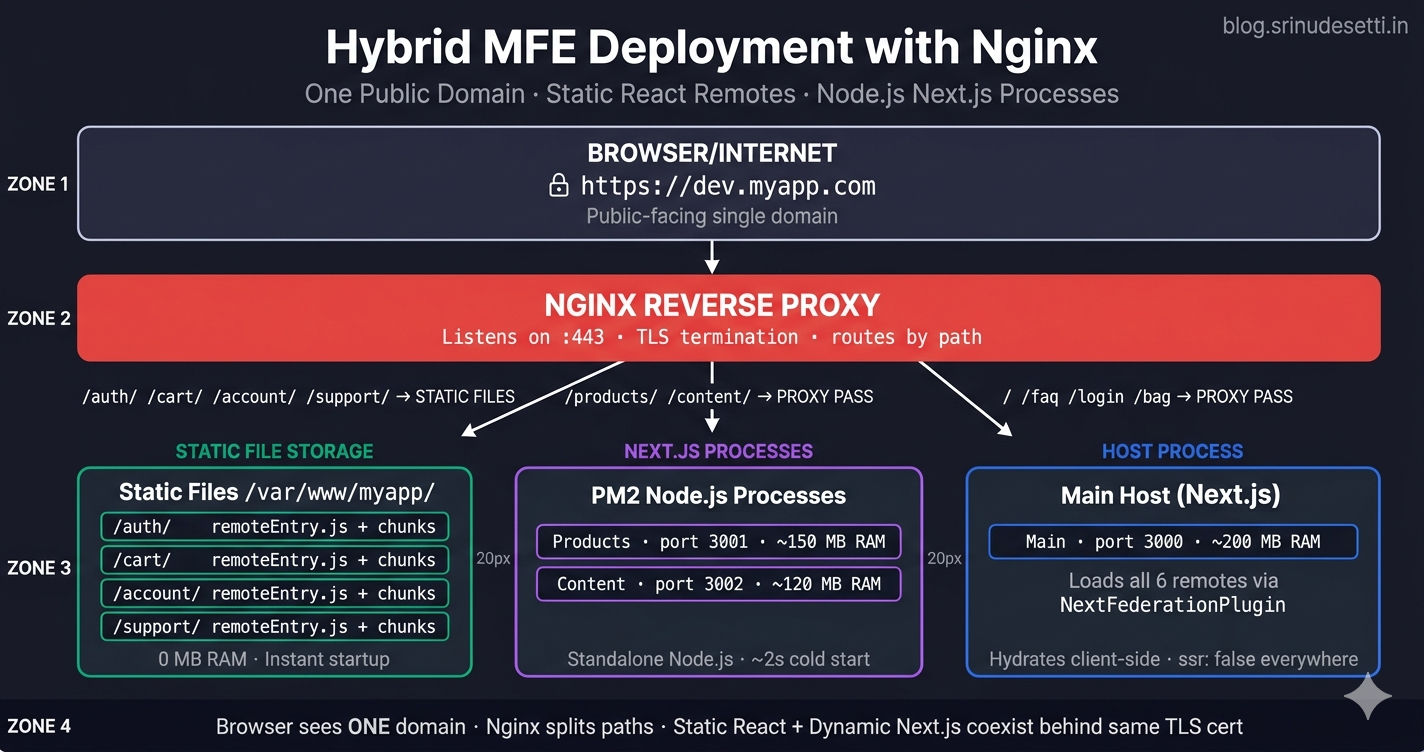
Hybrid React and Next.js micro frontend deployment architecture with Nginx reverse proxy routing static React remotes and Next.js Node.js processes

Common Pitfalls When Mixing Remote Types

After months of running a hybrid React + Next.js architecture in production, eight specific pitfalls account for the majority of broken deployments. Every one of them comes down to confusing the two plugin types or the two URL patterns.

Hybrid MFE pitfalls
# Common Pitfalls When Mixing React + Next.js Remotes
# ────────────────────────────────────────────────────
#
# 1. Forgetting the isServer ternary for Next.js remotes
#    WRONG: Content: 'Content@/content/remoteEntry.js'
#    Why it breaks:
#      - Server build fetches a browser-compatible entry → window is undefined
#      - Build crashes with: 'ReferenceError: window is not defined'
#    FIX: Use the isServer ternary from the host config example above
#
# 2. Adding the isServer ternary to React remote URLs
#    WRONG: Auth: `Auth@/auth/_next/static/${isServer ? 'ssr' : 'chunks'}/remoteEntry.js`
#    Why it breaks:
#      - React remotes have NO _next/static/ssr/ folder — that path 404s
#      - Server build fails to fetch the SSR entry
#    FIX: Plain URL only — Auth: 'Auth@/auth/remoteEntry.js'
#
# 3. Forgetting basePath on a Next.js remote
#    WRONG: Products without basePath/assetPrefix
#    Why it breaks:
#      - Static assets at /_next/static/chunks/ collide with the host's
#      - Two MFEs both write 'main-abc.js' to the same path
#      - First one wins, the other returns the wrong code
#    FIX: Always set basePath AND assetPrefix to a unique path per remote
#
# 4. Mixing React versions across remotes
#    WRONG: Auth uses react 17.0.2, Products uses react 18.2.0
#    Why it breaks:
#      - Singleton negotiation picks ONE version → other remote gets wrong API
#      - Hooks throw 'Invalid hook call' or 'rendered fewer hooks'
#    FIX: Lock react version in root package.json — every workspace pulls same version
#
# 5. Trying to use Next.js APIs inside a React remote
#    WRONG: import { useRouter } from 'next/navigation' inside Auth remote
#    Why it breaks:
#      - Auth has no Next.js dependency — webpack throws 'Module not found'
#      - Even if installed, useRouter has no Next.js context outside the host
#    FIX: Use the bridge pattern — host passes onNavigate prop to React remote
#
# 6. Calling next/image inside a Next.js remote when host is a React MFE
#    WRONG: next/image without enableImageLoaderFix
#    Why it breaks:
#      - next/image relies on Next.js image optimization endpoint at /_next/image
#      - The endpoint exists only on the Next.js host — React MFE has no /_next/image
#    FIX: enableImageLoaderFix: true in extraOptions of every Next.js remote
#
# 7. Using next/router inside a Next.js remote that also runs standalone
#    Why it works in some setups and breaks others:
#      - When loaded as a remote, the host owns the router context
#      - When the remote runs standalone for testing, it has its own router
#      - Code that depends on router presence breaks intermittently
#    FIX: Wrap router calls in try/catch OR use props for cross-MFE navigation
#
# 8. Hard-coding remote URLs without environment switching
#    Why it breaks deployment:
#      - Local dev: https://localhost:4101/remoteEntry.js
#      - Prod: https://dev.myapp.com/auth/remoteEntry.js
#      - One config wired to localhost crashes in production
#    FIX: Read remote URLs from process.env.NEXT_PUBLIC_AUTH_URL etc.

Most of these only surface in production — local development with self-signed certs and localhost URLs masks the routing issues. Always test the full URL pattern in a staging environment before deploying.

Hybrid Architecture Decision Flow

Before building a new feature, decide which remote type fits — the answer is almost always one of these:

Page TypeRemote TypeWhy
Public catalog, SEO-critical (products, blog, FAQ)Next.js remoteServer-rendered HTML for search engines
Auth-gated client interactions (cart, profile, settings)React remoteNo SEO need, faster build, no Node.js process
Marketing landing pages with content updatesNext.js remoteISR for content updates without redeploy
Admin dashboards behind loginReact remoteStatic files, instant deploy, low memory
Real-time / WebSocket-heavy pagesReact remoteNo SSR overhead, full client control
Content pages (terms, privacy, FAQ)Next.js remoteSSR for crawlers + ISR for editorial updates

The general rule: if Google does not need to read it, build it as a React remote.

What's Next

You now understand how to build a hybrid micro frontend architecture with one Next.js host loading both React and Next.js remotes — the dual-plugin configuration, the URL pattern differences, the bridge pattern for cross-framework navigation, the shared singleton dependencies, and the Nginx reverse proxy that ties it all together. The next article covers shared Redux store in Next.js micro frontends — the Provider setup, the strictVersion config, and the SSR hydration gotchas you hit when the same store is consumed by both React and Next.js remotes.

← Back to SSR vs CSR in Next.js Module Federation

Continue to Shared Redux Store in Next.js Micro Frontends →


Frequently Asked Questions

Can a Next.js host load both React and Next.js remotes at the same time?

Yes. NextFederationPlugin in the host's next.config.js can declare remotes built with either ModuleFederationPlugin (React) or NextFederationPlugin (Next.js). The remote URL pattern tells the host which type each remote is — plain /remoteEntry.js for React remotes and /_next/static/{ssr|chunks}/remoteEntry.js for Next.js remotes. The host loads each remote with next/dynamic and ssr: false, and Module Federation negotiates shared dependencies across all of them as singletons. This hybrid pattern is the foundation of incremental migration — old React MFEs keep working while new pages are built with Next.js for SSR.

Why do React remotes have only one remoteEntry.js while Next.js remotes have two?

React remotes built with ModuleFederationPlugin run exclusively in the browser — there is no server build, so a single remoteEntry.js is generated for the browser. Next.js remotes use NextFederationPlugin which hooks into the dual webpack build that Next.js runs (server + client). NextFederationPlugin emits one remoteEntry.js for the Node.js server build at _next/static/ssr/remoteEntry.js and another for the browser build at _next/static/chunks/remoteEntry.js. The host uses the isServer flag in next.config.js to pick the correct path during each webpack pass.

Why must I set ssr: false on every remote import even for Next.js remotes?

Every remote — React or Next.js — must be loaded with ssr: false in next/dynamic because Module Federation containers attach to the window object and cannot run during the Node.js server render. Even Next.js remotes that have an /ssr/ remoteEntry.js still depend on browser-only state (Redux store created on mount, useEffect data fetching, localStorage auth tokens). Without ssr: false, the host crashes with ReferenceError: window is not defined or hits a hydration mismatch the moment the client takes over. The /ssr/ entry exists for cases where Next.js needs to import the federated module during the server build — not for rendering remote components on the server.

How do I navigate between pages from inside a React remote when the host is Next.js?

Use the bridge pattern. The host passes a callback prop (e.g., onNavigate) into the React remote, and the remote calls it instead of importing next/navigation directly. The host's wrapper page uses useRouter from next/navigation and forwards the path string to router.push. This keeps the React remote framework-agnostic — it has no Next.js dependency and can be loaded by any host (Next.js, Create React App, Vite). If the React remote imports next/navigation directly, its standalone build breaks because Next.js is not in its package.json, and even if installed, the router context only exists when the component runs inside a Next.js host.

Why do Next.js remotes need basePath and assetPrefix but React remotes do not?

Next.js remotes write static assets to /_next/static/chunks/ by default. If two Next.js remotes ran on the same domain without basePath, they would both try to write main-abc.js to the same /_next/static/chunks/ path — assets from one remote would overwrite the other's. basePath and assetPrefix scope every Next.js remote's routes and assets under a unique path (e.g., /products and /content), preventing collisions. React remotes do not face this problem because their webpack output is fully customized via publicPath: '/auth/' and the host serves each one from its own /auth/, /cart/, /account/ folder via Nginx. There is no shared /_next/ directory to collide on.

Can I share a Redux store between React and Next.js remotes in the same host?

Yes. Declare the store package (e.g., @myapp/store) as a singleton with strictVersion: true and requiredVersion: '1.0.0' in the shared config of the host AND every remote — both ModuleFederationPlugin and NextFederationPlugin support the same shared API. The host creates the store once inside a ClientReduxProvider component, and Module Federation negotiates that the store package is already loaded when each remote requests it. Both React and Next.js remotes import from @myapp/store and receive the SAME store instance. This makes it possible for the Auth React remote to call dispatch(setUser()) and the Products Next.js remote to read useSelector(state => state.auth.user) and see the logged-in user.

How does deployment differ between React remotes and Next.js remotes?

React remotes built with ModuleFederationPlugin produce a dist/ folder of static JS, CSS, and HTML files served directly by Nginx — no runtime process is needed. They have near-zero memory footprint and instant startup. Next.js remotes built with NextFederationPlugin and output: 'standalone' produce a Node.js server bundle (server.js + .next/static/) that must run as a long-lived process — typically managed by PM2 or in a container with Kubernetes. Each Next.js remote consumes 80–200 MB of RAM and takes 1–3 seconds to cold start. In a hybrid setup, Nginx serves React remotes statically from /auth/, /cart/, /account/, /support/ paths and reverse-proxies Next.js remote paths /products/ and /content/ to their respective Node.js processes.